
Introduction
This manual provides essential instructions for the safe and effective use of your Fujifilm Fujinon XF150-600mmF5.6-8 R LM OIS WR Lens. Designed for Fujifilm X-mount cameras, this super-telephoto zoom lens offers a versatile focal range for capturing distant subjects with exceptional clarity. Please read this manual thoroughly before using the lens and keep it in a safe place for future reference.
What's in the Box
Upon unpacking, please ensure all the following items are present:
- Fujifilm Fujinon XF150-600mmF5.6-8 R LM OIS WR Lens
- Lens Cap (Front)
- Rear Lens Cap
- Lens Hood
- Tripod Collar Foot
- Soft Lens Pouch
- Instruction Manual (this document)
Note: If this is a renewed product, accessories may not be original but will be compatible and fully functional. The product may come in a generic box.
Setup
1. Attaching the Lens to the Camera
- Remove the rear lens cap from the lens and the body cap from your Fujifilm X-mount camera.
- Align the white mounting mark on the lens with the corresponding mark on the camera body.
- Insert the lens into the camera mount and rotate it clockwise until it clicks into place. Do not force the lens.
2. Attaching the Lens Hood
The lens hood helps to prevent stray light from entering the lens, reducing flare and ghosting. It also offers some protection to the front element.
- Align the mark on the lens hood with the mark on the front of the lens barrel.
- Rotate the hood clockwise until it locks securely.
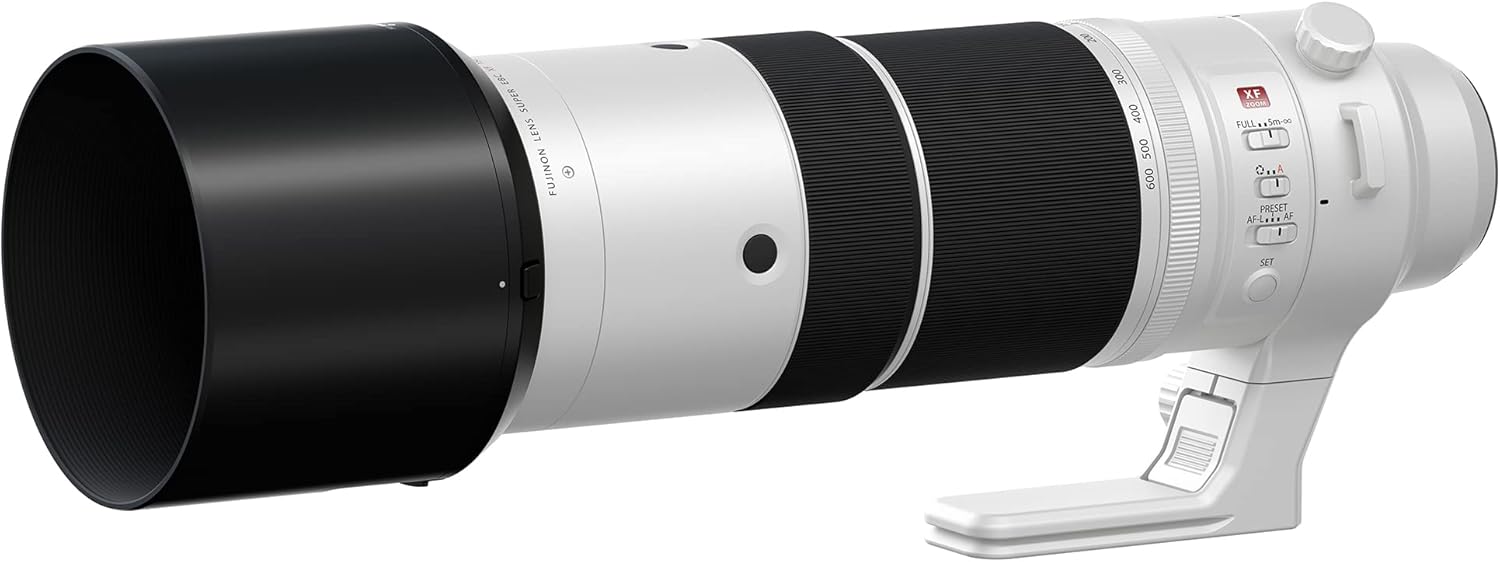
Figure 1: Fujifilm Fujinon XF150-600mmF5.6-8 R LM OIS WR Lens with its lens hood attached, showing the extended barrel.
3. Understanding Lens Controls
Familiarize yourself with the various controls on the lens barrel:
- Zoom Ring: Used to adjust the focal length from 150mm to 600mm.
- Focus Ring: Used for manual focusing.
- OIS (Optical Image Stabilization) Switch: Activates or deactivates image stabilization.
- Focus Limiter Switch: Restricts the autofocus range for faster focusing on specific distances.
- AF/MF Switch: Toggles between autofocus and manual focus modes.
- Preset Button: Allows saving and recalling a specific focus distance.
- AFL/AF-L Buttons: Customizable function buttons for focus lock or other camera functions.

Figure 2: Side view of the lens highlighting the various control switches and rings.
Operating the Lens
1. Zooming
Rotate the zoom ring to change the focal length. The lens extends as you zoom towards 600mm. The focal length markings (150, 200, 300, 400, 500, 600) are visible on the barrel.

Figure 3: Front view of the lens, illustrating the zoom ring and focal length indicators.
2. Focusing
- Autofocus (AF): Set the AF/MF switch to AF. The camera will automatically focus when the shutter button is half-pressed.
- Manual Focus (MF): Set the AF/MF switch to MF. Rotate the focus ring to adjust focus manually. Use your camera's focus peaking or magnification features for precise focusing.
3. Optical Image Stabilization (OIS)
The OIS system helps to reduce camera shake, especially at longer focal lengths or slower shutter speeds. Activate OIS using the dedicated switch on the lens barrel. It is recommended to turn OIS off when using a tripod to avoid potential conflicts with stabilization.
4. Focus Limiter
The focus limiter switch allows you to restrict the autofocus range, which can speed up focusing performance when you know your subject is within a certain distance. Common settings include FULL (entire range) and 5m-∞ (5 meters to infinity).
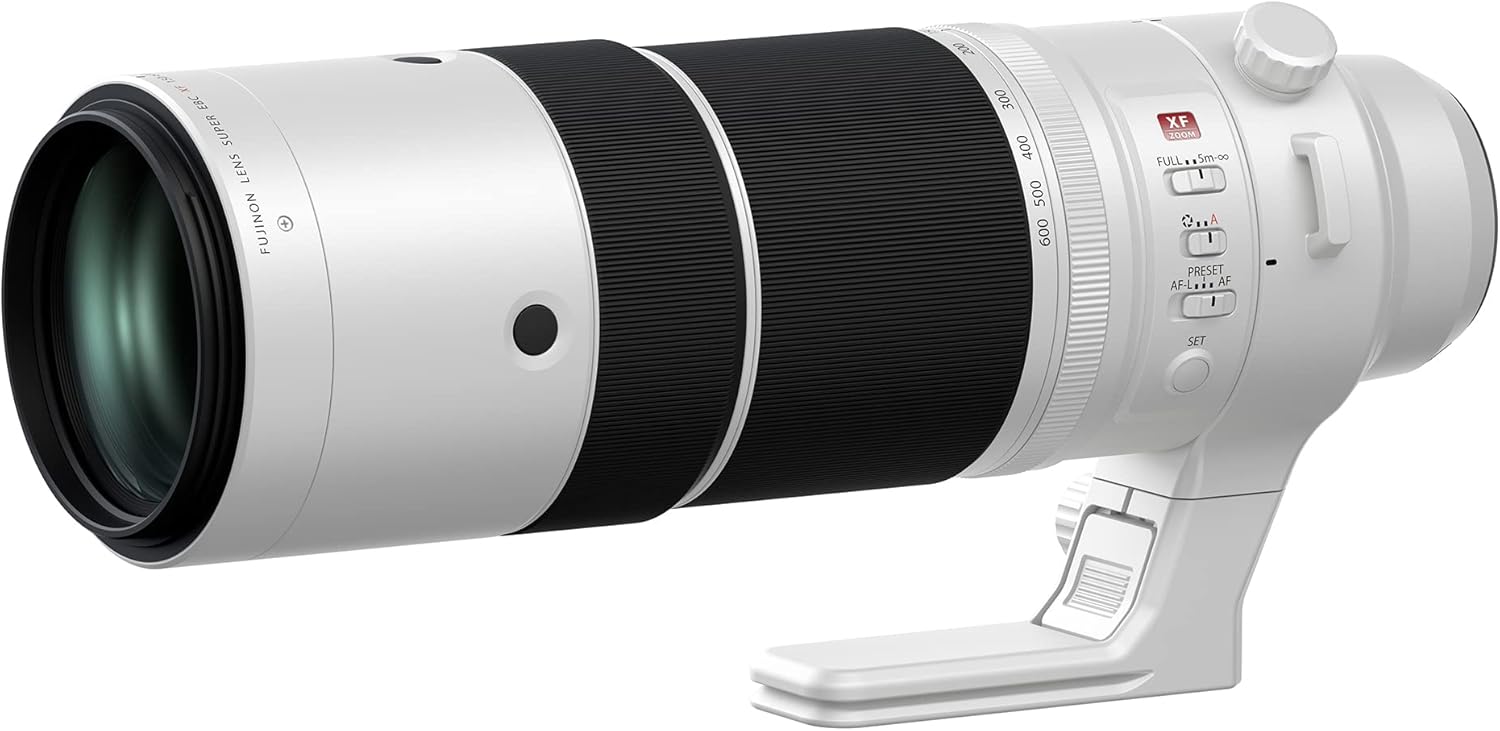
Figure 4: Angled view of the lens, showing the focus limiter and AF/MF switches for precise control.
Maintenance
1. Cleaning the Lens
- Use a blower brush to remove dust and loose particles from the lens surfaces.
- For smudges or fingerprints, use a clean, soft microfiber cloth specifically designed for optics, along with a small amount of lens cleaning fluid if necessary. Apply fluid to the cloth, not directly to the lens.
- Never use abrasive materials or harsh chemicals.
2. Storage
- Store the lens with both front and rear caps attached in a cool, dry place away from direct sunlight and extreme temperatures.
- If storing for extended periods, consider using a desiccant to prevent mold and mildew.
3. Handling Precautions
- Avoid exposing the lens to sudden temperature changes, which can cause condensation.
- Protect the lens from impacts and vibrations.
- The lens is Weather Resistant (WR), but avoid prolonged exposure to heavy rain or dust.
Troubleshooting
| Problem | Possible Cause | Solution |
|---|---|---|
| Lens not focusing (Autofocus) | AF/MF switch set to MF; Focus limiter engaged incorrectly; Low light conditions; Subject lacks contrast. | Set AF/MF switch to AF. Check focus limiter setting. Use camera's AF assist lamp if available. Try focusing on a higher contrast area. |
| Images are blurry despite OIS | Shutter speed too slow; OIS switch off; OIS active on tripod; Extreme camera shake. | Increase shutter speed. Ensure OIS switch is ON. Turn OIS OFF when using a tripod. Use a faster shutter speed or tripod. |
| Lens not recognized by camera | Lens not properly mounted; Dirty electrical contacts. | Re-attach the lens, ensuring it clicks into place. Gently clean the lens and camera electrical contacts with a clean, dry cloth. |
Specifications
| Feature | Detail |
|---|---|
| Brand | Fujifilm |
| Model Name | Fujinon XF150-600mmF5.6-8 R LM OIS WR |
| Item Model Number | 16754500-cr |
| Focal Length | 150-600mm (equivalent to 229-914mm on 35mm format) |
| Maximum Aperture | f/5.6-8 |
| Lens Type | Telephoto Zoom Lens |
| Compatible Mountings | Fujifilm X-Mount |
| Optical Image Stabilization (OIS) | Yes |
| Weather Resistant (WR) | Yes |
| Linear Motor (LM) | Yes |
| Product Dimensions | 16.2 x 8.3 x 8.2 inches |
| Item Weight | 6.82 pounds |
Warranty and Support
Amazon Renewed Guarantee
This product is part of the Amazon Renewed program. Renewed products are eligible for replacement or refund under the Amazon Renewed Guarantee if you are not satisfied with your purchase. The return policy allows for returns within 90 days for a refund or replacement.
For specific details regarding the Amazon Renewed Guarantee, please refer to the Amazon Renewed website or your purchase documentation.
Manufacturer Support
For technical assistance, service, or information regarding your Fujifilm product, please visit the official Fujifilm support website or contact their customer service department. Contact information can typically be found on the Fujifilm website or in the original product packaging (if available).


