
1. Important Safety Instructions
Read this user manual carefully before using the appliance and save it for future reference. Always follow basic safety precautions when using electrical appliances to reduce the risk of fire, electric shock, and personal injury.
- Ensure the voltage indicated on the appliance corresponds to your local mains voltage before connecting.
- Do not use the iron if the plug, main cord, or the appliance itself shows visible damage, or if the appliance has been dropped.
- Keep the iron and its cord out of reach of children when it is switched on or cooling down.
- Never immerse the iron in water or any other liquid.
- Do not leave the iron unattended while it is connected to the mains.
- Always place the iron on a stable, heat-resistant surface when resting.
- The soleplate of the iron can become extremely hot and cause burns if touched.
- Only use tap water for filling the water tank, unless you live in an area with extremely hard water. In that case, use distilled or demineralized water.
2. Product Overview
Familiarize yourself with the components of your PHILIPS GC4908/80 Steam Iron.
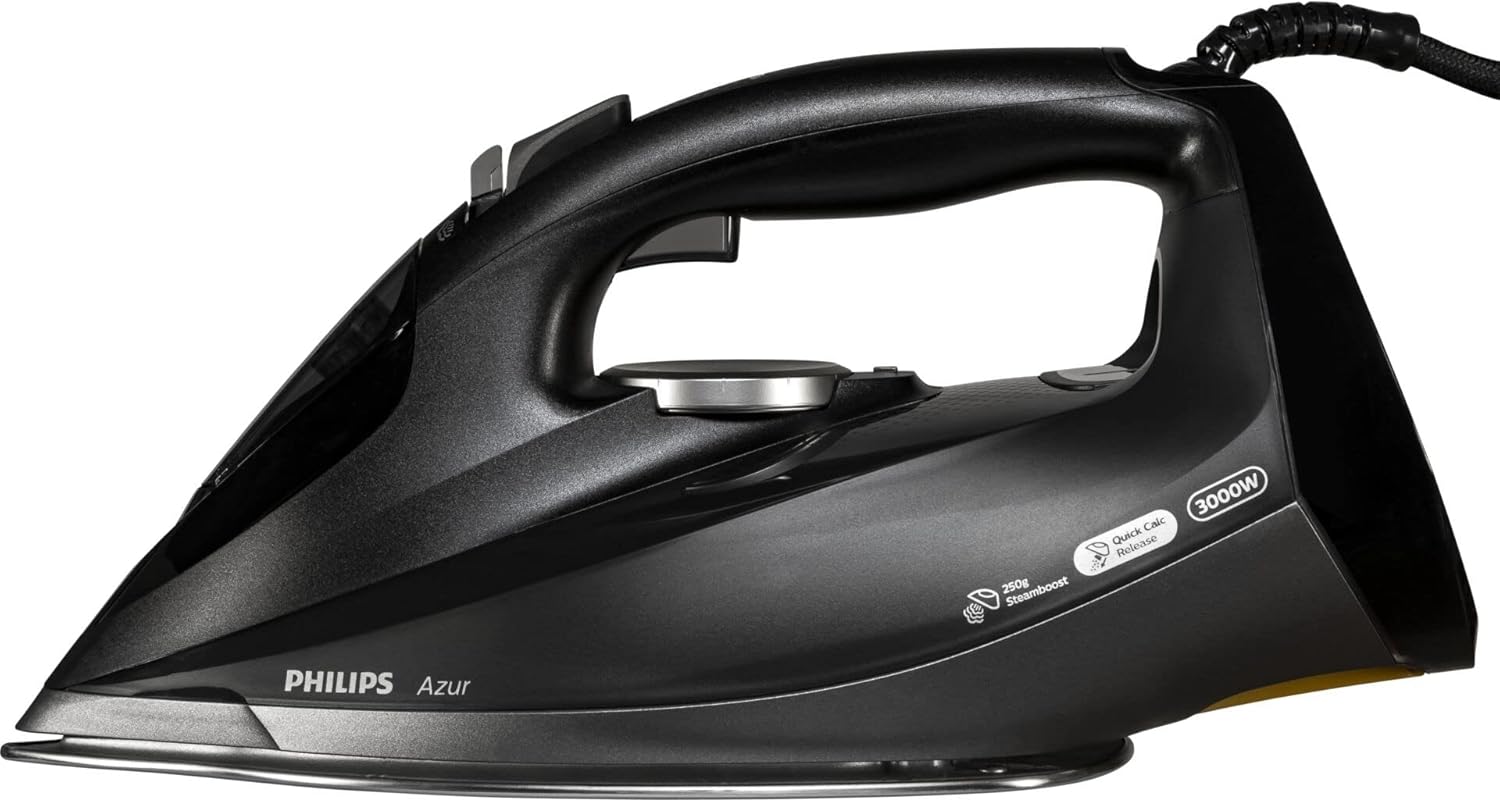
Figure 1: Top view of the PHILIPS GC4908/80 Steam Iron. This image displays the iron from a top-down perspective, highlighting the ergonomic handle, the transparent water tank, the temperature control dial, and the steam activation buttons located near the handle. The 3000W power rating and 'Quick Calc Release' feature are visible on the side.
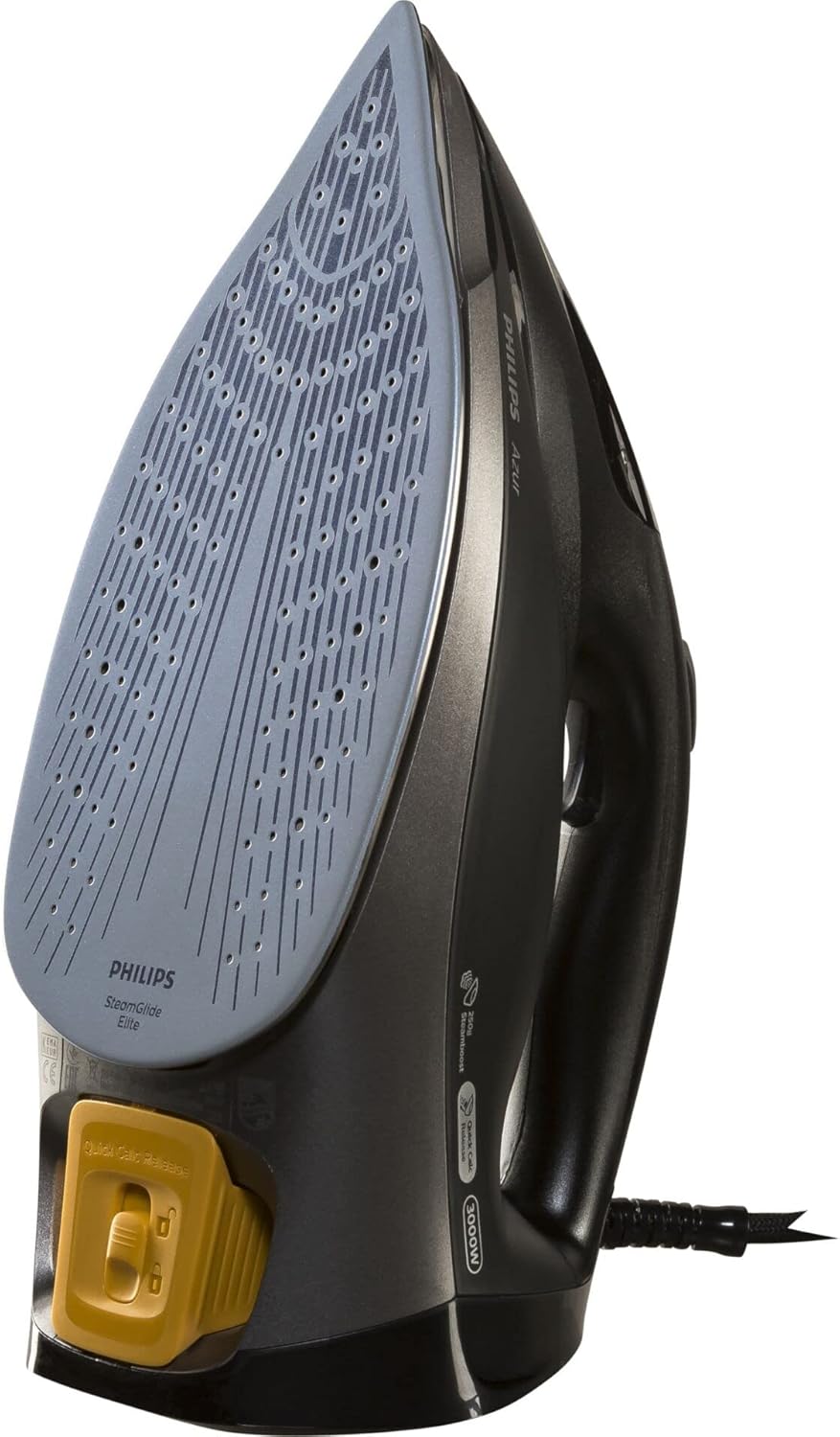
Figure 2: Bottom view of the PHILIPS GC4908/80 Steam Iron. This image shows the iron inverted, revealing the SteamGlide Elite soleplate with its numerous steam vents. The 'Quick Calc Release' mechanism, typically a removable part for descaling, is prominently visible at the rear of the soleplate in a contrasting color.
Key Components:
- A. Water filling hole: For adding water to the tank.
- B. Spray nozzle: For moistening stubborn creases.
- C. Steam trigger/Steam boost button: To activate steam or a powerful burst of steam.
- D. Temperature dial: To select the appropriate temperature for different fabrics.
- E. Soleplate: The heated surface that glides over fabrics.
- F. Quick Calc Release: Removable part for easy descaling.
- G. Power cord: Connects the iron to the electrical outlet.
3. Setup and First Use
Before First Use:
- Remove any stickers or protective foil from the soleplate.
- It is normal for the iron to emit a slight odor and some smoke during the first use. This will stop after a short while.
- To remove any manufacturing residues, iron an old piece of fabric (e.g., a cotton cloth) for a few minutes, using the steam function.
4. Operating Instructions
4.1 Filling the Water Tank:
- Ensure the iron is unplugged from the mains.
- Hold the iron in a slightly tilted position.
- Open the water filling hole cover.
- Fill the water tank with tap water up to the 'MAX' indication. Do not overfill.
- Close the water filling hole cover securely.
4.2 Setting the Temperature:
- Plug the iron into a grounded wall socket.
- Turn the temperature dial to the desired setting according to the fabric type. Refer to the garment care label.
- The indicator light will illuminate, indicating the iron is heating up. It will turn off when the set temperature is reached.
4.3 Using Steam:
- Steam ironing is only possible at higher temperature settings (typically from '••' to 'MAX').
- Once the iron has reached the desired temperature, press the steam trigger to release continuous steam.
- For a powerful burst of steam to remove stubborn creases, press the steam boost button. Wait a few seconds between bursts to allow the soleplate to reheat.
4.4 Dry Ironing:
To iron without steam, ensure the water tank is empty or set the steam control to the 'no steam' position (if available on your model). Select the appropriate temperature for your fabric.
4.5 Auto-Off Feature:
For safety and energy saving, the iron is equipped with an automatic shut-off function. If the iron is left unattended on its heel rest, it will switch off after approximately 8 minutes. If left on its soleplate or side, it will switch off after approximately 30 seconds. The indicator light will flash to signal that the iron has switched off. To restart the iron, simply pick it up or move it slightly.
5. Maintenance
5.1 Cleaning the Iron:
- Always unplug the iron and allow it to cool down completely before cleaning.
- Wipe the outer casing with a damp cloth.
- To clean the soleplate, use a damp cloth and a non-abrasive cleaner if necessary. Do not use abrasive scouring pads or harsh detergents.
5.2 Quick Calc Release:
The Quick Calc Release system helps prevent limescale build-up. For optimal performance, clean this system regularly.
- Ensure the iron is unplugged and completely cool.
- Hold the iron over a sink.
- Pull out the Quick Calc Release collector (refer to Figure 2 for location).
- Rinse the collector under running water to remove any loose scale particles.
- Wipe the collector clean and reinsert it into the iron until it clicks into place.
5.3 Storage:
- Unplug the iron and allow it to cool down completely.
- Empty the water tank after each use to prevent limescale build-up and leakage.
- Store the iron on its heel rest in a dry, safe place.
6. Troubleshooting
| Problem | Possible Cause | Solution |
|---|---|---|
| Iron does not heat up. | Not plugged in; power outlet faulty; auto-off activated. | Check plug connection; test outlet with another appliance; move the iron to reactivate. |
| No steam or insufficient steam. | Water tank empty; temperature too low; steam vents blocked. | Fill water tank; set temperature to steam zone; perform Quick Calc Release cleaning. |
| Water leaks from soleplate. | Temperature too low for steam; overfilled water tank; limescale build-up. | Increase temperature; do not overfill; perform Quick Calc Release cleaning. |
| Brown stains on fabric. | Limescale in water tank; fabric not clean. | Perform Quick Calc Release cleaning; ensure garments are clean before ironing. |
7. Specifications
- Model: PHILIPS GC4908/80
- Power: 3000 Watts
- Weight: 2.05 Kilograms
- Dimensions (L x W x H): 12.1 x 8.7 x 9 cm
- Material: Alloy Steel (Soleplate)
- Water Tank Capacity: (Typically around 300-350ml for this type of iron, specific value not provided in input, so omitted)
- Auto-Off: Yes
- Soleplate Type: SteamGlide Elite
8. Warranty and Support
This PHILIPS appliance comes with a standard manufacturer's warranty. For detailed warranty information, terms, and conditions, please refer to the warranty card included with your product or visit the official PHILIPS website. For technical support, spare parts, or service, please contact PHILIPS customer support in your region. Keep your proof of purchase for warranty claims.
You can find more information and support at the Philips Brand Store.


