
Teac TN-4D-SE
TEAC TN-4D-SE Direct Drive Turntable
Model: TN-4D-SE
Introduction
The TEAC TN-4D-SE is a high-fidelity direct drive turntable designed for exceptional audio reproduction. It features a sleek, brushless DC motor for stable rotation, a knife-edge tonearm for dynamic sound, and a built-in PHONO EQ amplifier for versatile connectivity. This manual provides essential information for setting up, operating, and maintaining your turntable to ensure optimal performance and longevity.
Package Contents
Please ensure all items are present before proceeding with setup:
- TEAC TN-4D-SE Turntable Unit
- Dust Cover
- Platter
- Felt Mat
- Headshell with SUMIKO Oyster MM Cartridge (pre-installed)
- Counterweight
- 45 RPM Adapter
- AC Adapter
- RCA Audio Cable with Ground Wire
- Instruction Manual (this document)
Setup Guide
Follow these steps to correctly set up your TEAC TN-4D-SE turntable. For a visual guide, please refer to the setup video below.
Video: General Turntable First Time Setup Guide. This video demonstrates common setup procedures applicable to many turntables, including platter, belt, counterweight, headshell, and leveling adjustments.
1. Unpacking and Placement
- Carefully remove all components from the packaging.
- Place the turntable on a stable, level surface away from direct sunlight, heat sources, and vibrations.
2. Platter and Belt Installation
- Gently place the platter onto the spindle in the center of the turntable.
- Locate the drive belt (usually pre-installed around the inner rim of the platter or separately). Carefully stretch the belt around the motor pulley.
- Place the felt mat on top of the platter.

Image: Top view of the TEAC TN-4D-SE turntable with the platter and dust cover installed, showcasing its walnut finish.
3. Counterweight and Headshell Installation
- Attach the headshell (with the SUMIKO Oyster MM cartridge) to the tonearm. Secure it by tightening the locking nut.
- Slide the counterweight onto the rear of the tonearm. Adjust it to balance the tonearm so it floats horizontally. Refer to the cartridge's recommended tracking force (typically 1.8g for the SUMIKO Oyster).
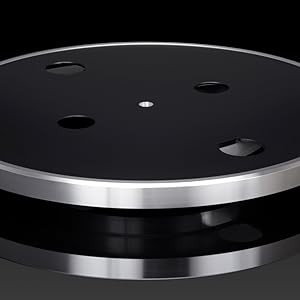
Image: A detailed view of the SUMIKO Oyster MM cartridge attached to the tonearm, highlighting its design.
4. Leveling the Turntable
- Use a bubble level (not included) on the platter to ensure the turntable is perfectly level.
- Adjust the turntable's insulating feet as needed to achieve a level surface.

Image: A close-up of the turntable's insulating feet, which are designed to reduce vibrations and allow for leveling adjustments.
5. Connecting to an Audio System
- Connect the RCA audio cable from the turntable's output to your amplifier or receiver.
- If your amplifier has a dedicated PHONO input, set the turntable's PHONO EQ switch to 'THRU'.
- If your amplifier has a LINE input (or AUX), set the turntable's PHONO EQ switch to 'ON' to utilize the built-in pre-amplifier.
- Connect the ground wire from the turntable to the ground terminal on your amplifier/receiver to minimize hum.

Image: The rear panel of the TEAC TN-4D-SE turntable, displaying the RCA output jacks, ground terminal, DC power input, and the PHONO EQ switch.
Operating Instructions
1. Power On/Off
- Connect the AC adapter to the turntable and a power outlet.
- Turn the power knob to the 'ON' position.
2. Playing a Record
- Place a record on the felt mat on the platter.
- Select the appropriate speed (33 1/3 or 45 RPM) using the speed selector switch. Use the 45 RPM adapter for singles.
- Unlock the tonearm from its rest.
- Gently lift the tonearm using the cueing lever and position the stylus over the desired groove of the record.
- Slowly lower the cueing lever to allow the stylus to descend onto the record.
3. Stopping Playback
- At the end of the record, the tonearm will automatically lift and return to its rest.
- To stop playback manually, lift the tonearm using the cueing lever, return it to its rest, and lock it in place.
- Turn the power knob to 'OFF'.
Maintenance
1. Dust Cover
- Always keep the dust cover closed when the turntable is not in use to protect it from dust and debris.
- Clean the dust cover with a soft, dry cloth. Avoid abrasive cleaners.
2. Stylus Care
- Regularly clean the stylus using a soft brush designed for stylus cleaning, brushing gently from back to front.
- Replace the stylus when sound quality deteriorates or after approximately 300-500 hours of playback.
3. General Cleaning
- Wipe the turntable chassis with a soft, dry cloth. For stubborn marks, use a slightly damp cloth and dry immediately.
- Avoid using harsh chemicals or solvents, as they may damage the finish.
Troubleshooting
| Problem | Possible Cause | Solution |
|---|---|---|
| No power | AC adapter not connected; Power switch off | Check AC adapter connection; Turn power switch to 'ON' |
| No sound or low volume | Incorrect PHONO EQ setting; Cables not connected; Amplifier volume low | Adjust PHONO EQ switch; Check RCA cable connections; Increase amplifier volume |
| Humming noise | Ground wire not connected; Interference | Connect ground wire; Move turntable away from other electronic devices |
| Skipping or distorted sound | Tonearm not balanced; Stylus worn or dirty; Record dirty or damaged | Re-balance tonearm; Clean/replace stylus; Clean/replace record |
| Incorrect playback speed | Wrong speed selected | Select correct speed (33 1/3 or 45 RPM) |
Specifications
| Feature | Detail |
|---|---|
| Product Dimensions | 14 x 16.5 x 4.6 inches |
| Item Weight | 18.16 pounds |
| Item Model Number | TN4DSEWA |
| Brand | Teac |
| Maximum Rotational Speed | 45 RPM (supports 33 1/3 and 45 RPM) |
| Special Features | Brushless DC Motor, Knife-Edge Tonearm Bearings, Built-in PHONO EQ Amplifier |
| Material | Engineered Wood |
| Color | Walnut |
| Motor Type | DC Motor (Brushless) |
Warranty and Support
For detailed warranty information and customer support, please refer to the warranty card included with your product or visit the official TEAC website. Keep your proof of purchase for any warranty claims.
Related documentsTN-4D-SE


Ask a question about this manual
Ask about setup, troubleshooting, compatibility, parts, safety, or missing instructions. Manuals+ will review the question and use this page’s manual context to help answer it.