
CAT DXB4
CAT® 18V 1 for All Battery – 4Ah - DXB4 User Manual
Model: DXB4 | Brand: CAT
Introduction
This manual provides essential information for the safe operation, maintenance, and troubleshooting of your CAT® 18V 1 for All 4Ah Lithium-Ion Battery, model DXB4. Please read this manual thoroughly before using the battery to ensure proper function and to prevent injury or damage.

Image: The CAT 18V 1 for All 4Ah Lithium-Ion Battery, model DXB4, featuring its distinctive yellow and black design.
Safety Information
Always observe basic safety precautions when using battery-powered tools to reduce the risk of fire, electric shock, and personal injury. Keep this manual for future reference.
- Read all instructions: Before using the battery, read all instructions and cautionary markings on the battery, battery charger, and product using the battery.
- Do not disassemble the battery pack: Disassembly may result in a risk of fire, electric shock, or exposure to battery chemicals.
- Do not short-circuit the battery pack: A short circuit can cause a large current flow, resulting in overheating, burns, or fire.
- Do not charge the battery in damp or wet locations: Do not expose the battery to rain or snow.
- Use only specified chargers: Use only the charger specified by the manufacturer for recharging. Using an incompatible charger may create a risk of fire.
- Do not store the battery in extreme temperatures: Avoid storing the battery in direct sunlight, near heat sources, or in freezing conditions.
- Dispose of batteries properly: Follow local regulations for battery disposal. Do not dispose of batteries in household waste or by incineration.
- Keep out of reach of children: Store batteries in a secure location away from children.
Product Features
The CAT® 18V 1 for All 4Ah Battery is designed for optimal performance and durability across the CAT 18V cordless tool platform.
- Innovative Power Delivery: The 18V CAT Cordless Power Tools platform utilizes advanced battery technology to maximize performance and power, ensuring extended run times for various tasks.
- Advanced Intelligence: Integrated advanced technology optimizes both tool and battery performance for efficient operation.
- Slide Pack Design: Features a slide pack design ensuring 100% compatibility with all CAT 1 FOR ALL 18V cordless tools.
- 1 FOR ALL System: CAT Lithium-Ion batteries provide intelligence, protection, and peak performance across the 1 FOR ALL platform, enhancing productivity per charge.
- Fuel Gauge: An onboard fuel gauge offers a quick visual reference to the battery's current charge status.
- Battery IQ System: Advanced electronics facilitate communication between the battery and tool, providing optimal performance and protection against overcurrent, low voltage, and extreme temperatures.
- Quick Release Button: Equipped with a quick release button for easy and swift removal of the battery from any compatible tool.
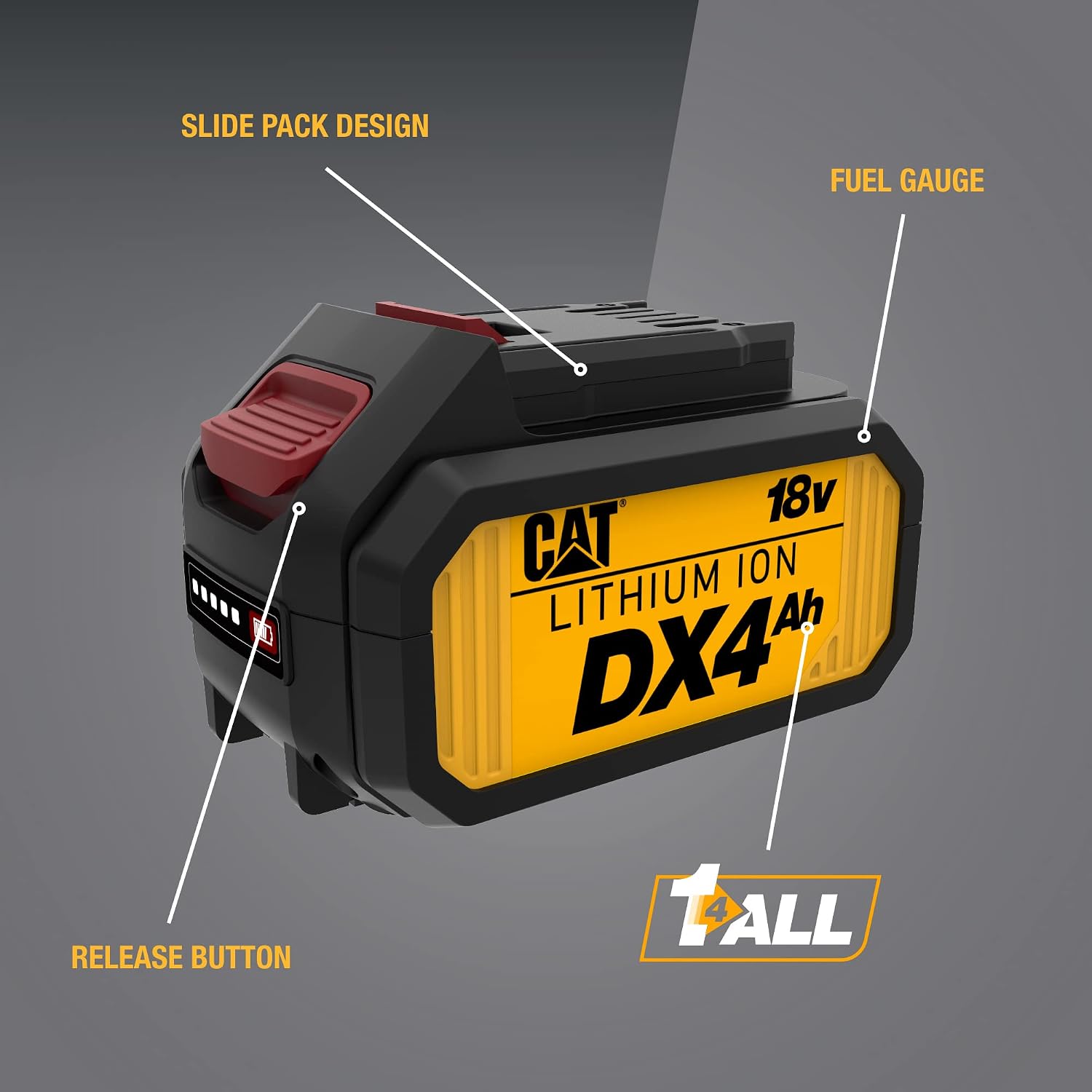
Image: An annotated diagram of the CAT 18V 4Ah battery, pointing out the Slide Pack Design, Fuel Gauge, and Release Button.

Image: A close-up view of the battery's fuel gauge, showing illuminated green indicator lights for charge status.

Image: An illustration demonstrating the "1 FOR ALL" system, showing the CAT 18V battery powering a variety of cordless tools such as drills, saws, and sanders.
Setup
Unpacking
Carefully remove the battery from its packaging. Inspect the battery for any signs of damage. If damage is observed, do not use the battery and contact customer support.

Image: The CAT 18V 4Ah Lithium-Ion battery as it appears when included in the product package.
Initial Charging
Before first use, fully charge the battery. Refer to your CAT 18V battery charger's instruction manual for specific charging procedures. Ensure the battery is securely seated in the charger.
Operating Instructions
Inserting the Battery
- Align the battery with the battery port on your CAT 18V cordless tool.
- Slide the battery into the tool until it clicks securely into place. Ensure it is fully seated and does not wobble.

Image: A hand demonstrating the insertion of the CAT 18V 4Ah battery into a compatible circular saw, illustrating the slide pack design.
Removing the Battery
- Locate the quick release button on the battery pack.
- Press and hold the quick release button.
- Slide the battery out of the tool.
Checking Battery Charge
Press the fuel gauge button on the battery pack. The illuminated LED indicators will show the remaining charge level. Refer to the charger manual for detailed interpretation of the LED patterns.
Maintenance
Cleaning
Keep the battery pack clean and free of debris. Use a dry cloth to wipe down the exterior. Do not use water or chemical cleaners.
Storage
Store the battery in a cool, dry place away from direct sunlight and extreme temperatures. For long-term storage, it is recommended to store the battery with a partial charge (around 50%).
Disposal
Lithium-ion batteries should not be disposed of with regular household waste. Contact your local waste management authority for information on proper recycling or disposal options for lithium-ion batteries.
Troubleshooting
| Problem | Possible Cause | Solution |
|---|---|---|
| Battery not charging |
|
|
| Tool not operating with battery |
|
|
| Reduced run time |
|
|
Specifications
| Feature | Detail |
|---|---|
| Model Number | DXB4 |
| Brand | CAT |
| Voltage | 18V |
| Battery Capacity | 4 Amp Hours (4Ah) |
| Battery Cell Composition | Lithium Ion |
| Product Dimensions | 6.17 x 2.3 x 6.67 inches |
| Item Weight | 1.65 pounds |
| Manufacturer | Caterpillar |
| Batteries Required | 1 Lithium Ion battery (included) |
| Recommended Uses | Power Tool |
Warranty and Support
Warranty Information
Specific warranty details for the CAT® 18V 1 for All 4Ah Battery (DXB4) are typically provided with the product packaging or can be found on the official CAT Power Tools website. Please retain your proof of purchase for warranty claims.
Customer Support
For technical assistance, replacement parts, or warranty service, please contact CAT customer support. Refer to the contact information provided in your product documentation or visit the official CAT website.
Related documentsDXB4


Ask a question about this manual
Ask about setup, troubleshooting, compatibility, parts, safety, or missing instructions. Manuals+ will review the question and use this page’s manual context to help answer it.