
Introduction
The ShiftCam ProGrip Starter Kit in Anthracite is designed to enhance your smartphone photography and videography experience. This grip provides a comfortable and secure hold for your mobile device, featuring an integrated Bluetooth shutter button and wireless charging capabilities. It allows for stable shooting in both landscape and portrait orientations, and includes a 1/4" screw mount for tripod compatibility.
1. Setup
1.1 Attaching Your Smartphone
Gently pull apart the adjustable clamps of the ProGrip and securely place your smartphone between them. Ensure the phone is centered and firmly held by the clamps. The grip is designed to accommodate various smartphone sizes.

Image: A smartphone securely attached to the ShiftCam ProGrip, viewed from the side, demonstrating how the phone fits into the grip's clamps.
1.2 Bluetooth Pairing
- Ensure your ProGrip is charged (refer to section 1.3).
- Turn on the ProGrip by pressing the power button.
- Activate Bluetooth on your smartphone.
- Search for available devices and select "ShiftCam ProGrip" to pair.
- Once paired, the LED indicator on the grip will confirm connection.
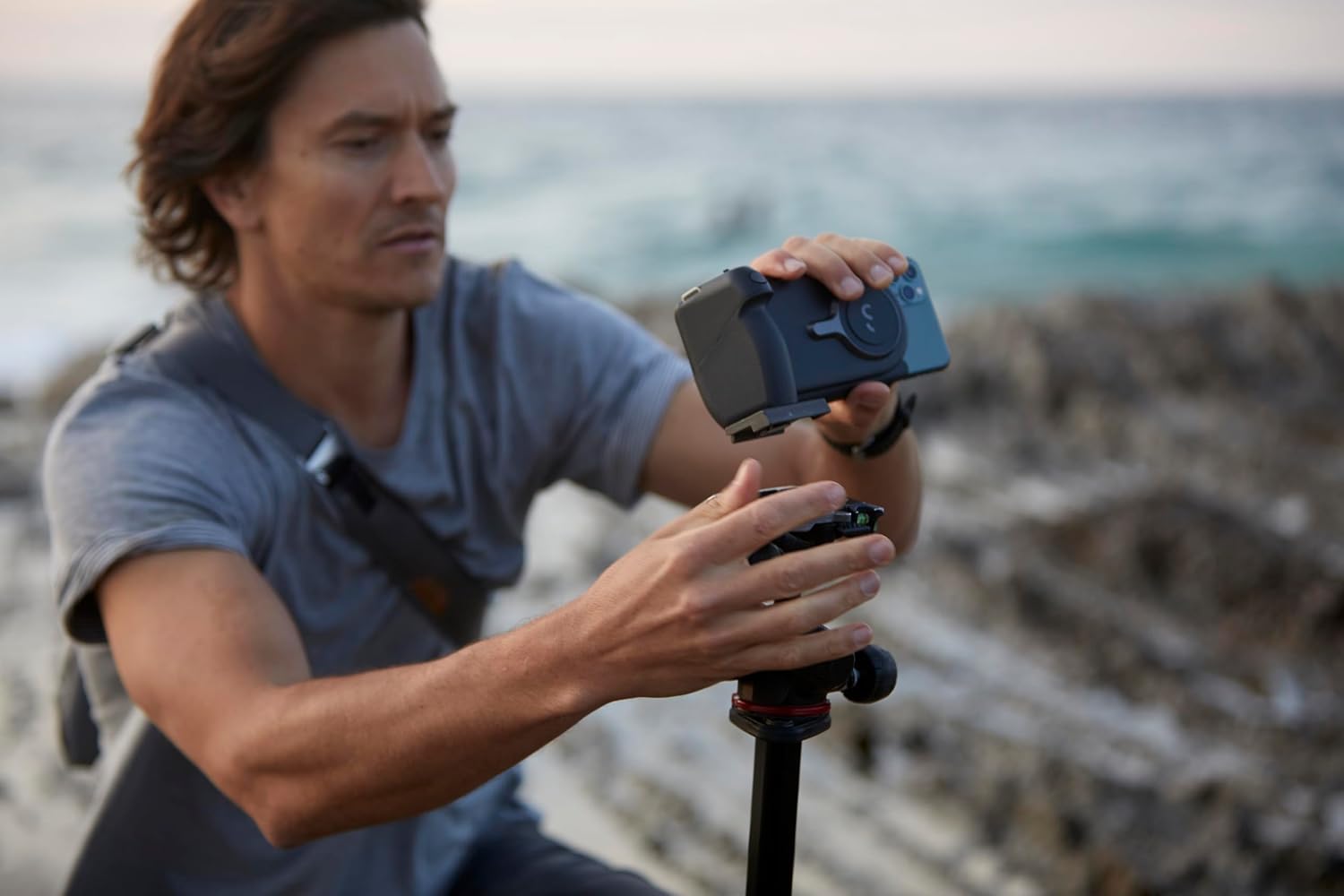
Image: The back of the ShiftCam ProGrip with a smartphone attached, showing the power button and Bluetooth indicator lights on the grip.
1.3 Charging the ProGrip
Connect the provided USB-C cable to the charging port on the ProGrip and to a suitable power adapter. The LED indicators will show the charging status. A full charge is indicated when all LEDs are solid. The ProGrip also supports wireless charging for your smartphone.
1.4 Attaching the Wrist Strap
For added security, attach the included wrist strap to the designated loop on the ProGrip. This helps prevent accidental drops during use.

Image: The ShiftCam ProGrip with an attached wrist strap, illustrating how the strap provides a secure hold for the user's hand.
2. Operating Instructions
2.1 Taking Photos and Videos
Once your smartphone is securely attached and paired via Bluetooth, open your phone's camera application. Use the physical shutter button on the ProGrip to capture photos or start/stop video recording. A half-press may activate autofocus on some devices.

Image: A person holding a smartphone with the ShiftCam ProGrip attached, aiming to take a photo, demonstrating the ergonomic design for shooting.
2.2 Switching Orientations (Landscape/Portrait)
The ProGrip allows for quick switching between landscape and portrait modes. Simply rotate your smartphone within the grip's mount to change orientation. Ensure the phone is securely locked in place after rotation.

Image: A smartphone held horizontally in landscape mode by the ShiftCam ProGrip, ready for wide-angle photography or videography.

Image: A smartphone held vertically in portrait mode by the ShiftCam ProGrip, suitable for social media content or vertical video.
2.3 Using as a Stand
The ProGrip can also function as a stand for your smartphone, allowing for hands-free viewing or video calls in both portrait and landscape orientations. Simply unfold the grip to create a stable base.

Image: The ShiftCam ProGrip unfolded to act as a stand, holding a smartphone in portrait mode on a flat surface, ideal for hands-free viewing.
2.4 Wireless Charging
The ProGrip features an integrated wireless charging pad. When your smartphone is attached to the grip, it will automatically begin charging if the wireless charging feature is enabled and the grip has sufficient power. This extends your shooting time.
2.5 Tripod Mounting
A standard 1/4" screw mount is located at the bottom of the ProGrip, allowing you to attach it to tripods, monopods, or other camera accessories for enhanced stability.

Image: A person attaching the ShiftCam ProGrip with a smartphone to a tripod, highlighting the 1/4" screw mount for stable setups.
3. Maintenance
- Cleaning: Wipe the ProGrip with a soft, dry cloth. Avoid using harsh chemicals or abrasive materials.
- Storage: Store the ProGrip in a cool, dry place away from direct sunlight and extreme temperatures.
- Battery Care: To prolong battery life, avoid fully discharging the grip frequently. Charge it regularly, even if not in use for extended periods.
4. Troubleshooting
4.1 ProGrip Not Powering On
Ensure the ProGrip is fully charged. Connect it to a power source using the USB-C cable and allow it to charge for at least 30 minutes before attempting to power it on again.
4.2 Bluetooth Connection Issues
- Make sure the ProGrip is powered on and within range of your smartphone.
- Turn off and then on your smartphone's Bluetooth.
- Forget the "ShiftCam ProGrip" device in your phone's Bluetooth settings and attempt to pair again.
- Restart both your smartphone and the ProGrip.
4.3 Wireless Charging Not Working
- Verify that your smartphone supports wireless charging.
- Ensure the ProGrip has sufficient battery charge.
- Check that your phone is correctly aligned on the wireless charging pad of the ProGrip.
- Remove any thick phone cases that might interfere with wireless charging.
4.4 Loose Phone Mount or Pivot
If the phone mount or pivot feels loose, ensure your smartphone is correctly seated and the clamps are fully engaged. If the issue persists and affects stability, contact customer support for assistance.
5. Specifications
| Model Number | PG-SK-CH-EN |
| Brand | ShiftCam |
| Color | Anthracite |
| Compatible Devices | Cellular Phones |
| Item Weight | 300 Grams |
| UPC | 655729667203 |
| Image Stabilizer | Yes (via smartphone features) |
| Water Resistance Level | Waterproof (as per product specifications, typically refers to the phone's resistance) |
| Exposure Control Type | Automatic (controlled by smartphone) |
| Minimum Shutter Speed | 1/4000 seconds (controlled by smartphone) |
6. Warranty and Support
6.1 Warranty Information
The ShiftCam ProGrip Starter Kit comes with a 2-year availability of spare parts in the EU. For specific warranty terms and conditions, please refer to the documentation provided with your purchase or visit the official ShiftCam website.
6.2 Customer Support
If you encounter any issues or have questions regarding your ShiftCam ProGrip Starter Kit, please contact the retailer where you purchased the product or visit the official ShiftCam support page for further assistance.


