
TecTake 404378-3
TecTake Metal Office Cabinet - User Manual
Model: 404378-3 | Brand: TecTake
1. Introduction
This user manual provides essential information for the safe and efficient use of your TecTake Metal Office Cabinet, Model 404378-3. Please read this manual thoroughly before assembly and operation to ensure proper handling and to maximize the lifespan of your product.

Figure 1.1: The TecTake Metal Office Cabinet, open to display its spacious interior with organized files and storage boxes.
2. Safety Information
Always observe the following safety precautions to prevent injury and damage to the product:
- Take precautions during handling and assembly of the steel cabinet to avoid injuries.
- Consult the manufacturer's instructions for proper assembly and use.
- Ensure the cabinet is placed on a stable, level surface to prevent tipping.
- Do not overload shelves beyond the specified weight capacity.
- Keep children and pets away during assembly.
- Use appropriate tools for assembly as instructed.

Figure 2.1: The TecTake Metal Office Cabinet in a typical office environment, demonstrating its compact and secure design when closed.
3. Product Overview and Features
The TecTake Metal Office Cabinet is a robust and versatile storage solution designed for various environments, including offices, workshops, and homes. It offers secure and organized storage for documents, files, and other valuable items.
Key Features:
- Secure Locking System: Equipped with a cylinder lock and two keys for maximum security of your contents.
- Adjustable Shelves: Four individually height-adjustable shelves to accommodate various item sizes and storage needs.
- High Load Capacity: Each shelf can support up to 40 kg, ensuring robust storage.
- Durable Construction: Made from high-quality powder-coated steel for long-lasting durability and an industrial aesthetic.
- Quiet Operation: Reinforced swing doors with noise-dampening rubber buffers for silent closing.
- Easy to Clean: Smooth, rimless shelves simplify interior cleaning.
- Versatile Use: Ideal for office, garage, cellar, or other storage areas.
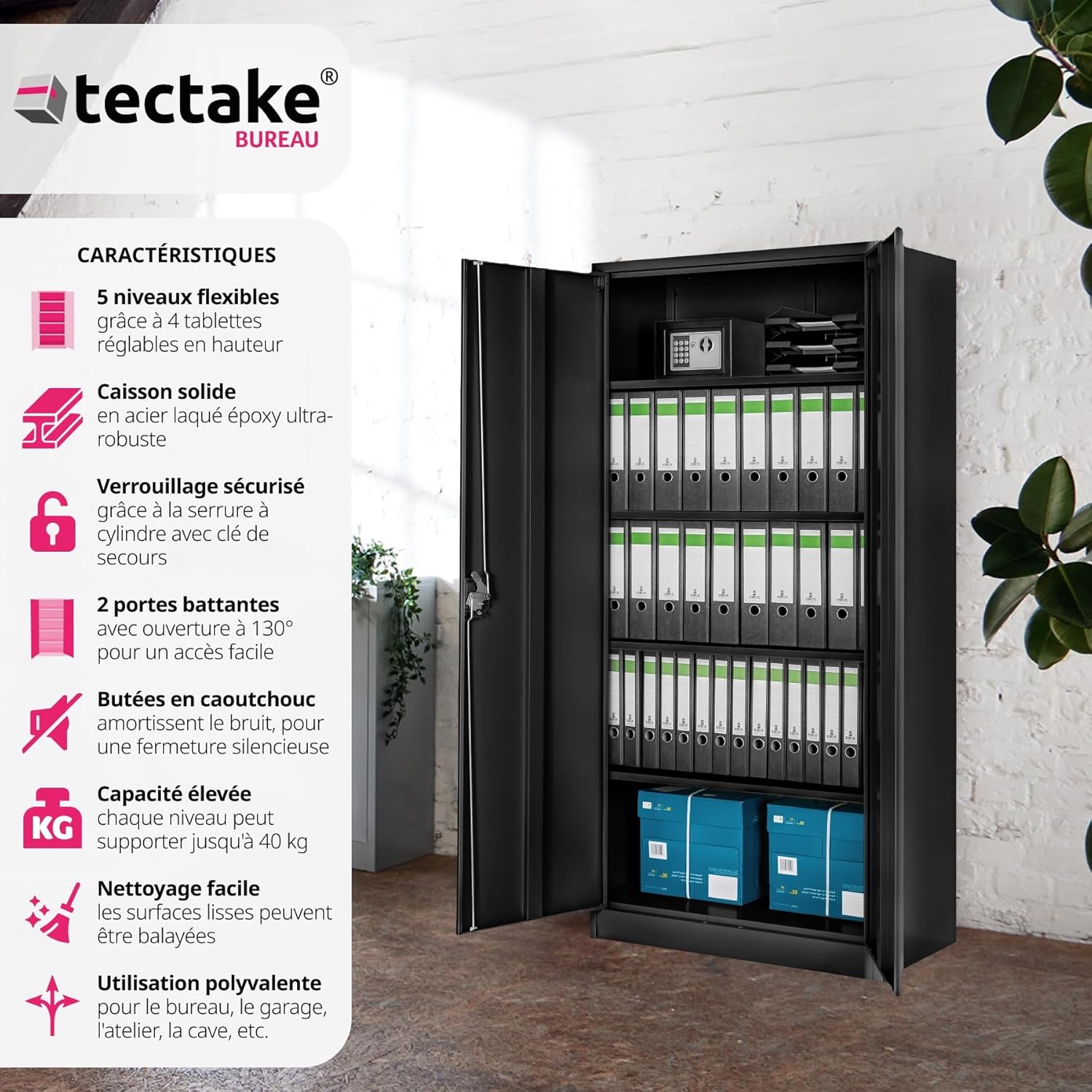
Figure 3.1: Visual representation of the cabinet's key features, such as adjustable shelves and robust construction.

Figure 3.2: The cabinet's versatility is demonstrated across different environments, from a home office to a warehouse.
4. Components List
Before starting assembly, ensure all components are present and undamaged. If any parts are missing or damaged, please contact customer support.
| Component | Quantity | Description |
|---|---|---|
| Cabinet Body Panels | Various | Side panels, back panel, top, and bottom panels. |
| Shelves | 4 | Adjustable shelves for interior organization. |
| Doors | 2 | Reinforced swing doors. |
| Lock Mechanism | 1 set | Cylinder lock with turning handle. |
| Keys | 2 | For the cylinder lock. |
| Rubber Buffers | Set | For noise dampening on doors. |
| Assembly Hardware | Set | Screws, bolts, nuts, and other fasteners. |
5. Setup and Assembly
Assembly of the TecTake Metal Office Cabinet is designed to be straightforward. Follow these steps carefully:
- Unpack Components: Carefully remove all parts from the packaging and lay them out on a clean, soft surface to prevent scratches. Verify all components are present using the list above.
- Assemble Cabinet Frame: Connect the side panels to the top and bottom panels using the provided hardware. Ensure all connections are secure.
- Attach Back Panel: Secure the back panel to the assembled frame.
- Install Shelf Supports: Insert the shelf supports into the desired height slots on the interior side panels. The shelves are individually adjustable.
- Insert Shelves: Place the four shelves onto the installed supports. Ensure they are level and stable.
- Mount Doors: Attach the two swing doors to the cabinet frame using the hinges. Ensure they open and close smoothly.
- Install Lock Mechanism: Secure the cylinder lock and turning handle to one of the doors as per the specific instructions provided with the lock.
- Apply Rubber Buffers: Attach the noise-dampening rubber buffers to the inside edges of the doors or cabinet frame where the doors make contact, to ensure quiet closing.
- Final Placement: Move the assembled cabinet to its final desired location. Ensure it is on a stable and level surface.
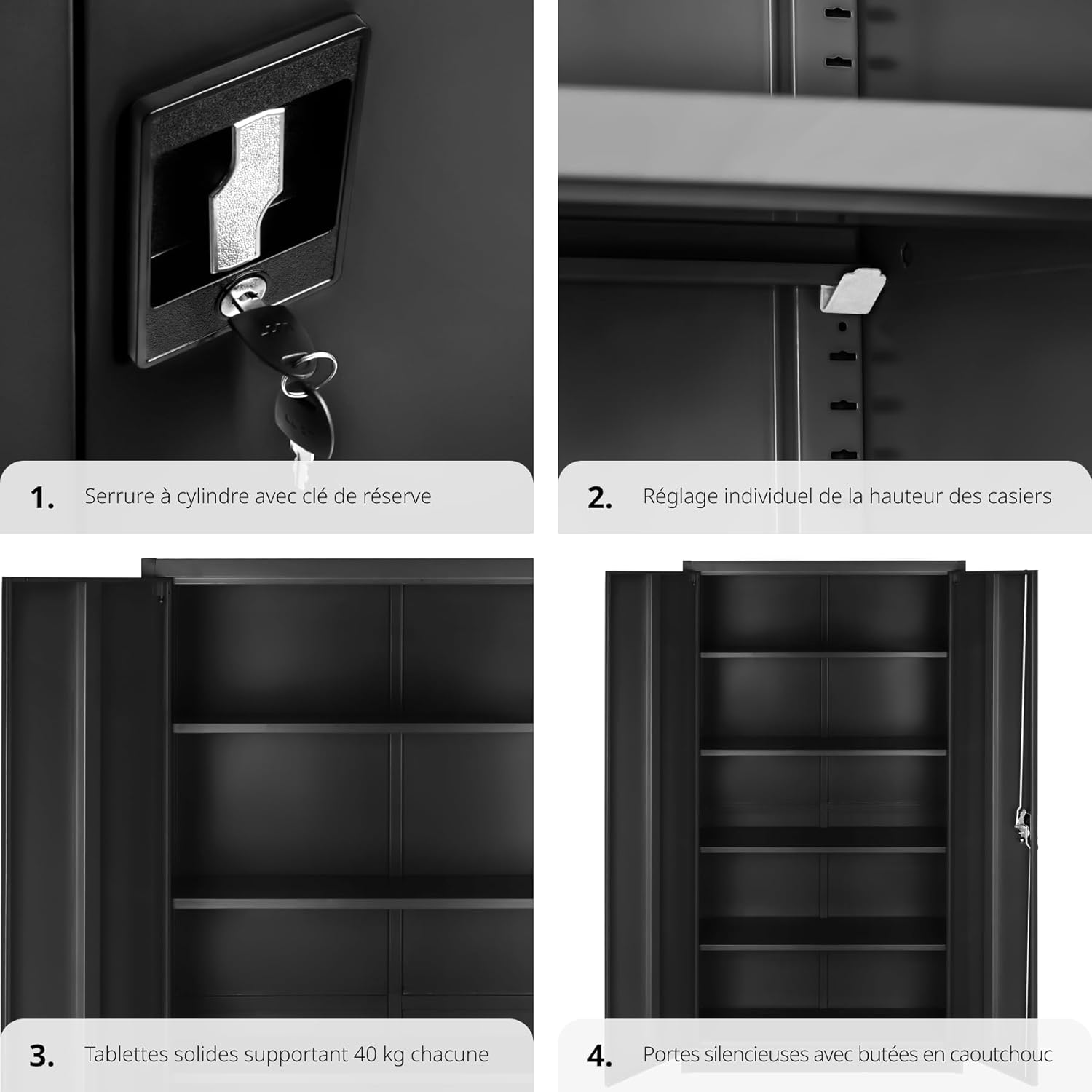
Figure 5.1: Detailed views of the lock mechanism, shelf adjustment, shelf capacity, and door buffers, illustrating key assembly and operational features.
6. Operating Instructions
6.1. Locking and Unlocking
To secure your documents and items, use the integrated cylinder lock:
- To Lock: Close both doors firmly. Insert one of the provided keys into the lock and turn it clockwise until the mechanism engages. Remove the key.
- To Unlock: Insert the key into the lock and turn it counter-clockwise until the mechanism disengages. The doors can now be opened.
Always keep the spare key in a safe and accessible location.
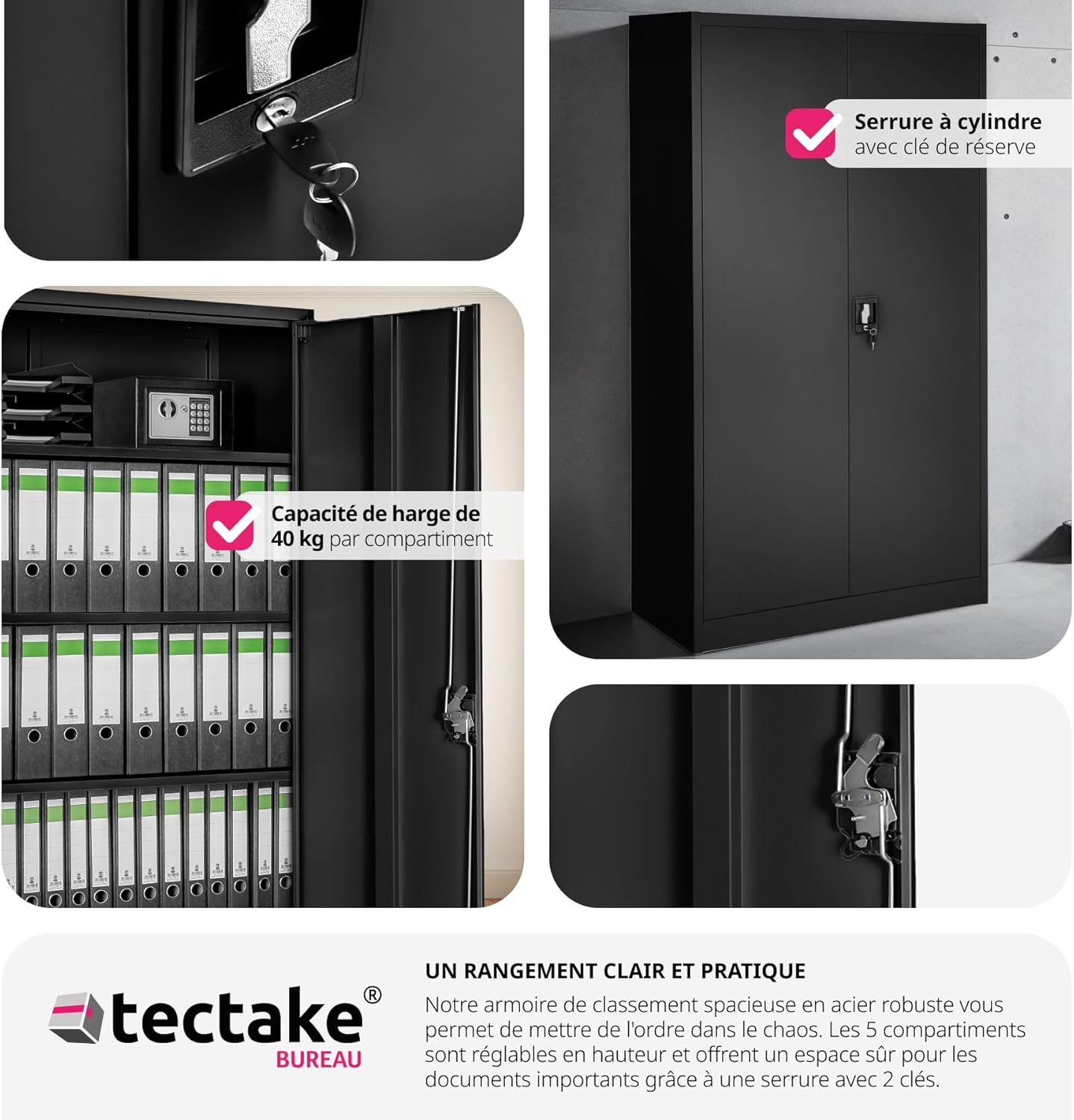
Figure 6.1: The cabinet's secure locking mechanism, ensuring the safety of your stored items.
6.2. Adjusting Shelves
The shelves can be adjusted to different heights to suit your storage needs:
- Empty the shelf you wish to adjust.
- Carefully lift the shelf and remove it from its supports.
- Relocate the shelf supports to the desired slots on the cabinet's interior side panels. Ensure the supports are at the same height on both sides.
- Place the shelf back onto the new supports, ensuring it is stable and level.

Figure 6.2: The cabinet's interior with adjustable shelves, demonstrating the ample storage capacity and wide door opening for easy access.
7. Maintenance
To keep your TecTake Metal Office Cabinet in optimal condition, follow these simple maintenance guidelines:
- Cleaning: Wipe surfaces with a soft, damp cloth. For stubborn dirt, use a mild, non-abrasive cleaner. Avoid harsh chemicals or abrasive materials that could damage the powder-coated finish. The smooth, rimless shelves are designed for easy cleaning.
- Inspection: Periodically check all screws and fasteners to ensure they remain tight. Retighten if necessary.
- Lubrication: If the lock mechanism or hinges become stiff, apply a small amount of silicone-based lubricant.
- Weight Distribution: Distribute weight evenly across shelves to prevent warping or instability. Do not exceed the maximum weight capacity per shelf.
8. Troubleshooting
This section addresses common issues you might encounter with your cabinet.
| Problem | Possible Cause | Solution |
|---|---|---|
| Doors do not close properly or are misaligned. | Uneven floor; loose hinges; cabinet not square. | Ensure cabinet is on a level surface. Check and tighten hinge screws. If cabinet is not square, slightly loosen assembly screws, adjust, and retighten. |
| Lock mechanism is stiff or difficult to turn. | Lack of lubrication; debris in lock. | Apply a small amount of graphite powder or silicone spray lubricant into the keyhole. Avoid oil-based lubricants. |
| Shelves sag or wobble. | Overloaded shelf; incorrect installation of shelf supports. | Reduce weight on the shelf. Ensure shelf supports are fully inserted and correctly aligned in the slots. |
| Cabinet makes noise when opening/closing doors. | Missing or worn rubber buffers. | Check if rubber buffers are properly installed. Replace if worn. |
9. Specifications
Detailed technical specifications for the TecTake Metal Office Cabinet:
- Brand: TecTake
- Model Number: 404378-3
- Color: Black (80 x 40 x 180 cm, Noir)
- Product Dimensions (L x W x H): 40 x 80 x 180 cm (approx. 15.7 x 31.5 x 70.9 inches)
- Item Weight: 35.3 Kilograms (approx. 77.8 lbs)
- Maximum Weight Capacity per Shelf: 40 Kilograms (approx. 88.2 lbs)
- Number of Shelves: 4 (individually adjustable)
- Door Style: Flat Panel Swing Doors
- Lock Type: Cylinder Lock with 2 Keys
- Material: Powder-coated Steel
- Recommended Use: Indoor
- Mounting Type: Floor Mount
- Special Feature: Adjustable shelves, Noise-dampening rubber buffers

Figure 9.1: Detailed dimensions and weight capacity of the cabinet.
10. Warranty and Support
For information regarding warranty coverage, spare parts availability, or technical support, please contact TecTake customer service or refer to the official TecTake website. Keep your purchase receipt as proof of purchase for any warranty claims.
Contact Information: Please visit the official TecTake website or refer to your purchase documentation for the most up-to-date contact details.
Note: Spare parts availability information was not provided at the time of manual creation.
Related documents404378-3

Ask a question about this manual
Ask about setup, troubleshooting, compatibility, parts, safety, or missing instructions. Manuals+ will review the question and use this page’s manual context to help answer it.