
SEDETA 2620-desk
SEDETA L Shaped Desk with Lift Top Instruction Manual
Model: 2620-desk
1. Introduction
Thank you for choosing the SEDETA L Shaped Desk with Lift Top. This versatile desk is designed to enhance your home office or workspace with its reversible configuration, integrated storage, and ergonomic features. This manual provides detailed instructions for assembly, operation, maintenance, and troubleshooting to ensure optimal use and longevity of your desk.
Please read all instructions carefully before beginning assembly or operation. Keep this manual for future reference.
2. Package Contents
Before assembly, verify that all components listed below are present and undamaged. If any parts are missing or damaged, please contact customer support.
- L-shaped desk components (desktop panels, frame pieces)
- Lift-top mechanism
- Monitor stand
- Printer stand shelves
- Storage bag
- Headphone hooks (2)
- Assembly hardware (screws, bolts, nuts, etc.)
Note: All assembly tools are not included. Please ensure you have the necessary tools for assembly.
3. Assembly Instructions
The SEDETA L Shaped Desk offers flexible assembly options, allowing you to configure it as an L-shaped desk or an extra-long straight desk (98.4 inches). Follow the steps carefully based on your desired configuration.
3.1 Choosing Your Configuration
The desk can be assembled in two primary ways:
- L-Shaped Configuration: Ideal for corner spaces, providing a compact yet spacious work area.
- Extra-Long Straight Configuration: Suitable for larger rooms, allowing two people to work simultaneously or providing extensive linear workspace.

Figure 3.1: Desk dimensions and configuration options (L-shaped or long desk).
3.2 Step-by-Step Assembly
Detailed assembly instructions are provided in the included assembly guide. Please refer to the diagrams and numbered steps in that guide for precise component identification and fastening. Ensure all screws are tightened securely but do not overtighten.

Figure 3.2: Fully assembled SEDETA L Shaped Desk.
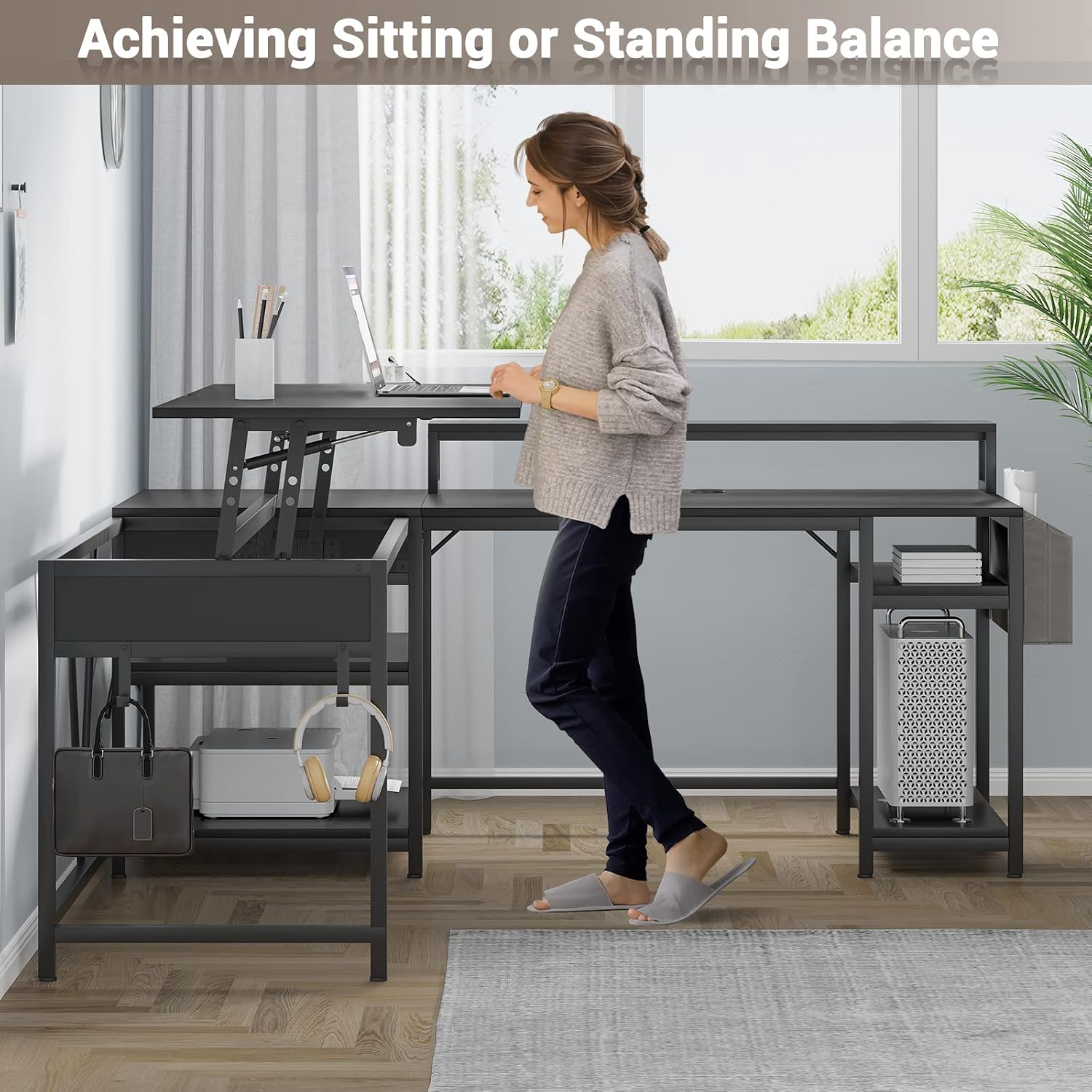
Figure 3.3: The desk configured as an extra-long straight desk.
4. Operating Instructions
4.1 Lift-Top Functionality
The left desktop panel features a lift-top mechanism, allowing you to easily transition between sitting and standing positions. To raise the lift top, gently pull the front edge upwards. To lower it, push down firmly and evenly until it locks into the flat position.

Figure 4.1: Utilizing the lift-top feature for ergonomic standing work.
4.2 Integrated Features
- Monitor Stand: The elevated monitor stand helps maintain correct posture and reduces neck strain by raising your display to an ergonomic viewing height.
- Printer Stand: Dedicated shelves provide convenient storage for your printer, files, and other office essentials, keeping your main desktop clear.
- Storage Bag: A fabric storage bag can be attached to the side of the desk, offering quick access to documents, notebooks, or other supplies.
- Headphone Hooks: Two integrated hooks provide a tidy spot to hang headphones or a backpack, keeping them off the floor and within reach.

Figure 4.2: The integrated monitor stand promotes ergonomic viewing.

Figure 4.3: Dedicated printer stand for organized storage.

Figure 4.4: Convenient side storage bag for quick access items.
4.3 Product Overview Video
For a visual demonstration of the desk's features and functionality, please watch the official product video below.
Video 4.1: Overview of the SEDETA L Shaped Desk with Lift Top, showcasing its features and design.
5. Maintenance
To ensure the longevity and appearance of your SEDETA desk, follow these simple maintenance guidelines:
- Cleaning: Wipe surfaces regularly with a soft, damp cloth. Avoid abrasive cleaners or harsh chemicals, as they may damage the finish.
- Spills: Clean up spills immediately to prevent staining or damage to the engineered wood surface.
- Hardware: Periodically check all screws and fasteners to ensure they remain tight. Retighten if necessary to maintain stability.
- Weight Distribution: Distribute weight evenly across the desk surface, especially on the lift-top section, to prevent stress on the mechanism.
6. Troubleshooting
If you encounter any issues with your SEDETA desk, please refer to the following common solutions:
- Desk Wobbles: Ensure all assembly hardware is securely tightened. Check that the desk is placed on a level surface. Adjust leveling feet if present.
- Lift Top Not Operating Smoothly: Check for any obstructions around the lift mechanism. Ensure the desk is not overloaded. If the issue persists, re-check the assembly of the lift mechanism according to the assembly guide.
- Missing Parts: If you find any parts missing during assembly, please contact SEDETA customer support with your purchase details.
For issues not covered here, please contact our customer support team for assistance.
7. Specifications
| Feature | Detail |
|---|---|
| Brand | SEDETA |
| Model Number | 2620-desk |
| Product Dimensions | 19.7"D x 98.4"W x 31.5"H |
| Color | Black |
| Style | Industrial |
| Base Material | Metal |
| Top Material Type | Engineered Wood |
| Finish Type | Powder Coated |
| Special Feature | Reversible, Adjustable |
| Room Type | Office, Bedroom, Living Room |
| Mounting Type | Freestanding |
| Included Components | Headphone Hook, Monitor Stand, CPU Stand, Desk, Storage Bag |
| Item Weight | 70 Pounds |
| Number Of Shelves | 2 |
| Required Assembly | Yes |
| Is Electric | No |
8. Warranty and Support
SEDETA stands behind the quality of its products. For specific warranty information regarding your L Shaped Desk with Lift Top, please refer to the warranty card included with your purchase or visit the official SEDETA website.
If you require technical assistance, have questions about assembly, or need to report missing/damaged parts, please contact SEDETA customer support. Our team is dedicated to providing prompt and helpful service.
Customer Support Contact: Please refer to the contact information provided on the product packaging or the official SEDETA brand store on Amazon.
Related documents2620-desk

Ask a question about this manual
Ask about setup, troubleshooting, compatibility, parts, safety, or missing instructions. Manuals+ will review the question and use this page’s manual context to help answer it.