1. Product Overview
Thank you for choosing the Midea 10 kg Top Load Washing Machine, Model MA200W100/W-SA. This appliance is designed to provide efficient and convenient laundry care for your home. Featuring a generous 10 kg capacity and intuitive touch controls, it simplifies your washing routine. Please read this manual thoroughly before operating your new washing machine to ensure safe and optimal performance.

Figure 1: Angled view of the Midea 10 kg Top Load Washing Machine.
2. Setup and Installation
Proper installation is crucial for the safe and efficient operation of your washing machine.
2.1 Unpacking
- Carefully remove all packaging materials, including the base packaging and any protective foam.
- Inspect the washing machine for any signs of damage during transit. If damaged, do not proceed with installation and contact customer support.
2.2 Location Requirements
- Place the washing machine on a firm, level surface to minimize vibration and noise during operation.
- Ensure adequate space around the machine for ventilation and maintenance.
- The location must have access to a water supply (hot and cold, if applicable), a drain, and a grounded electrical outlet (220 Volts).
2.3 Leveling the Machine
The Midea washing machine is equipped with adjustable leveling legs.
- Tilt the machine slightly and adjust the front leveling legs by turning them clockwise or counter-clockwise until the machine is stable.
- Use a spirit level to ensure the machine is perfectly level from front to back and side to side.
- Tighten the lock nuts on the leveling legs to secure them in place.
2.4 Connecting Water and Drain Hoses
- Connect the water inlet hoses to the corresponding hot and cold water faucets (if applicable) and to the inlet valves on the back of the washing machine. Ensure connections are tight to prevent leaks.
- Position the drain hose securely into a standpipe or laundry tub, ensuring it is not kinked or blocked.
2.5 Electrical Connection
- Plug the power cord into a grounded 220 Volt electrical outlet. Do not use extension cords or adapters.
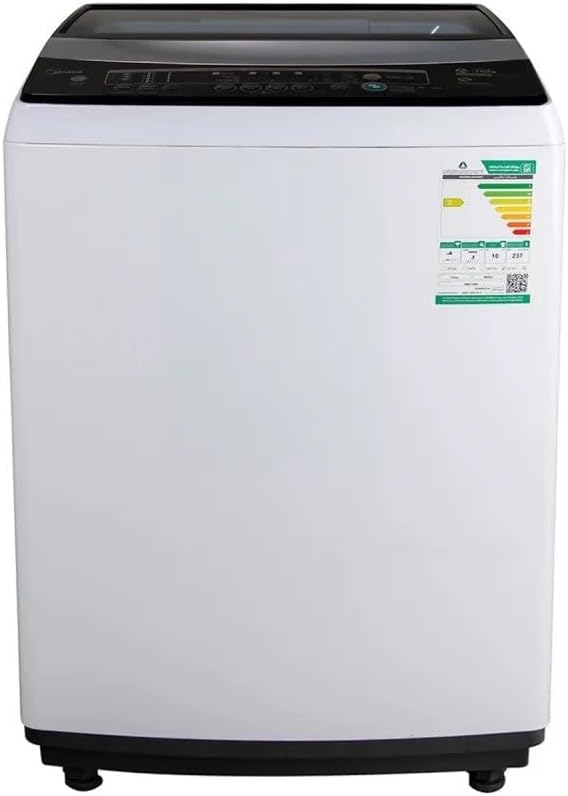
Figure 2: Front view of the Midea 10 kg Top Load Washing Machine with control panel.
3. Operating Instructions
Follow these steps for optimal washing performance.
3.1 Control Panel Overview
The Midea MA200W100/W-SA features a user-friendly touch control panel. Familiarize yourself with the various buttons and indicators before use.
3.2 Loading Laundry
- Sort laundry by fabric type, color, and soil level.
- Open the top lid and load items loosely into the drum, ensuring not to overload the 10 kg capacity. Overloading can reduce washing efficiency and damage the machine.
- Close the lid securely.

Figure 3: Top view of the Midea 10 kg Top Load Washing Machine with lid open.
3.3 Adding Detergent and Softener
- Add the appropriate amount of detergent to the detergent dispenser. Refer to your detergent's instructions for dosage.
- Pour fabric softener into the designated softener compartment (if available).
3.4 Selecting a Wash Program
- Press the Power button to turn on the machine.
- Use the program selection buttons on the touch control panel to choose the desired wash cycle. The machine offers various standard cycles.
- Adjust additional settings such as water level, temperature, or spin speed (up to 1500 RPM) if available and desired.
3.5 Starting and Pausing a Cycle
- Press the Start/Pause button to begin the wash cycle.
- To pause a cycle, press the Start/Pause button again. Press it once more to resume.
- The machine will automatically proceed through the wash, rinse, and spin phases.
3.6 End of Cycle
Once the cycle is complete, the machine will signal with an audible alert. Remove laundry promptly to prevent wrinkles and odors.
4. Maintenance
Regular maintenance helps prolong the life of your washing machine and ensures optimal performance. Always unplug the machine before performing any cleaning or maintenance.
4.1 Cleaning the Exterior
- Wipe the exterior surfaces with a soft, damp cloth.
- Avoid using abrasive cleaners, solvents, or harsh chemicals that could damage the finish.
4.2 Cleaning the Detergent Dispenser
- Periodically remove and clean the detergent and softener dispenser compartments to prevent residue buildup. Rinse with warm water and dry thoroughly before reinserting.
4.3 Cleaning the Drum
- Run a "Tub Clean" or "Self Clean" cycle (if available) regularly to remove detergent residue and odors from the drum.
- Alternatively, run an empty cycle with hot water and a cup of white vinegar or a washing machine cleaner.
- Leave the lid slightly ajar after use to allow the drum to air dry and prevent mildew.
4.4 Water Inlet Filter Cleaning
- If you notice reduced water flow, the inlet filters may be clogged. Turn off the water supply and disconnect the inlet hoses.
- Remove the mesh filters from the inlet valves and clean them under running water with a brush. Reinstall and reconnect hoses.
5. Troubleshooting
Before contacting customer service, please refer to the following common issues and their solutions.
| Problem | Possible Cause | Solution |
|---|---|---|
| Machine does not start | Power cord unplugged; Lid not closed properly; Power outage. | Ensure power cord is securely plugged in; Close the lid completely; Check household circuit breaker. |
| No water filling | Water supply turned off; Water inlet hoses kinked; Inlet filters clogged. | Turn on water supply; Straighten hoses; Clean inlet filters (refer to Maintenance section). |
| Machine vibrates excessively or is noisy | Machine not level; Shipping bolts not removed; Overloaded or unbalanced load. | Adjust leveling legs; Ensure all shipping bolts are removed; Redistribute laundry evenly in the drum. |
| Water not draining | Drain hose kinked or blocked; Drain pump filter clogged. | Check and straighten drain hose; Clean drain pump filter (refer to manual for location, if applicable). |
| Clothes are still wet after spin cycle | Load unbalanced; Spin speed too low; Overloaded. | Redistribute load; Select a higher spin speed; Reduce load size. |
If the problem persists after trying these solutions, please contact Midea customer support.
6. Specifications
| Brand | Midea |
| Model Info | MA200W100/W-SA |
| Product Dimensions | 22.83 x 38.11 x 23.46 cm (D x W x H) |
| Item Weight | 45 kg |
| Capacity | 10 Kilograms |
| Weighted Annual Energy Consumption | 191 Kilowatt Hours Per Year |
| Annual Energy Consumption | 255 Watts |
| Max Spin Speed | 1500 RPM |
| Noise Level | 30 dB |
| Installation Type | Freestanding |
| Color | White |
| Control Console | Touch |
| Standard Cycles | 60 |
| Access Location | Top Load |
| Voltage | 220 Volts |
| Material Type | Plastic |
| Special Features | Adjustable Leveling Legs |
7. Warranty Information
Your Midea 10 kg Top Load Washing Machine comes with a standard 2 Years Warranty from the date of purchase, covering manufacturing defects and malfunctions under normal use.
Extended Protection Plans
For additional peace of mind, the following protection plans are available for purchase:
- 1-Year Extended Warranty by Tawuniya: Provides an additional year of warranty coverage.
- 1 Year Accidental Damage Protection Plan: Covers accidental damage for one year.
- 2 Years Accidental Damage Protection Plan: Covers accidental damage for two years.
Please refer to the specific terms and conditions of each protection plan for full details on coverage and exclusions.
8. Customer Support
For installation services, technical assistance, or any inquiries regarding your Midea washing machine, please contact the Midea customer support team at the following regional numbers:
- Riyadh: +966-11-4094006 Ext – 113
- Jeddah: +966-12-6577714
- Dammam: +966-13-8343691
- Qassim: +966 581044198
- Abha: +966 593322785
Please have your model number (MA200W100/W-SA) and purchase details ready when contacting support.