
Cxy T13
Cxy Portable Car Jump Starter User Manual
Model: T13
1. Introduction
Thank you for choosing the Cxy Portable Car Jump Starter. This powerful and versatile device is designed to safely jump-start your vehicle, charge your electronic devices, and provide emergency lighting. Please read this manual carefully before use to ensure proper operation and to maximize the lifespan of your device.
2. Product Overview
2.1 Package Contents
- Cxy Portable Jump Starter T13 x 1
- Smart Battery Clamp x 1
- USB to USB-C Cable x 1
- USB-C to USB-C Cable x 1
- 12V Cigarette Lighter Socket Adapter x 1
- User Manual x 1
2.2 Device Components
Familiarize yourself with the main components of your Cxy Jump Starter:

Image: The Cxy Portable Car Jump Starter shown with its smart battery clamps, USB cables, 12V cigarette lighter adapter, and carrying case.

Image: A detailed diagram highlighting the Jump Start Output, Jump Button, LCD Display, Power Button, Type-C In&Out (PD60W), LED Lights (Torch, Strobe, SOS), DC Output (12V/6A), and USB-A (QC18W) port on the Cxy Jump Starter.
2.3 Digital Display Screen
The 3-inch LCD digital display provides real-time information about the device's status:
- Battery Status: Shows remaining battery percentage.
- Quick Charge Indicator: Indicates charging or discharging status.
- Jump Start Ready: Displays "READY" when the device is prepared for jump-starting.
- RC (Clamps Reversely): Indicates reverse polarity connection.
- LC (Low Voltage): Indicates low voltage.
- HT (Over Heat): Indicates overheating.

Image: A close-up view of the Cxy Jump Starter's digital display, showing indicators for battery status, charging/discharging, jump start readiness, and error codes like 'RC' (Clamps Reversely), 'LC' (Low Voltage), and 'HT' (Over Heat).
3. Setup
3.1 Initial Charging
Before first use, fully charge the jump starter. It can be charged to 100% in approximately 1.5 hours using a PD 60W Type-C charger (not included). A 10-minute charge can bring it from 0% to 20%.

Image: An illustration showing the Cxy Jump Starter being charged from a wall outlet, with a graphic indicating it can reach 20% charge in 10 minutes and 100% in 1.5 hours with a PD 60W charger.
It is recommended to use the jump starter when its battery level is above 20% for optimal performance and longevity.
4. Operating Instructions
4.1 Jump Starting a Vehicle
The Cxy T13 can safely jump-start 12V vehicles with up to 7.0L gasoline or 4.5L diesel engines.
- Ensure the jump starter has sufficient charge (above 20%).
- Connect the smart battery clamp to the jump starter's jump start output port.
- Connect the red (+) clamp to the positive (+) terminal of the vehicle's battery.
- Connect the black (-) clamp to the negative (-) terminal of the vehicle's battery.
- Once connected, the jump starter's LCD screen should display "READY". If an error code appears (RC, LC, HT), refer to the Troubleshooting section.
- Start your vehicle's engine.
- Once the engine starts, immediately remove the clamps from the vehicle battery, then disconnect the clamp from the jump starter.
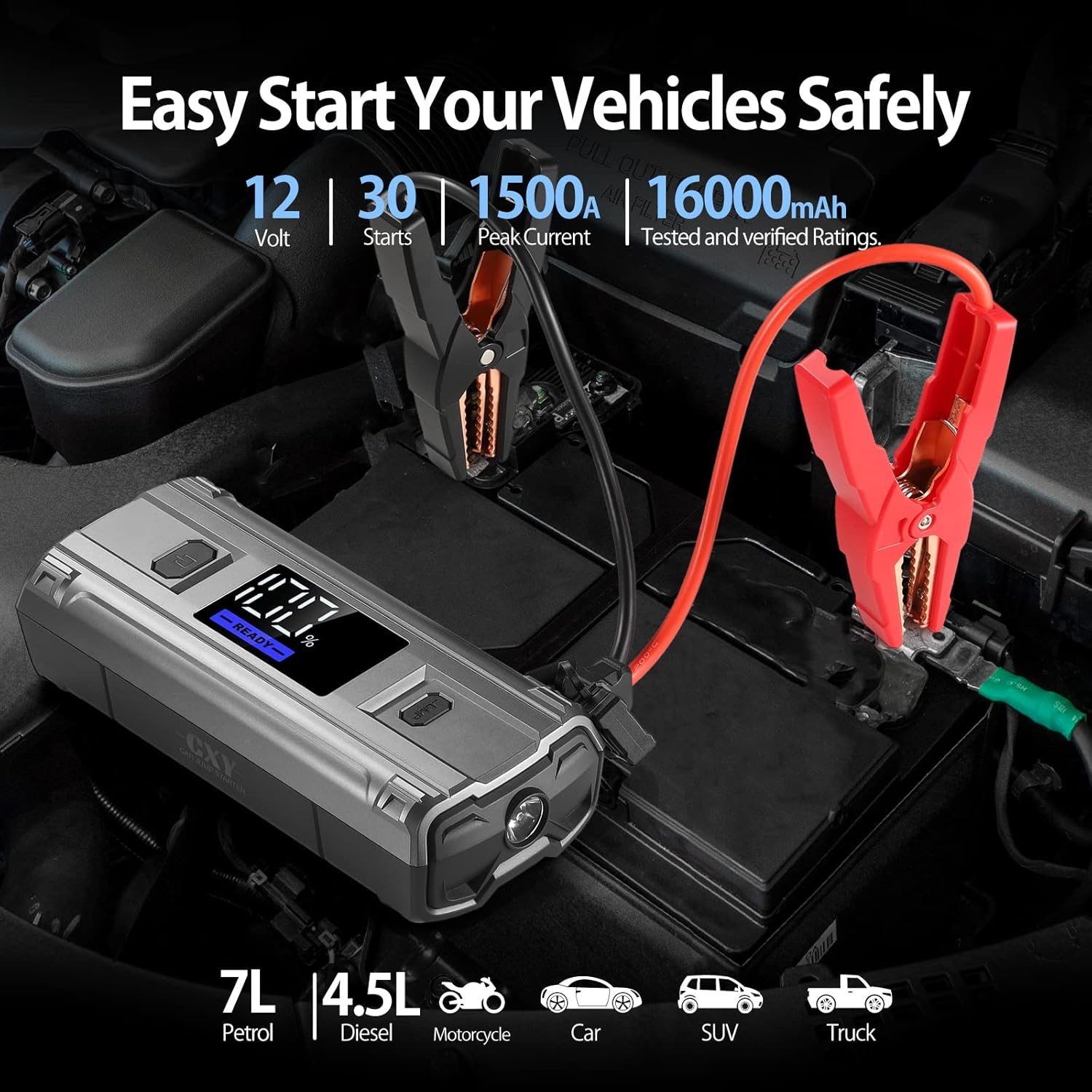
Image: The Cxy Jump Starter connected to a car battery with its red and black clamps, demonstrating the process of jump-starting a vehicle. The image also highlights its capability for 12V, 1500A peak current, and 16000mAh capacity, suitable for various vehicle types.
4.2 Using as a Power Bank
The Cxy T13 can charge various electronic devices:
- USB-C PD 60W Port: For fast charging laptops (e.g., MacBook Pro/Air, Dell XPS, Lenovo ThinkPad) and other compatible devices.
- USB-A QC18W Port: For quick charging smartphones and tablets.
- DC 12V/10A Output Port: Powers 12V DC devices such as tire inflators, car vacuum cleaners, car refrigerators, etc., using the included cigarette lighter adapter.

Image: The Cxy Jump Starter connected via its USB-C port to a laptop, illustrating its PD 60W super fast charging capability for various laptop models.

Image: The Cxy Jump Starter connected to a 12V DC cigarette lighter adapter, demonstrating its ability to power various 12V devices such as car shavers, cleaners, air fans, vacuum cups, MP3/4 players, air purifiers, tire inflators, and car refrigerators.
4.3 LED Light Functions
The built-in LED light has three modes:
- Spotlight: For general illumination.
- Strobe: For signaling or attracting attention.
- SOS: For emergency signaling.
Press the LED light button to cycle through the modes.
5. Safety Features
The Cxy T13 is equipped with an enhanced safety system, including:
- Anti-spark technology
- Reverse polarity protection
- Over-current protection
- Over-voltage protection
- Over-charge protection
- Over-discharge protection
- Short-circuit protection
- Over-temperature protection
- And more than 10 types of protection for safe and reliable operation.
6. Maintenance
- Store the jump starter in a cool, dry place away from direct sunlight and extreme temperatures.
- For optimal battery health, recharge the device every 3-6 months, even if not in use.
- Clean the device with a soft, dry cloth. Do not use harsh chemicals or abrasive materials.
- Keep the ports free of dust and debris.
7. Troubleshooting
| Problem | Possible Cause | Solution |
|---|---|---|
| Device does not turn on. | Battery is completely discharged. | Charge the jump starter. |
| "RC" (Clamps Reversely) displayed. | Clamps are connected to the wrong battery terminals. | Disconnect clamps and reconnect red to positive (+), black to negative (-). |
| "LC" (Low Voltage) displayed. | Vehicle battery voltage is too low or jump starter battery is low. | Ensure jump starter is sufficiently charged. If vehicle battery is severely drained, it may require professional assistance. |
| "HT" (Over Heat) displayed. | Device is overheating due to continuous use or high ambient temperature. | Disconnect the device and allow it to cool down for several minutes before attempting to use it again. |
| Vehicle does not start after jump attempt. | Vehicle battery issues, engine problems, or insufficient jump starter charge. | Check jump starter charge. Ensure clamps have good contact. If problem persists, consult a mechanic. |
8. Specifications
| Feature | Specification |
|---|---|
| Model | T13 |
| Peak Current | 1500A |
| Battery Capacity | 16000mAh |
| Start Voltage | 12V |
| Engine Compatibility (Gas) | Up to 7.0L |
| Engine Compatibility (Diesel) | Up to 4.5L |
| USB-C Input/Output | PD 60W Max |
| USB-A Output | QC18W |
| DC Output | 12V/10A |
| Dimensions (L x W x H) | 22 x 9 x 5 cm |
| Weight | 1.57 kg |
| Battery Type | Lithium-ion |
| UPC | 721295199377 |
9. Warranty and Support
Cxy provides a 24-month warranty for this product. We also offer a 30-day refund policy and dedicated customer support. For any questions, technical assistance, or warranty claims, please contact our friendly customer service team, available 24/7. Expert technical support is available for the lifetime of the product.
Related documentsT13


Ask a question about this manual
Ask about setup, troubleshooting, compatibility, parts, safety, or missing instructions. Manuals+ will review the question and use this page’s manual context to help answer it.