
1. Introduction
The ACOPOWER LiONCooler Pro 42Qts is a versatile portable car freezer designed for cooling and freezing items on the go. It features a strong DC compressor capable of reaching 32℉ (0℃) in 20 minutes on Max mode, fluoride-free insulation for efficient temperature retention, and smart APP control for convenient operation. Its portable design includes stretchable handles and 6-inch off-road wheels, making it ideal for various outdoor activities such as camping, fishing, picnics, and backyard barbecues.

Image 1.1: The ACOPOWER LiONCooler Pro 42Qts Portable Car Freezer, showcasing its compact and robust design.
2. Safety Information
- Ensure proper ventilation around the unit to prevent overheating.
- Do not block the ventilation openings.
- Keep the unit away from direct heat sources and moisture.
- Use only the provided power cables and adapters.
- Avoid placing hot food directly into the unit; allow it to cool first.
- Always pack food in sealed bags or containers to prevent spills and maintain hygiene.
- Do not submerge the unit in water.
3. Package Contents
- LiONCooler Pro Portable Car Freezer (Model HY-P40L)
- AC Adapter (for home use)
- DC Car Power Cable (for vehicle use)
- User Manual
- Note: Battery and solar panel are sold separately for this model.
4. Product Overview
The LiONCooler Pro features a robust exterior with practical elements for portability and convenience. The control panel is located on the side for easy access to temperature settings and power options. The unit is equipped with durable wheels and a telescopic handle for effortless transport.

Image 4.1: Overview of the LiONCooler Pro's handy features, including wheels, handle, and accessory points.
Internally, the cooler offers a spacious compartment for food and beverages. The design ensures a dry and clean environment, eliminating the need for ice.

Image 4.2: The 'No Ice, No Mess' feature highlights the benefit of a compressor-based cooler over traditional ice chests.

Image 4.3: The spacious interior of the LiONCooler Pro, demonstrating its capacity for various items.
5. Setup
5.1 Unpacking
Carefully remove the LiONCooler Pro from its packaging. Inspect the unit for any signs of damage. Retain all packaging materials for future transport or return if necessary.
5.2 Initial Power Connection
Connect the appropriate power cable (AC adapter for home, DC car cable for vehicle) to the unit's power input port. Plug the other end into a compatible power source. The unit will automatically power on or can be manually turned on using the control panel.
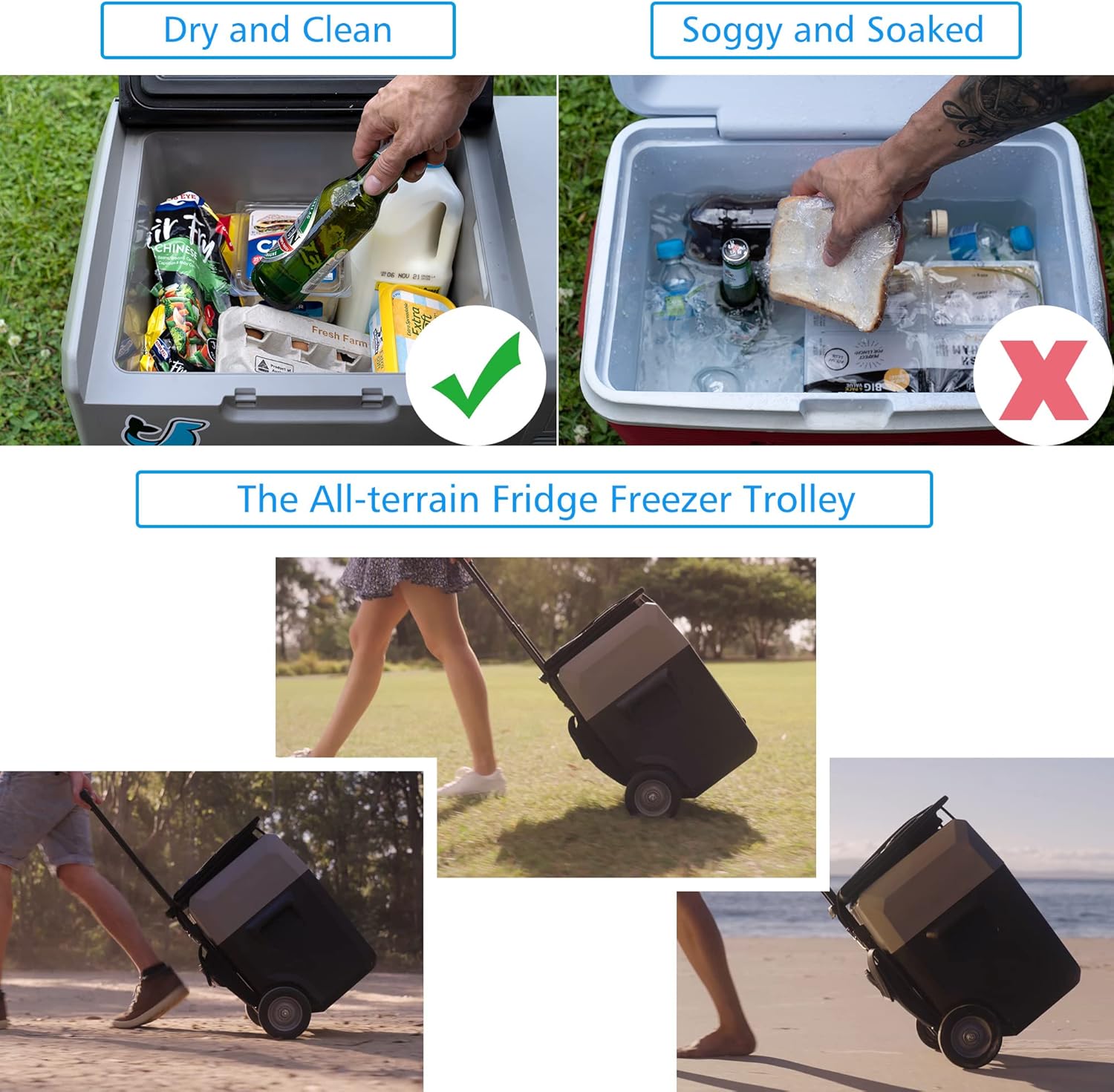
Image 5.1: The LiONCooler Pro fits conveniently into a vehicle for travel.
5.3 Battery Installation (Optional)
If using an optional LiONCooler battery, slide it into the designated battery compartment until it clicks into place. Ensure the battery is fully charged before initial use for optimal performance.

Image 5.2: The LiONCooler Pro with its optional battery, providing extended portable power.
6. Operating Instructions
6.1 Powering On/Off
Press the power button on the control panel to turn the unit on or off. The LCD display will illuminate, showing the current temperature and settings.
6.2 Temperature Adjustment
Use the '+' and '-' buttons on the control panel to set your desired temperature. The temperature range is -4℉ to 68℉ (-20℃ to 20℃). The unit will automatically adjust to reach and maintain the set temperature.

Image 6.1: The smart APP control allows remote temperature adjustment and monitoring.
6.3 Cooling Modes (MAX/ECO)
The LiONCooler Pro offers two cooling modes: MAX for rapid cooling and ECO for energy-saving operation. Select the appropriate mode based on your needs via the control panel or APP.
6.4 Battery Protection Settings
The unit includes a battery protection system with High (H), Medium (M), and Low (L) settings. This feature prevents your vehicle's battery from draining completely. Adjust the setting based on your vehicle's battery type and usage.
6.5 Food Storage Guidelines
For optimal performance and food safety, pre-cool the unit before loading. Ensure all food items are properly sealed to prevent cross-contamination and maintain freshness. The unit can function as both a refrigerator and a freezer, allowing for versatile storage.

Image 6.2: The LiONCooler Pro provides reliable cooling for outdoor activities.
7. Charging
The LiONCooler Pro supports multiple charging methods to ensure your items stay cool wherever you are.
Image 7.1: The LiONCooler Pro's battery compartment, ready for an optional power source.
7.1 AC Charging
Use the provided AC adapter to charge the unit from a standard wall outlet (100-240V AC).
7.2 DC (Car) Charging
Connect the unit to your vehicle's 12V/24V DC outlet using the provided car power cable. This allows for charging while driving.
7.3 Solar Charging (Optional)
The LiONCooler Pro can be charged using an optional solar panel, providing an eco-friendly charging solution for off-grid adventures.
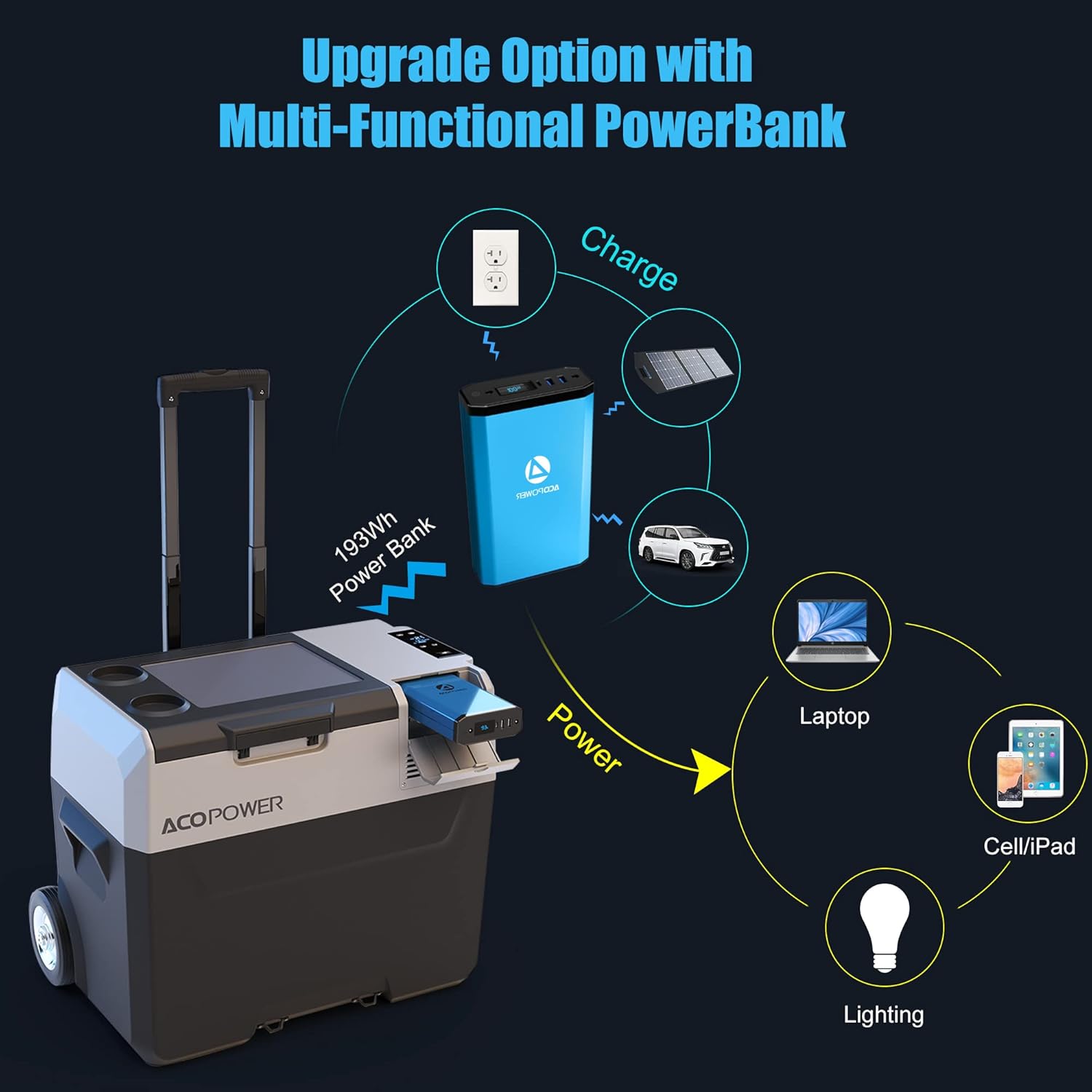
Image 7.2: The LiONCooler Pro can be charged using an optional solar panel.
7.4 Power Bank Functionality (Optional)
With an optional power bank, the LiONCooler Pro can also serve as a charging station for other electronic devices like phones, tablets, and laptops.

Image 7.3: The LiONCooler Pro, when equipped with a power bank, can charge other devices.
Video 7.1: An official overview of the LiONCooler Pro, highlighting its features, removable battery, and various charging options.
8. Maintenance
8.1 Cleaning
Regularly clean the interior and exterior of the unit with a damp cloth and mild detergent. Do not use abrasive cleaners or solvents. Ensure the unit is dry before closing the lid or storing.
8.2 Defrosting
If ice accumulates inside, turn off the unit and allow the ice to melt naturally. Drain any water through the drain plug (if available) or wipe it out with a cloth. Do not use sharp objects to remove ice.
8.3 Storage
When not in use for extended periods, ensure the unit is clean and dry. Store it in a cool, dry place with the lid slightly ajar to prevent odors and mildew.
9. Troubleshooting
- Unit not cooling: Check power connection, ensure the power source is active, and verify the temperature setting.
- Error codes on display: Refer to the specific error code in the full manual for detailed solutions. Often, this indicates a power supply issue or a sensor malfunction.
- Battery not charging: Ensure the charging cable is securely connected and the power source is functioning. If using a solar panel, ensure it is in direct sunlight.
- Unusual noise: A slight humming from the compressor is normal. If the noise is excessive or unusual, contact customer support.
10. Specifications
| Feature | Specification |
|---|---|
| Model Number | HY-P40L |
| Capacity | 42 Quarts / 40 Liters |
| Temperature Range | -4℉ to 68℉ (-20℃ to 20℃) |
| Product Dimensions | 25 x 15.9 x 20 inches |
| Item Weight | 27.7 pounds |
| Voltage | 12V / 24V DC, 100-240V AC |
| Special Feature | Portable, APP Control, Strong Compressor |
11. Warranty and Support
The ACOPOWER LiONCooler Pro 42Qts Car Freezer comes with a 1-year warranty from the date of purchase. This warranty covers manufacturing defects and ensures the product meets its specified performance standards.
For technical support, warranty claims, or any inquiries, please visit the official ACOPOWER store or contact their customer service directly. Keep your purchase receipt as proof of purchase for warranty services.
Visit the ACOPOWER Store on Amazon for more information and support.