1. Introduction
This manual provides essential information for setting up, operating, and maintaining your Acer Nitro V 16 Slim Gaming Laptop (Model: ANV16S-41-R2B9). Designed for high-performance gaming and demanding tasks, this laptop features an AMD Ryzen 7 processor, NVIDIA GeForce RTX 5060 graphics, a 16-inch WUXGA 180Hz display, and runs on Windows 11 Home. Please read this manual thoroughly to ensure optimal use and longevity of your device.
2. Product Overview
The Acer Nitro V 16 Slim is engineered for a powerful computing experience in a sleek form factor. Below are visual representations of the laptop's design and key components.
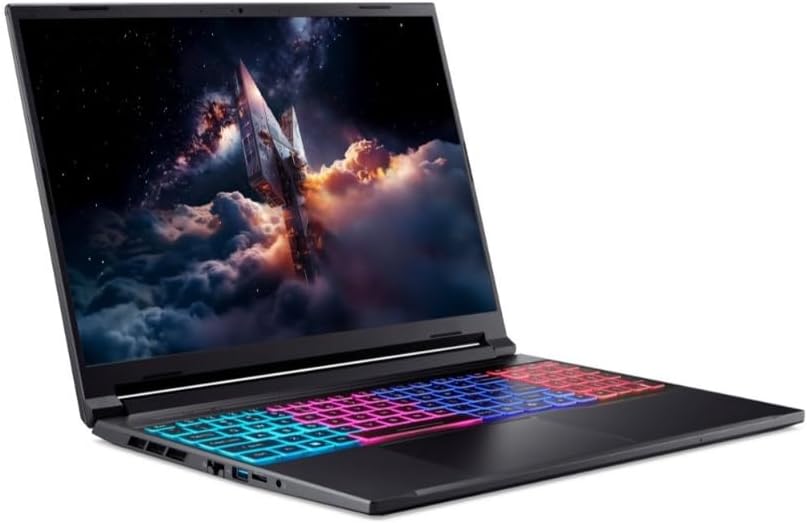
Figure 2.1: Angled view of the Acer Nitro V 16 Slim gaming laptop, showcasing its sleek design, keyboard, and vibrant display.

Figure 2.2: Another angled view of the Acer Nitro V 16 Slim laptop, highlighting its compact form factor and screen.

Figure 2.3: Top-down view of the Acer Nitro V 16 Slim laptop's keyboard, featuring multi-zone RGB backlighting and a full numeric keypad.
3. Setup
- Unpacking: Carefully remove the laptop and all accessories from the packaging. Ensure all components are present.
- Initial Power-Up: Connect the AC adapter to the laptop's power port and then to a power outlet. Open the laptop lid and press the power button to turn it on.
- Operating System Setup: Follow the on-screen instructions to complete the Windows 11 Home setup, including language selection, network connection, and user account creation.
- Software Updates: After initial setup, connect to the internet and check for system and driver updates to ensure optimal performance and security.
4. Operating Your Laptop
Display
The 16-inch WUXGA (1920x1200) IPS display features a 180Hz refresh rate, providing smooth visuals for gaming and multimedia. Adjust brightness and display settings through Windows display options.
Keyboard and Touchpad
The laptop features a full-size keyboard with an RGB backlight. Customize lighting effects through the pre-installed Acer software. The precision touchpad supports multi-touch gestures for intuitive navigation.
Performance Modes
Utilize Acer's dedicated software (e.g., NitroSense) to switch between performance modes (e.g., Quiet, Balanced, Performance, Turbo) to optimize CPU/GPU power, fan speed, and overall system behavior based on your current task.
5. Connectivity
The Acer Nitro V 16 Slim offers a range of ports and wireless connectivity options:
- USB Ports: Multiple USB ports for connecting peripherals.
- HDMI: For connecting to external displays.
- Ethernet (RJ-45): For wired network connections.
- Audio Jack: Combined headphone/microphone jack.
- Wi-Fi 6E: High-speed wireless internet connectivity.
- Bluetooth 5.3: For connecting wireless accessories.
6. Performance and Cooling
This laptop is equipped with powerful hardware to handle demanding applications and games:
- Processor: AMD Ryzen 7 processor 260 for efficient multitasking and processing power.
- Graphics: NVIDIA GeForce RTX 5060 8GB GDDR7 (85W) for high-fidelity gaming and content creation.
- Memory: 16GB DDR5 5600MHz RAM ensures smooth operation even with multiple applications open.
- Storage: 512GB PCIe NVMe SSD provides fast boot times and rapid data access.
- Cooling System: An advanced cooling system with multiple heat pipes and anti-dust fans is designed to keep the system cool during intense gaming sessions, maintaining optimal performance.
7. Battery Management
The laptop's battery provides sufficient power for portable use. For optimal battery life and performance, consider the following:
- Charging: Always use the original AC adapter for charging.
- Power Modes: Adjust Windows power settings to optimize battery life for different usage scenarios.
- Gaming/Intensive Tasks: For best performance during gaming or other demanding tasks, it is recommended to keep the laptop plugged into a power outlet.
8. Maintenance
Regular maintenance helps ensure the longevity and performance of your laptop:
- Cleaning: Use a soft, lint-free cloth to clean the screen and exterior. Avoid harsh chemicals. Regularly clean the keyboard and vents to prevent dust buildup.
- Software Updates: Keep your operating system, drivers, and applications updated to the latest versions.
- Backup Data: Regularly back up important data to an external drive or cloud storage.
- Avoid Extreme Conditions: Do not expose the laptop to extreme temperatures, direct sunlight, or excessive moisture.
9. Troubleshooting
If you encounter issues with your laptop, try the following basic troubleshooting steps:
- No Power: Ensure the AC adapter is securely connected and the power outlet is functional. Try a different outlet.
- Display Issues: Check external monitor connections if applicable. Adjust brightness settings. Restart the laptop.
- Slow Performance: Close unnecessary applications. Check for background processes. Ensure sufficient free storage space. Update drivers.
- Overheating: Ensure vents are clear and not obstructed. Use the laptop on a hard, flat surface. Adjust performance modes to a cooler setting.
- Software Problems: Restart the application or the laptop. Check for software updates. Reinstall problematic software.
For more complex issues, refer to the official Acer support website or contact customer service.
10. Specifications
| Feature | Detail |
|---|---|
| Brand | Acer |
| Model Name | ANV16S-41-R2B9 |
| Screen Size | 16 inches |
| Display Resolution | 1920 x 1200 pixels (WUXGA) |
| Refresh Rate | 180Hz |
| Processor Brand | AMD |
| Processor Type | AMD Ryzen 7 5800X (Processor 260) |
| Processor Speed | 3.8 GHz |
| Processor Count | 8 |
| RAM Memory Size | 16 GB DDR5 5600MHz |
| Maximum Memory Supported | 32 GB |
| Hard Drive Size | 512 GB PCIe NVMe SSD |
| GPU | NVIDIA GeForce RTX 5060 8GB GDDR7 (85W) |
| Operating System | Windows 11 Home |
| Wireless Type | Wi-Fi 6E, Bluetooth 5.3 |
| Built-in Webcam | HD |
| Laptop Dimensions | 357.7 (W) x 264 (D) x 13.9/19.95 (H) mm |
| Item Weight | 2.4 kg |
11. Warranty and Support
Your Acer Nitro V 16 Slim laptop comes with a 2 Years Carry-in local Singapore Warranty. For warranty claims, technical support, or service inquiries, please contact Acer Official Store support channels. Keep your proof of purchase for warranty validation.
For additional support and resources, visit the official Acer support website.


