
ELECOM DE-C40-5000BK
ELECOM MagKeep Magnet Power Bank User Manual
Model: DE-C40-5000BK
Brand: ELECOM
1. Product Overview
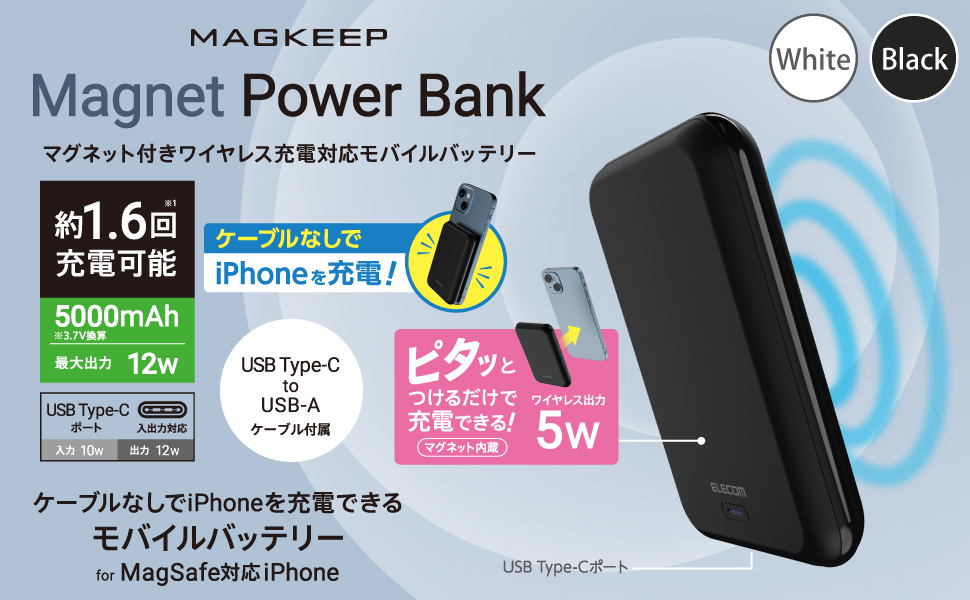
The ELECOM MagKeep Magnet Power Bank (Model: DE-C40-5000BK) is a portable 5000mAh mobile battery designed for convenient charging of your devices. It features both magnetic wireless charging for MagSafe-compatible iPhones and wired charging via a USB Type-C port. Its compact and lightweight design makes it ideal for on-the-go use.


2. Safety Information
Please read all safety warnings and instructions before using this product to prevent injury or damage.
- This product contains magnets. Keep magnetic cards (e.g., credit cards, cash cards) away from the device to prevent demagnetization.
- The device is equipped with six protection functions: overcharge, over-discharge, over-voltage, over-current prevention, short-circuit protection, and temperature detection.
- Wireless charging features foreign object detection to ensure safe operation.
- Do not disassemble, modify, or attempt to repair the device.
- Avoid exposing the device to extreme temperatures, direct sunlight, or high humidity.
- Keep out of reach of children.
- This product complies with the technical standards of Japan's Electrical Appliance and Material Safety Act (PSE).


3. Package Contents
Please check that all items are included in the package:
- ELECOM MagKeep Magnet Power Bank (DE-C40-5000BK)
- USB Type-C to USB-A Cable (0.1m)
4. Setup
4.1 Initial Charging of the Power Bank
The mobile battery is charged to approximately 70% at the factory. However, rechargeable lithium-ion batteries discharge over time. It is recommended to fully charge the power bank before its first use.
- Connect the included USB Type-C to USB-A cable to the USB Type-C port on the power bank.
- Connect the USB-A end of the cable to a USB AC adapter (not included) with an output of 10W or higher.
- Plug the AC adapter into a wall outlet. The LED indicator lights will show the charging progress.

5. Operating Instructions
5.1 Wireless Charging (for MagSafe-compatible iPhones)
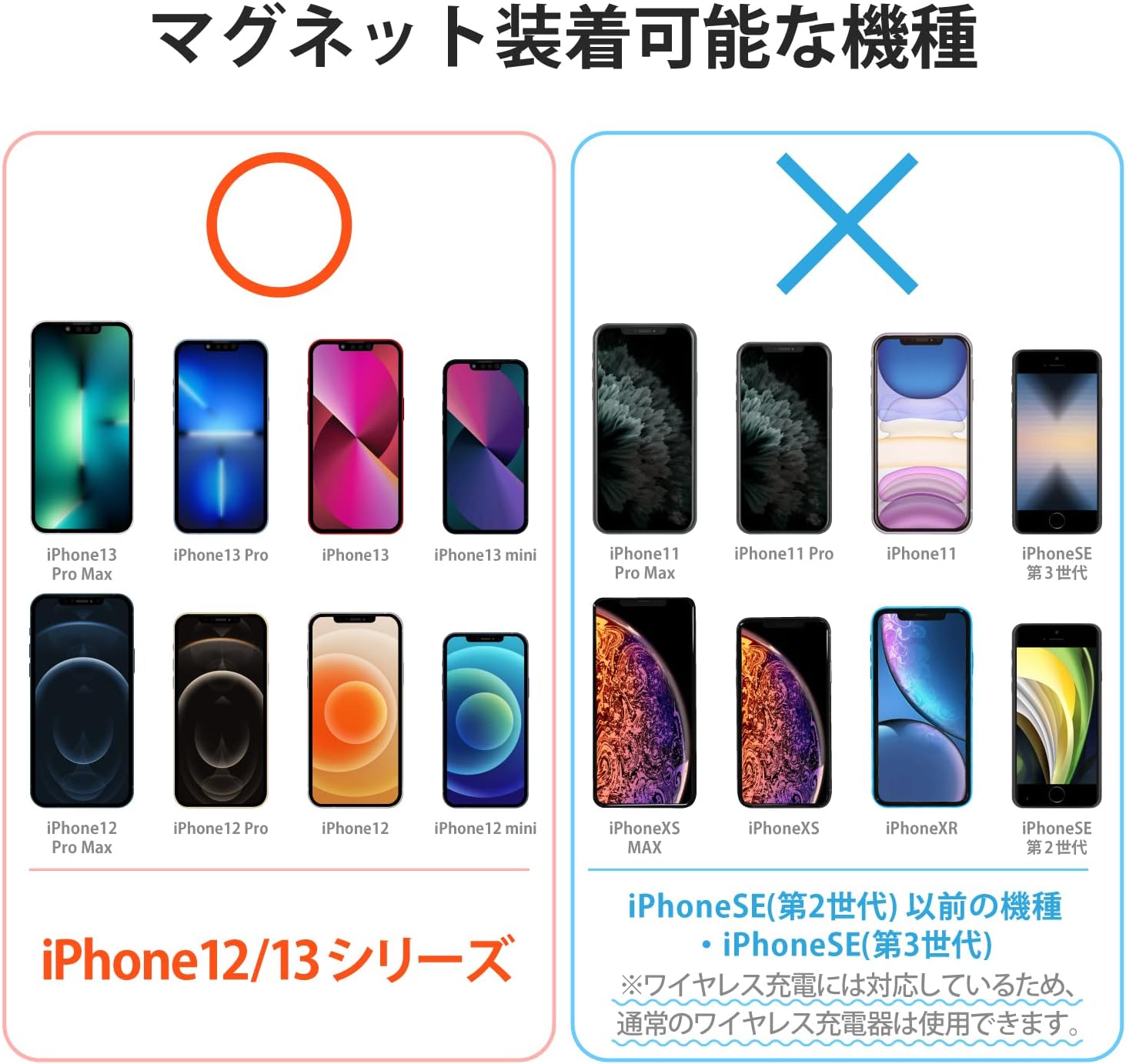
This power bank supports 5W wireless charging for iPhone 12 and 13 series (as of June 2022) via magnetic attachment.
- Align the power bank with the back of your MagSafe-compatible iPhone. The magnets will securely attach the power bank to your iPhone.
- Wireless charging will begin automatically. The magnetic alignment ensures efficient charging.
- You can continue to operate your iPhone while it is being wirelessly charged by the power bank.
- Charging is also possible with MagSafe-compatible cases up to 3mm thick. Note that charging may not occur depending on the case specifications or conditions.


5.2 Wired Charging (USB Type-C)
The power bank is equipped with one USB Type-C port capable of 12W output for charging various devices.
- Connect your device's charging cable to the USB Type-C port on the power bank.
- Connect the other end of the cable to your smartphone, tablet, or other compatible device.
- Charging will begin automatically.
5.3 Simultaneous Charging
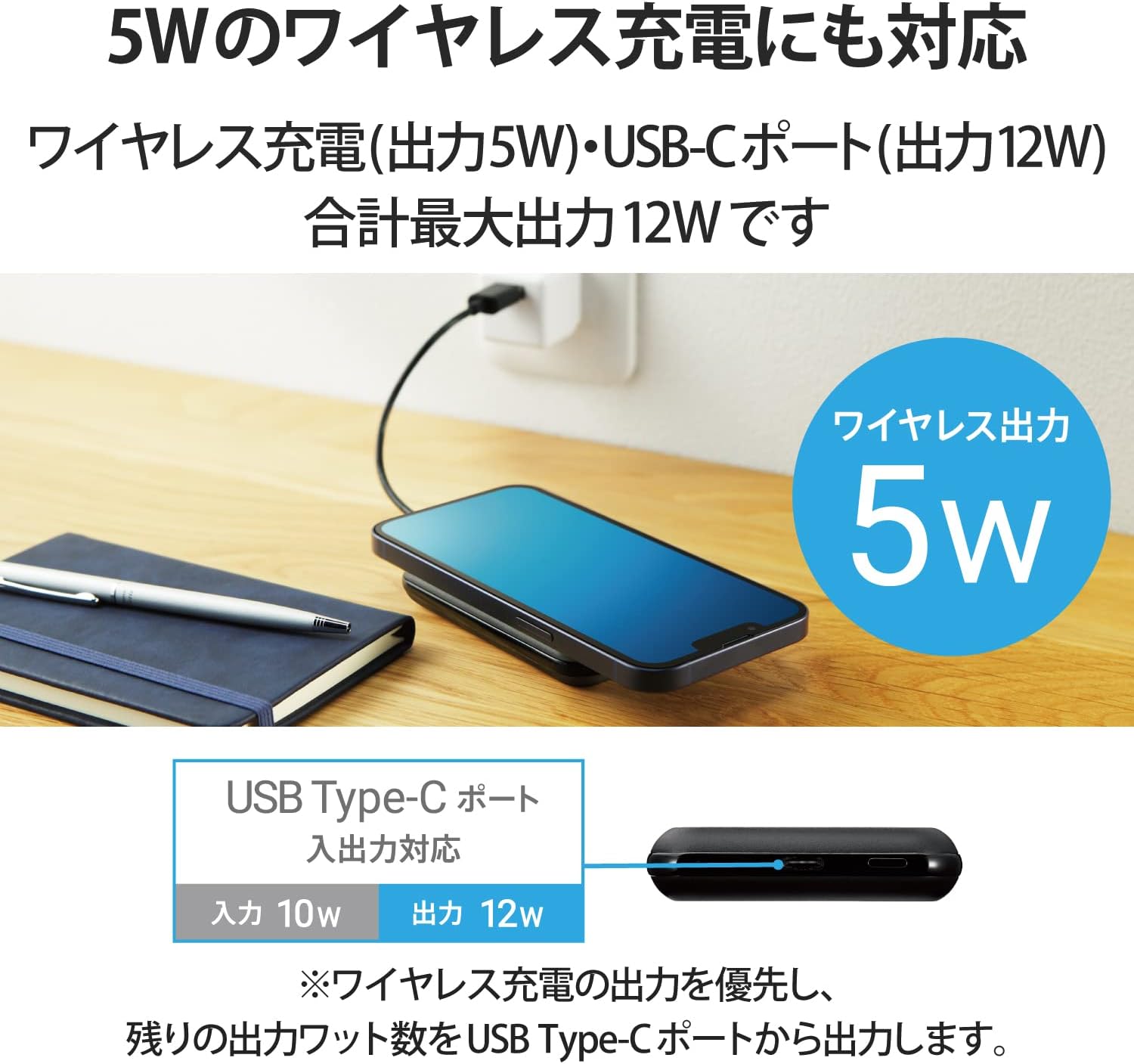
The power bank supports simultaneous charging of both the power bank itself and a connected iPhone, provided the power bank is connected to its charging cable.
Important Note: If both the USB Type-C port and wireless charging are used simultaneously, the output from the USB Type-C port will take priority, and wireless charging will stop.
6. Maintenance
- Clean the power bank with a soft, dry cloth. Do not use liquid cleaners or aerosols.
- Store the device in a cool, dry place away from direct sunlight and extreme temperatures.
- Avoid dropping or subjecting the device to strong impacts.
- If the device will not be used for an extended period, charge it periodically to maintain battery health.
7. Troubleshooting
7.1 Power Bank Not Charging
- Ensure the charging cable is securely connected to both the power bank and the AC adapter.
- Verify that the AC adapter is properly plugged into a working wall outlet.
- Use an AC adapter with an output of 10W or higher for optimal charging speed.
7.2 Device Not Charging from Power Bank
- For Wireless Charging: Ensure your iPhone is MagSafe-compatible (iPhone 12/13 series). Check for any foreign objects between the power bank and your iPhone that might interfere with charging. Ensure proper magnetic alignment.
- For Wired Charging: Ensure the cable is securely connected to both the power bank and your device. Try a different cable if available.
- Check the power bank's battery level using the LED indicator. Recharge the power bank if the battery is low.
- If using both wired and wireless charging simultaneously, remember that wired charging takes priority, and wireless charging will stop.
8. Specifications
| Feature | Specification |
|---|---|
| Model Number | DE-C40-5000BK |
| Compatible Devices | MagSafe-compatible iPhones, USB-C charging devices (iPad/Android, etc.) |
| Input Port | USB Type-C |
| Rated Input Voltage | 5V |
| Rated Input Current | 2.0A |
| Output Port | USB Type-C |
| Total Output | 12W (USB Type-C: 5V/2.4A, Wireless: 5W) |
| Battery Type | Rechargeable Lithium-ion Battery |
| Battery Rated Capacity | 3.7V/5000mAh (18.5Wh) |
| Charging Time (Power Bank) | Approx. 2 hours 50 minutes (with 10W or higher AC adapter) |
| External Dimensions (W×D×H) | Approx. 65mm × 15mm × 94mm |
| Weight | Approx. 125g |
| Color | Black |
| Cycle Life | 500 times |
| Included Accessories | USB Type-C to USB-A Cable (0.1m) |
| Safety Standards | PSE Compliant |

9. Warranty and Support
This product comes with a 1-year warranty from the date of purchase.
For product inquiries, technical support, or warranty claims, please refer to the official ELECOM website or contact ELECOM customer service.
Please retain your proof of purchase for warranty purposes.
Related documentsDE-C40-5000BK


Ask a question about this manual
Ask about setup, troubleshooting, compatibility, parts, safety, or missing instructions. Manuals+ will review the question and use this page’s manual context to help answer it.