
Important Safety Instructions
WARNING: To reduce the risk of fire, electric shock, injury to persons, or damage when using the appliance, follow basic precautions, including the following:
- Read all instructions before using the appliance.
- Ensure proper installation and grounding by a qualified installer.
- Do not store flammable materials in or near the appliance.
- Never use the appliance for warming or heating the room.
- Do not leave children unattended near the appliance.
- Always use dry pot holders. Moist or damp pot holders on hot surfaces may result in burns from steam.
- Do not touch heating elements or interior surfaces of the oven during or immediately after use.
- In case of a grease fire, smother flames with baking soda or a dry chemical extinguisher. Never use water on grease fires.
- Always turn off all controls when cooking is complete.
- Do not repair or replace any part of the appliance unless specifically recommended in this manual. All other servicing should be referred to a qualified technician.
Product Overview
The Midea Slide-In Gas Range MGS30S4AST combines powerful cooking capabilities with a sleek design. This appliance features a 5-burner cooktop, including an 18,000 BTU burner for rapid heating, and an oven with Air Fry Convection mode. It also offers Wi-Fi connectivity for remote monitoring and an integrated temperature probe for precise cooking.
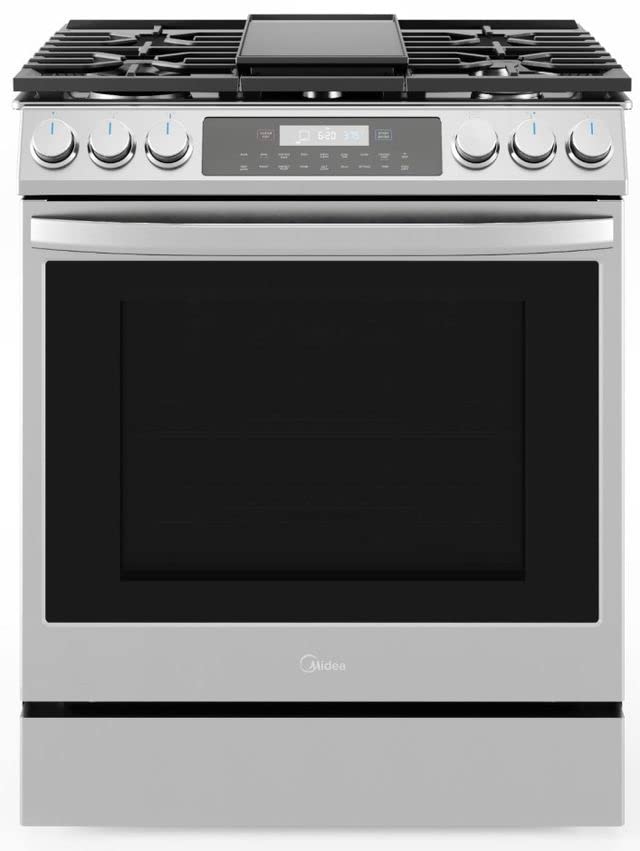
Figure 1: Front view of the Midea Slide-In Gas Range MGS30S4AST. This image shows the stainless steel finish, the five-burner cooktop with grates, and the front-mounted glass touch control panel.
Key Features:
- Powerful 18,000 BTU Burner: Designed for searing, stir-frying, and rapid boiling.
- Air Fry Convection Mode: For crispy, fried foods with less oil.
- Wi-Fi Capability: Monitor cooking progress and receive alerts via a smartphone app.
- Edge-to-Edge Design: Overlaps countertops for a seamless, built-in appearance.
- Temperature Probe: Measures internal food temperature and can automatically shut off the oven.
- Glass Touch Control Panel: Easy to clean and operate.
Installation and Setup
Proper installation is crucial for the safe and efficient operation of your gas range. It is strongly recommended that installation be performed by a qualified installer or service technician in accordance with local codes and the National Fuel Gas Code ANSI Z223.1/NFPA 54 (latest edition).
Pre-Installation Checklist:
- Verify that the gas supply line and electrical outlet meet the requirements specified in the installation manual.
- Ensure adequate ventilation is available.
- Confirm that all packaging materials and protective films have been removed from the appliance.
- Check for any shipping damage. Report any damage immediately to your dealer.
Connecting to Wi-Fi:
- Download the Midea app from your smartphone's app store.
- Create an account or log in.
- Follow the in-app instructions to add your Midea Slide-In Gas Range. This typically involves putting the range into pairing mode and connecting to your home Wi-Fi network.
- Once connected, you can monitor and control certain functions remotely.
Operating Instructions
Cooktop Operation:
The cooktop features five sealed burners of varying sizes and power levels. Each burner is controlled by a dedicated knob on the front panel.
- Place cookware centrally on the burner grate.
- Push in the desired burner knob and turn it counter-clockwise to the "LITE" position. You will hear a clicking sound as the igniter sparks.
- Once the burner ignites, continue to hold the knob in for a few seconds, then release.
- Adjust the flame size by turning the knob between "HI" and "LO" settings.
- To turn off, turn the knob clockwise to the "OFF" position.
Note: The 18,000 BTU burner is ideal for rapid boiling or high-heat searing. Use appropriate cookware for optimal heat distribution.
Oven Operation (Baking, Roasting, Air Fry Convection):
The oven offers multiple cooking modes accessible via the glass touch control panel.
- Press the "Oven" button on the control panel.
- Select your desired cooking mode (e.g., Bake, Roast, Air Fry Convection).
- Enter the desired temperature using the numeric keypad or +/- buttons.
- Press "Start" to begin preheating. The oven will beep when the set temperature is reached.
- Place food inside the oven.
- To stop cooking, press the "Off" button.
Air Fry Convection Mode: For best results with Air Fry, use a dark, non-stick baking sheet or an air fry basket placed on a rack. Ensure proper air circulation around food.
Using the Temperature Probe:
- Insert the temperature probe into the thickest part of the meat, avoiding bone or fat.
- Plug the probe into the designated jack inside the oven cavity.
- Select the "Probe" function on the control panel and set the desired internal temperature.
- The oven will automatically turn off when the food reaches the set temperature.
Maintenance and Cleaning
Regular cleaning and maintenance will ensure the longevity and optimal performance of your Midea Gas Range.
Exterior Surfaces (Stainless Steel and Glass Touch Panel):
- Wipe with a soft cloth dampened with mild soap and water.
- For stainless steel, use a non-abrasive stainless steel cleaner and polish in the direction of the grain.
- Avoid abrasive cleaners, scouring pads, or harsh chemicals that can scratch surfaces.
Cooktop and Burner Grates:
- Allow grates and burner caps to cool completely before cleaning.
- Remove grates and wash with warm, soapy water. For stubborn stains, soak them or use a non-abrasive scrub brush.
- Wipe spills on the cooktop surface immediately to prevent baking on.
- Ensure burner ports are clear of food debris. Use a small wire or needle if necessary, but do not enlarge the ports.
Oven Interior:
- For light soils, wipe with a damp cloth and mild detergent.
- For heavier soils, consult your full owner's manual for instructions on using the self-clean cycle, if available, or recommended oven cleaners.
- Remove oven racks before cleaning the interior.
Troubleshooting
Before contacting customer service, review the following common issues and solutions:
| Problem | Possible Cause | Solution |
|---|---|---|
| Burner does not light. | Gas supply off; burner ports clogged; igniter wet. | Check gas valve; clean burner ports; allow igniter to dry. |
| Oven not heating. | Power supply issue; incorrect mode/temperature setting. | Check circuit breaker; verify settings on control panel. |
| Uneven cooking. | Improper rack position; cookware size/type; oven door opened frequently. | Refer to cooking guide for rack positions; use recommended cookware; avoid opening door unnecessarily. |
| Wi-Fi connection fails. | Router too far; incorrect password; network interference. | Move router closer; re-enter password; check for other devices on network. |
For issues not listed here or if solutions do not resolve the problem, please refer to the complete owner's manual or contact Midea customer support.
Specifications
The following are key specifications for the Midea Slide-In Gas Range Model MGS30S4AST:
- Model Number: MGS30S4AST
- Brand: Midea
- Installation Type: Slide-In
- Fuel Type: Gas
- Capacity: 6.1 Cubic Feet (Oven)
- Number of Burners: 5
- Control Console: Touch
- Material: Stainless Steel
- Item Weight: 281 pounds
- Package Dimensions: 50.87 x 33.69 x 30.56 inches
- Efficiency: Energy Efficient
- Racks: 2
- Drawer Type: Baking, Broiler
Warranty and Customer Support
For detailed warranty information, please refer to the warranty card included with your appliance or visit the official Midea website. Keep your purchase receipt as proof of purchase for warranty claims.
If you require technical assistance, service, or have questions regarding your Midea Slide-In Gas Range, please contact Midea Customer Support. Contact information can typically be found in your full owner's manual or on the Midea website.
You can also visit the Midea Store on Amazon for more product information and support resources.


