
1. Introduction
The VIHELM GM8906 is a digital contact tachometer designed for measuring rotational speed (RPM) and surface speed (m/min, ft/min). It offers high accuracy and a wide measurement range, making it suitable for various industrial and scientific applications. This manual provides detailed instructions for the safe and effective use of your GM8906 tachometer.
2. Safety Information
WARNING: Please read this manual thoroughly before operation to ensure safe and correct use. Failure to follow safety instructions may result in injury or damage to the device.
- Always ensure the device is in good working condition before use.
- Do not attempt to measure rotating objects that are unstable or could cause injury.
- Keep the device away from water, dust, and extreme temperatures.
- Replace batteries promptly when the low battery indicator appears.
- Do not disassemble or modify the device. Refer all servicing to qualified personnel.
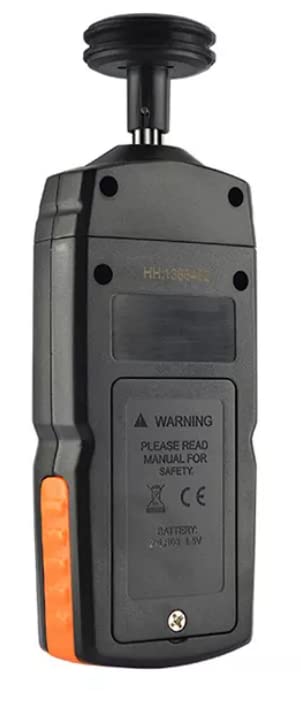
Figure 2.1: Rear view of the GM8906 tachometer, highlighting the battery compartment and a safety warning label.
3. Product Overview and Components
The GM8906 tachometer comes with several interchangeable contact tips to accommodate different measurement surfaces and applications.
3.1 Package Contents
- VIHELM GM8906 Digital Contact Tachometer (x1)
- Interchangeable Contact Tips (Cone, Funnel, Surface Wheel)
- User Manual

Figure 3.1: The GM8906 tachometer shown with its included interchangeable contact tips.
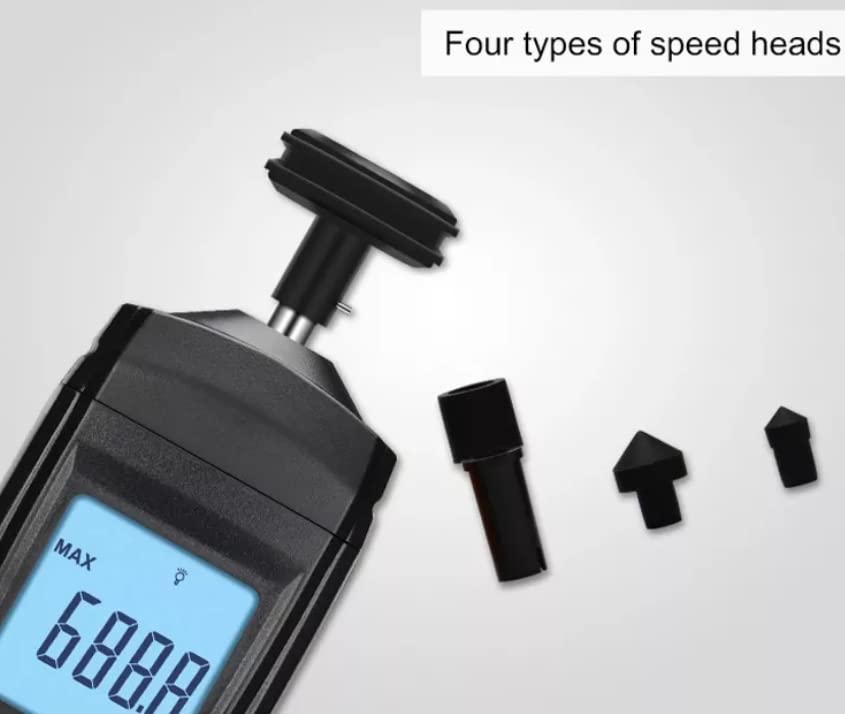
Figure 3.2: The tachometer and its four types of speed heads (cone, funnel, and two wheel types) for diverse contact measurements.
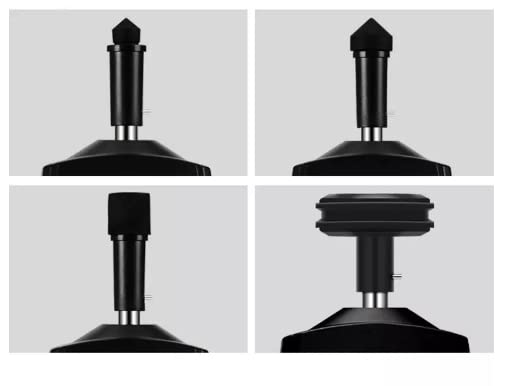
Figure 3.3: Detailed view of the four distinct contact tips provided with the GM8906.
3.2 LCD Display Elements
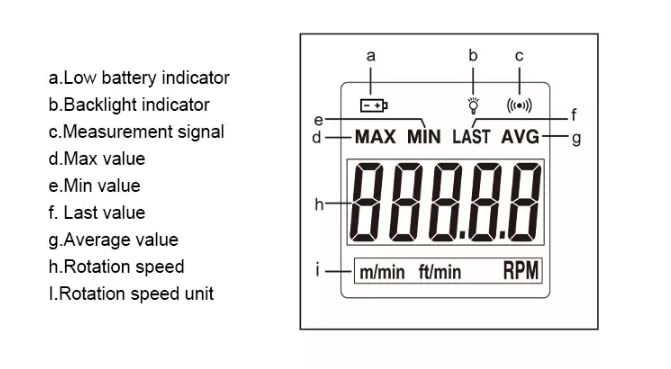
Figure 3.4: Diagram illustrating the various indicators and values on the GM8906 LCD display.
- Low battery indicator
- Backlight indicator
- Measurement signal
- Max value (Maximum recorded measurement)
- Min value (Minimum recorded measurement)
- Last value (Last recorded measurement)
- Average value (Average of recorded measurements)
- Rotation speed (Current measurement reading)
- Rotation speed unit (m/min, ft/min, RPM)
4. Setup
4.1 Battery Installation
- Locate the battery compartment on the back of the tachometer (refer to Figure 2.1).
- Open the battery cover.
- Insert two 1.5V AAA batteries, ensuring correct polarity (+/-).
- Close the battery cover securely.
4.2 Attaching Contact Tips
- Select the appropriate contact tip (cone, funnel, or surface wheel) for your measurement application.
- Gently push the chosen tip onto the rotating shaft at the top of the tachometer until it is firmly seated.
- Ensure the tip is securely attached before beginning measurements.
5. Operating Instructions
5.1 Power On/Off
Press the power button (U/I) to turn the tachometer on or off.
5.2 Taking Measurements
- Turn on the tachometer.
- Select the appropriate contact tip and attach it to the shaft.
- Gently press the contact tip against the center of the rotating object or surface you wish to measure. Ensure stable contact.
- The current rotation speed will be displayed on the LCD screen.
- The device will automatically record MAX, MIN, LAST, and AVG values during the measurement period.

Figure 5.1: Examples of the GM8906 tachometer in use for measuring rotational speed of fans and other machinery.
5.3 Display Functions
- MAX/MIN/LAST/AVG: Press the 'MEM' button to cycle through the maximum, minimum, last, and average recorded values.
- Unit Selection: The tachometer automatically displays RPM. For surface speed, ensure the wheel tip is used and the unit is set accordingly (if applicable, specific button for unit change is not visible in images, assuming auto-detection or internal setting).
- Backlight: Press the backlight button (light bulb icon) to turn the LCD backlight on or off for improved visibility in low-light conditions.
5.4 Automatic Shut-down
The GM8906 features an automatic shut-down function to conserve battery life. If no operation is performed for a certain period, the device will power off automatically.
6. Maintenance
6.1 Cleaning
Wipe the device with a soft, dry cloth. Do not use abrasive cleaners or solvents. Ensure no liquid enters the device.
6.2 Battery Replacement
When the low battery indicator appears on the display, replace both AAA batteries promptly to ensure accurate readings and continuous operation. Refer to Section 4.1 for battery installation instructions.
6.3 Storage
When not in use for extended periods, remove the batteries to prevent leakage. Store the tachometer in a cool, dry place, away from direct sunlight and extreme temperatures.
7. Troubleshooting
- No Display / Device Not Turning On:
Check battery installation and polarity. Replace batteries if they are depleted. - Inaccurate Readings:
Ensure the contact tip is firmly attached and making stable contact with the rotating object. Verify the object is rotating smoothly. Check for any obstructions or debris on the contact tip. - Low Battery Indicator:
Replace both 1.5V AAA batteries immediately. - Display Flickering:
This may indicate low battery power or unstable contact during measurement. Replace batteries or ensure stable contact.
8. Specifications
8.1 Technical Parameters
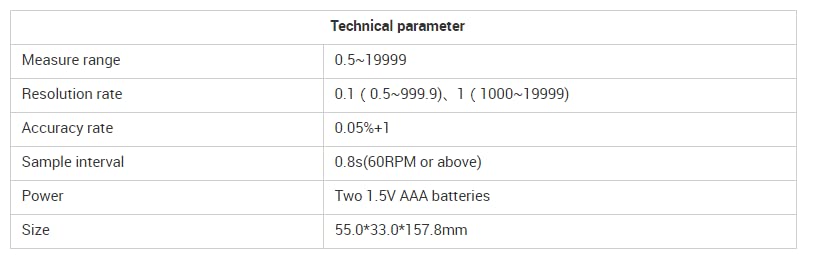
Figure 8.1: Detailed technical specifications of the GM8906 tachometer.
| Parameter | Value |
|---|---|
| Measure range | 0.5 ~ 19999 RPM |
| Resolution rate | 0.1 (0.5 ~ 999.9), 1 (1000 ~ 19999) |
| Accuracy rate | 0.05% + 1 digit |
| Sample interval | 0.8s (for 60 RPM or above) |
| Power | Two 1.5V AAA batteries |
| Size (L x W x H) | 157.8 x 55.0 x 33.0 mm (6.21 x 2.17 x 1.30 inches) |
8.2 General Specifications
- Item Weight: 0.5 Kilograms (1.1 Pounds)
- Display: Large LCD with backlight
- Features: MAX/MIN/LAST/AVG value display, Low battery alert, Automatic shut-down
- Construction: Durable ABS plastic shell
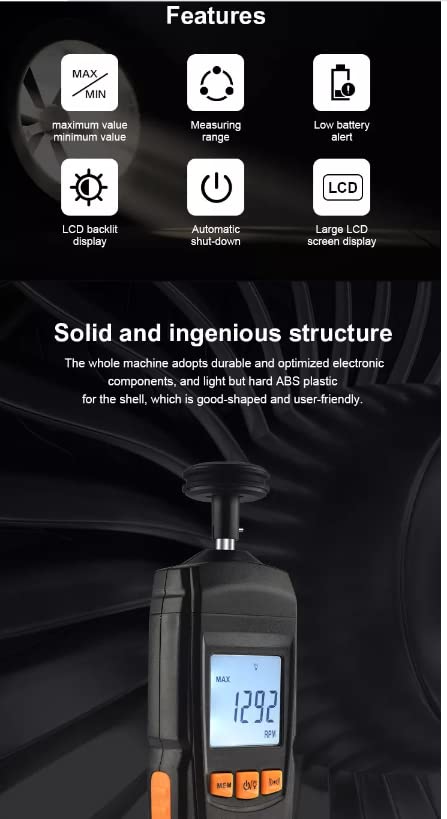
Figure 8.2: Overview of the GM8906's main features and robust construction.
9. Warranty and Support
VIHELM products are manufactured to high-quality standards. This product is covered by a standard manufacturer's warranty against defects in materials and workmanship from the date of purchase. Please retain your proof of purchase for warranty claims.
For technical support, warranty inquiries, or service, please contact your retailer or the manufacturer directly. Contact information can typically be found on the product packaging or the official VIHELM website.