1. Introduction
This manual provides essential instructions for the safe and efficient use of your Alcatel 3085 mobile phone. Please read this guide thoroughly before operating the device to ensure proper functionality and to prevent damage. Keep this manual for future reference.
2. Package Contents
Verify that your package contains the following items:
- Alcatel 3085 Mobile Phone
- Battery
- Charger
- Quick Start Guide
- (Optional) Charging Cradle
If any items are missing or damaged, please contact your retailer.
3. Setup
3.1. Inserting the SIM Card and Battery
- Remove the back cover: Gently pry open the back cover of the phone using the notch provided.
- Insert SIM card: Locate the SIM card slot(s). Align your SIM card with the cut corner and slide it into the slot until it clicks into place. Ensure the gold contacts face downwards.
- Insert battery: Place the battery into the battery compartment, ensuring the gold contacts on the battery align with the contacts in the phone.
- Replace back cover: Carefully align the back cover and press it firmly until it snaps into place.
3.2. Charging the Battery
Before first use, fully charge the phone's battery.
- Connect the charger to the charging port on the phone or place the phone in the charging cradle (if included).
- Plug the charger into a power outlet.
- The charging indicator will appear on the screen. Disconnect the charger once the battery is fully charged.
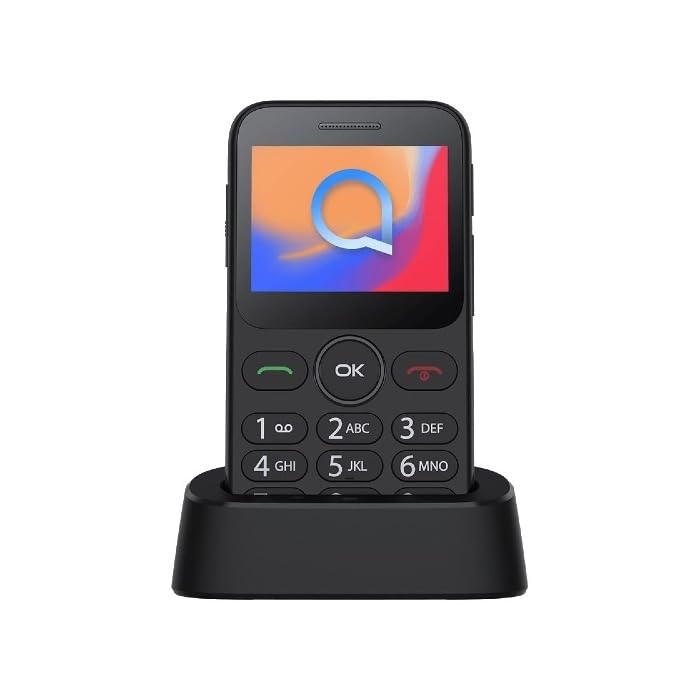
Image 1: Alcatel 3085 mobile phone placed in its charging cradle. The phone features a small color screen and a physical keypad with large, clearly labeled buttons.
4. Operating Instructions
4.1. Powering On/Off
- To Power On: Press and hold the Power/End Call button (red button) until the screen lights up.
- To Power Off: Press and hold the Power/End Call button until the power-off options appear, then select "Power off".
4.2. Making and Receiving Calls
- Making a Call: Enter the phone number using the keypad and press the Call button (green button).
- Receiving a Call: When the phone rings, press the Call button to answer.
- Ending a Call: Press the End Call button.
4.3. Sending and Receiving Messages
- Navigate to the Messages menu from the main screen.
- Select "Create new message" or "New SMS".
- Enter the recipient's number and type your message using the keypad.
- Press "Send".
4.4. Basic Navigation
- Use the Navigation Keys (up, down, left, right) to scroll through menus.
- Press the OK/Select button (center button) to confirm a selection.
- Press the Back/Clear button (often the right soft key) to go back to the previous screen or delete characters.
5. Maintenance and Care
- Cleaning: Use a soft, dry cloth to clean the phone's screen and body. Avoid liquid cleaners.
- Storage: Store the phone in a cool, dry place away from direct sunlight and extreme temperatures.
- Battery Care: Do not expose the battery to high temperatures or dispose of it in fire. Use only approved chargers.
- Water Resistance: This phone is not water-resistant. Avoid exposure to liquids.
6. Troubleshooting
| Problem | Possible Solution |
|---|---|
| Phone does not power on | Ensure the battery is correctly inserted and charged. Try charging the phone for at least 30 minutes. |
| Cannot make or receive calls | Check if the SIM card is properly inserted. Verify that you have network coverage. Contact your service provider if the issue persists. |
| Battery drains quickly | Reduce screen brightness. Close unused applications. Ensure the phone is not in an area with poor network signal, which can increase battery consumption. |
| Keypad unresponsive | Restart the phone. Ensure no physical obstruction is affecting the keys. |
7. Specifications
| Feature | Detail |
|---|---|
| Brand | Alcatel |
| Model Number | 3085 (HP02945) |
| Color | Metallic Black |
| ASIN | B0B8X482MH |
| Manufacturer | Alcatel |
| Software Updates Guaranteed Until | Information not available |
| Spare Parts Availability | Information not available |
8. Warranty and Support
For warranty information, please refer to the warranty card included in your product packaging or visit the official Alcatel website. For technical support, please contact Alcatel customer service through their official channels.
You can find more information and support resources on the official Alcatel website: www.alcatelmobile.com
9. Safety Information
- Do not attempt to disassemble or modify the phone.
- Use only original or approved accessories.
- Avoid exposing the phone to extreme temperatures, direct sunlight, or moisture.
- Keep the phone away from medical devices, as it may interfere with their operation.
- Dispose of the phone and battery responsibly according to local regulations.


