
Xpoovv AJ200
Xpoovv AJ200 Outdoor Bluetooth Flame Speaker Instruction Manual
Model: AJ200
Introduction
The Xpoovv AJ200 Outdoor Bluetooth Flame Speaker combines high-definition audio with an atmospheric LED flame effect. Designed for versatility, this portable speaker is suitable for various indoor and outdoor settings, offering both sound and ambient lighting. It features enhanced bass, Bluetooth 5.1 connectivity, and IP65 waterproof protection.
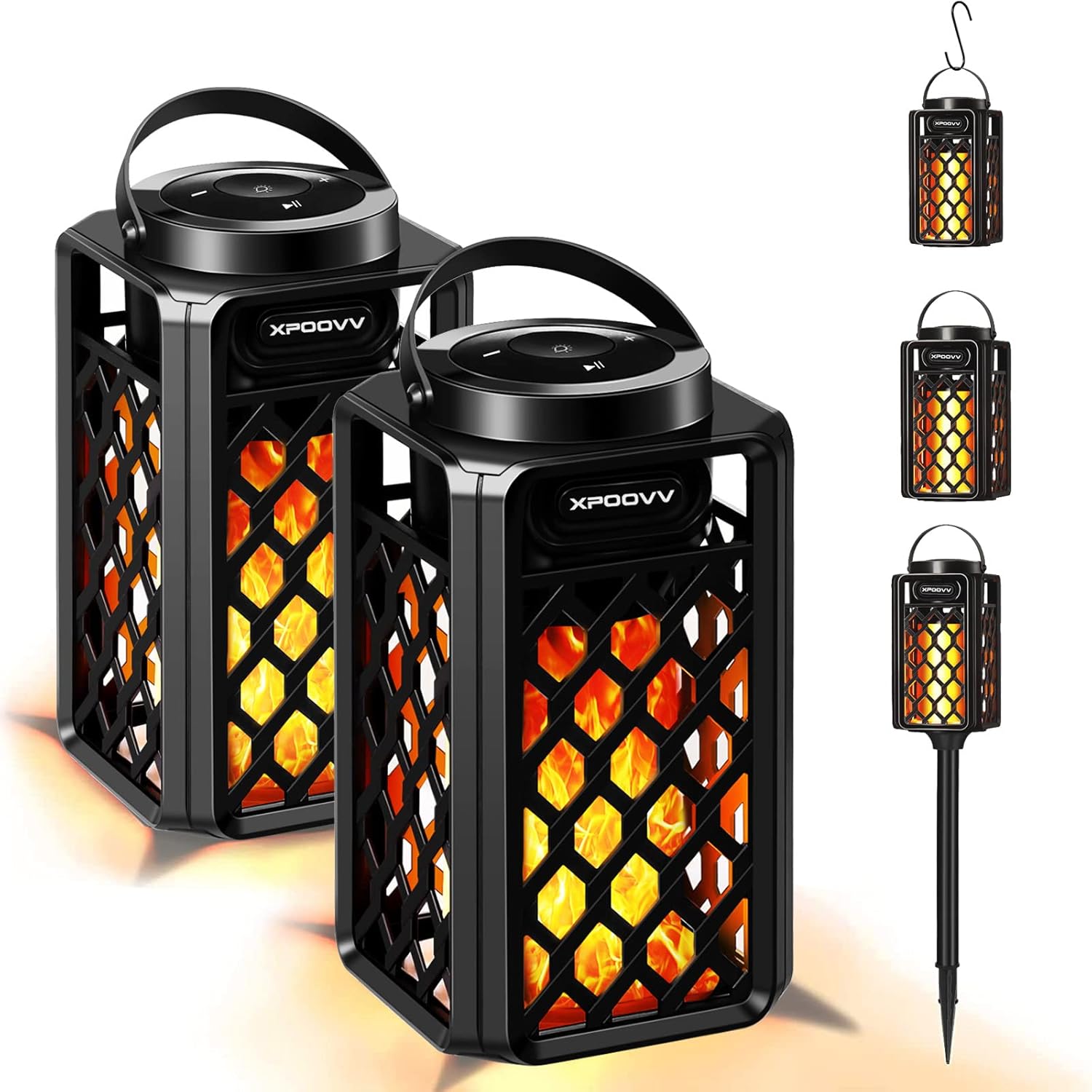
Image: The Xpoovv AJ200 speaker, showcasing its design and potential accessories.
What's in the Box
Upon unboxing your Xpoovv AJ200 speaker, please verify that all components are present:
- 2 x Xpoovv Bluetooth Flame Speakers
- 2 x S-hooks for hanging
- 2 x Height-adjustable ground stakes
- 1 x USB Charging Cable (not explicitly listed but implied by 'Easy battery charge by USB cable')
- 1 x User Manual (this document)
Setup
Charging the Speaker
Before initial use, fully charge the speaker. Connect the provided USB charging cable to the speaker's charging port and a compatible USB power source. A full charge typically takes 4-5 hours.
Mounting Options
The Xpoovv AJ200 offers flexible placement options:
- Freestanding: Place the speaker on any flat, stable surface.
- Ground Stake: Assemble the height-adjustable ground stake and insert it into soft ground for garden or pathway lighting.
- Hanging: Attach the S-hook to the speaker's handle and hang it from a suitable fixture, such as a pergola or tree branch.

Image: Assembly diagram for ground stake and S-hook options.
Operating Instructions
Power On/Off
Press and hold the power button located on the top of the speaker to turn it on or off.
Bluetooth Pairing
- Ensure the speaker is powered on and in Bluetooth pairing mode (indicated by a flashing LED).
- On your mobile device, enable Bluetooth and search for available devices.
- Select "Xpoovv AJ200" from the list to connect. A confirmation tone will sound upon successful pairing.
- The wireless range is up to 33 feet (10 meters).
True Wireless Stereo (TWS) Pairing (for two speakers)
To achieve 360° surround sound, two Xpoovv AJ200 speakers can be paired together:
- Ensure both speakers are powered on and not connected to any other Bluetooth device.
- On one speaker (this will be the primary speaker), double-press the Bluetooth pairing button. It will enter TWS pairing mode.
- The primary speaker will automatically search for and connect to the secondary speaker. A confirmation tone will sound when TWS pairing is successful.
- Once TWS paired, connect your mobile device to the primary speaker via Bluetooth as described above.

Image: Two speakers demonstrating True Wireless Stereo (TWS) pairing.
Light Modes
The speaker features an LED flame effect with multiple modes:
- Flickering Flame Mode: Mimics a realistic campfire ambiance.
- Night Light Mode: Provides a steady, soft glow.
Press the light button on the top panel to cycle through the available light modes.

Image: The speaker's flame effect creating a romantic ambiance.
Volume Control
Use the '+' and '-' buttons on the top panel to adjust the volume. You can also control the volume directly from your connected Bluetooth device.
Playback Control
Use the play/pause button on the top panel to control music playback. Some devices may allow skipping tracks using the volume buttons (long press).
Maintenance
The Xpoovv AJ200 speaker is designed with IP65 waterproof protection, safeguarding it against rain, dust, snow, and spills. To ensure longevity and optimal performance:
- Cleaning: Wipe the speaker with a soft, damp cloth. Avoid using harsh chemicals or abrasive cleaners.
- Storage: When not in use for extended periods, store the speaker in a cool, dry place.
- Charging Port: Ensure the charging port cover is securely closed when not charging to maintain water resistance.
- Extreme Conditions: While waterproof, avoid prolonged submersion or exposure to extreme temperatures.

Image: The speaker's IP65 water resistance in an outdoor setting.
Troubleshooting
- Speaker won't turn on: Ensure the battery is charged. Connect to a power source using the USB cable.
- Unable to pair via Bluetooth:
- Ensure the speaker is in pairing mode (flashing LED).
- Make sure your device's Bluetooth is enabled and within range (33 feet).
- Forget the device from your phone's Bluetooth settings and try pairing again.
- If TWS pairing, ensure both speakers are unpaired from other devices before initiating TWS pairing.
- No sound or low volume:
- Adjust the volume on both the speaker and your connected device.
- Ensure the speaker is properly connected via Bluetooth.
- Flame effect not working: Check if the light mode is selected correctly using the light button.
Specifications
| Feature | Specification |
|---|---|
| Brand | Xpoovv |
| Model Number | AJ200 |
| Product Dimensions | 3.93 x 3.93 x 7.08 inches |
| Item Weight | 2.97 pounds |
| Wattage | 10 watts |
| Voltage | 5 Volts (DC) |
| Battery Type | 1 Lithium Polymer battery (included) |
| Water Resistance Level | IP65 (Waterproof) |
| Light Source Type | Light Emitting Diode (LED) |
| Material | Metal, Plastic |
| Mounting Type | Freestanding, Outside Mount |
Warranty and Support
For warranty information and customer support, please refer to the product packaging or contact Xpoovv customer service directly. Keep your purchase receipt for any warranty claims.
Ask a question about this manual
Ask about setup, troubleshooting, compatibility, parts, safety, or missing instructions. Manuals+ will review the question and use this page’s manual context to help answer it.