
Wildgame Innovations WGIWGICM0710
Wildgame Innovations Switch Cam 16 Trail Camera User Manual
Model: WGIWGICM0710
Introduction
The Wildgame Innovations Switch Cam 16 is a robust trail camera designed for capturing high-quality images and videos of wildlife. Featuring a user-friendly interface and durable construction, it is suitable for various outdoor surveillance needs. This manual provides essential information for setting up, operating, and maintaining your Switch Cam 16.

Figure 1: Wildgame Innovations Switch Cam 16 Trail Camera (Lightsout Model)
This image displays the Wildgame Innovations Switch Cam 16 trail camera, featuring its distinctive tan and black casing. The camera's lens and infrared emitters are visible on the front, along with the Wildgame Innovations deer logo.
Setup
1. Battery Installation
The Switch Cam 16 requires eight (8) AA batteries (not included) for operation. Ensure batteries are inserted with the correct polarity as indicated inside the battery compartment.
2. SD Card Installation
A compatible SD card (not included) is required to store images and videos. Locate the SD card slot, typically found within the camera's internal compartment. Insert the SD card until it clicks into place.
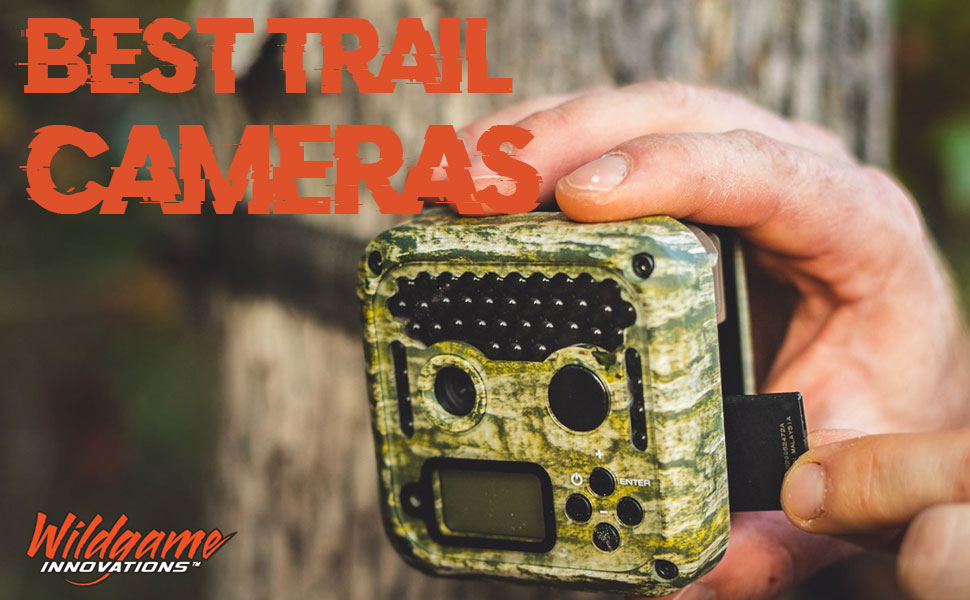
Figure 2: Inserting an SD Card
This image shows a close-up of a hand inserting an SD card into the designated slot of a trail camera. This step is crucial for enabling the camera to record and save captured media.
3. Mounting the Camera
The camera includes an adjustable tree strap with alligator clips for secure mounting to trees or posts. Position the camera at the desired height and angle to capture the target area. Ensure the camera is stable and not prone to movement from wind or wildlife.

Figure 3: Mounting the Camera on a Tree
This image depicts an individual in camouflage attire kneeling to adjust a Wildgame Innovations trail camera mounted on a tree trunk in a natural outdoor setting. This illustrates the typical setup process for deploying the camera in the field.
4. Initial Configuration
The Switch Cam 16 features an extremely simple user interface, typically involving three buttons for operation. Upon powering on, the camera automatically syncs the date and time, and self-corrects for daylight savings. Refer to the on-screen prompts for any additional initial settings, such as capture mode (photo or video) or delay settings.
Operating Instructions
Capturing Images and Videos
The camera is designed to automatically capture images and videos when motion is detected within its range. It records 16-megapixel images and 720p HD videos without audio. The trigger speed is less than one second, ensuring quick capture of subjects up to 70 feet away.
Lightsout Technology
The Lightsout model utilizes an invisible flash comprised of black infrared LEDs for nighttime capture. This technology allows the camera to record images and videos in low-light conditions without disturbing wildlife, maintaining concealment.
Maintenance
Battery Life
With fresh batteries, the camera can operate for up to 1 year, depending on usage and environmental conditions. Regularly check battery levels and replace them as needed to ensure continuous operation.
Weather Protection
The Switch Cam 16 features a weather-proof design and an anti-fog lens coating to eliminate dew and moisture. While designed for outdoor use, avoid submerging the camera in water. Periodically inspect the camera's seals and casing for any damage that could compromise its weather resistance.
Cleaning
To clean the camera, use a soft, damp cloth. Do not use abrasive cleaners or solvents. Gently wipe the lens with a microfiber cloth to avoid scratches and ensure clear image quality.
Troubleshooting
- Camera not powering on: Ensure fresh AA batteries are correctly installed with proper polarity. Check if the battery compartment is securely closed.
- No images/videos captured: Verify that an SD card is properly inserted and has sufficient free space. Check the camera's settings to ensure it is in the correct capture mode (photo or video) and that the motion sensor is enabled. Ensure the camera is positioned correctly to detect motion in the desired area.
- Poor image/video quality: Clean the camera lens with a soft, lint-free cloth. Ensure the camera is mounted securely to prevent movement. Check for obstructions in front of the lens or sensor.
- Short battery life: This can be influenced by frequent triggers, extreme temperatures, or the use of low-quality batteries. Use high-quality alkaline or lithium AA batteries for optimal performance.
- Date/Time incorrect: The camera is designed to automatically sync date and time. If issues persist, ensure the camera has a clear view of the sky for GPS signal (if applicable, though not explicitly stated for this model, it's a common feature for auto-sync).
Specifications
| Feature | Detail |
|---|---|
| Model Name | Wildgame Innovations Switch Lightsout Trail Camera |
| Model Number | WGIWGICM0710 |
| Still Image Resolution | 16 Megapixels |
| Video Resolution | 720p HD (without audio) |
| Trigger Speed | Less than 1 second |
| Detection Range | Up to 70 feet |
| Flash Type | Invisible Infrared (Lightsout Technology) |
| Power Source | 8 AA Batteries (not included) |
| Battery Life | Up to 1 year (depending on usage) |
| Storage | SD Card (not included) |
| Weather Resistance | Weather-proof design, Anti-fog lens coating (IP65, IP67 ratings) |
| Mounting | Adjustable tree strap with alligator clips |
| Item Weight | 14.08 ounces |
| UPC | 616376001611 |
Warranty and Support
Warranty Information
The Wildgame Innovations Switch Cam 16 Trail Camera comes with a 1-Year Warranty from the manufacturer. Please retain your proof of purchase for warranty claims. For specific warranty terms and conditions, refer to the documentation included with your product or visit the official Wildgame Innovations website.
Customer Support
For technical assistance, troubleshooting beyond this manual, or warranty inquiries, please contact Wildgame Innovations customer support. Contact information can typically be found on the manufacturer's official website or on the product packaging.
Safety Information
California Proposition 65 Warning: This product may contain chemicals known to the state of California to cause cancer and reproductive harm. For more information, visit www.P65Warnings.ca.gov.
Ask a question about this manual
Ask about setup, troubleshooting, compatibility, parts, safety, or missing instructions. Manuals+ will review the question and use this page’s manual context to help answer it.