
1. Product Overview
The BLACK+DECKER Solar-Powered Outdoor Disk Lights (Model BDSLDK8P) are designed to provide ambient lighting for your outdoor spaces. These decorative lights are solar-powered, eliminating the need for complex wiring or external power sources. They are ideal for illuminating pathways, yards, gardens, and patios, enhancing both aesthetics and safety.
Key Features:
- Solar Powered: Utilizes renewable solar energy with a rechargeable battery, providing up to 9 hours of illumination after a full charge.
- Weather Resistant: Constructed with durable stainless steel and ABS plastic, making them resistant to rain and splashes.
- Easy Installation: No tools or wires required for setup; simply assemble and push into the ground.
- Automatic Operation: Lights automatically turn on at dusk and off at dawn.

Image 1.1: A single BLACK+DECKER Solar-Powered Outdoor Disk Light.
2. Package Contents
Ensure all components are present before proceeding with installation.
- 8 x BLACK+DECKER Solar-Powered Outdoor Disk Lights
- 8 x Ground Spikes (for installation)

Image 2.1: Contents of the 8-pack of disk lights.
3. Safety Information
Please read and understand all safety instructions before using the product. Failure to follow these instructions may result in injury or damage to the product.
- Do not attempt to open or modify the light unit. Internal components are not user-serviceable.
- Keep the solar panel clean to ensure optimal charging performance.
- Ensure the installation location allows for direct sunlight exposure for several hours daily.
- Avoid installing near other light sources (e.g., streetlights) as this may prevent the solar light from activating automatically.
- Keep out of reach of children.
- Dispose of batteries according to local regulations when they reach the end of their life cycle.
4. Setup and Installation
The BLACK+DECKER Solar-Powered Outdoor Disk Lights are designed for quick and easy installation without the need for tools or complex wiring.
Installation Steps:
- Unpack Components: Carefully remove all disk lights and ground spikes from the packaging.
- Activate the Light: Locate the ON/OFF switch on the underside of each disk light. Slide the switch to the "ON" position.
- Assemble Ground Spike: Attach the two halves of the ground spike together, ensuring they interlock securely.
- Attach Spike to Light: Insert the assembled ground spike firmly into the designated slots on the underside of the disk light.
- Select Location: Choose an outdoor location that receives at least 6-8 hours of direct sunlight daily. Avoid shaded areas or locations directly under artificial light sources that might interfere with the light sensor.
- Install in Ground: Gently push the disk light, with the attached spike, into the soil until the top surface of the light is flush with the ground. Ensure it is stable and level.

Image 4.1: Installing a disk light into the ground.
Video 4.1: Official BLACK+DECKER guide demonstrating the easy assembly and installation of the solar disk lights, including turning on the switch, assembling the ground spike, and pushing the light into the ground. (Duration: 0:24)
5. Operating Instructions
Once installed and activated, the solar disk lights operate automatically.
- Daytime Charging: During daylight hours, the integrated solar panel will absorb sunlight and convert it into electrical energy, which is stored in the internal rechargeable battery.
- Automatic Illumination: As ambient light levels decrease at dusk, the built-in light sensor will detect the change and automatically turn on the LED lights.
- Duration: A full day's charge (6-8 hours of direct sunlight) can provide illumination for up to 9 hours during the night.
- Automatic Shut-off: The lights will automatically turn off at dawn or when the battery charge is depleted.

Image 5.1: Disk lights illuminating an outdoor pathway at night.
6. Maintenance
Regular maintenance ensures optimal performance and longevity of your solar disk lights.
- Clean Solar Panel: Periodically wipe the solar panel with a soft, damp cloth to remove dust, dirt, or debris. A clean panel ensures efficient charging.
- Clear Obstructions: Ensure no leaves, snow, or other obstructions cover the solar panel, especially during seasonal changes.
- Check Placement: Occasionally verify that the lights are still in a location receiving adequate direct sunlight.
- Weather Resistance: The lights are designed to be rain and splash resistant. However, during extreme weather conditions, consider temporarily relocating them to a sheltered area to prevent potential damage.
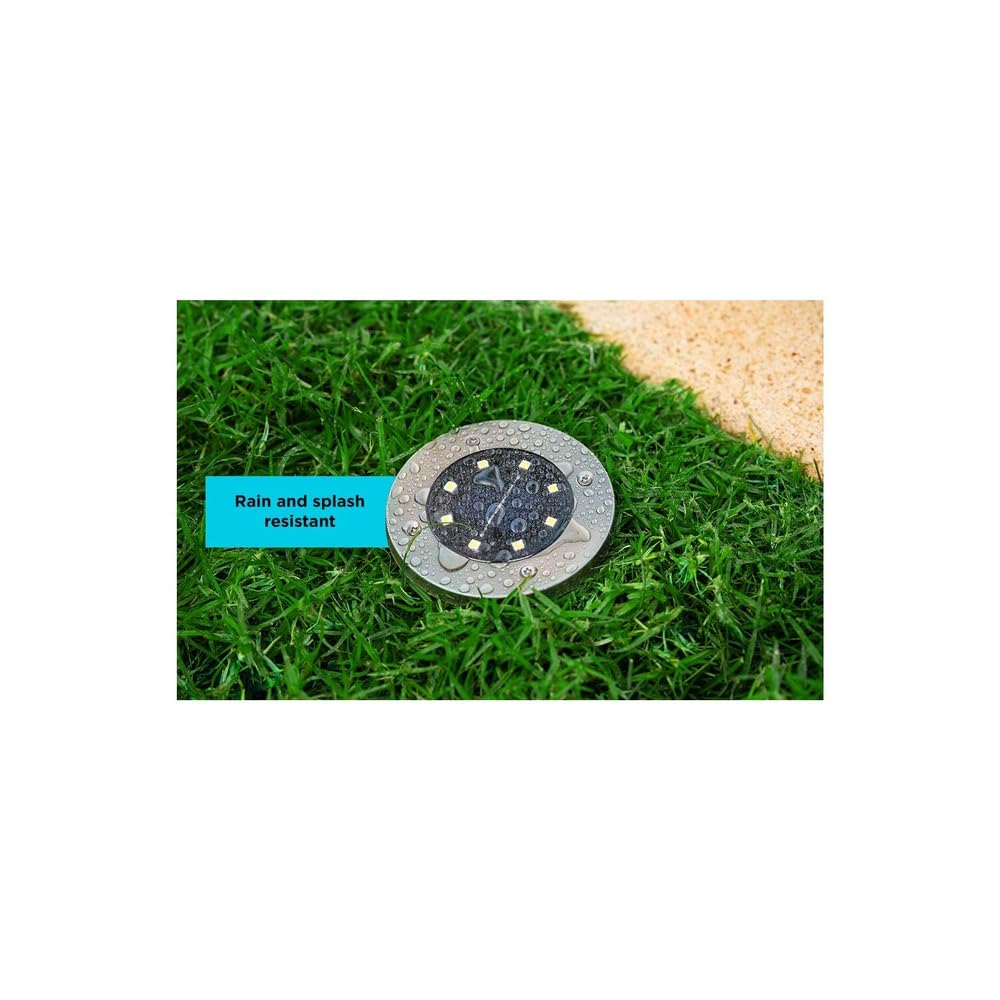
Image 6.1: Disk light demonstrating weather resistance.
7. Troubleshooting
If your solar disk lights are not functioning as expected, refer to the following common issues and solutions:
| Problem | Possible Cause | Solution |
|---|---|---|
| Light does not turn on at night. | 1. Switch is in 'OFF' position. 2. Insufficient solar charge. 3. Installed near other light sources. | 1. Ensure the switch on the underside is set to 'ON'. 2. Relocate the light to an area with 6-8 hours of direct sunlight daily. 3. Move the light away from streetlights or other bright lights. |
| Light is dim or only stays on for a short period. | 1. Insufficient solar charge. 2. Dirty solar panel. 3. Battery degradation. | 1. Ensure the light receives full, direct sunlight for 6-8 hours. 2. Clean the solar panel with a soft, damp cloth. 3. If the light is old, the rechargeable battery may need replacement (consult manufacturer for battery type and replacement instructions if applicable). |
| Light flickers. | Loose connection or low battery. | Ensure the light has a full charge. If flickering persists, contact customer support. |
8. Specifications
| Specification | Detail |
|---|---|
| Brand | BLACK+DECKER |
| Model Name | BDSLDK8P |
| Color | Silver |
| Material | Acrylonitrile Butadiene Styrene, Stainless Steel |
| Style | Disk Light, 8 Pack |
| Light Fixture Form | Path |
| Room Type | Patio |
| Product Dimensions | 10.55"L x 10.55"W x 5.83"H |
| Specific Uses For Product | Pathway, Yard |
| Indoor/Outdoor Usage | Outdoor |
| Power Source | Solar Powered |
| Installation Type | Ground Installation |
| Control Method | Touch (for ON/OFF switch) |
| Light Source Type | LED |
| Number of Light Sources | 8 per unit |
| Voltage | 3.7 Volts |
| Light Color | White |
| Included Components | 8 solar outdoor disk lights |
| Lighting Method | Solar-powered LED |
| Item Weight | 1.01 Kilograms (2.22 pounds) |
| Unit Count | 8.0 Count |
| Water Resistance Level | Water Resistant |
| Assembly Required | Yes |
| UPC | 885911828536 |
9. Warranty and Support
Warranty Information:
This BLACK+DECKER product is covered by a 1-year limited warranty from the date of purchase. This warranty covers defects in material or workmanship under normal use. It does not cover damage resulting from misuse, abuse, accident, alteration, or unauthorized repair.
Customer Support:
For technical assistance, warranty claims, or general inquiries, please contact BLACK+DECKER customer support through their official website or the contact information provided with your purchase documentation. Please have your model number (BDSLDK8P) and proof of purchase available when contacting support.


