
Introduction
The Benro WH15 Wildlife Head is a specialized 2-way long-lens support designed for wildlife, sports, and telephoto photography. It features an 8-stop counterbalance system, continuous pan and tilt drag adjustment, and a dual-pan design for precise control and smooth movement. This manual provides detailed instructions for the setup, operation, maintenance, and troubleshooting of your WH15 Wildlife Head.

Figure 1: Benro WH15 Wildlife Head with a spotting scope on a tripod.
Key Features
- High Payload Capacity: Supports up to 33 lb (15 kg) for various camera and long-lens combinations.
- Advanced Counterbalance & Drag: Features an 8-step counterbalance system and continuous pan/tilt drag adjustment for smooth, controlled movements.
- Dual-Pan Design: Allows panning from both the base and the quick-release platform, offering 360° rotation for versatile shooting angles and panoramic stitching.
- Quick Release System: Arca-Swiss style quick-release plate with a safety lock for secure and fast camera attachment.
- Extendable Pan Handle: A three-section pan handle that can be mounted on either the left or right side, and can also convert for selfie mode use.
- Durable Construction: Built on a 75 mm bowl base with a 3/8″ mounting thread, engineered for demanding telephoto and wildlife applications.
Setup
1. Mounting the Head to a Tripod
- Ensure your tripod has a 75 mm bowl or a flat base with a 3/8″ mounting screw.
- Align the 75 mm bowl base of the WH15 head with your tripod's mounting platform.
- Securely tighten the head to the tripod using the tripod's locking mechanism or the 3/8″ screw. Ensure it is stable before proceeding.

Figure 2: The base of the WH15 head, showing the pan lock and bubble level for proper mounting.
2. Attaching the Pan Handle
- Locate the pan handle attachment port on either side of the head.
- Insert the pan handle into the desired port.
- Tighten the handle's locking screw to secure it firmly in place. The handle can be extended by twisting its sections.
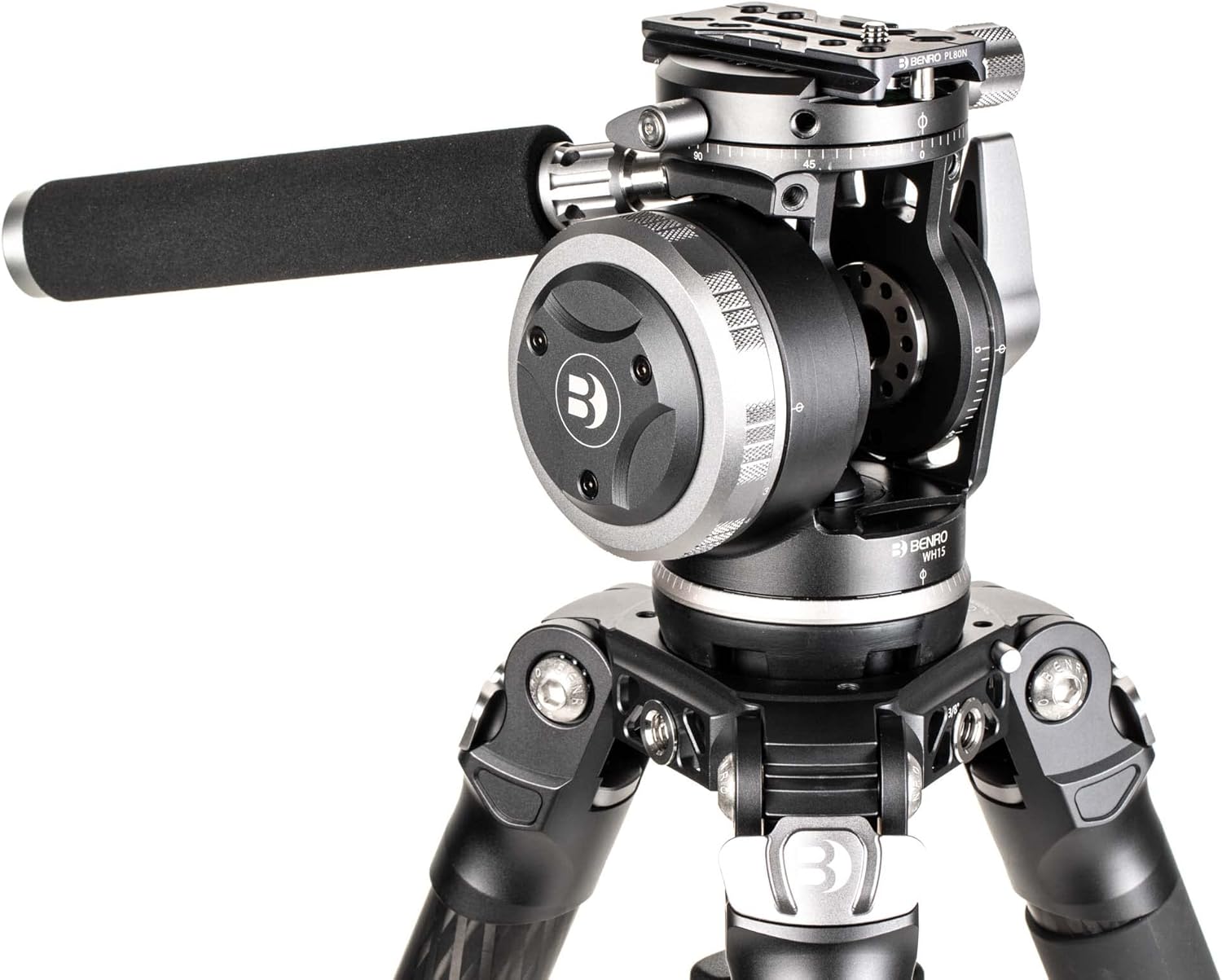
Figure 3: The WH15 head with the extendable pan handle attached.
3. Attaching Your Camera or Lens
- Ensure the quick-release plate is detached from the head. If not, unlock the quick-release lever and slide the plate out.
- Attach the quick-release plate to the base of your camera or lens collar using the provided screw. Ensure it is tightly secured.
- With the quick-release lever on the head in the unlocked position, slide the plate with your camera/lens into the receiver until it clicks into place.
- Engage the safety lock and then fully tighten the quick-release lever to prevent accidental detachment.

Figure 4: The quick-release plate receiver on the WH15 head.
Operation
1. Counterbalance Adjustment
The WH15 features an 8-step counterbalance system to help balance heavy camera and lens setups, preventing accidental tilting and providing smoother movements. Adjust the counterbalance knob (typically a large, numbered dial) to match the weight of your equipment. Start with a lower setting and increase until the camera remains stable when released.
2. Pan and Tilt Drag Control
Separate knobs control the continuous drag for both pan and tilt movements. Turn these knobs to increase or decrease resistance. A higher drag setting provides more control for slow, precise movements, while a lower setting allows for faster, freer motion. Ensure the drag is set appropriately for your shooting style and equipment weight.

Figure 5: Detail of the tilt lock and drag adjustment on the WH15 head.
3. Dual-Pan and Panorama Function
The dual-pan design allows for 360° rotation from two points: the base of the head and the quick-release platform. This is particularly useful for leveling the head on uneven terrain using the base pan, and then performing precise panoramic movements from the quick-release platform without re-leveling the tripod.
4. Using the Extendable Handle
The three-section pan handle can be extended or retracted by twisting its sections. It can be mounted on either the left or right side of the head for user preference. For specific applications, the handle can be detached and used in a 'selfie mode' configuration by attaching a smartphone holder (not included) to its end.
Video 1: Demonstrates the features and operation of the Benro WH15 Wildlife Head, including handle usage and smooth movements.
Maintenance
- Cleaning: Use a soft, dry cloth to wipe down the head after each use. For stubborn dirt, a slightly damp cloth can be used, followed by immediate drying. Avoid harsh chemicals or abrasive materials.
- Storage: Store the WH15 head in a clean, dry environment, away from extreme temperatures and humidity. Using a padded bag can protect it from dust and physical damage.
- Lubrication: The internal mechanisms are factory-lubricated. Do not attempt to lubricate internal parts yourself, as this may damage the head or affect its performance.
- Inspection: Periodically check all screws and locking mechanisms to ensure they are tight. Do not overtighten.
Troubleshooting
- Stiff or Frozen Controls: If a control knob (e.g., drag or counterbalance) feels stiff or is not moving, first ensure no other locking mechanisms are engaged. Do not force the control. If the issue persists, contact Benro customer support for assistance.
- Camera Not Secure: Ensure the quick-release plate is correctly attached to your camera/lens and fully seated in the head's receiver. Verify that both the quick-release lever and the safety lock are fully engaged.
- Unstable Movement: Check the counterbalance setting for your equipment weight. Adjust the pan and tilt drag controls to provide adequate resistance for smooth operation. Ensure the tripod itself is stable and properly set up.
Specifications
| Feature | Detail |
|---|---|
| Model Name | WH15 |
| Brand | Benro |
| Color | Black |
| Compatible Devices | Camera |
| Product Dimensions (D x W x H) | 5.15"D x 3.15"W x 5.15"H (13.08 cm x 8.00 cm x 13.08 cm) |
| Item Weight | 3.08 lb (1.4 kg) |
| Maximum Weight Recommendation | 33 lb (15 kg) |
| Bowl Size | 75 mm |
| Tilt Range | ±90° |
| Counterbalance Steps | 8-step |
Warranty Information
Benro offers a standard limited warranty of 3 years from the date of purchase for the original owner. This warranty covers defects in materials and workmanship. For purchases made from authorized dealers in the U.S., the warranty can be extended by an additional 2 years (for a total of 5 years) upon online product registration. Please retain your proof of purchase for warranty claims.
Customer Support
For technical assistance, warranty claims, or further inquiries regarding your Benro WH15 Wildlife Head, please visit the official Benro website or contact their customer service department. You can find more information and contact details at the Benro Store on Amazon or the main Benro website.

Figure 6: The Benro WH15 Wildlife Head in use for telephoto observation.