
Introduction
This manual provides essential information for the safe and efficient use of your Xiaomi 12 Lite 5G smartphone. Please read this guide thoroughly before operating your device to ensure optimal performance and longevity. Keep this manual for future reference.
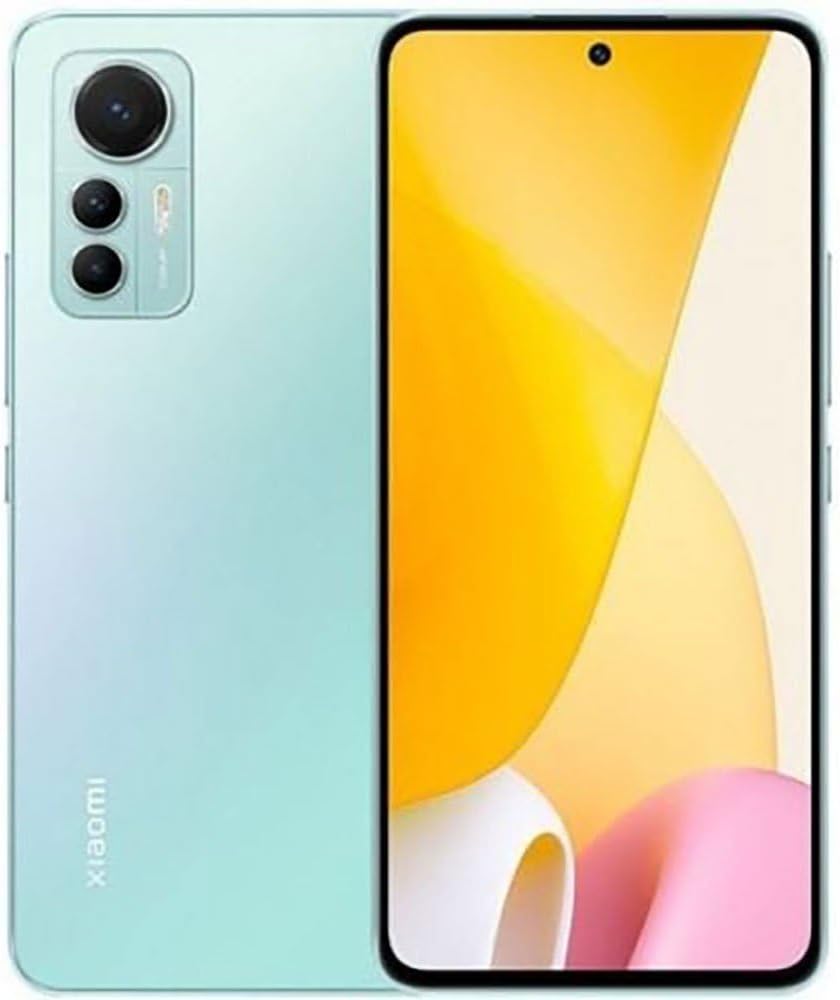
Figure 1: Xiaomi 12 Lite 5G Smartphone (Lite Green)
The image displays the Xiaomi 12 Lite 5G smartphone in a Lite Green finish. The front of the device features a large display with a punch-hole camera at the top center. The back showcases a sleek design with the triple camera module located in the upper left corner, consisting of three lenses and an LED flash. The Xiaomi branding is visible vertically along the lower left side of the back panel.
1. Setup Guide
1.1 Unboxing and Initial Inspection
Upon receiving your Xiaomi 12 Lite 5G, carefully unbox all components. The package should contain:
- Xiaomi 12 Lite 5G Smartphone
- Fast Car Charger
- Wall Charger
- USB Cable
- SIM Tray Ejector
- Phone Case
Inspect the device for any physical damage. If any components are missing or damaged, contact your retailer immediately.
1.2 SIM Card Installation
The Xiaomi 12 Lite 5G supports Dual Nano SIM cards. It does not have a Micro SD slot.
- Locate the SIM card tray on the side of the device.
- Insert the SIM tray ejector tool into the small hole next to the tray and press firmly until the tray pops out.
- Place your Nano SIM card(s) into the designated slots on the tray, ensuring the gold contacts face downwards and the cut corner aligns correctly.
- Carefully reinsert the SIM tray into the phone until it clicks into place.
Note: This device is unlocked and supports 5G + 4G LTE. It will NOT work on Verizon, AT&T, Boost, Cricket, or any CDMA Carrier. T-Mobile users may require a previously activated SIM card.
1.3 Powering On and Initial Configuration
- Press and hold the Power button (located on the side) until the Xiaomi logo appears.
- Follow the on-screen prompts to select your language, region, and connect to a Wi-Fi network.
- Sign in with your Google account or create a new one.
- Set up security features such as PIN, pattern, password, and fingerprint or AI Face Unlock.
- Complete the remaining setup steps to personalize your device.
2. Operating Instructions
2.1 Display Features
Your Xiaomi 12 Lite 5G features a 6.55" FHD+ AMOLED DotDisplay with vibrant colors and smooth visuals.
- Color Depth: Up to 68 billion colors (10-bit + 2-bit).
- Refresh Rate: 120Hz AdaptiveSync display (60/120Hz) for fluid scrolling and gaming.
- Touch Sampling Rate: 240Hz for responsive touch input.
- Resolution: 2400 x 1080 pixels (402ppi).
- HDR Support: Dolby Vision and HDR10+ for enhanced contrast and color.
- Ambient Light Sensors: 360-degree sensors for automatic brightness adjustment.
2.2 Camera Usage
Capture stunning photos and videos with the advanced camera system.
Rear Camera System:
- 108MP Wide-angle Camera: 1/1.52" sensor size, 6P lens.
- 8MP Ultra-wide Angle Camera: f/2.2, 120° FOV.
- 2MP Macro Camera: f/2.4, 4cm fixed focus distance.
Photography Features: 108MP mode, Eye tracking focus, Night mode, Motion capture, Timed burst, AI portrait mode with bokeh and depth control, AI SkyScaping, Magic cutout.
Video Features: One-click AI cinema, 19 vlog modes, 12 video filters, Time-lapse video.
Front Camera:
- 32MP In-display Selfie Camera: f/2.45, 5P lens, Dual LEDs.
Photography Features: Eye tracking focus, Night mode, AI Beautify, AI portrait mode with bokeh and depth control.
Video Features: Time-lapse selfie.
2.3 Performance and Connectivity
The device is powered by the Snapdragon® 778G 5G chipset, ensuring smooth performance for daily tasks and gaming.
- Processor: Snapdragon 778G Kryo 670 CPU (up to 2.4GHz), Adreno 642L GPU.
- RAM: 8GB.
- Storage: 128GB.
- Operating System: MIUI 13 based on Android 12.
- Wireless Connectivity: Wi-Fi 6 (802.11ax), Wi-Fi 5 (802.11ac), 802.11a/b/g/n (2.4GHz/5GHz support), Bluetooth 5.2.
- Navigation: BeiDou (B1I + B1C), GPS (L1), Galileo (E1), GLONASS (G1), QZSS (L1), A-GPS.
- Sensors: Proximity sensor, Ambient light sensor, Accelerometer, Gyroscope, Electronic compass, Linear motor, IR blaster.
2.4 Security and Authentication
Your device offers multiple security options to protect your data:
- In-screen Fingerprint Sensor: For quick and secure unlocking.
- AI Face Unlock: Convenient facial recognition for unlocking.
- Standard PIN, Pattern, and Password options.
3. Maintenance
3.1 Battery Charging
The Xiaomi 12 Lite 5G is equipped with a 4300mAh battery and supports Smart 67W turbo charging.
- Use only the provided Xiaomi wall charger and USB cable for optimal charging speed and safety.
- Connect the USB cable to the phone's charging port and the wall charger.
- Plug the wall charger into a power outlet.
- Avoid exposing the device to extreme temperatures during charging.
Note: The included Fast Car Charger can be used for convenient charging on the go.
3.2 Software Updates
Regular software updates provide new features, security enhancements, and bug fixes. Ensure your device is connected to Wi-Fi and has sufficient battery before initiating an update.
- Go to Settings > About phone > MIUI version.
- Tap Check for updates.
- If an update is available, follow the on-screen instructions to download and install it.
3.3 Cleaning Your Device
To maintain the appearance and functionality of your phone:
- Use a soft, lint-free cloth to wipe the screen and back panel.
- Avoid using harsh chemicals, abrasive cleaners, or compressed air.
- Keep ports free of dust and debris.
4. Troubleshooting
This section addresses common issues you might encounter with your Xiaomi 12 Lite 5G.
4.1 Device Not Powering On
- Ensure the battery is charged. Connect the phone to the charger for at least 15 minutes before attempting to power on again.
- Press and hold the Power button for 10-15 seconds to force a restart.
4.2 Network Connectivity Issues
- No Signal/Limited Service: Check if your SIM card is properly inserted. Verify that your carrier supports this device (refer to Section 1.2). Try restarting the phone.
- Wi-Fi Connection Problems: Ensure Wi-Fi is enabled. Restart your router and the phone. Forget the network and reconnect.
- Bluetooth Pairing Issues: Ensure both devices are in pairing mode and within range. Try restarting Bluetooth on both devices.
4.3 Battery Draining Quickly
- Reduce screen brightness and set a shorter screen timeout.
- Close unused apps running in the background.
- Disable unnecessary features like GPS, Bluetooth, or Wi-Fi when not in use.
- Check battery usage in Settings to identify power-hungry apps.
4.4 Device Freezing or Unresponsive
- Force restart the device by pressing and holding the Power button for 10-15 seconds.
- If the issue persists, consider performing a factory reset (Note: This will erase all data on your device. Back up important data before proceeding. Go to Settings > About phone > Factory reset).
5. Technical Specifications
| Feature | Specification |
|---|---|
| Model Name | 12 Lite 5G |
| Operating System | MIUI 13, Android 12 |
| Processor | Snapdragon 778G Kryo 670 CPU (up to 2.4GHz), Adreno 642L GPU |
| RAM | 8 GB |
| Internal Storage | 128 GB |
| Display | 6.55" FHD+ AMOLED DotDisplay, 2400 x 1080 resolution, 120Hz Refresh Rate, Dolby Vision, HDR10+ |
| Rear Camera | 108MP Wide-angle, 8MP Ultra-wide, 2MP Macro |
| Front Camera | 32MP In-display Selfie Camera |
| Battery Capacity | 4300 mAh |
| Charging | 67W Turbo Charging |
| Connectivity | 5G, 4G LTE, Wi-Fi 6, Bluetooth 5.2, GPS |
| SIM Support | Dual Nano SIM (No Micro SD Slot) |
| Security | In-screen Fingerprint Sensor, AI Face Unlock |
| Dimensions (Weight) | 173 Grams (6.1 ounces) |
| Color | Lite Green (as per current product) |
6. Warranty and Support
6.1 Product Warranty
Your Xiaomi 12 Lite 5G is covered by a limited manufacturer's warranty. Please refer to the warranty card included in your product packaging or visit the official Xiaomi website for detailed terms and conditions. Warranty coverage may vary by region and retailer.
Note: Warranty may be void if the device is used in regions where Xiaomi does not officially operate, such as the US, as mentioned in some customer reviews. Always check regional warranty policies.
6.2 Customer Support
For further assistance, technical support, or service inquiries, please visit the official Xiaomi support channels or the XIAOMI Store on Amazon.


