
Introduction
Thank you for purchasing the Inova RAD-9046 Mini Bluetooth Speaker. This portable speaker combines Bluetooth connectivity, FM radio, and media playback from USB drives and TF cards, all in a compact design. This manual provides essential information for setting up, operating, and maintaining your device to ensure optimal performance and longevity.
Safety Information
- Do not expose the speaker to extreme temperatures, direct sunlight, or high humidity.
- Avoid dropping or subjecting the speaker to strong impacts.
- Do not disassemble or attempt to repair the speaker yourself. This will void the warranty.
- Keep the speaker away from water and other liquids. It is not waterproof.
- Use only the provided USB cable for charging.
- Keep out of reach of children.
Package Contents
Please check the box for the following items:
- 1 x Inova RAD-9046 Mini Bluetooth Speaker
- 1 x USB Charging Cable

Image: The Inova RAD-9046 speaker packaging, illustrating the product's dimensions (9cm x 12cm x 17cm) and weight (390g), along with key features.
Product Overview
The Inova RAD-9046 is a compact and versatile portable speaker. It features a 3-inch speaker with 6W output, a 600mAh rechargeable lithium battery, and a built-in LED display. The ergonomic handle makes it easy to carry.
Controls and Ports:

Image: Front view of the Inova RAD-9046 speaker, highlighting the control panel with buttons for Mode, Play/Pause/Scan, Volume/Track, and the USB and TF card slots at the top.
- MODE Button: Switches between Bluetooth, FM Radio, USB, and TF Card modes.
- ►►I / SCAN Button: In Bluetooth/USB/TF mode, short press for Play/Pause. In FM mode, long press to auto-scan and save radio stations.
- ◀◀ / V- Button: Short press for previous track (Bluetooth/USB/TF) or previous station (FM). Long press to decrease volume.
- ►► / V+ Button: Short press for next track (Bluetooth/USB/TF) or next station (FM). Long press to increase volume.
- USB Port: For USB flash drive playback.
- TF Card Slot: For TF (Micro SD) card playback.
- Charging Port: Micro USB port for charging the speaker.
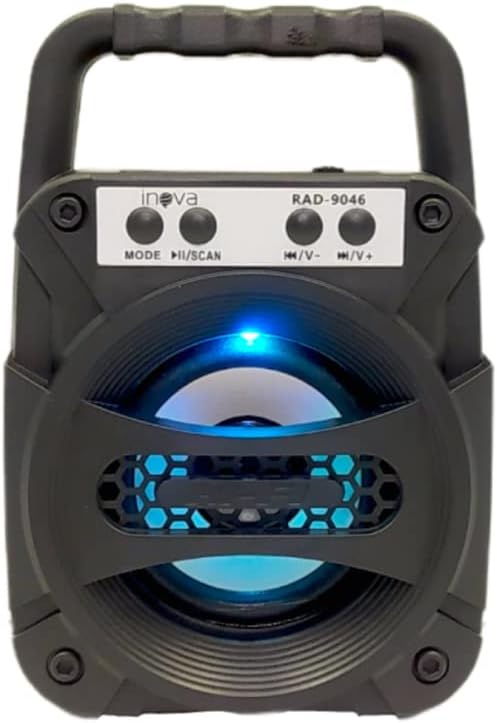
Image: Front view of the Inova RAD-9046 speaker with a blue LED light.

Image: Front view of the Inova RAD-9046 speaker with a green LED light.
Setup
1. Charging the Speaker
- Connect the small end of the included USB charging cable to the charging port on the speaker.
- Connect the larger end of the USB cable to a USB power adapter (not included) or a computer's USB port.
- The LED indicator will illuminate to show that the speaker is charging. It will turn off or change color once fully charged.
- A full charge typically takes 2-3 hours.
2. Power On/Off
- To power on, locate the power switch (usually a toggle switch) on the speaker and slide it to the "ON" position. You will hear a power-on prompt.
- To power off, slide the power switch to the "OFF" position.
Operating Instructions
1. Bluetooth Mode
- Turn on the speaker. It will automatically enter Bluetooth pairing mode, indicated by a flashing LED light and an audible prompt.
- On your smartphone, tablet, or other Bluetooth-enabled device, enable Bluetooth and search for available devices.
- Select "RAD-9046" from the list of devices.
- Once successfully paired, you will hear a confirmation sound, and the LED light will stop flashing.
- You can now play audio from your device through the speaker. Use the speaker's ►►I (Play/Pause) and track skip buttons, or control playback directly from your connected device.
2. FM Radio Mode
- Press the MODE button repeatedly until you hear the FM radio prompt.
- For the first use, or to rescan, long press the ►►I / SCAN button. The speaker will automatically scan and save available FM radio stations.
- Short press the ◀◀ / V- or ►► / V+ buttons to switch between saved stations.
3. USB / TF Card Playback
- Insert a USB flash drive or a TF (Micro SD) card into the corresponding port.
- The speaker will automatically detect the storage device and switch to USB or TF card mode, beginning playback of audio files. If it doesn't switch automatically, press the MODE button to select the correct mode.
- Use the ►►I button for Play/Pause, and the ◀◀ / V- or ►► / V+ buttons to skip tracks.
4. Volume Control
- Long press the ◀◀ / V- button to decrease the volume.
- Long press the ►► / V+ button to increase the volume.
Maintenance
- Clean the speaker with a soft, dry cloth. Do not use abrasive cleaners or solvents.
- Store the speaker in a cool, dry place when not in use.
- Charge the battery regularly, even if not used for extended periods, to maintain battery health.
Troubleshooting
| Problem | Possible Cause | Solution |
|---|---|---|
| Speaker does not turn on. | Battery is depleted. | Charge the speaker using the provided USB cable. |
| No sound. | Volume is too low or muted. Incorrect mode selected. | Increase volume. Press the MODE button to select the correct input source (Bluetooth, FM, USB, TF). |
| Bluetooth not connecting. | Speaker is not in pairing mode. Device is too far. Interference. | Ensure speaker is in Bluetooth mode and flashing. Move device closer. Turn off other Bluetooth devices. |
| FM radio reception is poor. | Weak signal. | Move the speaker to a location with better reception. Re-scan stations. |
| USB/TF card not playing. | Incorrect file format. Card/drive not inserted correctly. | Ensure audio files are in a compatible format (e.g., MP3). Reinsert the USB drive or TF card. Press MODE to select the correct source. |
Specifications
| Brand: | INOVA |
| Model: | RAD-9046 |
| Connectivity Technology: | Bluetooth, USB |
| Speaker Type: | Portable Bluetooth Speaker |
| Audio Output Mode: | Mono |
| Speaker Output Power: | 6 Watts |
| Speaker Size: | 3 Inches (7.62 cm woofer diameter) |
| Battery Capacity: | 600mAh Lithium (Rechargeable) |
| Special Features: | FM Radio, USB Port, TF Card Slot, LED Display |
| Recommended Uses: | For Computers, Smartphones, Tablets |
| Control Method: | Touch (Buttons) |
| Dimensions (Approx.): | 9 cm x 12 cm x 17 cm |
| Weight (Approx.): | 0.39 kg |
| Included Components: | USB Cable |
Warranty and Support
For warranty information or technical support, please refer to the retailer where you purchased the product or visit the official INOVA website. Keep your proof of purchase for any warranty claims.
Return Policy: Please consult the retailer's return policy for details regarding product returns and exchanges.