
Product Overview
The Ensenior 6 Inch LED Recessed Ceiling Light offers versatile lighting solutions with adjustable color temperature and dimming capabilities. This canless wafer downlight is designed for easy installation and energy efficiency, suitable for various indoor applications.
Key features include:
- 3 Color Temperature Settings: Select between 3000K (Warm White), 4000K (Cool White), and 5000K (Daylight) to match your desired ambiance.
- IC Rated & Certified: ETL & Energy Star certified, UL-certified wire terminals, and IC rated for safe contact with insulation.
- High Brightness & Dimmable: Delivers 1050 lumens with only 12 Watts consumption, offering 5%-100% smooth dimming compatible with most Lutron dimmers.
- Easy Installation: Designed for hassle-free setup, requiring minimal ceiling space.
Safety Information
Please read all instructions carefully before installation and retain for future reference. Improper installation can lead to electrical shock or fire hazards.
- Always turn off power at the circuit breaker before beginning installation.
- Consult a qualified electrician if you are unsure about the installation process.
- Ensure all electrical connections comply with local codes and ordinances.
- Do not modify the fixture or its components.
- This product is suitable for indoor use only and is damp-rated. Avoid direct water contact.
- The junction box provides thermal protection and is insulation compatible.
What's in the Box
Your package should contain the following items:
- Recessed Lights (24 units)
- Junction Box (24 units)
- Cutting Template
- Instruction Manual
Specifications
| Feature | Specification |
|---|---|
| Brand | Ensenior |
| Model Number | E16I-3CCT-24PACK |
| Size | 6 Inch |
| Color Temperature | 3000K/4000K/5000K (3CCT Selectable) |
| Brightness | 1050 Lumens |
| Wattage | 12 Watts |
| Voltage | 120 Volts |
| Dimmability | 5%-100% Smooth Dimming |
| Material | Aluminum |
| Life Span | 50,000 hours |
| Certifications | ETL, Energy Star, UL-certified wire terminals, IC Rated |
| Dimensions (L x W x H) | 6.69"L x 6.69"W x 0.94"H |
| Cutout Dimension | 6.22" ~ 6.6" |
Installation Instructions
Follow these steps for a safe and easy installation of your Ensenior LED Recessed Ceiling Light.
Step 1: Prepare the Ceiling
Using the provided cutting template, mark the desired location on the ceiling. Cut a hole with a diameter between 6.22 inches and 6.6 inches. Ensure there are no obstructions like joists or pipes in the ceiling space.

Image: Cutting a hole in the ceiling using the provided template.
Step 2: Connect Wiring to Junction Box
Open the junction box. Connect the household electrical wires (live, neutral, ground) to the corresponding terminals inside the junction box. Ensure all connections are secure. The junction box is designed for easy push-in connections.

Image: Detailed view of the junction box wiring connections.
Step 3: Connect Light Panel to Junction Box
Connect the cable from the LED light panel to the cable extending from the junction box. Ensure the connectors are fully engaged. This connection is typically a simple plug-and-play design.
Video: Official Ensenior video demonstrating the connection of the light panel to the junction box.
Step 4: Mount the Light
Gently push the junction box into the ceiling hole. Then, push the LED light panel into the hole. The spring clips on the sides of the light panel will secure it firmly against the ceiling. Ensure the light is flush with the ceiling surface.

Image: Mounting the recessed light into the ceiling.
Operating Instructions
Color Temperature Selection (3CCT)
Your Ensenior recessed light features a selectable color temperature switch located on the side of the junction box. Before final installation, or if you need to change the color temperature later, access the switch on the junction box. Slide the switch to choose between 3000K (Warm White), 4000K (Cool White), or 5000K (Daylight) to suit your preference.
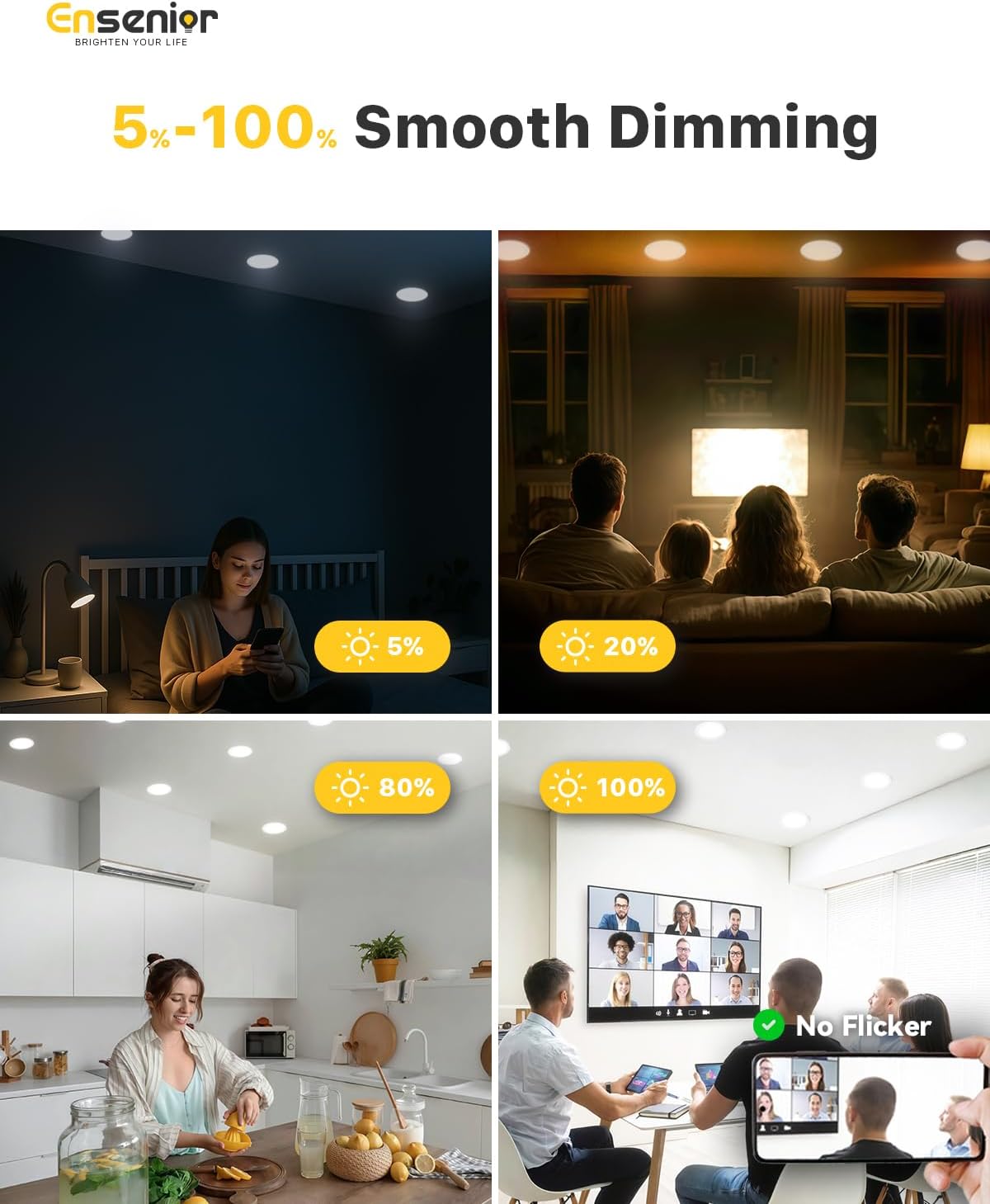
Image: CCT selection switch on the junction box.
Dimming Function
The Ensenior LED Recessed Ceiling Light is designed for smooth dimming from 5% to 100%. To utilize the dimming feature, ensure you have a compatible LED dimmer switch installed. Refer to the dimmer compatibility guide below for recommended models.

Image: Visual representation of dimming capabilities from 5% to 100%.
Dimmer Compatibility Guide
For optimal dimming performance, use one of the following compatible dimmer models. Other models may also be suitable, but compatibility is not guaranteed.

Image: Dimmer compatibility chart for various Lutron and Zooz models.
Maintenance
The Ensenior LED Recessed Ceiling Light requires minimal maintenance. Follow these guidelines to ensure longevity and optimal performance:
- Cleaning: Disconnect power before cleaning. Use a soft, dry cloth to wipe the surface of the light. Do not use abrasive cleaners, solvents, or cleaners containing alcohol, as these can damage the finish or electrical components.
- Bulb Replacement: The LED light source is integrated and not user-replaceable. The fixture has a long lifespan of approximately 50,000 hours.
- Inspection: Periodically check for any visible damage to the fixture or wiring. If any damage is found, discontinue use and consult a qualified electrician.
Troubleshooting
If you encounter issues with your Ensenior LED Recessed Ceiling Light, refer to the following common problems and solutions:
| Problem | Possible Cause | Solution |
|---|---|---|
| Light does not turn on | No power to the fixture; Loose wiring connection; Faulty switch or dimmer. | Check circuit breaker. Ensure all wiring connections are secure. Test the switch or dimmer. |
| Light flickers | Incompatible dimmer switch; Loose wiring; Voltage fluctuations. | Ensure dimmer is compatible (refer to compatibility guide). Check wiring connections. Consult an electrician for voltage issues. |
| Light is too dim or too bright | Dimmer setting; Incorrect CCT selection. | Adjust the dimmer switch. Verify the CCT switch on the junction box is set to your desired brightness/color. |
| Light turns off unexpectedly | Overheating (thermal protection activated); Loose connection. | Ensure proper ventilation around the fixture. Check all wiring connections. If problem persists, contact support. |
Warranty and Support
Ensenior provides a 5-Year Warranty for this product, covering defects in materials and workmanship under normal use. This warranty ensures your satisfaction and confidence in our product quality.
For any questions, concerns, or warranty claims, please contact our customer service team. We are committed to addressing your inquiries within 12 hours.
Contact Information: Please refer to the contact details provided on the product packaging or the official Ensenior website.
Video: Official Ensenior video highlighting product features and customer support.
