
Walfront Walfrontgm3zwxghsa6419-01
Digital Temperature Controller W3230 User Manual
Model: Walfrontgm3zwxghsa6419-01 | Brand: Walfront
Introduction
This manual provides comprehensive instructions for the installation, operation, and maintenance of the Walfront W3230 Digital Temperature Controller. This device is designed for precise temperature monitoring and control, offering both heating and cooling modes to maintain a constant temperature in various applications. Please read this manual thoroughly before use to ensure safe and efficient operation.
Key Features
- High quality and durable construction.
- Selectable cooling or heating working modes.
- Adjustable highest/lowest temperature limits to prevent accidents.
- Automatic start of cooling or heating for constant temperature maintenance.
- Temperature calibration function for accurate readings.
- Equipped with an LED display for clear temperature readings.
Setup and Installation
Circuit Connection
Refer to the circuit diagram for proper connection of the power supply and load. Ensure all connections are secure and correct before powering on the device. The digital tube (top) will display the actual measured temperature value, and the digital tube (bottom) will display the preset temperature.
If the temperature sensor is missing or damaged, the digital tube will display "-- --". Verify that the temperature sensor is correctly installed before use.
The temperature control output is a 10A relay, capable of handling various high-power loads. Always double-check the circuit for correctness to prevent damage or malfunction.
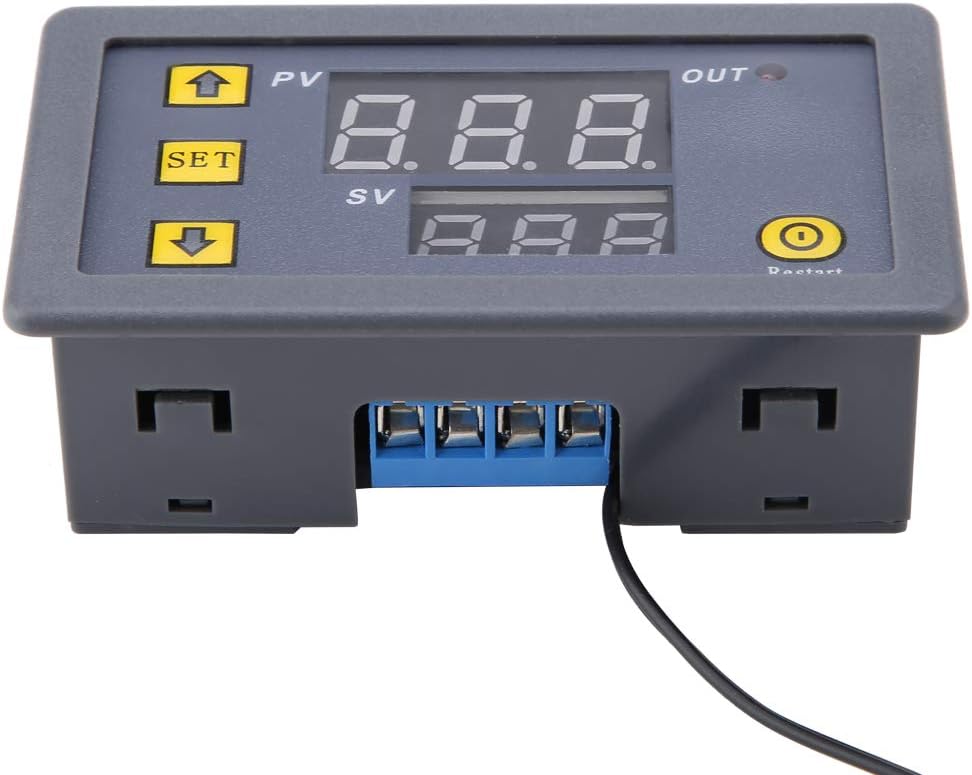
Image: Front and rear view of the W3230 controller, highlighting the display and the blue terminal block for wiring connections.
Operating Instructions
Indicator Light and Digital Tube Status
- Indicator Light:
- Off: The relay is disconnected.
- On: The relay is closed.
- Digital Tube Displaying "-- --": This indicates one of the following conditions:
- The temperature sensor is missing or damaged.
- High temperature in heating mode (exceeds set limit).
- Low temperature in refrigeration mode (falls below set limit).
Key Functions
The thermostat panel features three primary keys: +, -, and SET.
- Key +: Used for rapid increase of values (e.g., setting temperature).
- Key -: Used for rapid decrease of values (e.g., setting temperature).
- SET Key: Used to enter programming mode and confirm settings.
- Restart Button: Located on the right side of the display, used to restart the device.

Image: Front view of the W3230 controller, showing the dual LED display for PV (Process Value) and SV (Set Value), along with the 'SET', 'Up', 'Down', and 'Restart' buttons.
Maintenance
To ensure the longevity and accurate performance of your Walfront W3230 Digital Temperature Controller, follow these general maintenance guidelines:
- Cleaning: Gently wipe the device with a soft, dry cloth. Avoid using abrasive cleaners or solvents, as they may damage the display or casing.
- Environment: Operate the controller within its specified temperature and humidity ranges. Avoid exposure to extreme temperatures, direct sunlight, or high moisture environments.
- Connections: Periodically check all wiring connections to ensure they remain secure. Loose connections can lead to inaccurate readings or intermittent operation.
- Sensor Care: Handle the temperature sensor with care. Avoid bending or kinking the sensor cable excessively. Keep the sensor clean and free from debris that might affect its accuracy.
Troubleshooting
This section addresses common issues you might encounter with your W3230 Digital Temperature Controller.
| Problem | Possible Cause | Solution |
|---|---|---|
| Display shows "-- --" |
|
|
| Relay not activating/deactivating |
|
|
| Inaccurate temperature readings |
|
|
Specifications
| Attribute | Value |
|---|---|
| Brand | Walfront |
| Model Number | Walfrontgm3zwxghsa6419-01 |
| Voltage Options | DC 12V / 24V / 110-220V (Optional, specific to purchased model) |
| Power Options | 120W / 240W / 1500W (Optional, specific to purchased model) |
| Display Type | LCD |
| Color | Red, Blue (Display color) |
| Operating Temperature | 20 Degrees Celsius (Note: This might be a default or example value, actual range depends on model) |
| Item Weight | Approx. 48g / 1.7oz (1.51 ounces) |
| Package Dimensions | 4.37 x 2.2 x 1.14 inches |
| Batteries Required | No |
Warranty and Support
Specific warranty information for the Walfront W3230 Digital Temperature Controller is not provided within this manual. For details regarding warranty coverage, technical support, or service, please refer to the product packaging, the seller's website, or contact Walfront customer service directly.
For additional assistance, you may visit the Walfront Store on Amazon: Walfront Store
Related documentsWalfrontgm3zwxghsa6419-01


Ask a question about this manual
Ask about setup, troubleshooting, compatibility, parts, safety, or missing instructions. Manuals+ will review the question and use this page’s manual context to help answer it.