
Andoer MDE7472502909625PD
Andoer USB LED Video Light Kit User Manual
Model: MDE7472502909625PD | Brand: Andoer
1. Introduction
Thank you for purchasing the Andoer USB LED Video Light Kit. This portable and versatile lighting solution is designed to enhance your video conferences, live streaming sessions, video recordings, and product photography. It features adjustable brightness, bi-color temperature, and a range of color filters to meet various lighting needs. Please read this manual thoroughly before use to ensure proper operation and maintenance.
2. Package Contents
- LED Video Light with USB Cable and Inline Controller
- Extendable Desktop Tripod Stand
- Set of 8 Color Filters (Red, Yellow, Blue, Pink, Green, Purple, Orange, Black)
3. Key Features
- Portable LED Video Light Kit: Includes LED video light with bi-color temperature, extendable desktop stand, and color filters, ideal for video conferencing, video recording, live streaming, and product photography.
- Bi-Color Temperature LED Video Light: Equipped with 160 high-quality LED beads, offering 3200K-5600K bi-color temperature and 11 levels of adjustable brightness to suit various lighting conditions.
- Colorful Effects: Comes with multiple color filters (red/yellow/blue/pink/green/purple/orange/black) to provide diverse colorful effects. Easily change the light color to create unique photos and videos.
- 5V USB Power Supply: Conveniently powered by PC/laptop/power bank/power adapter (not included), allowing for all-day use without the need for battery charging or replacement.
- Extendable and Detachable Stand: Features an extendable stand with a maximum height of up to 137.5 cm (54.1 inches), enabling stable placement on a desktop or floor. The stand can also be used as a selfie stick or a mini desktop tripod when detached.
4. Safety Information
- Do not expose the device to rain or moisture.
- Keep the device away from heat sources and direct sunlight.
- Do not attempt to disassemble or modify the device.
- Use only the specified 5V USB power supply.
- Ensure the stand is stable before mounting the light to prevent tipping.
5. Setup
5.1 Assembling the Light Kit
- Unpack all components from the box.
- Attach the LED video light to the top of the extendable tripod stand using the 1/4-inch screw mount. Ensure it is securely fastened.
- Extend the tripod legs to a stable position. Adjust the height of the stand by extending the telescopic sections as needed.
- Connect the USB cable from the LED light to a 5V USB power source (e.g., computer USB port, power bank, or USB wall adapter).

Figure 1: Fully assembled Andoer USB LED Video Light Kit, showing the light panel mounted on the extendable tripod stand with the USB cable connected.

Figure 2: Close-up view of the universal 1/4-inch screw interface, demonstrating how the light attaches to the stand for secure and versatile mounting.
6. Operating Instructions
6.1 Powering On/Off and Brightness Adjustment
The LED video light is controlled by an inline remote on the USB cable.

Figure 3: Detailed view of the inline controller, showing buttons for Power On/Off, Brightness Up (+), Brightness Down (-), and Light Color Control.
- Power On/Off: Press the Power On/Off button (usually marked with a power symbol) to turn the light on or off.
- Brightness Adjustment: Use the Brightness Up (+) and Brightness Down (-) buttons to adjust the light intensity. There are 11 levels of adjustable brightness.

Figure 4: Illustration demonstrating the 11 levels of adjustable brightness, ranging from 20% to 100% intensity, controlled via the inline remote.
6.2 Changing Color Temperature
The light supports bi-color temperature adjustment (3200K-5600K).
- Color Temperature Control: Press the Light Color Control button on the inline remote to cycle through the available color temperature modes: Warm Light (3200K), Warm & Cold Mixed Light, and Cold Light (5600K).
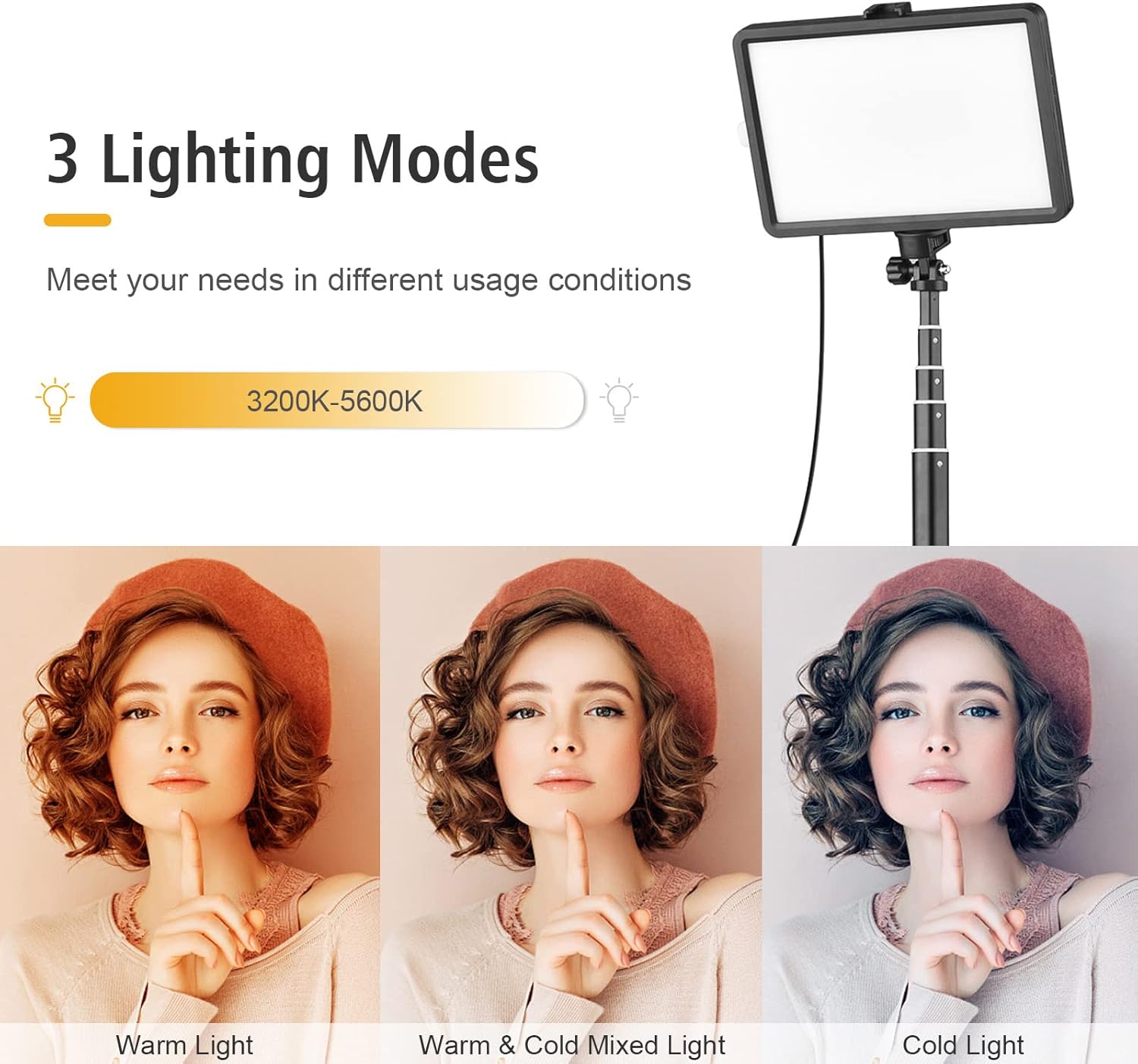
Figure 5: Visual representation of the three distinct lighting modes: Warm Light (3200K), Warm & Cold Mixed Light, and Cold Light (5600K), illustrating the range of color temperatures available.
6.3 Using Color Filters
The kit includes 8 color filters to create various lighting effects.
- To use a color filter, gently slide it into the designated slot on the front of the LED video light.
- Experiment with different colors to achieve desired atmospheric or creative effects for your photos and videos.
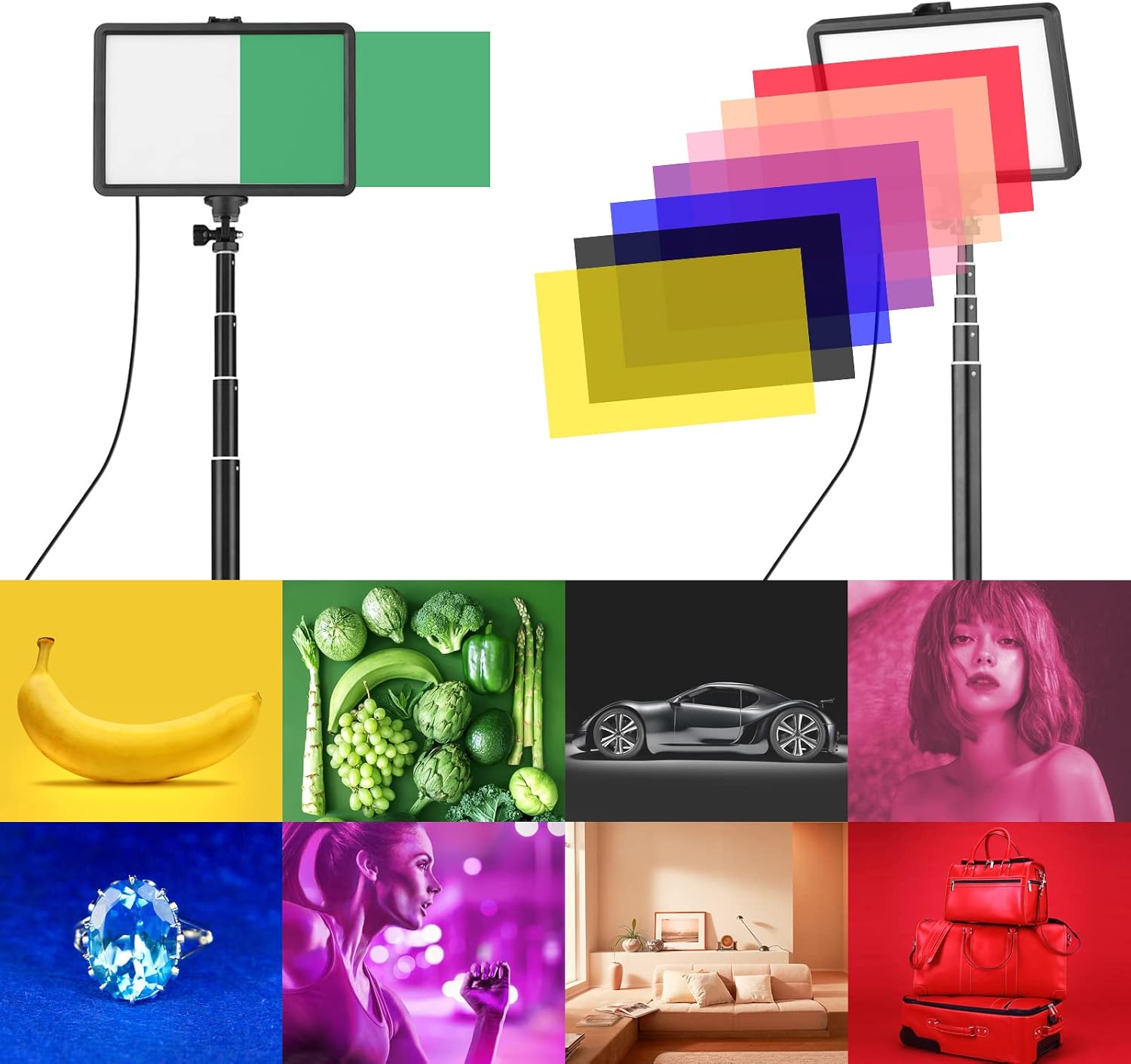
Figure 6: An array of eight different color filters (red, yellow, blue, pink, green, purple, orange, black) that can be used with the LED light to produce various colored lighting effects.
6.4 Power Supply Options
The light is powered via a 5V USB connection.
- Connect the USB cable to a compatible 5V USB power source such as a desktop computer, laptop, power bank, or a USB wall adapter (not included).
- This design allows for continuous operation without the need for battery charging or replacement.

Figure 7: Illustration of various compatible 5V USB power sources for the LED light, including laptops, desktop computers, power banks, and USB wall adapters.
7. Maintenance
- Cleaning: Use a soft, dry cloth to wipe the light panel and stand. Do not use abrasive cleaners or solvents.
- Storage: When not in use, store the light kit in a cool, dry place, away from direct sunlight and excessive dust.
- Handling: Handle the light and stand with care to avoid damage to the LED beads or mechanical components.
8. Troubleshooting
| Problem | Possible Cause | Solution |
|---|---|---|
| Light does not turn on. | No power supply or loose connection. | Ensure the USB cable is securely connected to a 5V power source. Try a different USB port or power adapter. |
| Brightness cannot be adjusted. | Inline controller malfunction. | Check if the buttons are stuck. If the issue persists, contact customer support. |
| Light flickers. | Unstable power supply. | Use a stable 5V USB power source. Avoid using low-power USB ports. |
| Stand is unstable. | Legs not fully extended or uneven surface. | Ensure all tripod legs are fully extended and locked. Place the stand on a flat, stable surface. |
9. Specifications
| Feature | Detail |
|---|---|
| Model Number | MDE7472502909625PD |
| Light Source | 160 pcs High-Quality LED Beads |
| Color Temperature | 3200K-5600K (Bi-color) |
| Brightness Levels | 11 Levels Adjustable |
| Power Supply | 5V USB |
| Max. Stand Height | Up to 137.5 cm (54.1 inches) |
| Light Panel Dimensions | Approx. 19.2 cm x 12.7 cm |
| Package Dimensions | 37.5 x 20 x 4.5 cm |
| Package Weight | 663.83 Grams |
| Interface | Universal 1/4-inch Screw Mount |
| Water Resistance Level | Waterproof (as per product specifications, typically refers to splash resistance for electronics) |

Figure 8: Dimensional overview of the light panel (19.2cm x 12.7cm) and the extendable stand components, including the tripod base and telescopic pole, with measurements.

Figure 9: An overview of all included components: the LED light with its USB cable and inline controller, the compact tripod stand, and the set of various color filters.
10. Warranty and Support
Andoer products are designed and manufactured to the highest quality standards. For warranty information and technical support, please refer to the warranty card included with your purchase or visit the official Andoer website. If you encounter any issues not covered in this manual, please contact our customer service team for assistance.
For further assistance, please visit: www.andoer.com
Related documentsMDE7472502909625PD


Ask a question about this manual
Ask about setup, troubleshooting, compatibility, parts, safety, or missing instructions. Manuals+ will review the question and use this page’s manual context to help answer it.