
JJN 36-M6
JJN 200 Watt Solar Panel Kit User Manual
Model: 36-M6 | Brand: JJN
1. Introduction
This manual provides comprehensive instructions for the installation, operation, and maintenance of your JJN 200 Watt Solar Panel Kit. This kit is designed for efficient power generation in various off-grid applications, including RVs, campers, boats, and home systems. It features high-efficiency monocrystalline solar panels and a 30A PWM charge controller.

Figure 1: Overview of the JJN 200 Watt Solar Panel Kit components.
2. Components Included
Your JJN 200 Watt Solar Panel Kit includes the following:
- 2 x 100W Monocrystalline Solar Panels
- 1 x 30A PWM 12V/24V Charge Controller
- 2 Pairs of 10BB Solar Panel Cables
- MC4 Connectors
- Z Mounting Brackets
- User's Manual
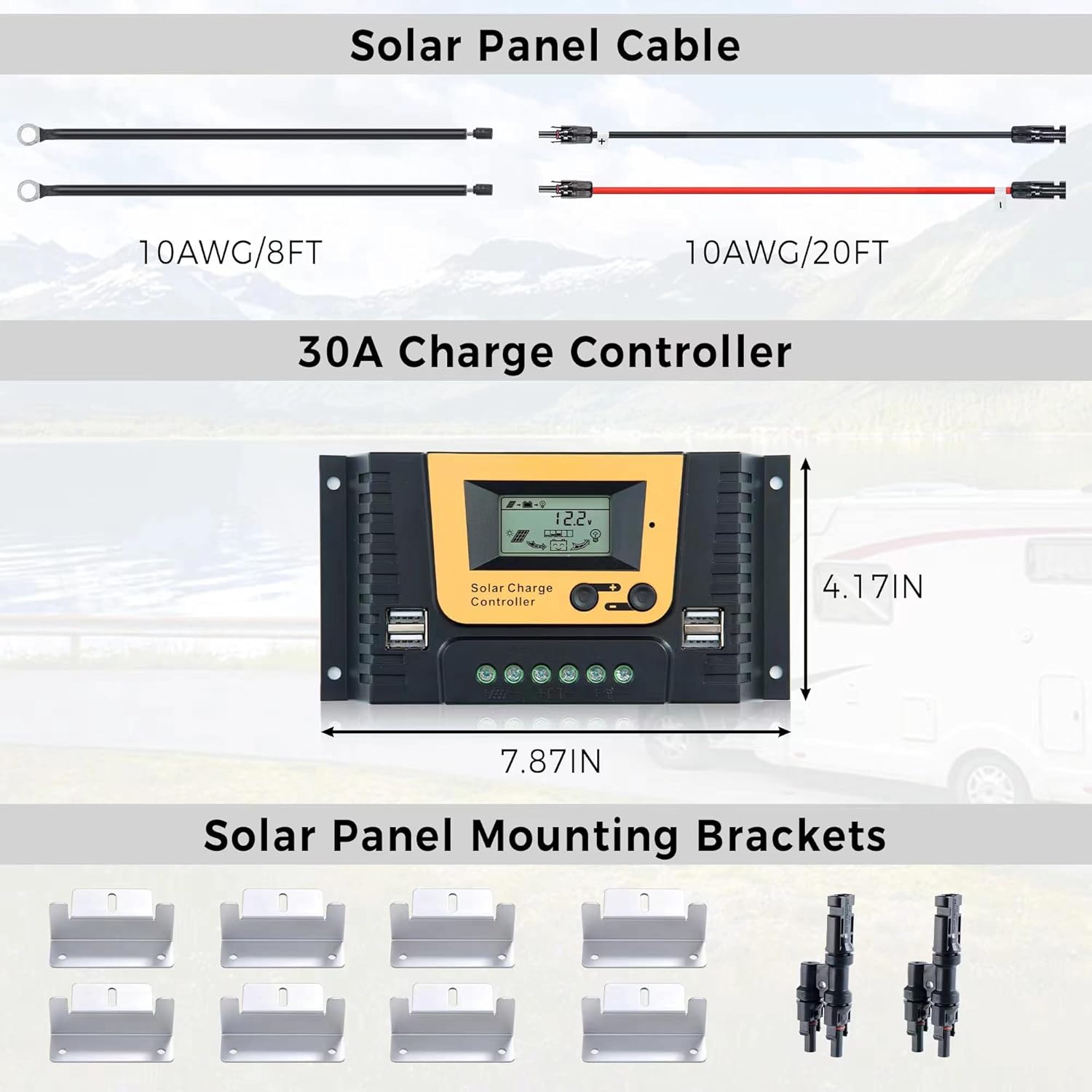
Figure 2: Detailed view of included accessories: solar panel cables, 30A charge controller, and mounting brackets.
3. Setup and Installation
The JJN solar panel kit is designed for easy installation. Each 12 Volt solar panel features pre-drilled holes for convenient mounting. Follow the steps below for proper wiring and setup.
3.1 Wiring Order
It is crucial to connect components in the correct order to prevent damage to the charge controller or battery. The recommended installation order is: Battery → Solar Panel → Load.
Connect the Battery: First, connect the battery to the charge controller. Ensure the positive (+) and negative (-) terminals are connected correctly. The charge controller will automatically detect the battery voltage (12V/24V).


Figure 3: Correct battery connections to the charge controller.
Connect the Solar Panel: After the battery is connected, connect the solar panels to the charge controller. Ensure proper polarity. The kit includes two pairs of wires for easy connection.

Figure 4: Connecting solar panel cables to the charge controller.
Connect the Load (Optional): Finally, connect any DC loads (e.g., lights, fans) to the load terminals of the charge controller. This allows the controller to manage power distribution and protect your devices.
3.2 Installation Video Guide
Video 1: This video demonstrates the unboxing, wiring order (battery, solar panel, load), and basic LCD display parameter settings for the JJN PWM Solar Charge Controller. It provides a visual guide for the installation process.
4. Operating Instructions
The 30A PWM charge controller included in your kit manages the charging process and provides essential system information via its LCD display.
4.1 LCD Display and Button Functions
The LCD screen displays real-time system status, including battery voltage, charging current, and load status. The buttons allow for browsing different parameters and setting various operational modes.

Figure 5: LCD Display and Key Description of the Solar Charge Controller.
- LCD Screen: Displays system parameters.
- Browse/Set Buttons: Used to navigate through display screens and adjust settings.
- USB Ports: Provide 5V/2A output for charging small electronic devices.
4.2 Power Generation and Efficiency
The JJN 200W solar panel kit utilizes 10BB solar cell design with a conversion rate of up to 22%. Each 100W solar panel can provide approximately 500 Wh of electricity per day, depending on sun availability and weather conditions. The upgraded half-cut cell technology enhances performance by reducing power loss and lowering panel temperature.

Figure 6: Internal structure and efficiency features of the solar panel.
5. Maintenance
Regular maintenance ensures optimal performance and longevity of your solar panel system.
- Cleaning: Periodically clean the surface of the solar panels with a soft cloth and mild, non-abrasive cleaner to remove dust, dirt, and debris. Ensure panels are cool before cleaning.
- Inspection: Regularly inspect all connections for tightness and corrosion. Check cables for any signs of wear or damage.
- Shading: Ensure no objects (trees, buildings) are casting shadows on the panels, as this can significantly reduce power output.
- Charge Controller: Keep the charge controller in a dry, well-ventilated area. Ensure its heat sink is not obstructed.
6. Troubleshooting
If you encounter issues with your solar panel kit, refer to the following common troubleshooting tips:
| Problem | Possible Cause | Solution |
|---|---|---|
| No power output from solar panels | Insufficient sunlight, dirty panels, loose connections, faulty panel. | Ensure direct sunlight, clean panels, check all wiring connections, test panel output. |
| Battery not charging | Incorrect wiring order, faulty charge controller, discharged battery. | Verify wiring order (Battery first), check controller display for errors, test battery voltage. |
| Load not receiving power | Load terminals incorrectly connected, battery too low, overload protection. | Check load wiring, ensure battery is sufficiently charged, reduce connected load. |
For persistent issues, please contact JJN customer support.
7. Specifications
| Feature | Detail |
|---|---|
| Brand | JJN |
| Model Number | 36-M6 |
| Material | Monocrystalline Silicon, Tempered Glass, Aluminum |
| Product Dimensions | 41"L x 23"W x 1.5"H |
| Item Weight | 36 Pounds |
| Efficiency | High Efficiency (up to 22%) |
| Connector Type | MC4 |
| AC Adapter Current (Charge Controller) | 30 Amps |
| Maximum Voltage | 12 Volts |
| Upper Temperature Rating | 149 Degrees Fahrenheit (65°C) |
| Maximum Power | 200 Watts (total for kit) |
| UPC | 766429467205 |
8. Warranty and Support
JJN offers an extra-long transferable power output warranty of 25 years for this solar panel kit. For any problems or inquiries, JJN Solar Panels Service is available to provide professional off-grid system solutions.
For support, please visit the official JJN website or contact their customer service department. Keep your purchase receipt for warranty claims.
Ask a question about this manual
Ask about setup, troubleshooting, compatibility, parts, safety, or missing instructions. Manuals+ will review the question and use this page’s manual context to help answer it.