
SIYOTEAM BQ02
SIYOTEAM Wireless Meat Thermometer BQ02 Instruction Manual
Model: BQ02
1. Introduction
Thank you for choosing the SIYOTEAM Wireless Meat Thermometer BQ02. This device is designed to help you achieve perfectly cooked meats every time, whether you're using an oven, grill, BBQ, or smoker. With its advanced wireless technology and user-friendly interface, monitoring your food's internal temperature has never been easier. This manual provides detailed instructions for setup, operation, and maintenance to ensure optimal performance and longevity of your thermometer.
2. Package Contents
Please verify that all items listed below are included in your package:
- 1 x SIYOTEAM Wireless Meat Thermometer (Main Unit)
- 1 x Wireless Distance Amplifier
- 1 x Meat Probe
- 1 x User Manual (this document)
- 1 x Sling
- 1 x Package Box

Figure 2.1: All components of the SIYOTEAM Wireless Meat Thermometer.
3. Product Features
The SIYOTEAM Wireless Meat Thermometer BQ02 offers a range of features designed for precision cooking:
- 200ft Long Remote Range: Features 2.4G WiFi stable transmission and auto-connect technology, allowing temperature tracking up to 200 feet away without an app or Bluetooth.
- Accurate Reading Sensor: Monitors internal meat temperature from -4°F to 212°F (-20°C to 100°C) with an accuracy of ±1.8°F (±1°C). The ceramic handle withstands ambient temperatures up to 527°F (300°C). The probe is IP67 waterproof.
- Pre-programmed Temperatures: Includes USDA preset temperatures for various meats and doneness levels, simplifying the cooking process.
- Simple 3-Step Use: Probe, distance amplifier, and host connect automatically. Simply insert the probe, choose meat type and doneness, and start cooking.
- Fast Response Time with Alarm: Provides ultra-fast 1-3 second response time for real-time temperature monitoring. An alarm sounds from the host when the target temperature is reached, preventing undercooking or overcooking. Customizable temperature and time alerts are also available.
- Versatile Application: Suitable for use with ovens, pans, ranges, cast iron skillets, smokers, grills, and Kamado grills.
4. Setup Guide
Follow these steps to set up your SIYOTEAM Wireless Meat Thermometer BQ02:
- Power On: Ensure the main thermometer unit and the wireless distance amplifier are powered on. The devices are designed to connect automatically.
- Probe Insertion: Carefully insert the stainless steel probe into the thickest part of the meat, ensuring the probe tip reaches the center. The probe should be inserted up to the safety notch line to ensure accurate internal temperature readings and to protect the ceramic handle from excessive heat. Avoid touching bones.
- Automatic Connection: The probe, distance amplifier, and main unit will automatically establish a connection. A successful connection will be indicated on the main unit's display.
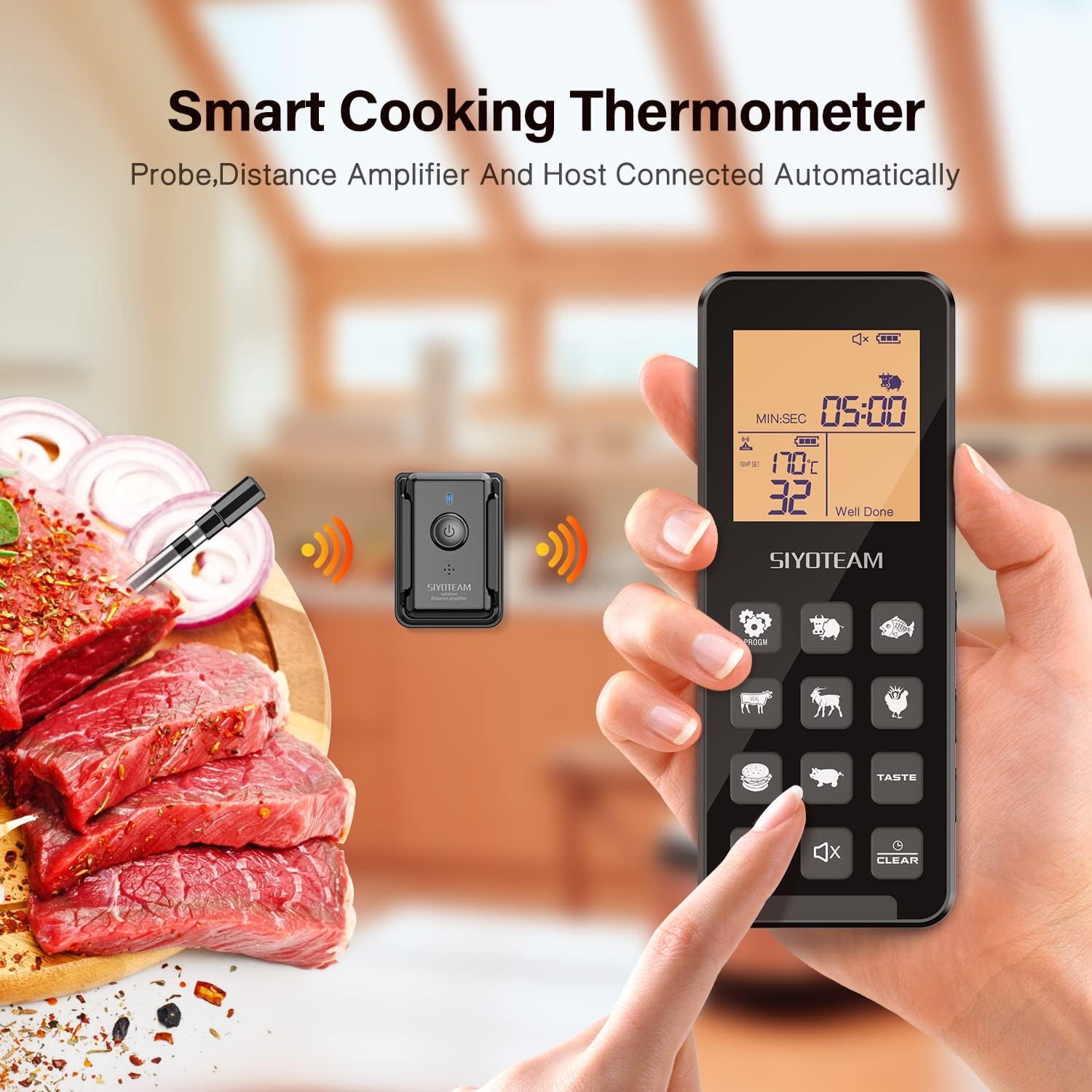
Figure 4.1: Automatic connection of the thermometer components.

Figure 4.2: Probe details, including the safety notch for correct insertion depth.
Video 4.1: Demonstration of probe insertion and automatic connection.
5. Operating Instructions
Once set up, operate your thermometer as follows:
- Select Meat Type: On the main unit, press the corresponding button to select the type of meat you are cooking (e.g., Beef, Pork, Chicken, Fish, Hamburger, Lamb, Veal).
- Set Doneness Level: After selecting the meat type, use the 'TASTE' button to cycle through the desired doneness levels (e.g., Rare, Medium Rare, Medium, Well Done). The display will show the target temperature for your selection.
- Monitor Temperature: Place your meat in the oven, grill, or smoker. The main unit will display the current internal temperature of the meat. The wireless distance amplifier extends the range, allowing you to monitor from up to 200 feet away.
- Alarm Notification: When the meat reaches the set target temperature, the main unit will emit an audible alarm, indicating that your food is ready.
- Custom Settings: You can also set custom target temperatures or countdown timers using the 'PROGM' and 'MIN/SEC' functions for specific recipes.

Figure 5.1: Main unit with preset meat and doneness options.

Figure 5.2: The wireless distance amplifier extends the monitoring range.
Video 5.1: Cooking demonstration using the SIYOTEAM Wireless Meat Thermometer for roast beef.
Video 5.2: User demonstration of grilling steaks with the wireless meat thermometer.
6. Maintenance and Care
To ensure the longevity and proper functioning of your thermometer:
- Cleaning: Wipe clean the main unit and amplifier with a damp cloth. The probe is IP67 waterproof and can be cleaned with soap and water, but avoid submerging the entire probe unit (especially the ceramic handle and cable connection) for extended periods.
- Storage: Store the thermometer in a dry place when not in use.
- Battery Replacement: The device requires batteries. Replace them as needed to maintain optimal performance.
7. Troubleshooting
If you encounter issues with your SIYOTEAM Wireless Meat Thermometer BQ02, refer to the following common solutions:
- No Connection/Signal Loss:
- Ensure both the main unit and the wireless distance amplifier are powered on and have sufficient battery.
- Verify that the amplifier is within the recommended range (within 6.5 feet) of the probe and the main unit is within 200 feet of the amplifier.
- Check for any obstructions that might interfere with the wireless signal.
- Inaccurate Temperature Readings:
- Ensure the probe is inserted correctly into the thickest part of the meat, avoiding bones, which can cause false readings.
- Verify the probe is inserted past the safety notch line.
- Confirm that the selected meat type and doneness level on the main unit match your cooking requirements.
- Display Not Working:
- Check the batteries in the main unit and replace them if necessary.
- Ensure the unit is powered on.
8. Specifications
Technical specifications for the SIYOTEAM Wireless Meat Thermometer BQ02:
- Internal Temperature Range: -4°F to 212°F (-20°C to 100°C)
- Withstand Ambient Temperature (Ceramic Handle): Up to 527°F (275°C)
- Countdown Setting: 00:00 - 99:00 minutes
- Accuracy: ±1.8°F (±1°C)
- Backlight Time: 180 seconds
- Waterproof Rating: IP67 (probe)
- Probe Dimensions: 119mm length, 6mm diameter
- Probe Insert Size: 77.5 mm (from probe tip to notch)
- Host Size: 140mm x 55mm x 22mm
- Connectivity Technology: 2.4G WiFi
- Display Type: LCD
- Outer Material: Stainless Steel
- Certifications: CE, FCC, FDA, RoHS
- Batteries Required: Yes
9. Warranty and Support
Your SIYOTEAM Wireless Meat Thermometer BQ02 comes with a manufacturer's warranty and dedicated support:
- Warranty: This product is covered by a 12-month manufacturer warranty from the date of purchase.
- Support: For any questions, technical assistance, or warranty claims, please contact our customer support team at support@siyoteam.com.
Related documentsBQ02


Ask a question about this manual
Ask about setup, troubleshooting, compatibility, parts, safety, or missing instructions. Manuals+ will review the question and use this page’s manual context to help answer it.