
Nespresso ENV90.B
Contents
Nespresso De'Longhi Vertuo Pop ENV90.B Automatic Coffee Machine User Manual
Model: ENV90.B | Brand: Nespresso
Introduction
The Nespresso De'Longhi Vertuo Pop ENV90.B is an automatic capsule coffee machine designed to deliver a high-quality coffee experience with convenience. Featuring innovative Centrifusion technology and smart connectivity, this machine offers versatility in cup sizes and ensures a perfect brew every time. This manual provides essential information for setup, operation, maintenance, and troubleshooting to help you get the most out of your Vertuo Pop machine.
Product Overview

Figure 1: Nespresso Vertuo Pop ENV90.B machine with a brewed coffee and capsules.

Figure 2: Key features of the Vertuo Pop, including Centrifusion technology and adaptable brewing.
The Vertuo Pop machine is characterized by its compact and modern design, available in various colors. It features a water tank, a capsule insertion mechanism, and a single button for operation. The machine utilizes Nespresso's patented Centrifusion technology, which spins the capsule at high speeds to extract coffee, ensuring a rich crema and full-bodied flavor.
- Centrifusion Technology: Extracts coffee by spinning the capsule up to 7,000 times per minute, blending ground coffee with water for optimal results.
- Versatility: Supports 4 cup sizes (Espresso, Double Espresso, Gran Lungo, Mug) using 3 different capsule sizes.
- Smart Connectivity: Bluetooth and Wi-Fi enabled for automatic software updates, enhancing the coffee experience.
- One-Touch Operation: Brews coffee or espresso with a single button press; capsules are automatically ejected after brewing.
Setup
1. Unboxing and Initial Placement
Carefully remove all components from the packaging. Ensure all protective films and packaging materials are removed from the machine. Place the machine on a clean, stable, and flat surface, away from heat sources and direct sunlight. Ensure adequate space around the machine for ventilation and access to the water tank and capsule container.
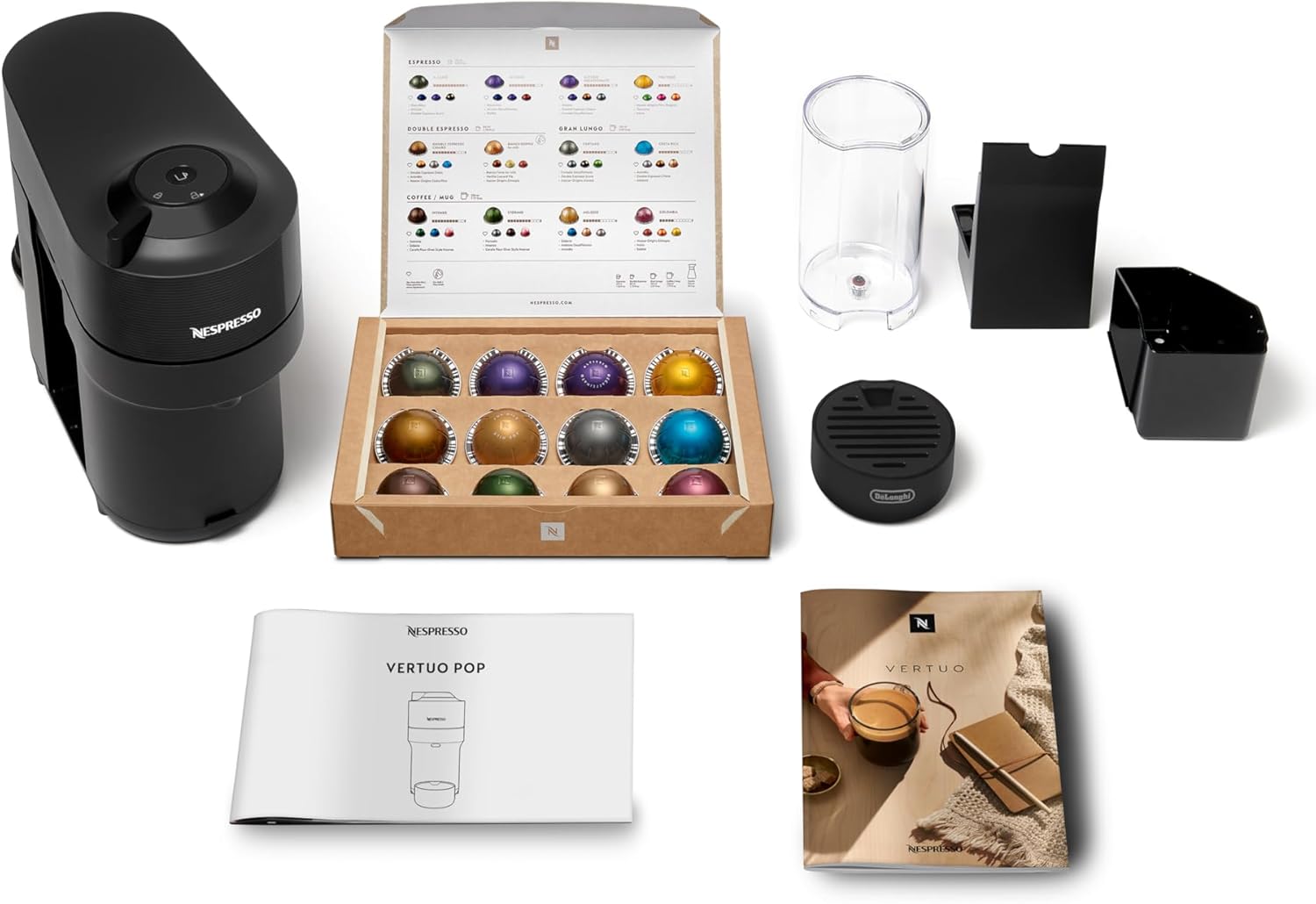
Figure 3: Included components with the Vertuo Pop machine.
2. Filling the Water Tank
Remove the water tank from the machine. Fill it with fresh, potable water up to the 'MAX' level indicator. Do not use sparkling water or any other liquids. Place the water tank back onto the machine securely.

Figure 4: Water tank on the side of the machine.
3. First Use and Rinsing
Before first use, or after a long period of inactivity, the machine should be rinsed. Ensure the water tank is filled. Place a container (at least 0.5L) under the coffee outlet. Close the machine head. Press the coffee button three times quickly. The machine will start a rinsing cycle, dispensing hot water. Repeat this process until the water tank is empty. Refill the water tank with fresh water.
Operating Instructions
1. Powering On
Plug the machine into a grounded power outlet. Press the coffee button to turn on the machine. The button will blink while heating up and become steady when ready (approximately 30 seconds).
2. Brewing Coffee
- Lift the machine head to open.
- Insert a Nespresso Vertuo capsule into the capsule holder. Ensure it is correctly seated.
- Close the machine head firmly. The machine will automatically read the barcode on the capsule.
- Place a cup of appropriate size under the coffee outlet.
- Press the coffee button once. The machine will begin brewing. The brewing process will stop automatically once the optimal volume for the selected capsule is reached.
- After brewing, the capsule will be automatically ejected into the used capsule container.

Figure 5: Opening the machine head to insert a capsule.

Figure 6: Top view of the machine with the brew button and lock indicator.
3. Capsule Compatibility
The Nespresso Vertuo Pop machine is exclusively designed for Nespresso Vertuo capsules. OriginalLine capsules are not compatible with this machine due to the different brewing technology and capsule design.

Figure 7: Vertuo capsule compatibility information.
4. Smart Connectivity
The Vertuo Pop machine features Bluetooth and Wi-Fi connectivity. This allows for automatic software updates, ensuring your machine always has the latest features and optimal performance. You can also connect to the Nespresso app for additional functionalities, such as managing your capsule stock, ordering new capsules, and accessing personalized recommendations.
Maintenance
1. Daily Cleaning
- Water Tank: Empty and rinse the water tank daily. Refill with fresh water.
- Drip Tray and Used Capsule Container: Empty and clean the drip tray and used capsule container daily. Wash them with warm water and a mild detergent.
- Coffee Outlet: Wipe the coffee outlet with a damp cloth.
2. Descaling
Descaling is crucial for maintaining machine performance and coffee quality. The frequency depends on water hardness and usage. The machine will indicate when descaling is needed (refer to the machine's light indicators for specific signals). Use only Nespresso descaling solution. Follow the instructions provided with the descaling kit or refer to the Nespresso website for detailed steps.
3. Storage
If the machine will not be used for an extended period, empty the water tank and used capsule container. Clean the machine thoroughly. Store it in a dry, dust-free place.
Troubleshooting
| Problem | Possible Cause | Solution |
|---|---|---|
| No coffee flows, or only a few drops. | Water tank empty; machine needs descaling; coffee outlet blocked. | Refill water tank; perform descaling procedure; clean coffee outlet. |
| Coffee is not hot enough. | Cups not preheated; machine needs descaling. | Preheat cups with hot water; perform descaling procedure. |
| Machine leaks. | Water tank not correctly positioned; damaged water tank. | Ensure water tank is securely in place; contact Nespresso support if damaged. |
| Machine lights are blinking red. | Error state; descaling required; machine needs rinsing. | Refer to the user manual for specific light patterns; perform descaling or rinsing cycle. |
For more detailed troubleshooting or persistent issues, please refer to the full Nespresso Vertuo Pop user manual or contact Nespresso customer support.
Specifications
- Brand: Nespresso
- Model Number: ENV90.B
- Color: Licorice Black
- Product Dimensions: 42.6 x 13.6 x 25 cm (Length x Width x Height)
- Product Weight: 4 kg
- Special Features: Smart Connectivity (Bluetooth, Wi-Fi)
- Coffee Machine Type: Espresso Machine
- Filter Type: Metal
- Specific Uses: Vertuo Line capsules
Warranty and Support
Nespresso products come with a standard manufacturer's warranty. For specific warranty terms and conditions, please refer to the documentation included with your machine or visit the official Nespresso website. In case of any issues, technical support, or warranty claims, please contact Nespresso customer service directly. You can find contact information on the Nespresso website or in the welcome kit provided with your machine.
For further assistance, visit the official Nespresso support page: www.nespresso.com/support
Ask a question about this manual
Ask about setup, troubleshooting, compatibility, parts, safety, or missing instructions. Manuals+ will review the question and use this page’s manual context to help answer it.