
1. Introduction
Thank you for choosing the BRCOVAN M23-C3 Metal Anti-Theft Motorcycle Phone Mount. This mount is designed to securely hold your smartphone on various vehicles, including motorcycles, bicycles, ATVs, UTVs, and scooters. Constructed from durable 6061-T6 aluminum alloy, it features a vibration dampener and a high-speed secure lock mechanism to protect your device during rides. This manual provides essential information for proper installation, operation, and maintenance to ensure optimal performance and longevity of your phone mount.

Image 1.1: Overview of the BRCOVAN Motorcycle Phone Mount.
2. Package Contents
Please verify that all components are present in the package:
- (1) Aluminum Alloy Phone Holder Main Body with Vibration Dampener
- (1) Handlebar Clamp Base with 1'' Ball
- (1) B Size 1'' Ball Double Socket Arm
- (1) Special Wrench

Image 2.1: Exploded view of the phone mount components, including the main body, double socket arm, and clamp base.
3. Setup and Installation
Follow these steps to install your BRCOVAN phone mount securely:
- Attach the Handlebar Clamp Base: Select a suitable position on your handlebar or round rail. The clamp base fits handlebars with a diameter of 0.5 inches to 1.75 inches. Use the provided special wrench to tighten the safety knob on the clamp base, ensuring it is firmly secured to the handlebar. The clamp features built-in TPU pads for stable gripping and protection of the mounting surface.
- Connect the Double Socket Arm: Attach one end of the B Size 1'' Ball Double Socket Arm to the ball on the handlebar clamp base.
- Attach the Phone Holder Main Body: Connect the other end of the double socket arm to the ball on the back of the phone holder main body.
- Adjust and Secure: Use the special wrench to tighten the safety knob on the double socket arm. This anti-theft design prevents easy removal of the mount. Adjust the angle and orientation of the phone holder to your preferred viewing position.
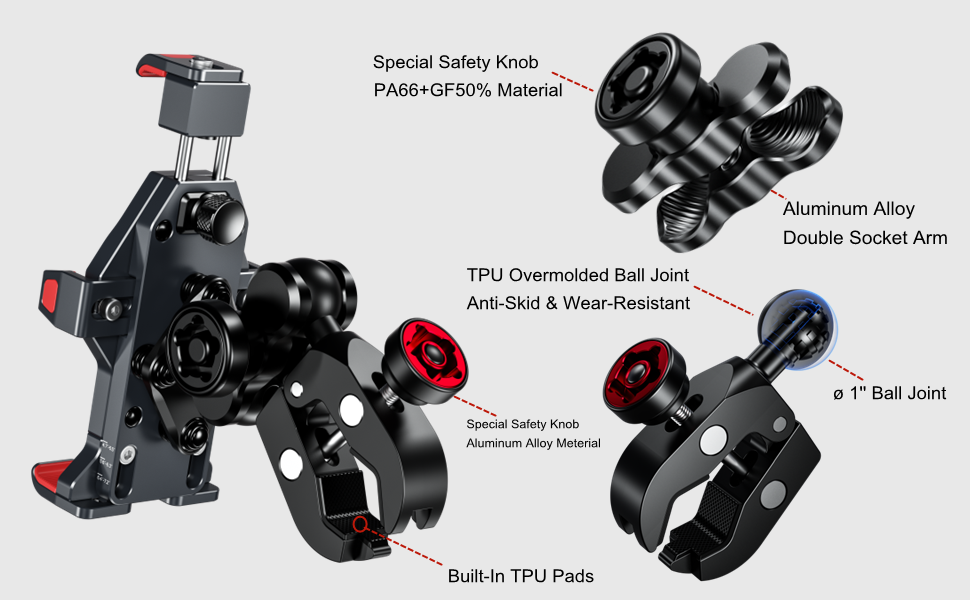
Image 3.1: Illustration of the aluminum alloy handlebar clamp base and its secure attachment.
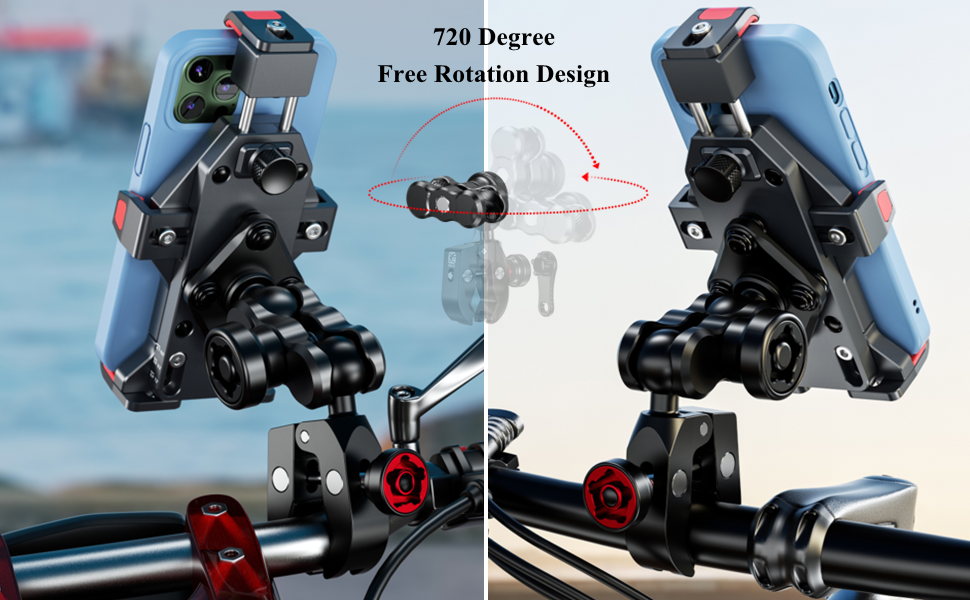
Image 3.2: The phone mount securely installed on a handlebar, suitable for various vehicles.
4. Operating Instructions
The BRCOVAN phone mount is designed for convenient one-handed operation and secure phone retention.
- Inserting Your Phone: Press the side release buttons or gently push your phone into the mount. The one-push automatic lock mechanism will secure your phone in place.
- Securing Your Phone: After placing your phone in the mount, tighten the high-speed secure lock knob located on the back of the phone holder. This ensures your mobile phone is securely attached, even on bumpy roads or at high speeds.
- Adjusting Phone Position: The mount features a 720-degree free rotation design, allowing you to easily adjust your smartphone to horizontal or vertical screen orientation for optimal viewing.
- Removing Your Phone: To remove your phone, loosen the high-speed secure lock knob, then press the quick-release mechanism to disengage the phone.

Image 4.1: Demonstrates the one-handed operation for inserting and removing a phone.
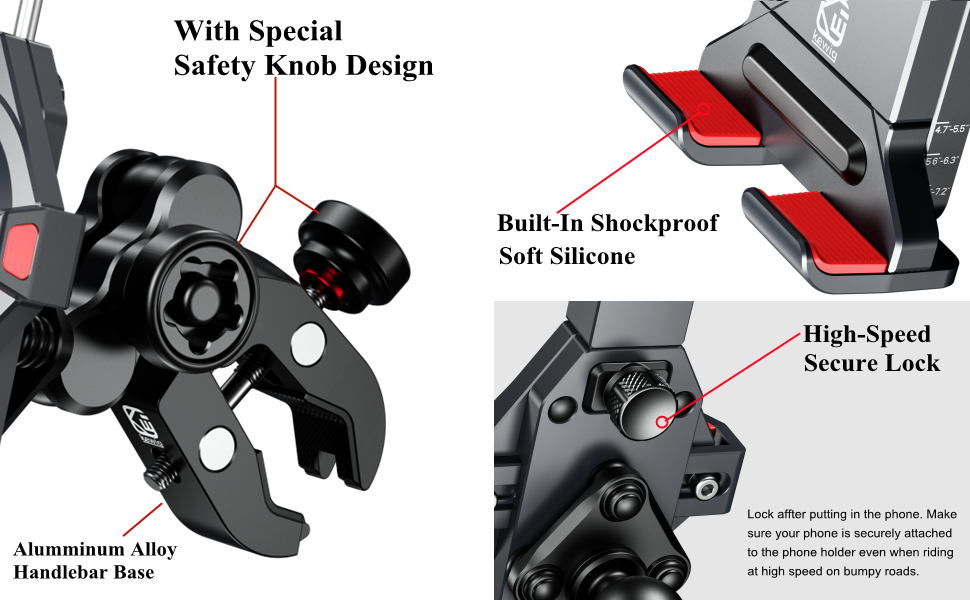
Image 4.2: Close-up of the high-speed secure lock knob for enhanced phone security.
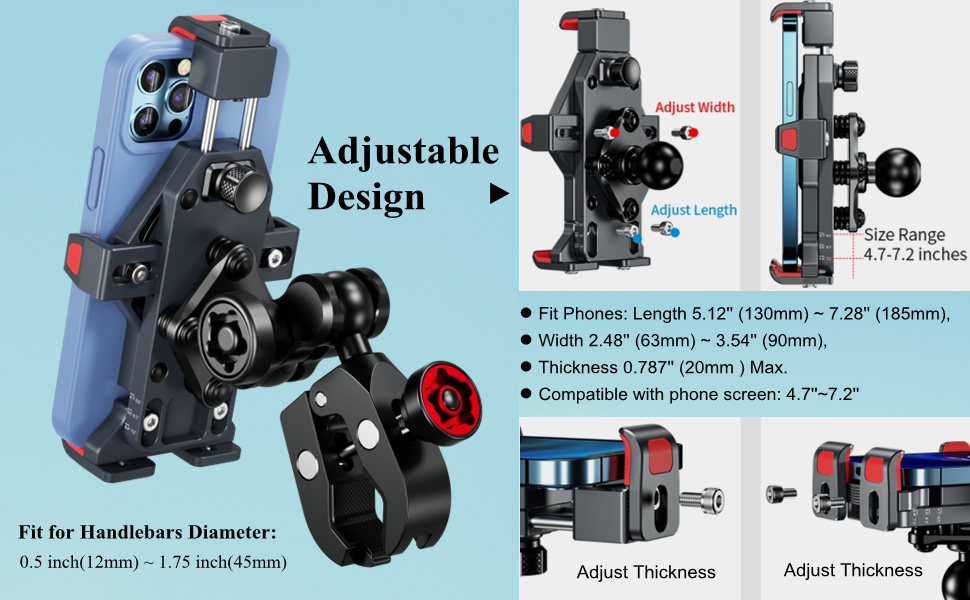
Image 4.3: The adjustable design accommodates various phone dimensions.
5. Vibration Dampener
The integrated vibration dampener significantly reduces vibrations transmitted to your smartphone by up to 90%. This feature is crucial for protecting your phone's internal components, especially the camera, from damage caused by prolonged exposure to vehicle vibrations.

Image 5.1: Depiction of the vibration dampening system within the mount.
6. Maintenance
To ensure the longevity and optimal performance of your BRCOVAN phone mount, follow these simple maintenance guidelines:
- Cleaning: Wipe the mount regularly with a soft, damp cloth to remove dust and grime. Avoid using harsh chemicals or abrasive cleaners.
- Inspection: Periodically check all screws and knobs for tightness. Ensure the handlebar clamp and double socket arm are securely fastened.
- Lubrication: If any moving parts feel stiff, apply a small amount of silicone-based lubricant to ensure smooth operation.
- Storage: If not in use for extended periods, store the mount in a clean, dry place away from direct sunlight.
7. Troubleshooting
If you encounter any issues with your phone mount, refer to the following common solutions:
- Mount feels loose: Ensure all safety knobs on the handlebar clamp base and double socket arm are fully tightened using the special wrench.
- Phone not secure in holder: Verify that the high-speed secure lock knob on the back of the phone holder is tightened after inserting your phone. Check that your phone's dimensions are within the compatible range (Length 5.12''-7.28'', Width 2.48''-3.54'', Thickness 0.787'' Max).
- Difficulty adjusting angle: Loosen the safety knob on the double socket arm slightly to adjust, then re-tighten firmly.
- Excessive vibration: Confirm that the vibration dampener is correctly integrated and that the mount is installed on a stable part of the handlebar.
If problems persist, please contact customer support.
8. Specifications
| Feature | Detail |
|---|---|
| Brand | BRCOVAN |
| Model Name | M23-C3 Black |
| Main Body Material | 6061-T6 Aluminum Alloy |
| Compatible Phone Length | 5.12'' (130mm) ~ 7.28'' (185mm) |
| Compatible Phone Width | 2.48'' (63mm) ~ 3.54'' (90mm) |
| Compatible Phone Thickness | 0.787'' (20mm) Max |
| Compatible Phone Screen Size | 4.7''-7.2'' |
| Handlebar Clamp Diameter | 0.5'' to 1.75'' |
| Weight Capacity Maximum | 0.72 kg |
| Item Weight | 0.72 kg |
| Water Resistance Level | Waterproof |
| Additional Features | Vibration Dampener, High-Speed Secure Lock, Anti-Theft Design |
9. Warranty Information
The BRCOVAN M23-C3 Metal Anti-Theft Motorcycle Phone Mount comes with a 1-year warranty from the date of purchase. This warranty covers manufacturing defects and material flaws under normal use. It does not cover damage resulting from misuse, accidents, unauthorized modifications, or normal wear and tear. Please retain your proof of purchase for warranty claims.
10. Support
For further assistance, technical support, or warranty inquiries, please contact BRCOVAN customer service through the retailer where you purchased the product or visit the official BRCOVAN website. Please have your model number (M23-C3) and purchase details ready when contacting support.
You can visit the BRCOVAN Store on Amazon for more information: BRCOVAN Store