
1. Introduction
The Catalinbread Callisto MKII is an analog chorus pedal designed to deliver classic trembling warmth and versatile modulation effects. This updated version retains the robust engine of the original while incorporating additional features for enhanced sonic capabilities. It offers a range of sounds from subtle chorus to pitch vibrato and even flanger-like textures, all within an intuitive control layout.

Image 1: Front view of the Catalinbread Callisto MKII Chorus Pedal, showcasing its blue enclosure and control knobs.
2. Key Features
- 100% Analog Circuitry: Provides classic, warm, and organic modulation tones.
- Versatile Mix Control: Allows adjustment from 100% dry to 100% wet, enabling pure pitch vibrato at maximum settings.
- Expanded Rate and Depth Controls: Offers a wide range of modulation speeds and intensities for both lead and rhythm applications.
- Added Feedback Control: Introduces regenerative tones by feeding signal back into the circuit, creating unique chorus and flanger-like effects.
- Compact and Durable Design: Housed in a sturdy enclosure suitable for pedalboard integration.
3. Controls and Functions
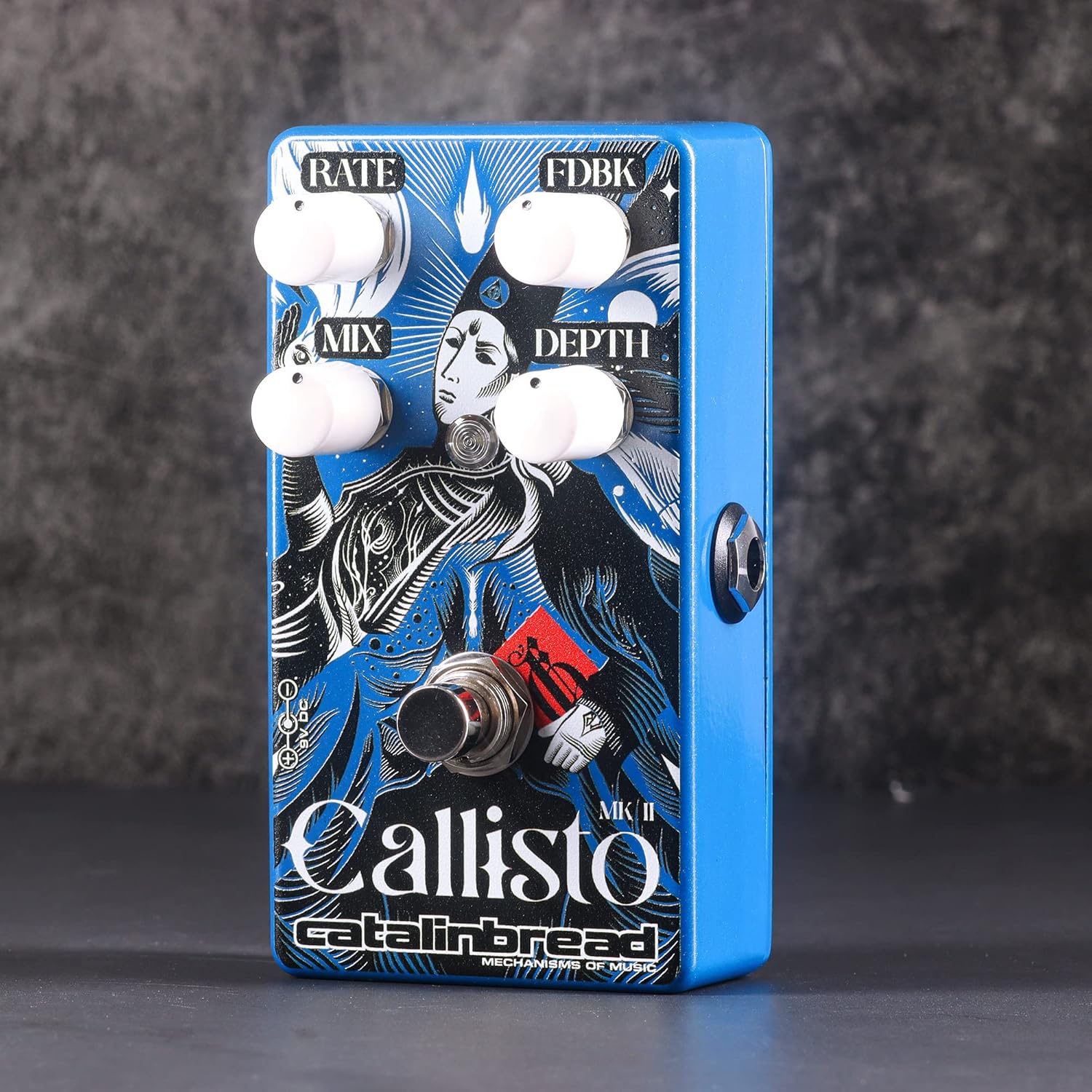
Image 2: Angled view of the pedal, highlighting the four control knobs and footswitch.
- RATE: Controls the speed of the chorus or vibrato effect. Turning clockwise increases the modulation speed.
- FDBK (Feedback): Adjusts the amount of signal fed back into the circuit. Higher settings introduce regenerative tones, creating a more intense, almost flanger-like sound.
- MIX: Blends the dry (unaffected) signal with the wet (effected) signal. Fully counter-clockwise is 100% dry, fully clockwise is 100% wet, resulting in a pure pitch vibrato effect.
- DEPTH: Determines the intensity or sweep range of the modulation. Turning clockwise increases the depth of the chorus effect.
- Footswitch: Toggles the effect on or off. When the effect is active, an LED indicator typically illuminates.
4. Setup

Image 3: Side view of the pedal, illustrating the 1/4-inch audio input and output jacks.
- Power Connection: Connect a standard 9V DC power supply (center-negative) to the power input jack on the pedal. Ensure the power supply meets the specified voltage and polarity requirements to prevent damage.
- Input Connection: Connect your instrument (e.g., guitar) to the input jack on the right side of the pedal using a standard 1/4-inch instrument cable.
- Output Connection: Connect the output jack on the left side of the pedal to your amplifier or the next pedal in your signal chain using a standard 1/4-inch instrument cable.
- Signal Chain Placement: Chorus pedals are typically placed after drive/distortion pedals and before time-based effects like delay and reverb for optimal sound. Experiment with placement to find your preferred tone.
5. Operating Instructions
Once the pedal is correctly set up and powered, you can begin to explore its sonic capabilities:
- Engaging the Effect: Press the footswitch to activate the chorus effect. The LED indicator will light up. Press it again to bypass the effect.
- Adjusting Chorus: Start with the MIX control at noon, and adjust RATE and DEPTH to achieve your desired chorus intensity and speed. Lower RATE and DEPTH settings provide subtle thickening, while higher settings create more pronounced wobble.
- Exploring Vibrato: Turn the MIX control fully clockwise to achieve a pure pitch vibrato effect. Then, use the RATE and DEPTH controls to dial in the desired vibrato speed and intensity.
- Utilizing Feedback: Introduce the FDBK control to add regenerative qualities. Experiment with this knob, especially at higher DEPTH and RATE settings, to create unique swirling and flanger-like textures.
- Fine-Tuning: Adjust all four controls in conjunction to discover the wide array of sounds available, from classic shimmering chorus to disorienting tape-like warbles.
6. Specifications
| Specification | Value |
|---|---|
| Model Number | CALLISTOMKII |
| Item Weight | 12.2 ounces (approx. 346 grams) |
| Product Dimensions | 5 x 3 x 3 inches (approx. 12.7 x 7.6 x 7.6 cm) |
| Power Source | Corded Electric (9V DC, center-negative) |
| Voltage | 9 Volts |
| Signal Format | Analog |
| Hardware Interface | 1/4-inch Audio |
| Color | Blue |
7. Maintenance
To ensure the longevity and optimal performance of your Catalinbread Callisto MKII pedal, follow these maintenance guidelines:
- Cleaning: Use a soft, dry cloth to clean the pedal's exterior. Avoid abrasive cleaners or solvents, which can damage the finish.
- Storage: Store the pedal in a cool, dry place away from direct sunlight, extreme temperatures, and high humidity.
- Connections: Periodically check all cable connections for wear and tear. Ensure jacks are free of dust and debris.
- Power Supply: Always use a regulated 9V DC center-negative power supply. Incorrect power can damage the unit.
8. Troubleshooting
If you encounter issues with your Callisto MKII, consider the following troubleshooting steps:
- No Sound:
- Check all cable connections (instrument, amplifier, power) to ensure they are secure.
- Verify that the power supply is correctly connected and providing the correct voltage (9V DC, center-negative).
- Test with different cables and a different power supply if possible.
- Ensure your instrument and amplifier are working correctly.
- Unwanted Noise (Humming/Buzzing):
- Ensure you are using a high-quality, isolated power supply. Daisy-chaining with other pedals can sometimes introduce noise.
- Check for faulty cables.
- Move the pedal away from power transformers or other sources of electromagnetic interference.
- Effect Not Engaging/Bypassing:
- Ensure the footswitch is functioning correctly.
- Check power supply. An underpowered pedal may not function correctly.
If these steps do not resolve the issue, please contact Catalinbread customer support or an authorized service center.
9. Warranty and Support
For detailed information regarding the warranty policy for your Catalinbread Callisto MKII Chorus Pedal, please refer to the official Catalinbread website or contact your authorized dealer. Warranty terms typically cover manufacturing defects for a specified period from the date of purchase.
For technical support, service inquiries, or further assistance, please visit the Catalinbread Store or their official website.
