
TOTAL TVLI2006
TOTAL Portable 20V Lithium Battery Vacuum Cleaner
Model: TVLI2006
Brand: TOTAL
Introduction
This manual provides essential information for the safe and efficient operation, maintenance, and troubleshooting of your TOTAL Portable 20V Lithium Battery Vacuum Cleaner, model TVLI2006. Please read this manual thoroughly before first use and retain it for future reference.
Safety Instructions
Always observe basic safety precautions when using electrical appliances to reduce the risk of fire, electric shock, or injury.
- Do not operate the vacuum cleaner without the dust cup and filter properly installed.
- Do not pick up flammable or combustible liquids, such as gasoline, or use in areas where they may be present.
- Do not pick up anything that is burning or smoking, such as cigarettes, matches, or hot ashes.
- Keep hair, loose clothing, fingers, and all parts of the body away from openings and moving parts.
- Use only as described in this manual. Use only manufacturer's recommended attachments.
- Turn off all controls before unplugging.
- Exercise extreme care when cleaning on stairs.
- Do not allow to be used as a toy. Close attention is necessary when used by or near children.
- The battery pack is not fully charged upon purchase. Before first use, charge the battery pack completely.
- Store the appliance indoors in a cool, dry place.
Product Overview
The TOTAL TVLI2006 is a portable, cordless vacuum cleaner designed for efficient cleaning of various surfaces. Below is an illustration of the main components.
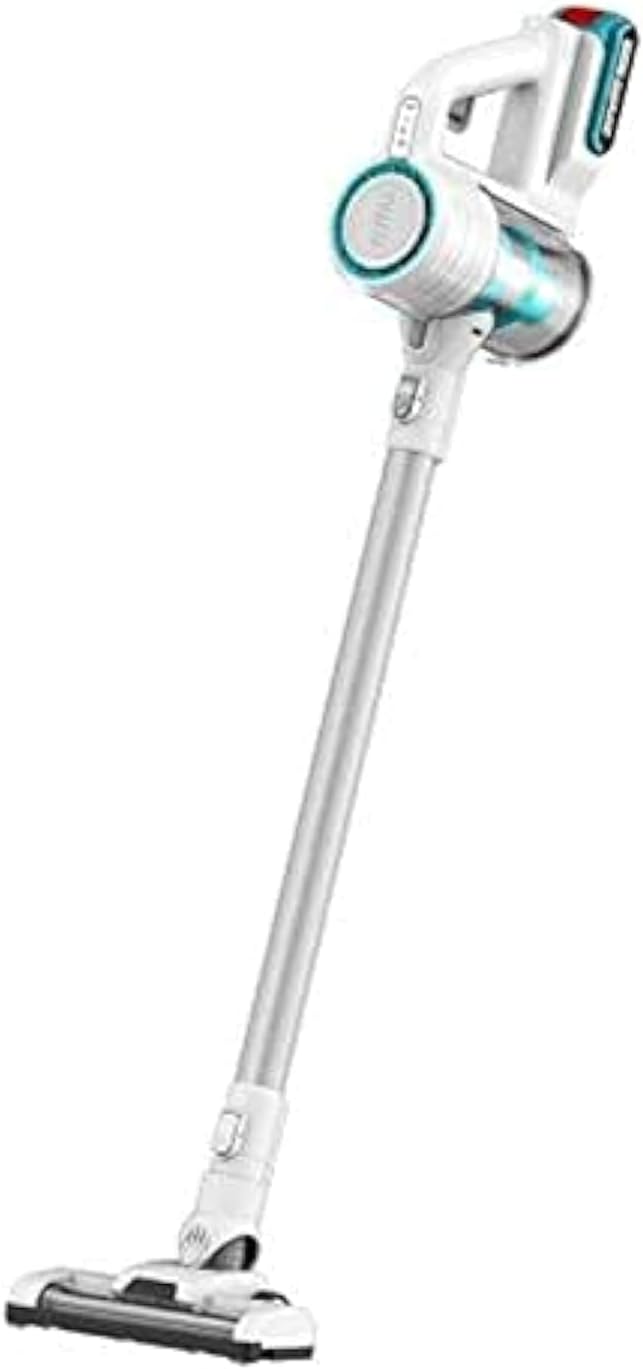
Figure 1: TOTAL TVLI2006 Portable Vacuum Cleaner showing the main unit, extension wand, and floor brush attachment.
Key Components:
- Main Unit: Contains the motor, dust cup, and control buttons.
- Dust Cup: Collects debris and houses the filter.
- Filter: Traps fine dust particles. (Cartridge type)
- Extension Wand: Connects the main unit to the floor brush for extended reach.
- Floor Brush: Attachment for cleaning floors. Suitable for hard floors or low-pile carpets.
- Battery Pack: 20V Lithium-Ion battery, provides cordless power.
- Charger: For recharging the battery pack.
Setup
1. Charging the Battery:
- Ensure the battery pack is securely inserted into the charger.
- Plug the charger into a standard electrical outlet.
- Allow the battery to charge fully before first use. Charging indicators on the battery or charger will signal completion.
2. Assembly:
- Insert the extension wand into the main unit until it clicks into place.
- Attach the floor brush to the other end of the extension wand, ensuring it is firmly connected.
- Ensure the dust cup and filter are correctly installed in the main unit.
- Insert the charged battery pack into the designated slot on the main unit until it locks securely.
Operating Instructions
1. Power On/Off:
- To turn on the vacuum cleaner, press the power button located on the main unit.
- To turn off, press the power button again.
2. Cleaning Surfaces:
- For hard floors or low-pile carpets, use the floor brush attachment.
- For handheld cleaning of smaller areas, upholstery, or car interiors, detach the extension wand and floor brush, and use the main unit directly or with other compatible attachments (if included, not specified in data).
- Move the vacuum cleaner slowly over the surface to allow for effective debris collection.
3. Battery Life:
The 20V Lithium-Ion battery provides cordless operation. Battery life will vary depending on the cleaning mode and surface type. Recharge the battery when suction power decreases or the battery indicator shows low charge.
Maintenance
Regular maintenance ensures optimal performance and extends the lifespan of your vacuum cleaner.
1. Emptying the Dust Cup:
- Ensure the vacuum cleaner is turned off and the battery is removed.
- Locate the dust cup release button and detach the dust cup from the main unit.
- Empty the contents of the dust cup into a waste bin.
- Reattach the dust cup securely to the main unit.
2. Cleaning the Filter:
The cartridge filter should be cleaned regularly, ideally after every few uses or when suction power noticeably decreases.
- Remove the dust cup as described above.
- Carefully remove the filter from the dust cup.
- Tap the filter gently over a waste bin to dislodge dust and debris. For a more thorough cleaning, rinse the filter under cool running water.
- Allow the filter to air dry completely for at least 24 hours before reinserting it. Do not use the vacuum cleaner with a wet filter.
- Once dry, place the filter back into the dust cup and reattach the dust cup to the main unit.
3. General Cleaning:
- Wipe the exterior of the vacuum cleaner with a soft, damp cloth. Do not use harsh detergents or solvents.
- Check the floor brush for tangled hair or debris and remove as necessary.
Troubleshooting
| Problem | Possible Cause | Solution |
|---|---|---|
| Vacuum cleaner does not turn on. | Battery not charged or not properly inserted. | Ensure battery is fully charged and securely inserted. |
| Low suction power. | Dust cup is full; filter is clogged; blockage in nozzle/hose. | Empty dust cup. Clean or replace filter. Check for and remove any blockages. |
| Vacuum cleaner stops during operation. | Battery is depleted; motor overheating due to blockage. | Recharge battery. Turn off and allow motor to cool down, then check for blockages. |
| Debris falls out of nozzle after turning off. | Dust cup is too full. | Empty the dust cup before it reaches maximum capacity. |
Specifications
| Model | TVLI2006 |
| Brand | TOTAL |
| Voltage | 20 Volts |
| Wattage | 40 watts |
| Noise Level | 70 dB |
| Item Weight | 3.34 Kilograms |
| Capacity | 0.8 Liters |
| Power Source Type | Battery Powered |
| Included Components | Battery |
| Filter Type | Cartridge |
| Special Features | Compact, Portable |
| Cordless | Yes |
| Surface Recommendation | Hard Floor or Low-pile Carpet |
Warranty and Support
For warranty information, technical support, or service inquiries, please contact TOTAL customer service or refer to the warranty card included with your product. Keep your purchase receipt as proof of purchase.
For further assistance, visit the official TOTAL website or contact their authorized service centers in your region.
Related documentsTVLI2006

Ask a question about this manual
Ask about setup, troubleshooting, compatibility, parts, safety, or missing instructions. Manuals+ will review the question and use this page’s manual context to help answer it.