1. Product Overview
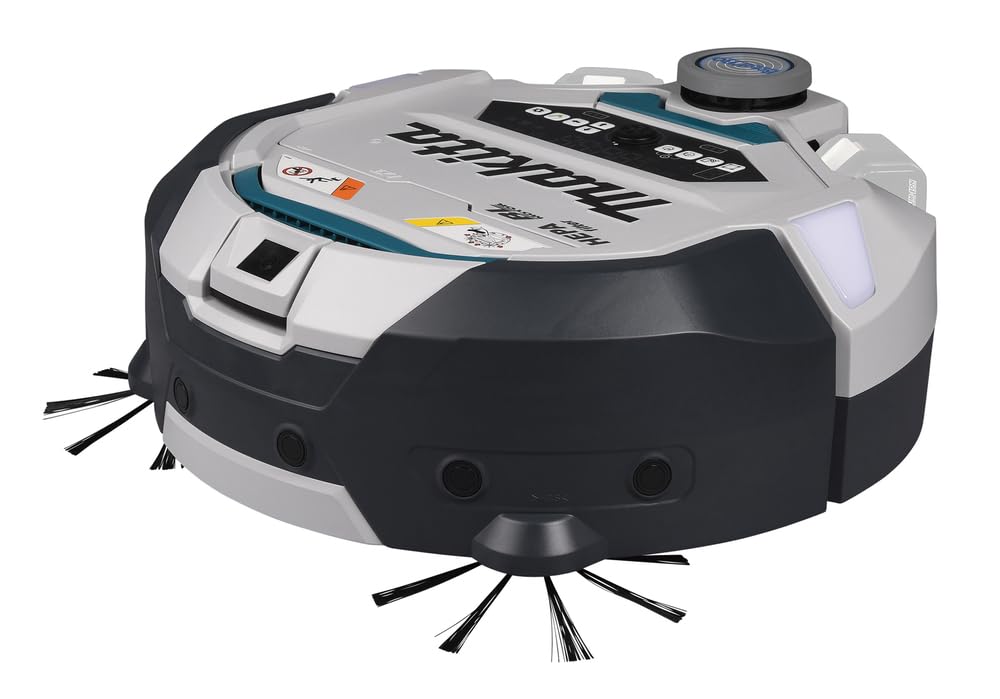
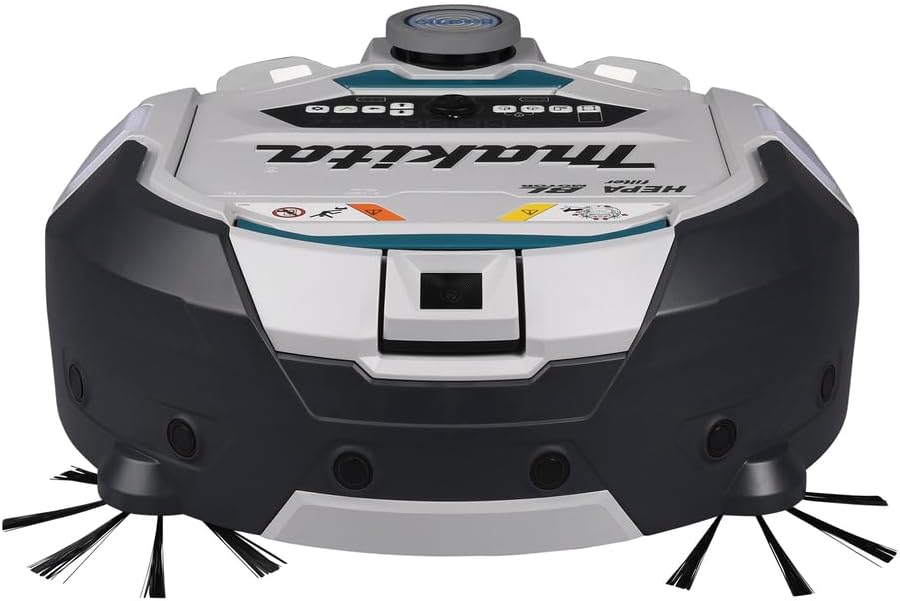
The Makita DRC300Z is an 18V X2 LXT Brushless Cordless Smart Robotic HEPA Filter Vacuum designed for automated cleaning of large flooring spaces in commercial environments. It features a brushless motor for extended run time and tool life. The vacuum utilizes LiDAR sensor technology and a front camera sensor for room mapping and obstacle detection, enabling efficient cleaning across areas up to 100,000 square feet across five rooms. It operates with 18V LXT batteries (sold separately) and offers up to 200 minutes of continuous operation with two 5.0Ah batteries.
2. Safety Information
General Safety Precautions
- Read all instructions before using the appliance.
- Do not allow children to operate the vacuum. Supervise children and pets when the vacuum is in operation.
- Do not use the vacuum on wet surfaces or to pick up liquids.
- Ensure the battery compartment is securely closed before operation.
- Do not operate the vacuum if it is damaged or malfunctioning. Contact customer support for assistance.
- Keep hair, loose clothing, fingers, and all parts of the body away from openings and moving parts.
- Only use Makita 18V LXT batteries and chargers.
3. Package Contents
The Makita DRC300Z is sold as a tool-only unit. Batteries and charger are not included. The package typically includes:
- Makita DRC300Z Robotic HEPA Filter Vacuum (Tool Only)
- Main Brush Roller (Part No. 191P20-2)
- Main Brush Cover, DCR300 (Part No. 191P24-4)
- HEPA Filter, DRC300 (Part No. 191P31-7)
4. Setup
4.1 Battery Installation
The DRC300Z operates using one or two 18V LXT Lithium-Ion batteries. For optimal performance and extended run time, two batteries are recommended.
- Open the battery compartment cover located on the top of the vacuum.
- Align the battery with the battery slot and slide it in until it clicks into place.
- If using two batteries, repeat for the second slot.
- Close the battery compartment cover securely.

4.2 App Connection and Room Mapping
The DRC300Z connects to a smartphone via a dedicated app for smart cleaning features, including LiDAR mapping. This allows the vacuum to map and save up to five rooms, covering over 100,000 square feet.
- Download and install the official Makita robotic vacuum app on your smartphone.
- Follow the in-app instructions to pair your DRC300Z with your smartphone.
- Initiate the mapping process through the app. The vacuum will use its LiDAR sensor to create a detailed map of your cleaning area.
- Once mapped, you can define up to 100 programmable boundary lines per room to restrict the vacuum's travel.
5. Operating Instructions
5.1 Navigation Options
The DRC300Z offers two primary navigation modes:
- Mapping Pattern Navigation: For efficient cleaning of registered rooms. The vacuum follows a systematic path based on the stored map.
- Free Mode: For immediate cleaning without requiring a pre-registered room map. The vacuum navigates randomly until the battery is low or the area is covered.
5.2 Cleaning Modes
Select the appropriate cleaning mode based on the debris type:
- Main Brush Only: Ideal for collecting large debris.
- Main Brush Plus Vacuum: For comprehensive cleaning, collecting both large debris and small particles.
5.3 Obstacle Detection
The vacuum is equipped with six ultrasonic sensors, one bumper sensor, and one LiDAR sensor (2D) for robust obstacle detection, allowing it to navigate around furniture and other impediments.
5.4 Remote Control
A remote control is included, providing wireless capability to set most operating functions, including the location beacon feature.
6. Maintenance
Regular maintenance ensures optimal performance and longevity of your Makita DRC300Z vacuum. All cleaning components are removable and washable.
6.1 Dust Collection Box and HEPA Filter
The debris collection box has a large capacity (3.1 quarts / 0.79 gallons) and is easily accessible for emptying. The filtration system includes a HEPA filter to capture micro dust particulates.
- Open the top cover of the vacuum.
- Lift the dust collection box by its handle.
- Empty the contents into a waste receptacle.
- Remove the HEPA filter from the dust box. Clean the filter by tapping it gently or rinsing with water if heavily soiled (ensure it is completely dry before reinstallation).
- Reinstall the HEPA filter and dust box, then close the top cover.
6.2 Main Brush Roller
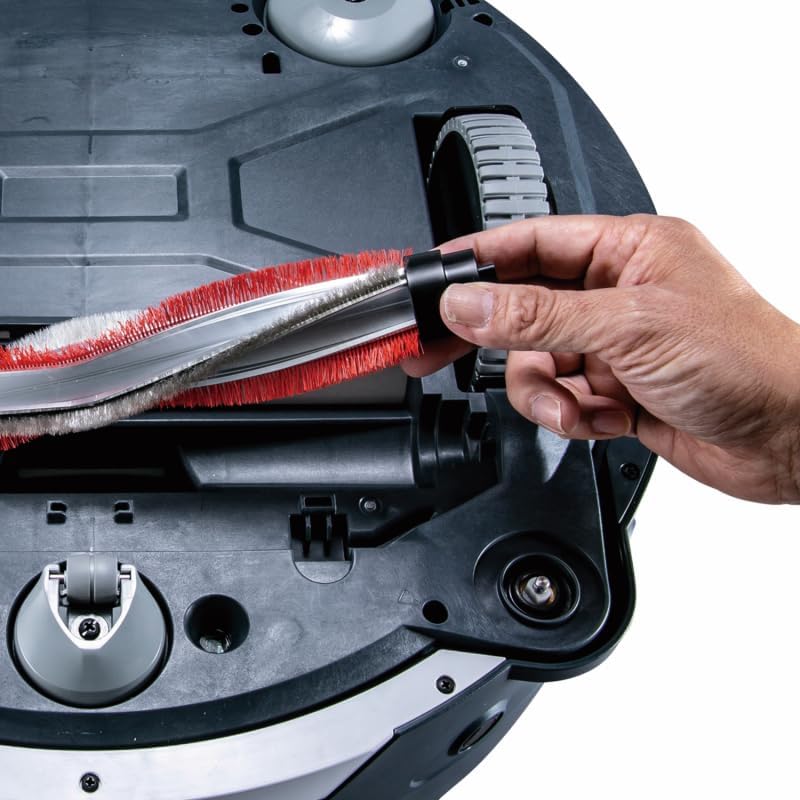
The main brush roller should be cleaned regularly to remove tangled hair and debris.
- Turn the vacuum upside down.
- Locate the main brush cover and release the latches.
- Remove the main brush roller.
- Clean any hair or debris from the brush and its bearings.
- Reinstall the main brush roller and secure the cover.

6.3 Side Brushes
Inspect and clean the side brushes periodically. Replace them if they are worn or damaged.
- Turn the vacuum upside down.
- Gently pull the side brushes upwards to remove them.
- Clean any debris from the brushes and their mounting posts.
- Press the side brushes back onto their posts until they click into place.

7. Troubleshooting
If you encounter issues with your Makita DRC300Z, refer to the following general troubleshooting steps:
- Vacuum not starting: Ensure batteries are fully charged and correctly installed. Check that the power button is pressed.
- Poor cleaning performance: Empty the dust collection box and clean the HEPA filter. Check and clean the main brush and side brushes for tangled debris.
- Vacuum getting stuck: Clear any obstacles from the cleaning path. Ensure boundary lines are correctly set in the app. Clean sensors if they appear dirty.
- App connectivity issues: Ensure your smartphone's Bluetooth or Wi-Fi is enabled and the vacuum is within range. Restart both the vacuum and the app.
- Unusual noises: Turn off the vacuum and inspect the brushes and wheels for any foreign objects.
For persistent issues or error codes, consult the detailed troubleshooting section in the full product manual or contact Makita customer support.
8. Specifications
| Feature | Specification |
|---|---|
| Brand | Makita |
| Model Name | DRC300Z |
| Power Source | Battery Powered (18V LXT Lithium-Ion) |
| Battery Type | 2x 18V LXT Lithium-Ion (batteries not included) |
| Battery Life | Up to 200 minutes (with two 5.0Ah batteries) |
| Capacity | 3.1 Quarts (0.79 Gallons) |
| Filter Type | HEPA Filter |
| Special Features | Cordless, LiDAR Navigation, Smart App Control, Obstacle Detection |
| Navigation | LiDAR sensor technology, Front camera sensor |
| Obstacle Detection | 6 ultrasonic sensors, 1 bumper sensor, 1 LiDAR sensor (2D) |
| Mapping Capability | Maps up to 5 rooms, totaling over 100,000 sq ft |
| Boundary Lines | Up to 100 programmable boundary lines per mapped room |
| Cleaning Modes | Main Brush Only, Main Brush Plus Vacuum |
| Control Method | App Control, Remote Control |
| Recommended Uses | Hard Floor, Office, Commercial |
| Product Dimensions | 19.75"L x 19.75"W x 8"H |
| Item Weight | 21.2 pounds |
| Noise Level | 62 Decibels |
9. Warranty and Support
Makita provides a limited warranty for its products. Please refer to the warranty card included with your purchase or visit the official Makita website for detailed warranty terms and conditions. For technical support, service, or to order replacement parts, please contact Makita customer service or an authorized service center. Keep your purchase receipt as proof of purchase for warranty claims.
Makita Customer Service: Please visit www.makitatools.com for contact information and support resources.


