1. Product Overview
The SIEDiNLAR Solar Post Cap Lights are designed to provide ambient lighting for outdoor spaces such as fences, decks, patios, and pillars. These lights feature two color modes: a warm white setting for a classic ambiance and an RGB color-changing mode for decorative effects. Powered by solar energy, they are designed for easy installation and durability in various weather conditions.

Figure 1: SIEDiNLAR Solar Post Cap Lights in various color modes.
Key Features:
- Dual Color Modes: Switch between warm white and automatic RGB color changing.
- Solar Powered: Integrated solar panel charges during the day for automatic illumination at night.
- Durable Construction: Made from UV-resistant Acrylonitrile Butadiene Styrene (ABS) with an IP44 waterproof rating.
- Versatile Fit: Compatible with 4x4, 5x5 inch vinyl posts and 4x4, 5x5, 6x6 inch wooden posts.
2. Package Contents
Ensure all components are present before beginning installation:
- Solar Post Cap Lights (6 units)
- Mounting Adapters (various sizes for post compatibility)
- Screws for installation (optional)
- Reflector (included within each light unit)
- AA Batteries (pre-installed, 1 per light unit)
3. Setup and Installation
Follow these steps for proper installation of your solar post cap lights:
- Unpack and Inspect: Carefully remove all lights and accessories from the packaging. Inspect each unit for any damage.
- Activate the Light:
- Twist off the lamp head and adapter from the lamp shade.
- Locate the switch inside the light unit.
- Turn the switch to either the 'WARM' or 'RGB' mode to activate the light.
- Choose the Correct Adapter: The lights are designed to fit various post sizes. Select the appropriate adapter for your post type and dimensions:
- For 4x4 or 5x5 inch vinyl/PVC posts, remove the inner adapter lining if necessary to ensure a snug fit.
- For 4x4 (3.5"x3.5"), 5x5 (4.5"x4.5"), or 6x6 (5.5"x5.5") inch wooden posts, use the appropriate adapter.
- Mount the Light: There are two primary installation methods:
- Method 1 (Screws): Secure the base of the light or adapter to the top or side of your post using the provided screws. This method offers maximum stability.
- Method 2 (Friction Fit): For vinyl posts, the light can often be placed directly on top of the post, relying on a snug fit. Ensure it is stable and not easily dislodged.
- Secure the Lamp Head: Once the base is installed, rotate the lamp head clockwise onto the base until it is securely fastened.
- Placement: Position the solar post cap lights in an area that receives direct sunlight for at least 6-8 hours daily to ensure optimal charging and performance.

Figure 2: Product dimensions and post compatibility guide.

Figure 3: Instructions for adapting the light for vinyl posts by removing the inner lining.

Figure 4: Step-by-step installation process.
4. Operating Instructions
The SIEDiNLAR Solar Post Cap Lights are designed for automatic operation once activated and properly charged.
Automatic Operation:
- During daylight hours, the integrated solar panel will charge the internal AA battery.
- At dusk, the light sensor will automatically turn on the lights in the selected mode (Warm White or RGB).
- The lights will remain illuminated for approximately 6-8 hours, depending on the amount of sunlight received during the day.
Changing Color Modes:
Before installation, or by carefully twisting off the lamp head, you can access the toggle switch to select your preferred lighting mode:
- Warm White Mode: Provides a steady, soft white light, ideal for creating a cozy and inviting atmosphere.
- RGB Color Changing Mode: Cycles automatically through a spectrum of colors, suitable for festive occasions or dynamic outdoor decor.

Figure 5: Solar powered lights demonstrating RGB and Warm White modes.
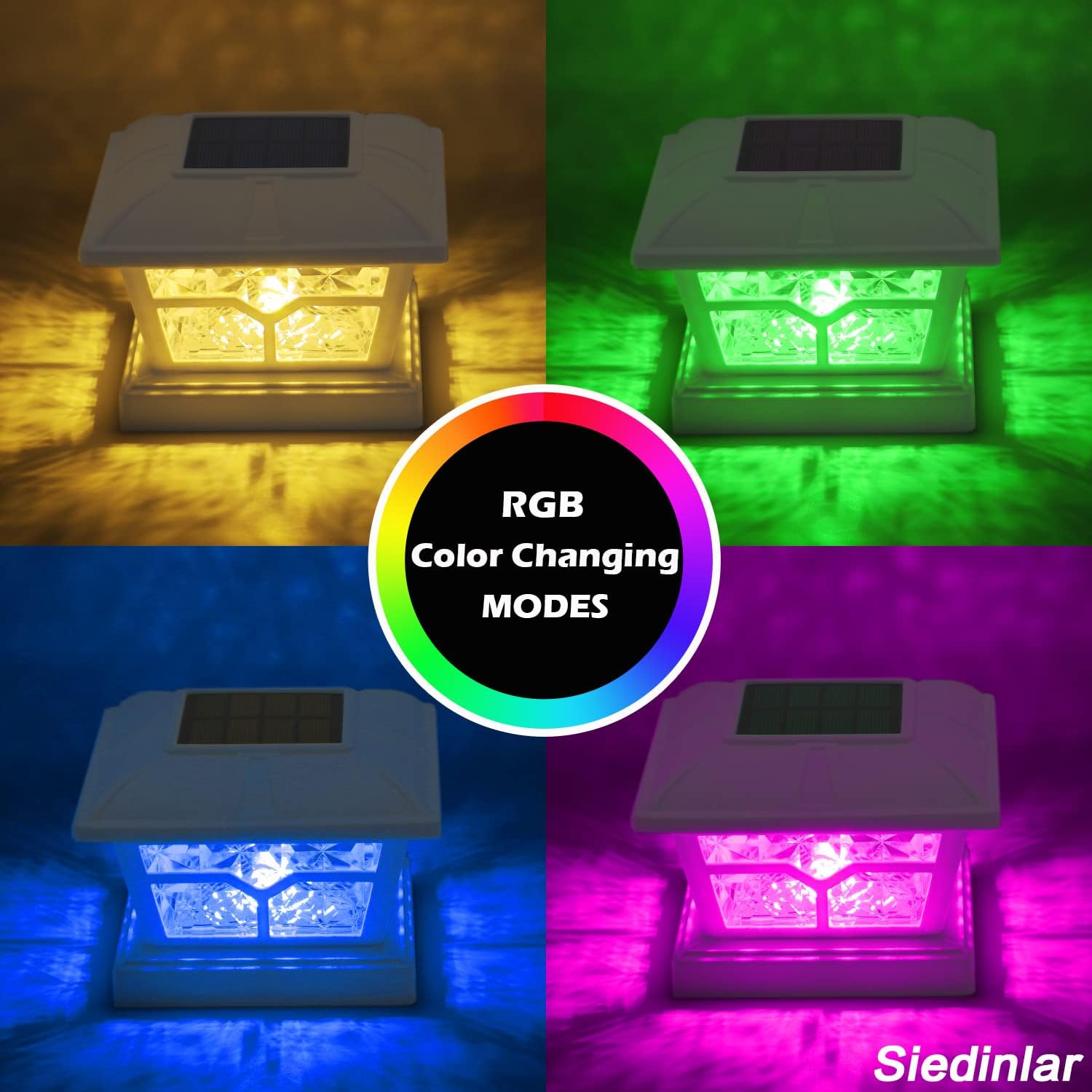
Figure 6: Visual representation of RGB color changing modes.
5. Maintenance
To ensure the longevity and optimal performance of your SIEDiNLAR Solar Post Cap Lights, follow these simple maintenance guidelines:
- Clean Solar Panels: Regularly wipe the solar panel surface with a soft, damp cloth to remove dust, dirt, leaves, or snow. A clean panel ensures efficient charging.
- Battery Replacement: The lights use 1 AA rechargeable battery per unit. If the lights' performance diminishes over time, the battery may need replacement. Use only rechargeable AA batteries of the same type and capacity.
- Weather Resistance: The lights are IP44 waterproof and designed to withstand harsh heat, heavy downpours, and snow. However, extreme weather conditions may temporarily affect performance. Ensure they are securely mounted to prevent dislodgement during high winds.
- Post Protection: These post caps also serve to protect your wooden posts from rain and sun exposure, helping to prevent premature rotting.

Figure 7: The lights are designed for all-weather durability.
6. Troubleshooting
If your solar post cap lights are not functioning as expected, consider the following:
- Light Not Turning On:
- Check Switch: Ensure the internal switch is set to either 'WARM' or 'RGB' mode, not 'OFF'.
- Sunlight Exposure: Verify that the solar panel receives at least 6-8 hours of direct sunlight daily. Shaded areas will reduce charging efficiency.
- Obstructions: Remove any debris (leaves, dirt) from the solar panel surface.
- Ambient Light: The light sensor may be detecting other light sources (e.g., streetlights, porch lights), preventing the solar light from activating. Relocate if possible.
- Short Illumination Time:
- Insufficient Charge: The battery may not be fully charged due to limited sunlight. Ensure optimal placement.
- Battery Age: Rechargeable batteries have a finite lifespan. If the battery is old, consider replacing it with a new rechargeable AA battery.
- Dim Light:
- Low Charge: Similar to short illumination time, a dim light often indicates an undercharged battery.
- Dirty Panel: A dirty solar panel will reduce charging efficiency, leading to dimmer light output. Clean the panel regularly.
7. Specifications
| Model Number | SD020W-RGB-6PK |
| Brand | SIEDiNLAR |
| Light Source Type | LED |
| Light Color | RGB, Warm White |
| Brightness | 15 Lumens |
| Power Source | Solar Powered |
| Voltage | 1.2 Volts |
| Battery | 1 AA rechargeable battery (included) |
| Material | Acrylonitrile Butadiene Styrene (ABS) |
| Finish Type | Brushed |
| Product Dimensions | 5.55 x 5.55 x 3.93 inches |
| Item Weight | 4.27 pounds (for 6-pack) |
| Water Resistance Level | IP44 Waterproof |
| Average Life | 100,000 Hours |
| Assembly Required | Yes |
8. Warranty and Support
SIEDiNLAR provides a 1-year warranty for these Solar Post Cap Lights, covering manufacturing defects and malfunctions under normal use. For any questions, technical assistance, or warranty claims, please contact SIEDiNLAR customer support. Our customer service team is available to assist you.
Please refer to your purchase documentation or the retailer's website for specific contact information.


