
Soundcore VR P10
Contents
Soundcore VR P10 Gaming Earbuds User Manual
Model: VR P10
Your comprehensive guide to setup, operation, and maintenance.
Introduction
The Soundcore VR P10 Gaming Earbuds are designed to provide a low-latency, high-quality audio experience for gaming across multiple platforms. Officially co-branded with Meta, these earbuds offer seamless integration with Meta Quest 2, alongside compatibility with Steam Deck, PS4, PS5, PC, and Switch via the included 2.4GHz USB-C dongle. Featuring dual connection capabilities, you can simultaneously connect to your gaming device and a mobile phone, ensuring you never miss a call during gameplay. The earbuds are equipped with 11mm drivers and BassUp technology for immersive sound.
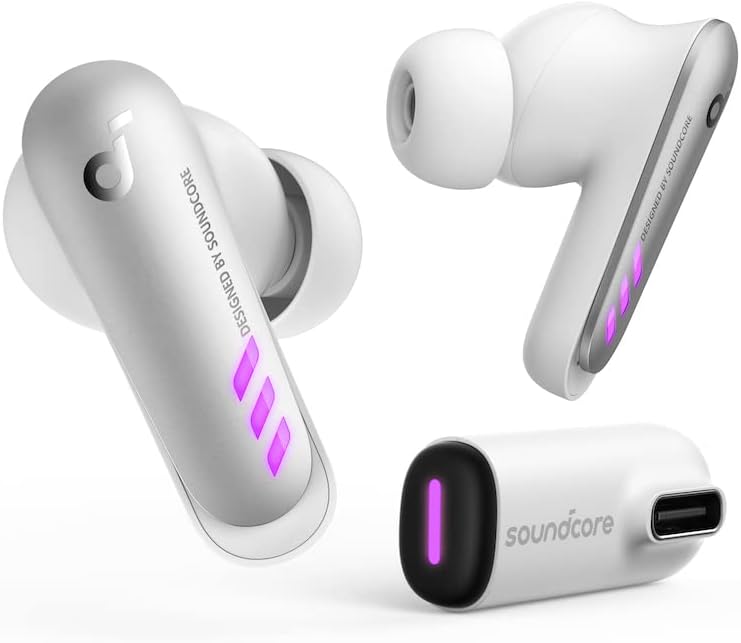
Image: The Soundcore VR P10 earbuds and their accompanying USB-C dongle, showcasing their compact design and the distinct purple LED lighting on the earbuds and dongle.
Setup
Follow these steps to set up your Soundcore VR P10 Gaming Earbuds for optimal performance.
- Charging: Before first use, ensure both earbuds and the charging case are fully charged. Place the earbuds into the charging case. Connect the charging case to a power source using a USB-C cable. The LED indicators will show charging status.
- Dongle Connection: For ultra-low latency gaming, insert the included USB-C dongle into the compatible port of your gaming device (e.g., Meta Quest 2, Steam Deck, PS5, PC, Switch). The dongle will automatically pair with the earbuds when they are taken out of the case.
- Meta Quest 2 Integration: The VR P10 earbuds are authorized by Meta for Meta Quest 2. Simply plug the USB-C dongle into your Meta Quest 2 headset. The pass-through charging function allows you to recharge your Meta Quest 2 via the dongle while playing, provided you use a charger that supports USB Power Delivery and a minimum 9V/2A output.
- Bluetooth Pairing (Optional): For dual connection with a mobile device, enable Bluetooth on your phone and select "Soundcore VR P10" from the available devices. This allows you to receive calls without interrupting your game.

Image: A person wearing a Meta Quest 2 VR headset with the Soundcore VR P10 earbuds inserted, demonstrating the product's integration with the VR system. The image highlights the "Made for Meta" authorization.

Image: A Meta Quest 2 headset is shown connected to the Soundcore VR P10 USB-C dongle, which is then connected to a charging cable, illustrating the pass-through charging capability for the VR headset.
Operating Instructions
Understand the key features and how to operate your Soundcore VR P10 Gaming Earbuds.
- Ultra-Low Latency Gaming: The LightningSync wireless technology, utilizing a 2.4GHz high-speed wireless connection and a custom chipset, ensures audio latency under 30ms for a synchronized gaming experience.
- Dual Connection: With the USB-C dongle connected to your gaming device and Bluetooth connected to your phone, you can seamlessly switch between game audio and incoming calls. Answer calls directly from your phone without pausing gameplay.
- Multi-Platform Compatibility: The USB-C dongle allows for plug-and-play connectivity with Meta Quest 2, Steam Deck, PICO 4, PS4, PS5, PC, and Switch. For switching between platforms, additional dongles can be purchased and managed via the Soundcore app.
- Immersive Audio: The 11mm drivers deliver powerful sound, enhanced by Soundcore's exclusive BassUp technology, providing deep bass and clear audio for an immersive gaming experience.

Image: The Soundcore VR P10 earbuds and dongle are depicted with a graphic emphasizing "ULTRA-LOW LATENCY" and "UNDER 30ms," highlighting the LightningSync wireless technology.

Image: A user wearing a VR headset and the Soundcore VR P10 earbuds, with a smartphone visible, illustrating the dual connection feature that allows answering calls mid-game via Bluetooth and 2.4GHz wireless.

Image: A detailed close-up of an 11mm audio driver, accompanied by the BassUp™ technology logo, visually representing the sound quality and bass enhancement features of the earbuds.

Image: A smartphone screen displaying the Soundcore app interface, showing options to switch between different dongle connections for various platforms like Quest 2, PS5, Switch, and PC, indicating multi-platform compatibility.
Maintenance
Proper care will extend the life and performance of your Soundcore VR P10 Gaming Earbuds.
- Cleaning: Regularly clean the earbuds, especially the ear tips and charging contacts, with a soft, dry, lint-free cloth. Do not use harsh chemicals or abrasive materials.
- Storage: When not in use, always store the earbuds in their charging case to protect them from dust and damage. Store in a cool, dry place away from extreme temperatures.
- Battery Care: To maintain battery health, avoid fully discharging the earbuds or charging case frequently. Charge them regularly, even if not in constant use.
Troubleshooting
If you encounter issues with your Soundcore VR P10 Gaming Earbuds, refer to the following common solutions.
| Problem | Solution |
|---|---|
| No audio from earbuds. |
|
| High latency or audio delay. |
|
| Earbuds not pairing with dongle. |
|
| Pass-through charging not working for Meta Quest 2. |
|
Specifications
| Feature | Detail |
|---|---|
| Brand | Soundcore |
| Model | VR P10 |
| Color | White |
| Ear Placement | In Ear |
| Form Factor | In Ear |
| Impedance | 16 Ohm |
| Connectivity | 2.4GHz Wireless (USB-C Dongle), Bluetooth |
| Latency | Under 30ms (via 2.4GHz dongle) |
| Drivers | 11mm |
| Special Features | Meta Officially Co-branded, LightningSync Wireless Technology, BassUp Technology, Dual Connection, Pass-Through Charging (for Meta Quest 2) |
Warranty and Support
Soundcore products come with a limited warranty. For detailed warranty information, product registration, and technical support, please visit the official Soundcore website or contact their customer service. Keep your proof of purchase for warranty claims.
Official Soundcore Website: www.soundcore.com
Documents and downloads
Ask a question about this manual
Ask about setup, troubleshooting, compatibility, parts, safety, or missing instructions. Manuals+ will review the question and use this page’s manual context to help answer it.