
Introduction
The LINQ 9-Port Pro Studio USB-C Docking Station (Model LQ48020) is a versatile multiport hub designed to expand connectivity and storage for your USB-C enabled devices. This device integrates multiple essential ports and an NVMe M.2 SSD enclosure into a single, compact unit, providing high-speed data transfer, video output, network connectivity, and power delivery.

Figure 1: Overview of the LINQ 9-Port Pro Studio USB-C Docking Station with connected devices, highlighting its various ports and features.
Setup
Follow these steps to set up your LINQ 9-Port Pro Studio USB-C Docking Station:
- Connect to Host Device: Plug the integrated USB-C cable from the docking station into a compatible USB-C port on your laptop, tablet, or other host device. Ensure the USB-C port on your host device supports DisplayPort Alternate Mode (Alt Mode) and Power Delivery for full functionality.
- Power Connection (Optional but Recommended): For optimal performance and to charge your host device, connect a USB-C Power Delivery (PD) charger (up to 100W) to the docking station's USB-C PD input port.
- NVMe M.2 SSD Installation:
- Carefully open the NVMe enclosure cover on the docking station.
- Insert your NVMe M.2 SSD into the designated slot. Ensure it is properly seated.
- Secure the SSD with the provided fastener (if applicable).
- Close the enclosure cover securely.

Figure 2: Installation of an NVMe M.2 SSD into the docking station's dedicated enclosure.
- Connect Peripherals: Connect your desired peripherals (monitor, keyboard, mouse, Ethernet cable, SD card, USB drives) to the corresponding ports on the docking station.
Operating Instructions
The docking station provides a variety of ports for enhanced functionality:
- USB-C Power Delivery (PD) Port: Connect your USB-C power adapter to this port to charge your host device (up to 100W) and power the docking station simultaneously.
- HDMI 2.0 Port: Connect an HDMI cable from this port to an external monitor or display for video output up to 4K resolution at 60Hz.
- USB 3.2 Gen 2 Ports: Utilize the USB-A and USB-C data ports for connecting external storage devices, keyboards, mice, or other USB peripherals. These ports support data transfer speeds up to 10 Gigabits per second (10Gbps).
- 2.5Gbps Multi-Gigabit Ethernet Port: Connect an Ethernet cable to this port for a stable and high-speed wired network connection, supporting speeds up to 2.5 Gigabits per second (2.5Gbps).
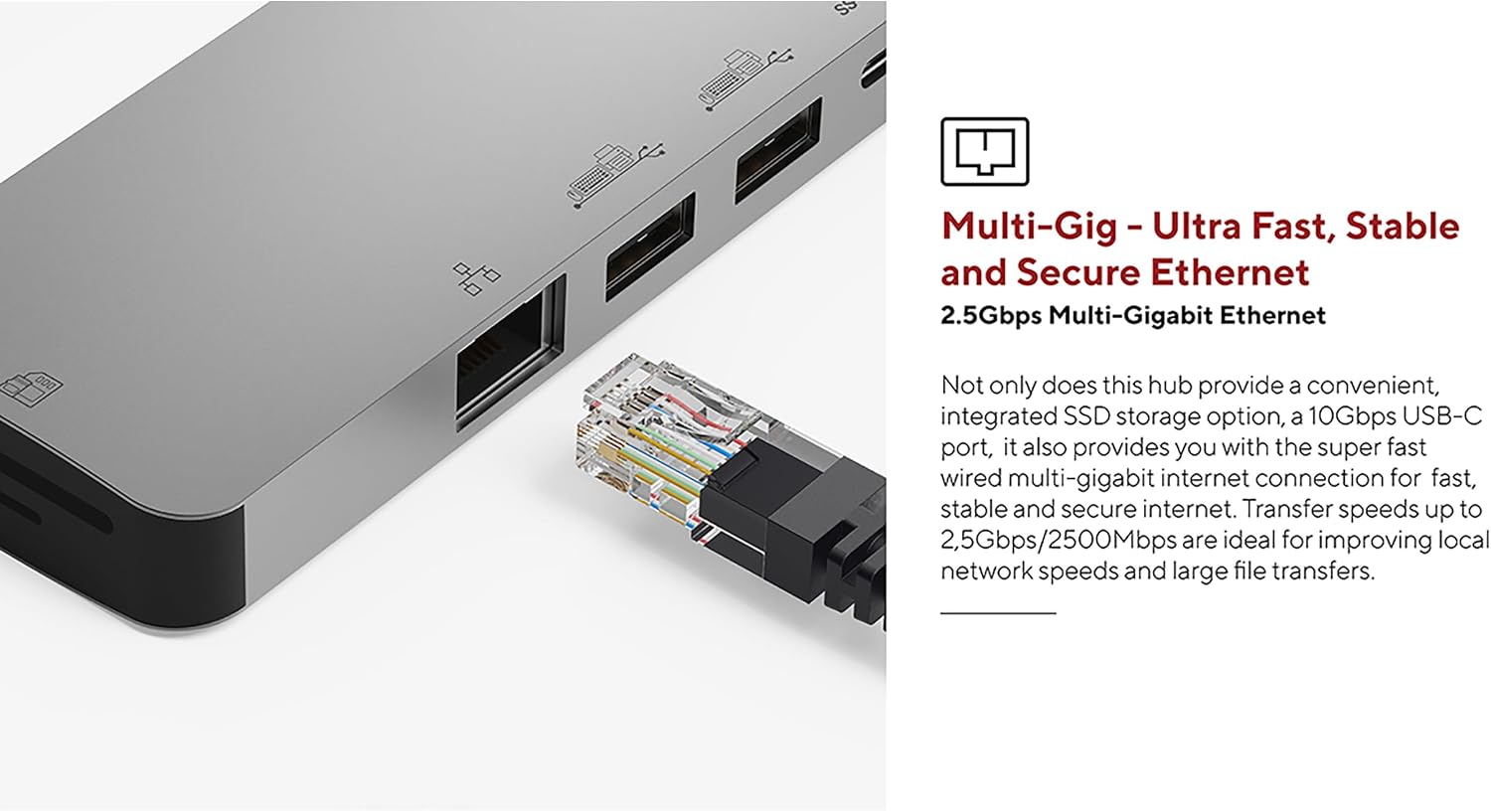
Figure 3: The 2.5Gbps Multi-Gigabit Ethernet port for high-speed wired network access.
- UHS-II SD 4.0 Card Reader: Insert an SD card into the card reader slot for fast data transfer, supporting speeds up to 300MB/s. This is ideal for photographers and videographers.

Figure 4: The UHS-II SD 4.0 Card Reader for high-speed memory card access.
- NVMe M.2 SSD Enclosure: The integrated NVMe M.2 SSD enclosure allows you to expand your storage with an NVMe SSD, providing data transfer speeds up to 10Gbps. This is suitable for fast backups and quick access to large files.

Figure 5: The docking station in use, demonstrating multiple connected peripherals.
Maintenance
To ensure the longevity and optimal performance of your docking station, follow these maintenance guidelines:
- Cleaning: Use a soft, dry, anti-static cloth to clean the exterior of the docking station. Avoid using liquid cleaners or solvents, as they may damage the finish or internal components.
- Storage: When not in use, store the docking station in a cool, dry place away from direct sunlight and extreme temperatures.
- Ventilation: Ensure the docking station has adequate airflow around it during operation to prevent overheating, especially when multiple high-power devices or an NVMe SSD are in use.
- Cable Care: Avoid bending or twisting the integrated USB-C cable excessively. Always grasp the connector when plugging or unplugging to prevent damage to the cable or port.
Troubleshooting
If you encounter issues with your docking station, refer to the following common problems and solutions:
- No Display Output:
- Ensure your host device's USB-C port supports DisplayPort Alt Mode.
- Check that the HDMI cable is securely connected to both the docking station and the monitor.
- Verify the monitor input source is set correctly (e.g., HDMI 1, HDMI 2).
- Try connecting the monitor directly to your host device (if possible) to rule out monitor or cable issues.
- USB Devices Not Recognized:
- Ensure the docking station is properly connected to your host device.
- Try connecting the USB device to a different port on the docking station.
- Connect the USB device directly to your host device to confirm it is functional.
- If using high-power USB devices, ensure a power adapter is connected to the docking station's PD port.
- Slow Data Transfer Speeds:
- Ensure your connected devices and cables support the advertised speeds (e.g., USB 3.2 Gen 2 for 10Gbps).
- Verify that your host device's USB-C port supports the necessary bandwidth.
- Avoid using excessively long or low-quality cables.
- Network Connection Issues:
- Check the Ethernet cable connection to both the docking station and your router/modem.
- Verify that your network drivers are up to date on your host device.
- Test your Ethernet cable and network connection with another device if possible.
- NVMe SSD Not Detected:
- Ensure the NVMe SSD is correctly installed and seated firmly in its slot.
- Check your operating system's disk management utility to see if the drive is detected but uninitialized or unformatted.
- Ensure the SSD is an NVMe M.2 drive; SATA M.2 SSDs are not supported.
Specifications
| Feature | Specification |
|---|---|
| Model Number | LQ48020 |
| Dimensions (L x W x H) | 21.5 x 8 x 21.5 cm (approx. 4.6 x 7.92 x 0.95 cm for main unit) |
| Weight | 119 Grams |
| Material | Aluminum |
| Color | Grey |
| Total Ports | 9 |
| USB-C Host Connection | 1 (integrated cable) |
| USB-C Power Delivery | Up to 100W |
| HDMI Output | 4K @ 60Hz (HDMI 2.0) |
| USB Data Ports | Multiple (USB-A, USB-C) |
| USB Data Transfer Speed | 10 Gigabits per second (USB 3.2 Gen 2) |
| Ethernet Port | 2.5Gbps Multi-Gigabit |
| Card Reader | UHS-II SD 4.0 (up to 300MB/s) |
| NVMe M.2 SSD Enclosure | Yes, up to 10Gbps (does not support SATA SSD) |
| Compatible Operating Systems | Linux (and generally macOS, Windows with USB-C Alt Mode support) |
Warranty and Support
This LINQ 9-Port Pro Studio USB-C Docking Station comes with a 2-year manufacturer's warranty.
For technical support, warranty claims, or further assistance, please contact your retailer or visit the official LINQ website for contact information.


