
TCFUNDY 600W
TCFUNDY 600W Snow Machine Instruction Manual
Model: 600W | Brand: TCFUNDY
1. Introduction
The TCFUNDY 600W Snow Machine is designed to produce a realistic snowflake effect for various indoor and outdoor events. It creates an enchanting snow scene suitable for parties, stage performances, weddings, and holiday decorations. This manual provides essential information for the safe and effective operation of your snow machine.
2. Safety Information
- Always disconnect the power supply before performing any maintenance or refilling the fluid tank.
- Use only professional snow fluid specifically designed for snow machines. Do not use any other liquids.
- Ensure the fluid tank scale is clearly visible and turn off the machine before the liquid is completely used up to prevent damage to the pump.
- Position the machine on a stable, level surface to prevent tipping.
- Keep the machine away from heat sources, open flames, and flammable materials.
- Do not block the ventilation openings on the machine.
- Keep children and pets away from the machine during operation.
- This snow machine is designed for artificial snow effects and does not produce toxic gas.
3. Package Contents
Please check the package contents to ensure all items are present:
- TCFUNDY 600W Snow Machine
- Wireless Remote Control
- Power Cord
- Hanging Bracket (for installation)
- Instruction Manual (this document)
4. Product Overview
Familiarize yourself with the components of your TCFUNDY 600W Snow Machine:
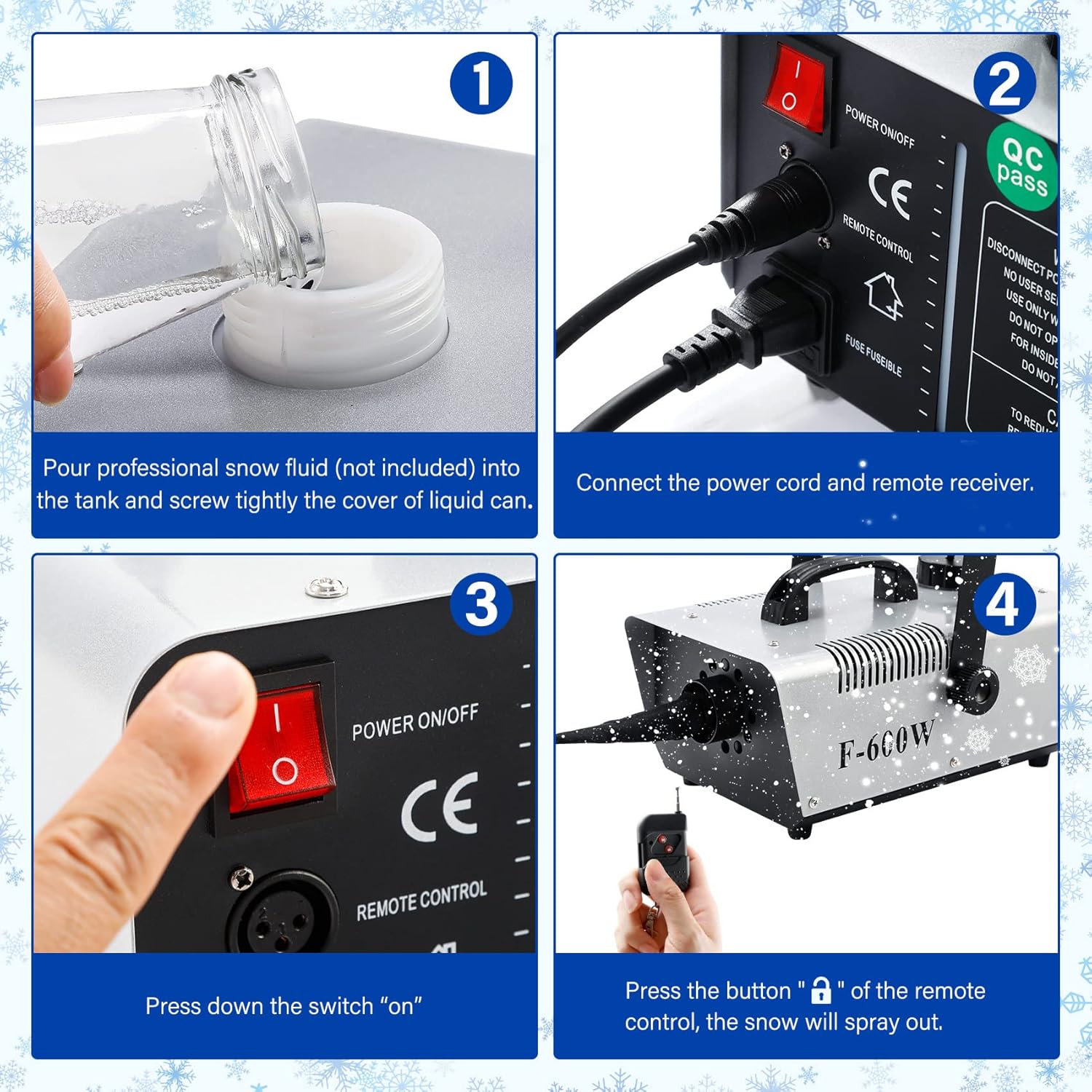
Figure 1: Labeled diagram of the TCFUNDY 600W Snow Machine, showing the hanging bracket, handle, intake hole, snow outlet, non-slip base, power ON/OFF switch, remote receiver socket, power cord, and visible fluid capacity indicator.
- Hanging Bracket: For secure overhead installation.
- Handle: For easy portability and positioning.
- Intake Hole: Where the snow fluid is drawn into the machine.
- Snow Outlet: Where the artificial snowflakes are expelled.
- Non-Slip Base: Provides stability when placed on a surface.
- Power ON/OFF Switch: Controls the main power to the unit.
- Receiver Socket: Connects the wireless remote control receiver.
- Power Cord: Connects the machine to an electrical outlet.
- Visible Capacity: A transparent window on the fluid tank to monitor fluid levels.

Figure 2: An internal view of the snow machine, illustrating the high-powered blower and pump system responsible for generating and propelling the snowflakes.
5. Setup Instructions
Follow these steps for initial setup and preparation:
- Fill the Fluid Tank: Unscrew the cap of the fluid tank and carefully pour professional snow fluid (not included) into the tank. Ensure the fluid level is visible but do not overfill. Screw the cap tightly.
- Connect Power and Remote: Connect the power cord to the machine and then to a standard AC110V, 60Hz electrical outlet. Plug the remote control receiver into its designated socket on the machine.
- Power On: Flip the power ON/OFF switch to the 'ON' position. Allow the machine a few moments to warm up.
- Initiate Snow Production: Once ready, press the button on the wireless remote control to start spraying snow.

Figure 3: Visual guide demonstrating the four setup steps: pouring snow fluid, connecting power and remote, turning on the power switch, and activating snow production with the remote.
Video 1: A short demonstration of the TCFUNDY 600W Snow Machine in operation, showcasing its snow output.
6. Operating Instructions
The TCFUNDY 600W Snow Machine is designed for straightforward operation:
- Remote Control: Use the provided wireless remote control to activate and deactivate the snow production. This allows for convenient control from a distance.
- Continuous Output: The machine is capable of continuous snow output once activated.
- Output Volume: The machine produces approximately 3000 CFM (cubic feet per minute) of snow, capable of reaching distances of up to 3 meters (9.84 feet).
- Monitoring Fluid: Regularly check the visible fluid capacity indicator. Discontinue operation and refill the tank before it runs completely dry to protect the pump.

Figure 4: The TCFUNDY 600W Snow Machine in action, demonstrating the snow output and the wireless remote control for operation.

Figure 5: An outdoor scene with Christmas decorations, enhanced by the snow effect produced by the TCFUNDY 600W Snow Machine.
7. Maintenance
Proper maintenance ensures the longevity and optimal performance of your snow machine:
- Cleaning: After each use, especially if storing for an extended period, run the machine with distilled water to flush out any remaining snow fluid from the pump and lines. This prevents clogs.
- Exterior Cleaning: Wipe the exterior of the machine with a soft, dry cloth. Do not use harsh chemicals or abrasive cleaners.
- Storage: Store the machine in a cool, dry place, away from direct sunlight and extreme temperatures. Ensure the fluid tank is empty or contains only distilled water if flushing was performed.
8. Troubleshooting
If you encounter issues with your snow machine, refer to the following common problems and solutions:
| Problem | Possible Cause | Solution |
|---|---|---|
| No snow output | No power; fluid tank empty; remote not connected/working; pump clogged. | Check power connection; refill fluid tank; ensure remote receiver is plugged in and remote battery is functional; clean pump/lines with distilled water. |
| Weak snow output | Low fluid level; partial pump clog; insufficient warm-up time. | Refill fluid tank; run cleaning cycle with distilled water; allow adequate warm-up time. |
| Machine not turning on | No power; faulty power switch/cord. | Check power outlet and connections; inspect power cord for damage. |
9. Specifications
- Voltage: AC110V, 60Hz
- Power: 600W
- Output: 3000 CFM (cubic feet per minute)
- Output Distance: 3 meters (9.84 feet)
- Tank Capacity: 1 Liter (33 oz)
- Control Modes: Wireless Remote Control
- Item Weight: 7.81 pounds
- Package Dimensions: 15.16 x 10.04 x 7.64 inches

Figure 6: Visual representation of the TCFUNDY 600W Snow Machine's dimensions and key specifications.
10. Warranty and Support
For warranty information, technical support, or service inquiries, please refer to the product packaging or contact TCFUNDY customer service directly. Keep your purchase receipt as proof of purchase.
Ask a question about this manual
Ask about setup, troubleshooting, compatibility, parts, safety, or missing instructions. Manuals+ will review the question and use this page’s manual context to help answer it.