
Rossmax X5BT
Rossmax X5 Automatic Blood Pressure Monitor User Manual
Model: X5BT
Introduction
The Rossmax X5 Automatic Blood Pressure Monitor is an advanced device designed for accurate and convenient blood pressure measurement at home. It incorporates PARR Technology for Arrhythmia Detection (ARR), Atrial Fibrillation Detection (AFib), and Premature Contraction Detection (PC), providing comprehensive cardiovascular health insights. Featuring Bluetooth connectivity, it allows for easy data transfer and tracking.
This manual provides essential information for the safe and effective operation of your Rossmax X5 Blood Pressure Monitor. Please read it thoroughly before first use and keep it for future reference.
Important Safety Information
- Consult your physician before using this device if you have any medical conditions.
- Do not self-diagnose or self-treat based on measurement results. Always consult a healthcare professional.
- Keep the device out of reach of children and pets.
- Do not use the device in a moving vehicle or on an airplane.
- Avoid strong electromagnetic fields (e.g., mobile phones, microwave ovens) near the device during measurement.
- Use only the specified cuff and accessories provided by Rossmax.
- Do not disassemble or attempt to repair the device yourself. Contact authorized service personnel.
Parts Identification
Familiarize yourself with the components of your Rossmax X5 Blood Pressure Monitor:
- Main Unit: Contains the display, control buttons, and measurement mechanism.
- Arm Cuff: Universal Cone Cuff (24-40cm) for accurate arm measurements.
- Air Tube: Connects the cuff to the main unit.
- Battery Compartment: Located on the back of the main unit.
- AC Adapter Socket: For optional AC adapter use (adapter not always included).
- Data Port: For connecting to a computer or other devices (if applicable).
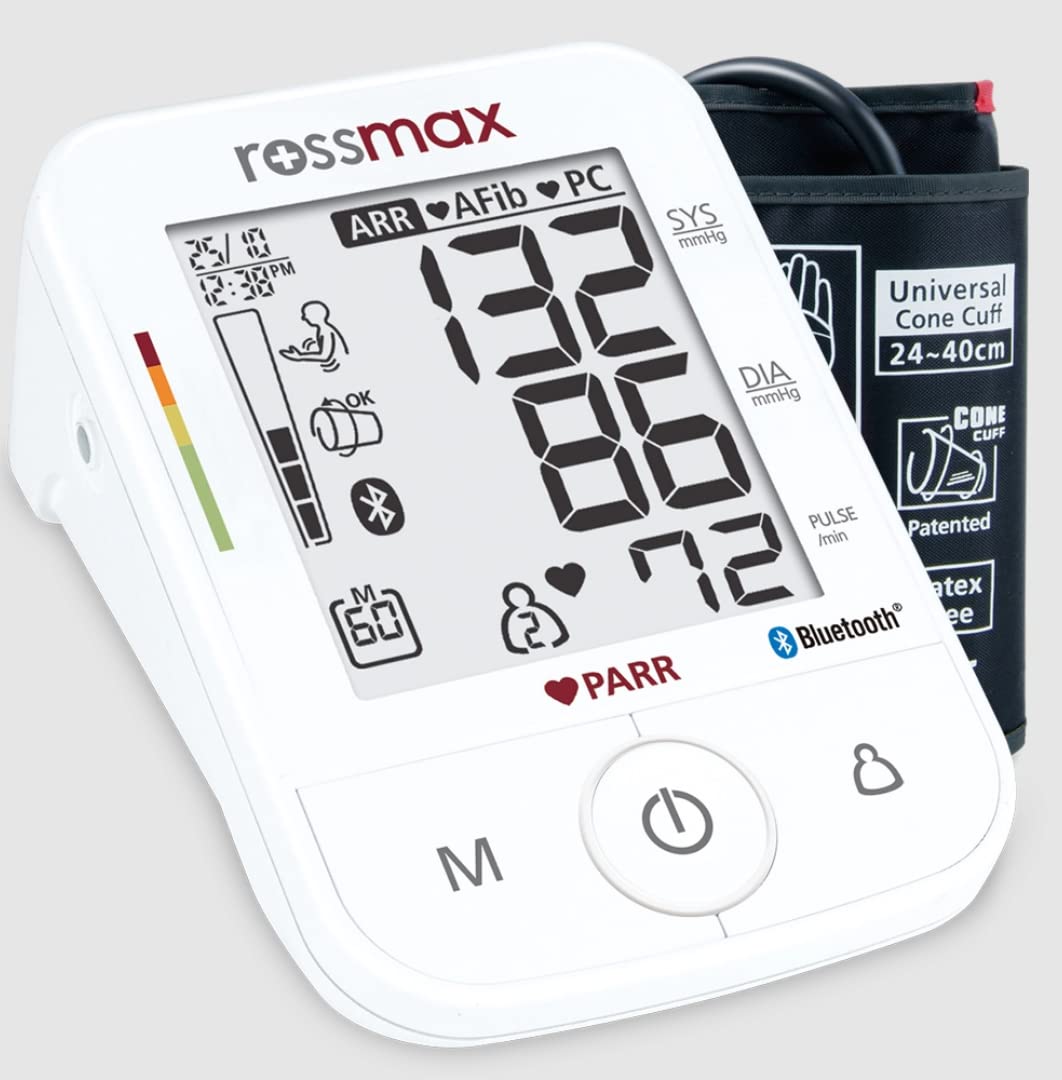
Image: Rossmax X5 Blood Pressure Monitor main unit with its universal cone cuff. The display shows blood pressure readings and various indicators like PARR, ARR, AFib, and Bluetooth connectivity.

Image: Side view of the Rossmax X5 Blood Pressure Monitor, highlighting the 6V DC power input and DATA port for external connections.
Setup
1. Battery Installation
- Open the battery compartment cover on the back of the main unit.
- Insert four (4) AAA alkaline batteries, ensuring correct polarity (+/-) as indicated inside the compartment.
- Close the battery compartment cover securely.
Note: The device can also be powered by an optional AC adapter (6V DC).
2. Connecting the Cuff
- Insert the air plug of the arm cuff firmly into the air jack on the left side of the main unit.
- Ensure the connection is secure to prevent air leakage during measurement.

Image: The Rossmax X5 Blood Pressure Monitor displaying its Bluetooth capability and highlighting its early stage stroke risk screening feature.
Operating Instructions
1. Before Measurement
- Avoid eating, drinking alcohol, smoking, exercising, and bathing for 30 minutes before measurement.
- Rest for at least 5 minutes before taking a measurement.
- Sit upright with your back supported, feet flat on the floor, and legs uncrossed.
- Place your arm on a flat surface so the cuff is at heart level.
- Ensure clothing does not constrict your arm.
2. Applying the Arm Cuff
- Slide your left arm through the cuff loop. The air tube should run down the inside of your arm.
- Position the cuff so the bottom edge is approximately 1-2 cm above your elbow joint.
- Wrap the cuff snugly around your arm, ensuring it is not too tight or too loose. The index line should be within the range indicated on the cuff.
3. Taking a Measurement
- Press the START/STOP button to turn on the device.
- The cuff will automatically inflate, and the measurement will begin. Remain still and silent during the measurement.
- Once the measurement is complete, your Systolic, Diastolic, and Pulse readings will be displayed.
- The device will also indicate if Arrhythmia (ARR), Atrial Fibrillation (AFib), or Premature Contraction (PC) is detected.
- Press the START/STOP button again to turn off the device, or it will automatically shut off after 1 minute of inactivity.

Image: A person correctly positioned with the Rossmax X5 Blood Pressure Monitor on their arm, ready for a measurement.
4. Memory Function
The Rossmax X5 stores up to 120 memories for 2 users with date and time indication. To review past readings:
- Press the M button when the device is off.
- Use the M button to scroll through previous measurements.
5. Bluetooth Connectivity
The device features Bluetooth Low Energy technology for seamless data transfer to compatible applications. Refer to the specific app's instructions for pairing and data synchronization.
Maintenance
Cleaning
- Wipe the main unit and cuff with a soft, dry cloth.
- If necessary, use a cloth lightly dampened with water or a mild detergent, then wipe dry immediately.
- Do not use abrasive cleaners, solvents, or immerse the device in water.
Storage
- Store the device in its original packaging or a protective case when not in use.
- Keep it in a cool, dry place, away from direct sunlight, extreme temperatures, and humidity.
- Remove batteries if the device will not be used for an extended period.
Troubleshooting
| Problem | Possible Cause | Solution |
|---|---|---|
| Device does not turn on. | Batteries are dead or incorrectly inserted. | Replace batteries or check polarity. Ensure AC adapter is properly connected if using. |
| Error message on display. | Cuff not applied correctly, movement during measurement, or air leakage. | Reapply cuff, remain still, check cuff connection. Consult manual for specific error codes. |
| Inaccurate readings. | Improper cuff placement, movement, talking, or incorrect body position. | Ensure correct cuff placement and body posture. Avoid movement and talking during measurement. |
| Bluetooth connection issues. | Device not in pairing mode, app issues, or interference. | Ensure Bluetooth is enabled on both devices. Restart device and app. Move closer to the paired device. |
Specifications
| Model Number | X5BT |
| Measurement Method | Oscillometric |
| Display Type | Digital LCD (69 x 78 mm) |
| Cuff Type | Universal Cone Cuff (24-40 cm), Latex-Free |
| Memory | 120 memories for 2 users with date & time indication |
| Power Source | 4 AAA batteries (included) or AC/DC adapter (optional) |
| Weight | 630 g |
| Dimensions (Package) | 18.5 x 13.5 x 11.5 cm |
| Special Features | PARR Technology (ARR, AFib, PC Detection), Bluetooth Connectivity, Movement Detection, Cuff Detection, Hypertension Risk Indication, 7-day AM/PM Averaging, Guest Mode, Cuff Holder Design, Lifetime Calibration |
| Included Components | Cuff |
| Country of Origin | China |
Warranty and Support
Rossmax provides a Lifetime Calibration warranty for the X5 Blood Pressure Monitor, ensuring its accuracy over time. For specific warranty terms and conditions, please refer to the warranty card included with your product or visit the official Rossmax website.
For technical support, troubleshooting assistance, or service inquiries, please contact Rossmax customer service through their official channels. Keep your purchase receipt and product model number (X5BT) ready when contacting support.

Image: A graphic indicating Rossmax's 5-year warranty and lifetime calibration for the blood pressure monitor.
Related documentsX5BT


Ask a question about this manual
Ask about setup, troubleshooting, compatibility, parts, safety, or missing instructions. Manuals+ will review the question and use this page’s manual context to help answer it.