
1. Introduction
This manual provides comprehensive instructions for the OMAIC Universal Replacement Remote Control, designed for a wide range of LG Smart TVs. It covers essential information regarding setup, operation, maintenance, and troubleshooting to ensure optimal use of your remote control.
2. Product Overview
The OMAIC Universal Replacement Remote Control is an infrared remote designed to replace various LG Smart TV remote models. It features dedicated hotkeys for popular streaming services and a full set of control buttons for seamless navigation.

Figure 1: Front and back view of the OMAIC Universal Replacement LG Smart TV Remote Control, showcasing its design and battery compartment.
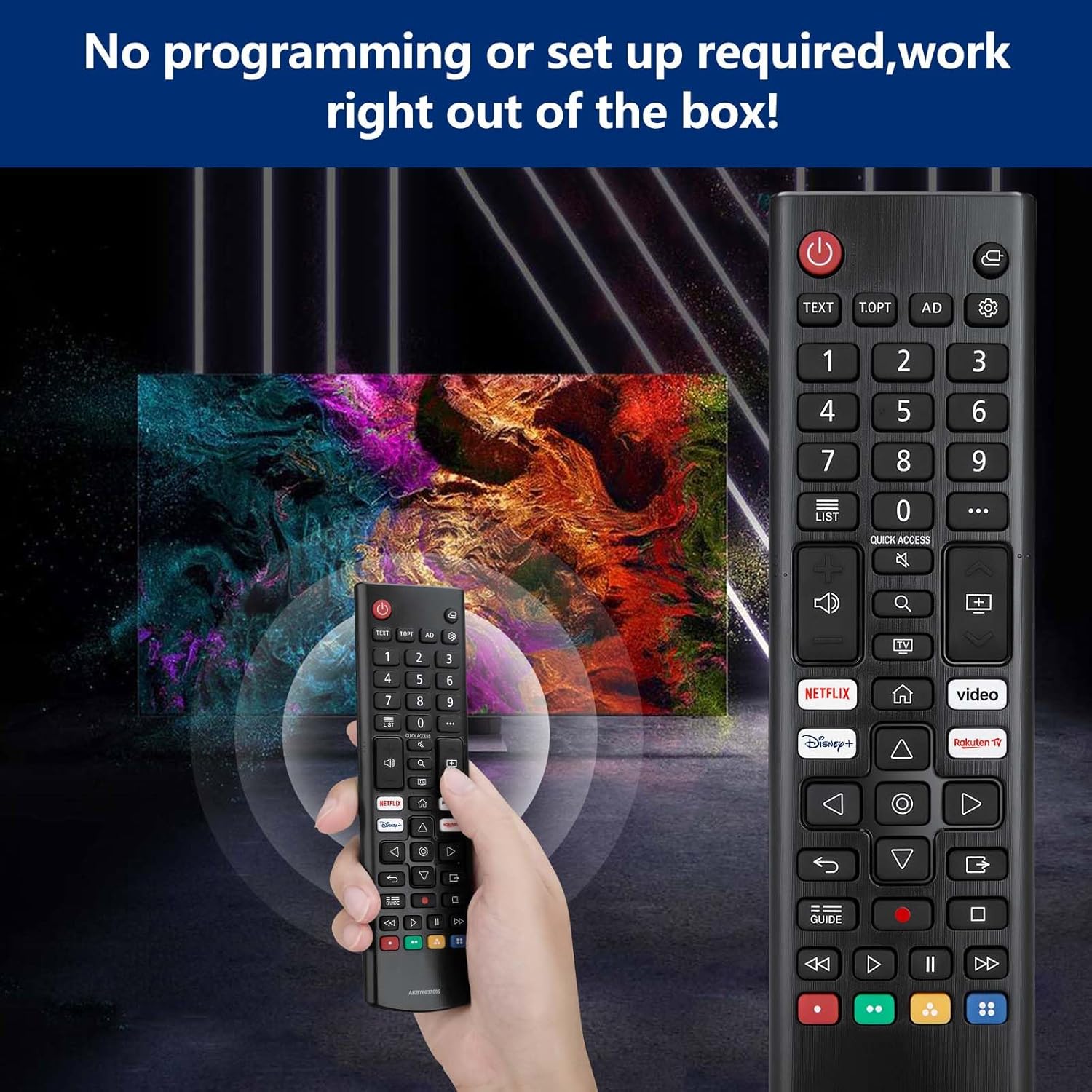
Figure 2: Detailed diagram illustrating the function of each button on the OMAIC remote control.
3. Setup
This remote control requires no programming or complex setup. Simply insert two AAA batteries, and it will be ready for use.
3.1 Battery Installation
- Locate the battery compartment on the back of the remote control.
- Slide open the battery compartment cover.
- Insert two AAA batteries, ensuring correct polarity (+ and - terminals).
- Close the battery compartment cover securely.

Figure 3: Visual guide for inserting two AAA batteries into the remote control's battery compartment.
4. Operating Instructions
The remote control provides intuitive access to various LG Smart TV functions. Refer to Figure 2 for a visual guide to button layout.
4.1 Basic Functions
- Power Button (⏻): Turns the TV on or off.
- Number Buttons (0-9): Directly select channels or input numbers.
- Volume Buttons (▲/▼): Adjust the volume level.
- Programme Buttons (▲/▼): Scroll through saved programs/channels.
- Navigation Buttons (Up/Down/Left/Right): Navigate through menus and options.
- OK Button: Selects menu items or confirms options.
- Back Button: Returns to the previous level in menus.
- Home Button (⌂): Accesses the TV's Home menu.
- Input Button: Changes the input source (HDMI, AV, etc.).
- Quick Access: Edits Quick Access settings (functionality may vary by TV model).
4.2 Streaming Service Hotkeys
Dedicated buttons provide direct access to popular streaming applications:
- Netflix Button: Launches the Netflix application.
- Prime Video Button: Launches the Prime Video application.
- Disney+ Button: Launches the Disney+ application.
- Rakuten TV Button: Launches the Rakuten TV application.

Figure 4: Illustration of the dedicated hotkeys for quick access to streaming services.
5. Compatibility
This OMAIC Universal Replacement Remote Control is compatible with a wide range of LG Smart TV models and can replace several original LG remote control models.
5.1 Compatible LG TV Models
The remote is designed for use with various LG 4K, 8K, NanoCell, QNED, OLED, LED, and UHD Smart TVs, including but not limited to:
- LED TV Models: LM5, LM6, LQ6, UM7 Series
- NanoCell TV Models: NANO70, NANO75, NANO76, NANO77, NANO78, NANO79, NANO80, NANO81, NANO85, NANO86, NANO88, NANO90, NANO91, NANO95, NANO96, NANO99 Series
- OLED 4K/8K TV Models: A1, A2, A8, B1, B2, B7, B8, B9, C1, C2, C7, C8, C9, E7, E8, E9, G1, G2, G7, G8, W7, W8, W9, Z1, Z2, ZX, WX, GX, CX, BX, CS Series
- QNED MiniLED TV Models: QNED81, QNED82, QNED86, QNED87, QNED91, NANO95, QNED96, QNED99 Series
- UHD 4K TV Models: 7 series, 8 series, 9 series, UN71, UN73, UN74, UN80, UN81, UN85, UP75, UP76, UP77, UP78, UP80, UP81, UQ70, UQ75, UQ76, UQ80, UQ81, UQ90, UQ91 Series
- Also compatible with UK6, UK7, UK8, UK9, UJ6, UJ7, UJ8, UJ9, SJ7, SJ8, SJ9, SM8, SM9, SK7, SK8, SK9, LK5, LK6, LJ5, LJ6 Series.

Figure 5: The OMAIC remote control demonstrating compatibility with various LG 4K and 8K Smart TV technologies.
5.2 Compatible Original Remote Control Models
This remote acts as a universal replacement for many LG TV remote models, including:
- AN-MR650A, AN-MR18BA, AN-MR19BA, AN-MR20GA, AN-MR21GA, AN-MR22GN
- PM20GA, PM21GA, PM22GN
- AGF76631064, AKB75095308, AKB75095307, AKB76037605, AKB75055701, AKB73715608, AKB73715601

Figure 6: The OMAIC remote control shown with various original LG remote models it is designed to replace.
6. Maintenance
Proper care and maintenance will extend the lifespan of your remote control.
- Cleaning: Use a soft, dry cloth to clean the remote control. Avoid using liquid cleaners or abrasive materials.
- Battery Replacement: Replace batteries when the remote's response becomes sluggish or stops working. Always replace both batteries at the same time with new ones.
- Storage: If the remote control will not be used for an extended period, remove the batteries to prevent leakage and potential damage.
- Environment: Avoid exposing the remote to extreme temperatures, direct sunlight, or high humidity.
7. Troubleshooting
If you encounter issues with your remote control, refer to the following troubleshooting steps:
- Remote Not Responding:
- Ensure the batteries are inserted correctly with the correct polarity.
- Replace the batteries with new AAA batteries.
- Check for any obstructions between the remote control and the TV's infrared (IR) receiver. Ensure a clear line of sight.
- Verify that the TV is powered on.
- Buttons Not Working:
- Clean the remote control surface and buttons to remove any dirt or debris that might be interfering with button presses.
- If only specific buttons are not working, and battery replacement does not resolve the issue, the remote may require replacement.
8. Specifications
| Feature | Specification |
|---|---|
| Model Number | AKB76037605 |
| Brand | OMAIC |
| Connectivity Technology | Infrared |
| Compatible Devices | Television (LG Smart TVs) |
| Number of Buttons | 50 |
| Controller Type | Button Control |
| Batteries Required | 2 AAA batteries |
| Product Dimensions | 17 x 4.7 x 2.5 cm |
| Product Weight | 65 g |
| Maximum Range | 12 Meters |
| Special Features | Universal |
9. Support
OMAIC is committed to maintaining a high standard of excellence and customer satisfaction. If you have any questions, concerns, or require assistance with your OMAIC Universal Replacement LG Smart TV Remote Control, please contact our customer support team. We aim to respond to all inquiries within 12 business hours.
Please refer to your purchase documentation or the retailer's website for specific contact information.