
EBXYA 2i2 USB Audio Interface User Manual
Model: Audio Interface-Black
Introduction
This manual provides detailed instructions for the setup, operation, and maintenance of your EBXYA 2i2 USB Audio Interface. Designed for PC recording, music production, studio use, guitar, podcasting, and streaming, this 24-bit/192kHz interface offers high-quality audio capture and playback with +48V phantom power. Please read this manual thoroughly to ensure optimal performance and longevity of your device.
Package Contents
Verify that all items listed below are included in your package:
- 1 x EBXYA 24-bit/192kHz USB Audio Interface
- 1 x 6.35mm to 3.5mm Audio Adapter
- 1 x USB-C to USB-A Adapter
- 1 x USB-A to USB-C Cable
- 1 x USB-A to USB-B 2.0 Cable
- 1 x User Manual (this document)
Product Overview
The EBXYA 2i2 USB Audio Interface is a compact and portable device designed for high-fidelity audio recording and playback. It features two inputs and two outputs, making it suitable for various recording scenarios.

Image: Front and back view of the EBXYA 2i2 USB Audio Interface, showcasing its compact design and various ports.
Key Features:
- 2-In/2-Out Configuration: Two XLR/Line combo inputs for microphones and instruments, and two balanced TRS main line-level outputs for speakers.
- High-Resolution Audio: Supports recording and mixing at up to 24-bit/192kHz for clear studio-quality sound.
- +48V Phantom Power: Provides power for condenser microphones, indicated by a phantom light.
- HI-Z Selection Switch: Allows direct connection for high-impedance instruments like guitars.
- Ultra-Low Latency Monitoring: Minimal delay between input and headphone output for real-time monitoring.
- Plug and Play: No complex driver installation required for Mac/PC or mobile devices.
- Loopback Function: Mixes input and playback sound for direct streaming to a computer.
- Independent Level Controls: Separate volume controls for main outputs and headphone output.
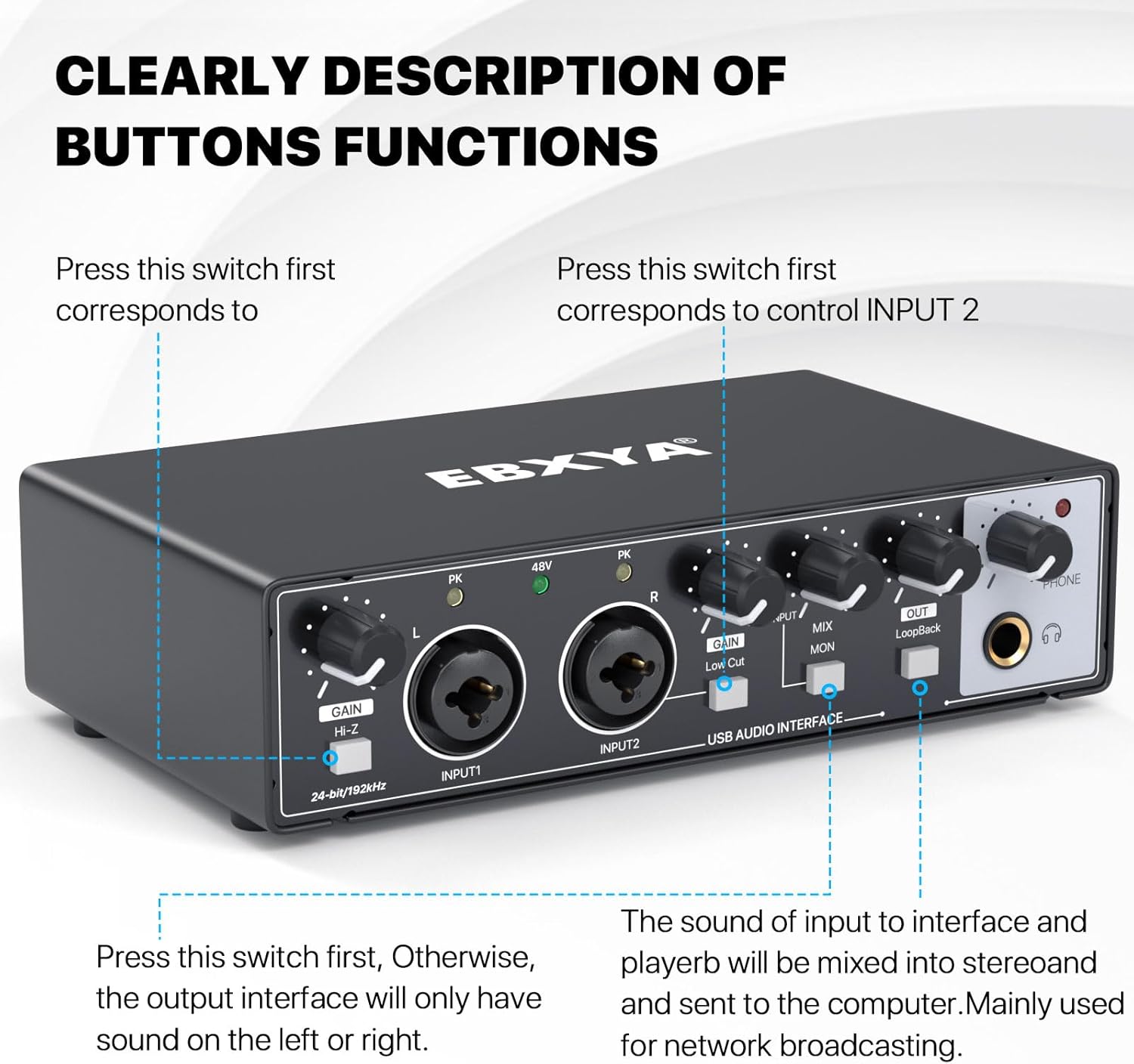
Image: Detailed description of the front panel buttons and knobs, including Gain controls, HI-Z switch, 48V phantom power indicator, Mix/Mon knob, Loopback switch, and Phone output.
Setup Instructions
Follow these steps to set up your EBXYA 2i2 USB Audio Interface:
- Connect to Power and Computer: Use the provided USB-A to USB-B 2.0 cable to connect the interface to your computer (PC or Mac). If your computer only has USB-C ports, use the included USB-C to USB-A adapter. The device is plug-and-play and typically does not require additional drivers.
- Connect Instruments/Microphones:
- For microphones, connect via an XLR cable to INPUT 1 or INPUT 2. If using a condenser microphone, activate the +48V Phantom Power switch. The phantom light will illuminate.
- For instruments (e.g., guitar, bass), connect via a 1/4-inch TS cable to INPUT 1 or INPUT 2. Engage the HI-Z switch for high-impedance instruments on the corresponding input.
- Connect Headphones: Plug your headphones into the 1/4-inch PHONE jack on the front panel. Adjust the PHONE knob for headphone volume.
- Connect Speakers (Optional): Connect your studio monitors or speakers to the OUTPUT 1L and OUTPUT 2R TRS jacks on the rear panel using 1/4-inch TRS cables. Adjust the OUT knob for speaker volume.
- Software Configuration: Once connected, your computer should recognize the EBXYA 2i2 as an audio device. Select it as your input and output device in your Digital Audio Workstation (DAW) software (e.g., Logic Pro, Cubase, Pro Tools, Reaper) or system sound settings.

Image: A diagram illustrating how to connect various devices such as guitars, keyboards, microphones, headphones, PCs/Macs, power supplies, and speakers to the EBXYA 2i2 USB Audio Interface.
Operating Instructions
Understanding the controls on your audio interface is essential for effective recording and monitoring.
Front Panel Controls:
- GAIN Knobs (L/R): Adjust the input level for INPUT 1 (L) and INPUT 2 (R). Turn clockwise to increase gain. The PK (Peak) indicator lights up if the input signal is too high, indicating potential clipping. Reduce gain if the PK light illuminates frequently.
- HI-Z Switch: Activates high-impedance mode for direct instrument input (e.g., electric guitar). Press this switch for the corresponding input when connecting instruments.
- +48V Phantom Power Switch: Engages +48V phantom power for condenser microphones. The 48V indicator light will turn on.
- MIX/MON Knob: Blends the direct input signal (MIX) with the playback signal from your computer (MON) for real-time monitoring. Turn towards MIX for more direct input sound, or towards MON for more computer playback sound.
- LOOPBACK Switch: When activated, this function mixes the input signal with the computer's playback audio and sends it back to the computer. This is useful for live streaming or podcasting where you want to capture both your microphone and computer audio simultaneously.
- OUT Knob: Controls the overall output volume for the main TRS outputs (speakers).
- PHONE Knob: Controls the volume for the headphone output.
Recording and Monitoring:
After connecting your devices and configuring your software, you can begin recording. Adjust the GAIN knobs for each input to achieve a healthy signal level without clipping (avoiding the PK light). Use the MIX/MON knob to balance your direct input signal with the audio playing back from your computer for comfortable monitoring. The ultra-low latency design ensures that you hear your performance in real-time without distracting delays.

Image: A person wearing headphones and using the EBXYA 2i2 USB Audio Interface, demonstrating real-time monitoring during a recording session.
Usage Scenarios:

Image: A collage depicting different applications of the audio interface, including recording music, recording videos for podcasts, playing guitar at home, and playing games with friends, highlighting its versatility.
Maintenance
To ensure the longevity and optimal performance of your EBXYA 2i2 USB Audio Interface, follow these maintenance guidelines:
- Cleaning: Use a soft, dry cloth to clean the exterior of the device. Avoid using abrasive cleaners, solvents, or waxes, as these can damage the finish.
- Environmental Conditions: Operate and store the interface in a clean, dry environment away from direct sunlight, extreme temperatures, and high humidity.
- Liquid Exposure: Prevent liquids from entering the device. If liquid spills occur, immediately disconnect power and allow the unit to dry completely before attempting to use it again.
- Cable Management: Handle cables carefully. Avoid sharp bends or excessive pulling that could damage the connectors or internal wiring.
- Storage: When not in use for extended periods, store the interface in its original packaging or a protective case to prevent dust accumulation and physical damage.
Troubleshooting
If you encounter issues with your EBXYA 2i2 USB Audio Interface, refer to the following common problems and solutions:
- No Sound Output:
- Ensure the interface is properly connected to your computer and powered on.
- Check that the OUT and PHONE volume knobs are turned up.
- Verify that the EBXYA 2i2 is selected as the default playback device in your computer's sound settings and your DAW.
- Check all cable connections to speakers and headphones.
- No Input Signal:
- Ensure the microphone or instrument is properly connected to INPUT 1 or INPUT 2.
- Turn up the corresponding GAIN knob.
- For condenser microphones, ensure +48V Phantom Power is activated and the 48V light is on.
- For high-impedance instruments, ensure the HI-Z switch is engaged for the correct input.
- Verify that the EBXYA 2i2 is selected as the default recording device in your computer's sound settings and your DAW.
- Distortion or Clipping:
- If the PK (Peak) indicator lights up frequently, reduce the corresponding GAIN knob.
- Check the input level in your recording software and adjust if necessary.
- Device Not Recognized by Computer:
- Try connecting the interface to a different USB port on your computer.
- Ensure you are using the provided USB cables and adapters.
- Restart your computer.
- While the device is plug-and-play, ensure your operating system is up to date.
- Phantom Power Switch Appears Inoperative (as noted in some reviews):
- If the 48V light does not respond to the switch, or phantom power is always on/off regardless of switch position, this may indicate a unit specific issue. Contact customer support for assistance.
Specifications
| Item Weight | 1.53 pounds |
| Product Dimensions | 6.89 x 3.86 x 1.77 inches |
| Model Number | Audio Interface-Black |
| Compatible Devices | Bass, Guitar, Keyboard, Microphone, Speaker |
| Hardware Interface | 1/4-inch Audio, 3.5mm Audio, USB 2.0 Type B, USB Type C |
| Supported Software | DAW, Studio Magic Plug-in Suite, Avid Pro Tools, Ableton Live, Steinberg Cubase and more |
| Operating System | Mac OS and Windows 7 or later (Reformatting required for use with MacOS) |
| Brand | EBXYA |
| Connectivity Technology | USB |
| Number of Channels | 2 |
Warranty and Support
The EBXYA 2i2 USB Audio Interface comes with a 2-year Premium Warranty. This warranty covers defects in materials and workmanship under normal use.
If you have any questions, require technical support, or need to make a warranty claim, please contact EBXYA customer service. Our team is dedicated to providing professional technical support and timely reply services.
For further assistance, please visit the official EBXYA store or contact us through the platform where you purchased the product.


