Introduction
Welcome to the user manual for your new Xiaomi Electric Scooter 4 Pro. This manual provides essential information on how to set up, operate, maintain, and troubleshoot your scooter to ensure a safe and enjoyable riding experience. The Xiaomi Electric Scooter 4 Pro offers a super long range of 55km, a max speed of 25km/h, and a powerful 700W max motor, capable of climbing 20% inclines. It features 130mm dual-disc brakes and 10" tubeless self-sealing tires for enhanced safety and comfort.

Figure 1: Front view of the Xiaomi Electric Scooter 4 Pro.
Setup
Unboxing and Initial Assembly
Upon receiving your Xiaomi Electric Scooter 4 Pro, carefully open the large package. Inside, you will find the main scooter body, the handlebar assembly, a power adapter for charging, a pump connection piece, and a scooter lock. The scooter is well-packaged with protective padding. The handlebar needs to be connected to the main body; the cable feeds through the neck of the scooter. Ensure all connections are secure before proceeding.
Charging the Battery
Before first use, fully charge the scooter's lithium polymer battery using the provided power adapter. Connect the charger to the scooter's charging port and then to a power outlet. The charging indicator will show the charging status. Ensure the connection is firm to avoid issues like intermittent charging. A full charge ensures optimal performance and range.
Connecting to the App
For full functionality and to monitor your scooter's status, download the official Xiaomi Home app. Follow the in-app instructions to pair your scooter via Bluetooth. The app allows for firmware updates, ride statistics, and other smart features.
Operating Your Scooter
Power On/Off
To power on the scooter, press and hold the power button located on the handlebar. To power off, press and hold the power button again until the display turns off.
Riding Guidelines
Always wear a helmet and appropriate safety gear when riding. Ensure you are familiar with local regulations regarding electric scooter use. Start in a low-speed mode to get accustomed to the scooter's acceleration and handling. Maintain a safe distance from other vehicles and pedestrians.
Braking System
The Xiaomi Electric Scooter 4 Pro is equipped with a 130mm dual-disc brake system for effective stopping power. Apply both brakes gently and evenly to slow down or stop. Avoid sudden braking, especially at high speeds, to prevent loss of control.
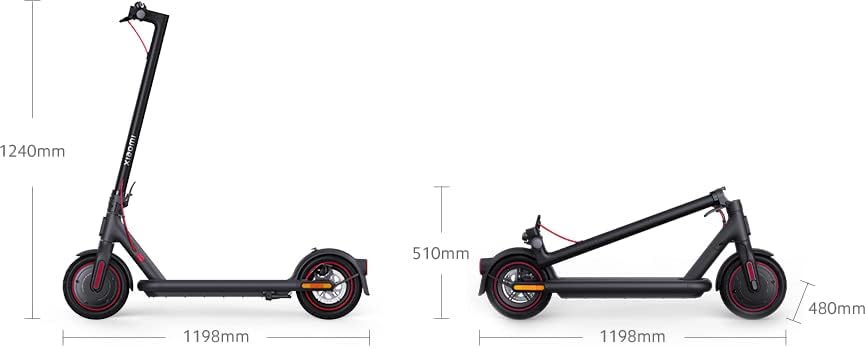
Figure 2: Close-up of the rear wheel and dual-disc brake system.
Folding and Unfolding
The scooter features a convenient folding mechanism for easy storage and transport. To fold, locate the folding latch near the base of the handlebar stem and follow the instructions to secure the handlebar to the rear fender. To unfold, reverse the process, ensuring the latch is securely engaged before riding.

Figure 3: The scooter shown in both unfolded and folded configurations with dimensions.
Maintenance
Tire Care
The 10" tubeless self-sealing tires require regular pressure checks. Proper tire inflation is crucial for ride comfort, range, and tire longevity. Use the provided pump connection piece with a suitable pump to maintain recommended tire pressure.
Battery Maintenance
To prolong battery life, avoid completely draining the battery and store the scooter in a cool, dry place when not in use. Charge the battery regularly, even if the scooter is not used frequently.
Cleaning and Storage
Clean the scooter regularly with a damp cloth. Avoid using high-pressure water jets or harsh chemicals. Store the scooter indoors, away from direct sunlight and extreme temperatures, to protect electronic components and the battery.
Troubleshooting
Common Issues and Solutions
- Scooter not turning on: Ensure the battery is charged. If fully charged, try resetting the scooter by holding the power button for an extended period.
- Charging issues: Verify that the charging cable and adapter are securely connected to both the scooter and the power outlet. Check if the power outlet is functional. Some users have reported intermittent charging if the magnetic connection is not perfectly aligned.
- App connectivity problems: Ensure Bluetooth is enabled on your device and the scooter is powered on. Try restarting both the app and the scooter. Update the app to the latest version.
- Cruise control inconsistency: If cruise control is not working reliably, check the app for any settings that might affect it. Ensure the firmware is up to date.
- Reduced performance/range: Check tire pressure, as under-inflated tires can significantly impact performance. Ensure the battery is fully charged and consider environmental factors like temperature and terrain.
Specifications
| Feature | Specification |
|---|---|
| Brand | Xiaomi |
| Model | Xiaomi Electric Scooter 4 Pro (DDHBC25NEB) |
| Item Weight | 17.5 Kilograms (38.5 pounds) |
| Item Dimensions (L x W x H) | 47.17 x 19.06 x 48.82 inches |
| Max. Speed | 25km/h (approx. 15.5 mph) |
| Max. Power | 700W |
| Range | 55km (approx. 34 miles) |
| Incline Climb | 20% |
| Brake Type | 130mm Dual-disc Brake |
| Tire Type | 10" Tubeless Self-Sealing Tires |
| Load Capacity | 739 Pounds |
| Battery | 1 Lithium Polymer battery (included) |
Warranty and Support
Your Xiaomi Electric Scooter 4 Pro comes with a manufacturer's warranty. Please refer to the warranty card included in your package for specific terms and conditions. For technical support, spare parts, or warranty claims, please contact Xiaomi customer service through their official website or authorized service centers. Keep your proof of purchase for any warranty-related inquiries.


