
Introduction
This instruction manual provides comprehensive guidance for the Easyfone T300 4G Flip Cell Phone. Designed for ease of use, this phone features large buttons, clear and loud sound, and essential functions like an SOS button and photo speed dial. Please read this manual thoroughly to understand all features and ensure proper operation and maintenance of your device.
What's in the Box
Upon unboxing your Easyfone T300, please verify that all the following items are included:
- Easyfone T300 Flip Phone
- Charging Set (with Charging Dock)
- 1500mAh Battery
- User Manual
- SpeedTalk 3-in-1 SIM Card Kit
Setup Guide
1. SIM Card and Battery Installation
Before using your Easyfone T300, you must install the SIM card and battery. The phone supports a micro-size SIM card, or a nano-size SIM can be used with the provided adapter.
- Carefully remove the back cover of the phone.
- Insert the SIM card into the designated SIM slot. Ensure it is correctly oriented.
- Insert the 1500mAh battery into its compartment.
- Replace the back cover securely.
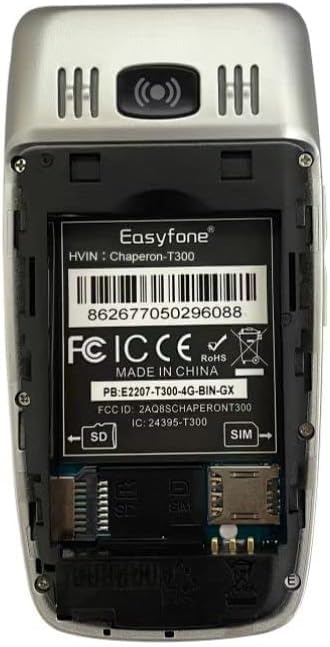
Image: Rear view of the Easyfone T300, showing the internal battery compartment and slots for SIM and SD cards.
2. Initial Charging
For optimal battery performance, fully charge the phone before first use.
- Place the Easyfone T300 into the charging dock, ensuring it is seated correctly.
- Connect the charging cable to the dock and a power source.
- The phone will indicate charging status on its screen. A full charge typically takes approximately 3.5 hours.

Image: The Easyfone T300 flip phone resting in its dedicated charging dock, placed on a wooden surface next to a vase and books.
3. Powering On/Off
- To power on: Press and hold the Power/End Call button until the screen illuminates.
- To power off: Press and hold the Power/End Call button, then select "Power off" from the options.
Basic Operation
Making and Receiving Calls
- To make a call: Dial the number using the large keypad and press the Call button (green button).
- To answer a call: Simply flip open the phone, or press the Call button.
- To end a call: Close the phone, or press the Power/End Call button (red button).

Image: The Easyfone T300 flip phone, black, shown partially open, highlighting its external display and large, easy-to-read keypad.
Adjusting Volume
Use the volume buttons located on the side of the phone to adjust call volume, ringtone volume, and media volume.
Text Messaging
To access text messages, press the Menu button and navigate to the "Message" icon. You can read, compose, and send SMS messages from this menu.
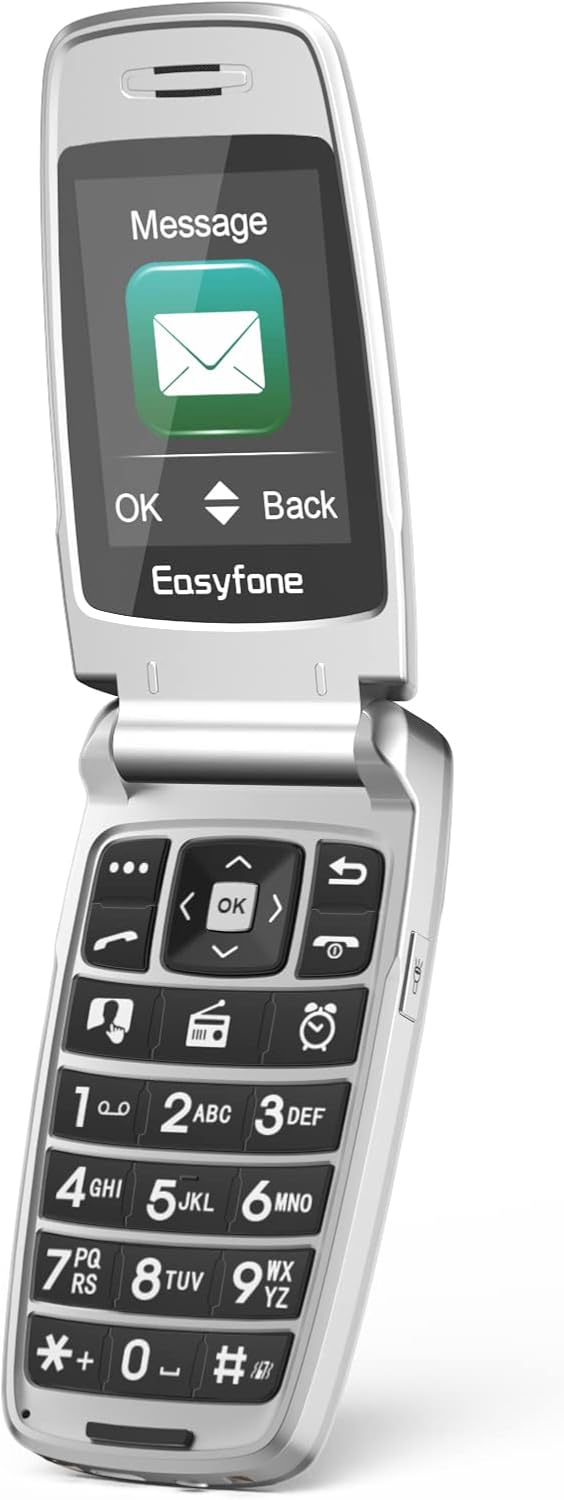
Image: The Easyfone T300 flip phone shown open, with its internal screen displaying a message icon and various menu options.
Special Features
Photo Speed Dial
The Easyfone T300 allows you to set up to 8 photo speed dial contacts for quick and easy calling. This feature displays a contact's photo, making it simpler to identify who you are calling.
- Saving Contacts: Press Contact, then Add contact, and select Phone. Edit necessary information such as "Add photo", "Name", and "Mobile" number. Select SAVE.
- Adding to Speed Dial: From the contact list, select the target contact. Press Option, then Add to Speed Dial. Choose a number (1-8) for the contact and confirm with OK.
- Using Speed Dial: From the main screen, press the photo speed dial shortcut button. Use the Up and Down navigation buttons to switch between contacts. Press the Call button to dial immediately.

Image: The Easyfone T300 displaying a contact's photo and name on its screen, illustrating the photo speed dial feature.
Video: This video demonstrates how to set up the Photo Speed Dial and SOS emergency functions on the Easyfone T300.
SOS Emergency Button
The SOS button provides a critical safety feature, allowing you to quickly contact pre-selected emergency numbers and send an alert message.
- Setting SOS Numbers: Press Menu, then navigate to SOS settings. Select SOS numbers. You can save up to 5 emergency contact numbers. Press Option, then Add from contacts to select contacts. Ensure SOS active is set to "On".
- Activating SOS: From the main page, press and hold the SOS button (located on the back of the phone) for 3 seconds.
- The phone will automatically call the saved emergency contacts in a loop until a call is answered. Simultaneously, an SOS message will be sent to each emergency contact.

Image: The Easyfone T300 highlighting its SOS emergency button on the back, with a graphic representation of emergency contacts on a map.
Other Features
- FM Radio: The phone includes a built-in FM radio.
- Flashlight: A convenient flashlight function is integrated into the device.
- Dual HD Display: Features a 2.4" main display and a 1.44" external colorful HD screen, both designed with large fonts and icons for easy viewing.
- Hearing Aid Compatible (HAC): Designed to work effectively with hearing aids.
Maintenance
- Cleaning: Use a soft, dry cloth to clean the phone's exterior. Avoid liquid cleaners or abrasive materials.
- Battery Care: Do not expose the battery to extreme temperatures. If the phone will not be used for an extended period, charge the battery to about 50% before storing.
- Storage: Store the phone in a cool, dry place away from direct sunlight and moisture.
- Avoid Drops: While durable, avoid dropping the phone to prevent damage to internal components or screens.
Troubleshooting
Common Issues and Solutions
- Phone not turning on:
- Ensure the battery is correctly installed and charged.
- Connect the phone to the charging dock and allow it to charge for at least 15 minutes before attempting to power on again.
- Poor call quality or no signal:
- Check that the SIM card is properly inserted.
- Ensure you are in an area with network coverage.
- Restart the phone.
- External display not working:
- Restart the phone.
- If the issue persists, contact customer support.
- Difficulty setting up contacts or features:
- Refer to the detailed instructions in the "Setup Guide" and "Special Features" sections of this manual.
- For complex issues, contact customer support for assistance.
Specifications
| Feature | Detail |
|---|---|
| Model Name | T300 |
| Brand | Easyfone |
| Operating System | Nucleus OS |
| Cellular Technology | 4G |
| Wireless Carrier Compatibility | T-Mobile, SpeedTalk, Tello Mobile (Not compatible with AT&T, Cricket, Verizon, Sprint, Boost Mobile) |
| Screen Size | 2.4 Inches (Main), 1.44 Inches (External) |
| Resolution | 720 x 600 |
| Battery Capacity | 1500 mAh (Lithium Ion) |
| Phone Talk Time | Up to 50 Hours |
| Charging Time | Approx. 3.5 Hours |
| Item Weight | 4 ounces |
| Special Features | Big buttons, Clear & Loud Sound, Dual HD display, Photo speed dial, Charging station, SOS button, HAC Compatible, FM Radio, Flashlight |
| Audio Jack | 3.5 mm |
Warranty and Support
For warranty information, technical support, or any inquiries regarding your Easyfone T300, please contact the manufacturer, Shen Zhen Yixun Electronic Technology Co., Ltd, or the seller, FamFun Direct, through your purchase platform. Retain your proof of purchase for warranty claims.
Manufacturer: Shen Zhen Yixun Electronic Technology Co., Ltd
Seller: FamFun Direct


