
Important Safety Instructions
Read all instructions carefully before using the appliance and keep them for future reference. Failure to follow these instructions may result in electric shock, fire, or injury.
- Do not attempt to operate this oven with the door open as this can result in harmful exposure to microwave energy.
- Do not place any object between the oven front face and the door or allow soil or cleaner residue to accumulate on sealing surfaces.
- Do not operate the oven if it is damaged. It is particularly important that the oven door closes properly and that there is no damage to the: (1) door (bent), (2) hinges and latches (broken or loosened), (3) door seals and sealing surfaces.
- The oven should not be adjusted or repaired by anyone except properly qualified service personnel.
- Ensure the appliance is properly grounded.
- Do not use corrosive chemicals or vapors in this appliance.
- Always use microwave-safe cookware. Metal containers are not suitable for microwave cooking.
- Liquids and other foods must not be heated in sealed containers since they are liable to explode.
- This appliance is intended for household use only.
Product Overview
The Sharp YC-QG204AE-B is a 20-liter countertop microwave oven with an integrated grill function, offering 800W microwave power. It features a flatbed cooking type, LED cooking light, and touch controls for ease of use.
Components
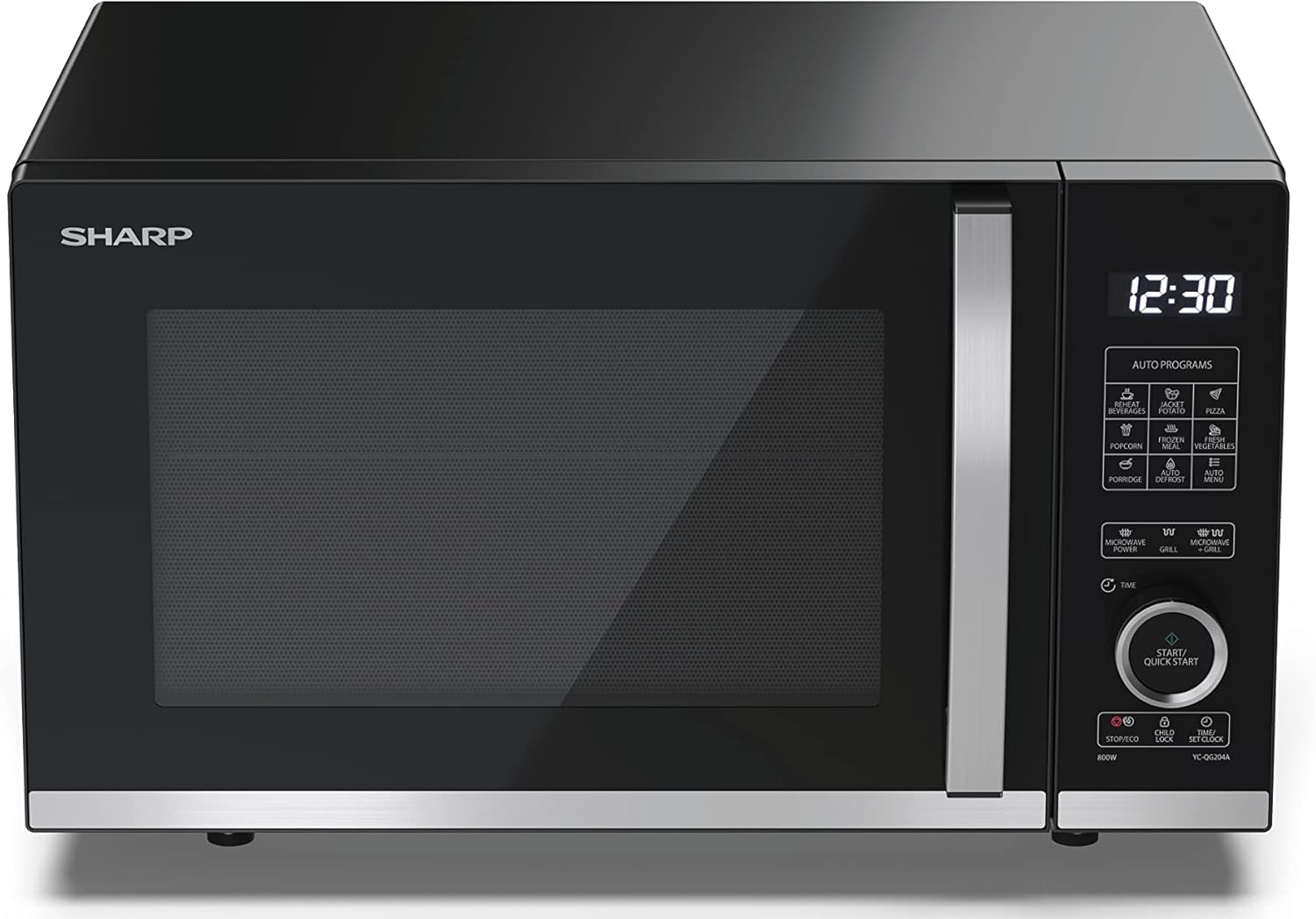
Figure 1: Front view of the Sharp YC-QG204AE-B microwave oven, showcasing the black finish, glass door, and control panel on the right.

Figure 2: Angled view of the microwave, providing a clear look at the digital display and touch control panel with various function buttons.

Figure 3: Interior view of the microwave oven, showing the flatbed cooking surface and the included grill rack.

Figure 4: Diagram illustrating the external dimensions of the microwave oven: 39.1 cm (depth) x 27.2 cm (height) x 45.7 cm (width).
Key Features
- Capacity: 20 Liters
- Microwave Power: 800 Watts
- Cooking Type: Flatbed (no turntable)
- Grill Function: Integrated grill for browning and crisping.
- Control Type: Tactile (Touch Control)
- Lighting: LED cooking light
- Safety: Child lock function
- Efficiency: ECO function
- Accessories: Includes grill rack
Installation and Setup
Unpacking
Carefully remove the microwave oven and all packing materials from the carton. Check the oven for any damage, such as dents or a misaligned door. Do not operate the oven if it is damaged. Retain the packaging for future transport or disposal.
Placement
- Place the oven on a flat, stable surface that can support its weight and the heaviest food likely to be cooked in the oven.
- Ensure adequate ventilation. Leave a minimum of 10 cm (4 inches) clearance at the rear, 20 cm (8 inches) at the top, and 5 cm (2 inches) on both sides.
- Do not block air vents. Blocking vents can damage the oven and lead to poor cooking results.
- Keep the oven away from heat sources, steam, or splashing liquids.
- Do not place the oven near a radio or TV, as it may cause interference.
Electrical Connection
- Ensure the voltage specified on the rating label matches your household power supply (230 Volts).
- Plug the oven into a properly installed and grounded wall outlet. Do not use an extension cord or adapter.
- The appliance must be grounded. In the event of an electrical short circuit, grounding reduces the risk of electric shock by providing an escape wire for the electric current.
Operating Your Microwave Oven
Control Panel Overview
The microwave features a digital display and a tactile control panel. The panel includes buttons for various functions such as microwave power levels, grill, combination cooking, auto programs, time setting, and start/quick start.
Setting the Clock
- Press the 'Clock' button once.
- Use the dial or '+' / '-' buttons to set the hour.
- Press the 'Clock' button again.
- Use the dial or '+' / '-' buttons to set the minutes.
- Press the 'Clock' button one last time to confirm.
Microwave Cooking
- Place food in a microwave-safe container inside the oven.
- Close the oven door securely.
- Press the 'Microwave Power' button repeatedly to select the desired power level (e.g., 800W for high).
- Use the dial or '+' / '-' buttons to set the cooking time.
- Press 'Start/Quick Start' to begin cooking.
Grill Cooking
- Place food on the grill rack provided, then place it inside the oven.
- Close the oven door securely.
- Press the 'Grill' button.
- Use the dial or '+' / '-' buttons to set the grilling time.
- Press 'Start/Quick Start' to begin grilling.
Combination Cooking (Microwave + Grill)
This function combines microwave and grill cooking for faster results and a crispy finish.
- Place food in a suitable container on the grill rack.
- Close the oven door.
- Press the 'Combi' button to select the desired combination mode (e.g., C-1, C-2).
- Use the dial or '+' / '-' buttons to set the cooking time.
- Press 'Start/Quick Start' to begin.
Auto Programs
The oven includes several pre-set auto programs for common foods. Refer to the specific program list on your control panel for details on each program and recommended food types/weights.
- Place food in the oven.
- Press the 'Auto Programs' button or select the specific program button (e.g., 'Pizza', 'Popcorn').
- Adjust weight/quantity if prompted, using the dial or '+' / '-' buttons.
- Press 'Start/Quick Start' to begin.
Child Lock Function
To prevent unintended operation, activate the child lock.
- To activate: Press and hold the 'Stop/Eco' button for 3 seconds. A lock indicator will appear on the display.
- To deactivate: Press and hold the 'Stop/Eco' button for 3 seconds again. The lock indicator will disappear.
ECO Function
The ECO function helps save energy by turning off the display when the oven is not in use for a certain period.
- To activate/deactivate: Press the 'ECO' button. The display will indicate when ECO mode is active.
Care and Maintenance
Regular cleaning and proper maintenance will ensure the longevity and efficient operation of your microwave oven.
- Cleaning the Exterior: Wipe the exterior with a damp cloth and mild detergent. Avoid abrasive cleaners.
- Cleaning the Interior: For spills, wipe immediately with a damp cloth. For stubborn food residue, place a bowl of water with lemon juice inside and microwave on high for 2-3 minutes to loosen the residue, then wipe clean.
- Door Seals: Keep the door seals and adjacent parts clean. Use a soft cloth and mild soap.
- Grill Rack: The grill rack can be washed with warm soapy water.
- Odor Removal: To remove odors, combine a cup of water with several tablespoons of lemon juice in a microwave-safe bowl. Microwave on high for 5-7 minutes.
- Always unplug the oven before cleaning.
Troubleshooting Guide
If you experience issues with your microwave oven, consult the table below for common problems and solutions.
| Problem | Possible Cause | Solution |
|---|---|---|
| Oven does not start | Power cord not plugged in; Door not closed properly; Fuse blown or circuit breaker tripped; Child lock activated. | Plug in power cord; Close door securely; Check fuse/reset circuit breaker; Deactivate child lock. |
| Food not heating | Incorrect cooking time/power level; Door not closed properly; Microwave-safe cookware not used. | Adjust time/power; Close door securely; Use appropriate cookware. |
| Sparking inside oven | Metal or foil in oven; Food residue on interior walls. | Remove metal/foil; Clean oven interior thoroughly. |
| Unusual noise during operation | Normal operation sound; Loose components. | Some operational noises are normal. If excessive, ensure no loose items are inside. If problem persists, contact service. |
If the problem persists after attempting these solutions, please contact customer support.
Technical Specifications
| Specification | Value |
|---|---|
| Brand | Sharp |
| Model Number | YC-QG204AE-B |
| Color | Black |
| Capacity | 20 Liters |
| Microwave Power | 800 Watts |
| Voltage | 230 Volts |
| Material | Stainless Steel, Glass |
| Product Dimensions (L x W x H) | 39.1 x 45.7 x 27.2 cm |
| Item Weight | 12.4 Kilograms |
| Special Features | Flatbed cooking, LED lighting, Child control, ECO function, Grill included |
| Controller Type | Tactile |
| Included Components | YC-QC254AE-B (model variant), grill rack, manual, warranty card |
Warranty and Customer Support
For detailed warranty information, please refer to the warranty card included with your product. The warranty period and terms may vary by region and retailer.
If you require technical assistance, have questions about operation, or need to report a fault, please contact Sharp customer support. Contact details can typically be found in your warranty documentation or on the official Sharp website for your region.
When contacting support, please have your model number (YC-QG204AE-B) and purchase date readily available.


