
1. Introduction
This manual provides detailed instructions for the assembly, operation, maintenance, and troubleshooting of your FLEXISPOT S2E-PRO Queen Adjustable Bed Frame. Please read this manual thoroughly before use to ensure proper functionality and safety. Keep this manual for future reference.
2. Key Features
- Independent Head and Foot Lift: Adjust the head section up to 60° and the foot section up to 45° to find your preferred position for sleeping, reading, or relaxation.
- Zero Gravity Preset: A pre-programmed position that elevates your legs above your heart, promoting a balanced, weightless sensation to reduce pressure.
- Wireless Remote Control: Features two preset positions (Zero Gravity and One-Touch Flat), two memory buttons for custom settings, and a built-in flashlight for convenience.
- Whisper-Quiet and Durable Motors: Equipped with motors designed for smooth, quiet operation, tested for durability, and certified with UL, FCC, and CE safety standards.
- Health Benefits: Designed to alleviate joint pain, reduce snoring, support back and legs, and improve blood circulation.
- Robust Construction: Supports up to 750 lbs.
- Warranty: Includes a 5-year motor warranty and a 10-year frame warranty.

Independent Head and Foot Lift for Customizable Comfort.

Zero-Gravity Relaxation position to relieve pressure and alleviate snoring.

Benefits of Adjustable Beds for Every Lifestyle.

Advanced Safety Features with UL, FCC, and CE certifications.
3. Setup Instructions
Follow these steps to properly set up your adjustable bed frame. It is recommended that two people assemble the bed frame due to its weight and size.
- Unpack the Box: Carefully open the shipping box. It is recommended that two people work together to lift the bed frame out of the box.
- Prepare the Frame: Lay the folded bed frame on a clean, flat surface.
- Install Legs: Attach the six adjustable bed legs by rotating the end cap at the bottom of each leg clockwise to adjust to the desired height (from 0 to 11 cm). Securely screw each leg into the designated points on the bed frame.
- Connect Power: Connect the power cord to the power supply unit, then plug the power supply into a wall outlet.
- Flip the Bed: With the help of another person, carefully flip the bed frame over so it rests on its legs.
- Install Mattress Retainer Bar: Locate the holes at the foot of the bed and insert the mattress retainer bar to prevent the mattress from shifting.
- Place Mattress: Carefully place your mattress on the adjustable bed frame. The frame is compatible with most mattress types including memory foam, latex, gel, and hybrid mattresses.
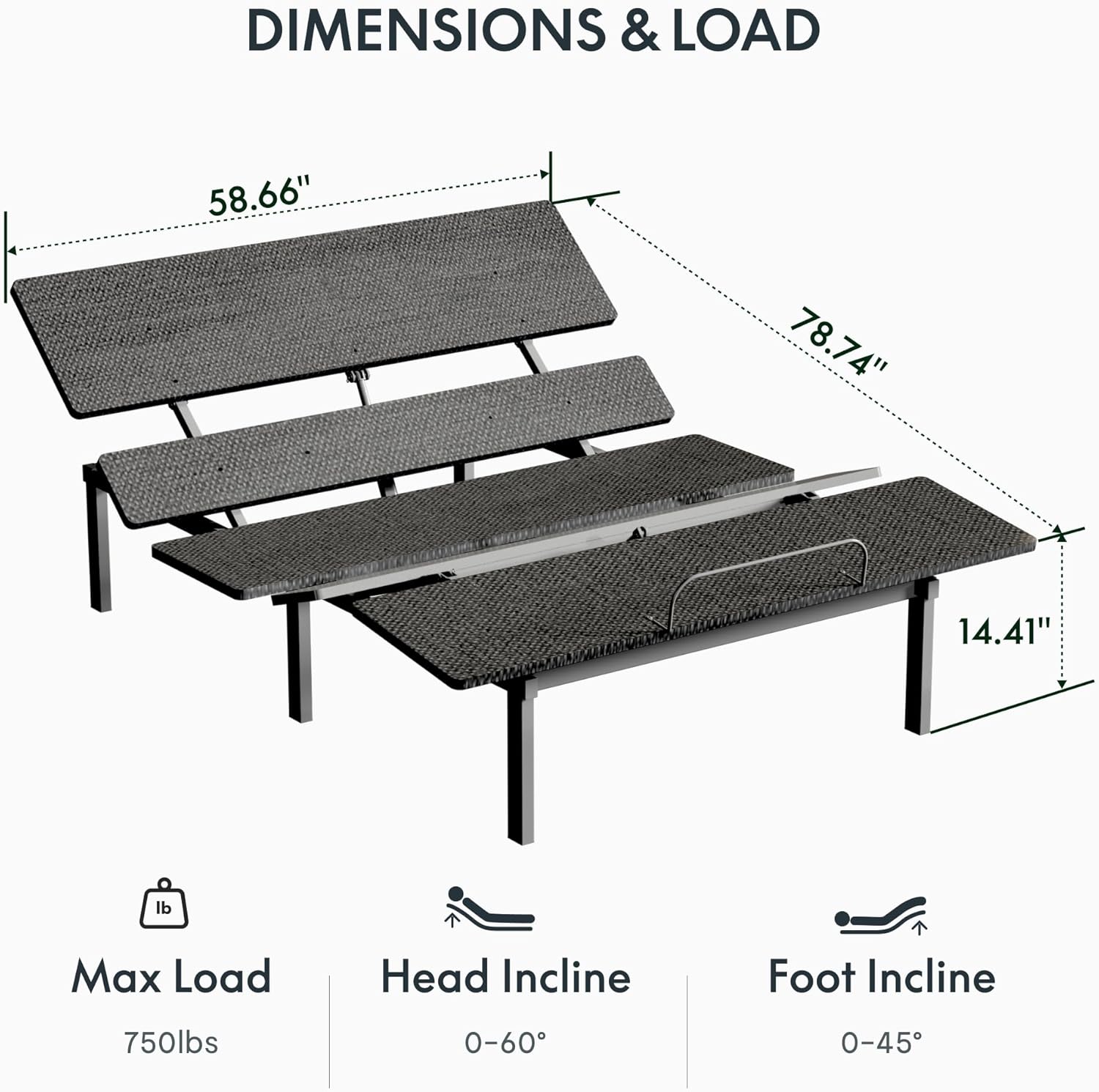
Dimensions and Load Capacity of the Adjustable Bed Frame.

The adjustable bed frame is designed to work with most existing bed frames.
Setup Videos:
Video: SunsGrove Twin Adjustable Bed Frame Assembly. This video demonstrates the assembly process for a similar adjustable bed frame, including attaching legs and the retainer bar.
Video: Electric Adjustable Bed Assembly. This video provides a step-by-step guide on unpacking, assembling legs, connecting power, and testing the bed frame.
4. Operating Instructions
Your FLEXISPOT S2E-PRO adjustable bed frame comes with a wireless remote control for easy adjustments.
- Head Up/Down: Use the dedicated buttons to raise or lower the head section of the bed.
- Foot Up/Down: Use the dedicated buttons to raise or lower the foot section of the bed.
- Zero Gravity (ZG): Press the 'ZG' button to activate the pre-programmed Zero Gravity position.
- One-Touch Flat: Press the 'FLAT' button to return the bed to a completely flat position.
- Memory Settings (M1, M2): Customize and save your favorite positions using the memory buttons. To save a position, adjust the bed to your desired setting, then press and hold a memory button (M1 or M2) until the remote indicates the position is saved.
- Flashlight: The remote includes a built-in flashlight for convenience in low light conditions.
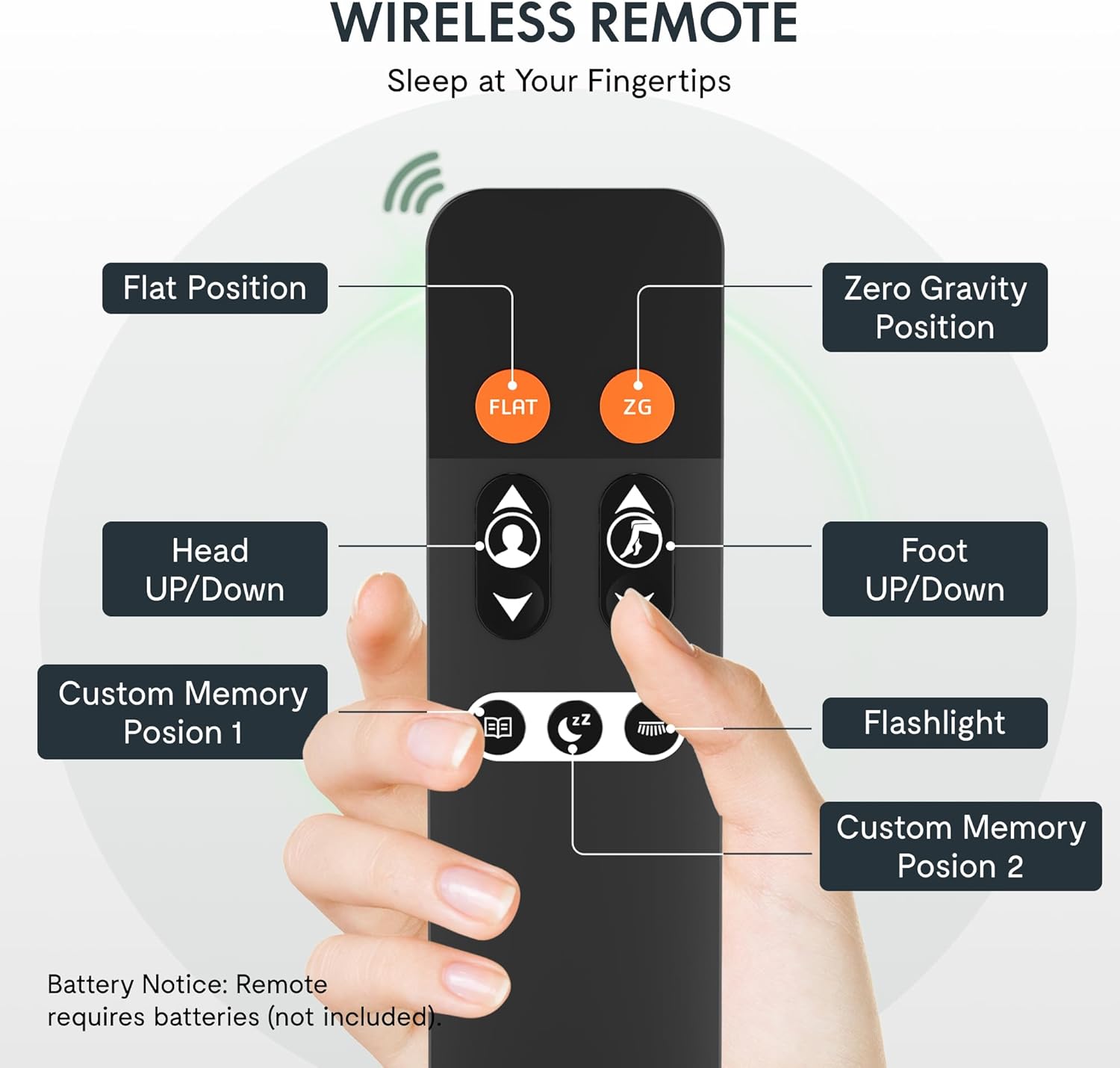
Wireless Remote Control for easy adjustment of bed positions.

One-Touch Flat and Memory Buttons for effortless adjustment and saving preferred positions.

Mattress Retainer Bar keeps your mattress securely in place.
Operating Videos:
Video: Softa Adjustable Bed Frame. This video demonstrates the remote control functionality and various bed positions.
Video: Why Choose TAMI TAMI Adjustable Bed Frame. This video showcases various adjustable bed features and positions. Note: Some features shown (e.g., massage, USB ports, under-bed light) may not be present on the FLEXISPOT S2E-PRO model.
Video: BedsPick Adjustable queen bed frame with remote control. This video demonstrates the remote control functions and bed adjustments.
5. Maintenance
Regular maintenance ensures the longevity and optimal performance of your adjustable bed frame.
- Cleaning: Wipe the frame with a damp cloth. Avoid harsh chemicals or abrasive cleaners.
- Motor Inspection: Periodically check the motor and electrical connections for any signs of wear or damage. Ensure all cables are securely connected and not pinched.
- Leg Stability: Ensure all bed legs are securely tightened and at the correct height.
- Mattress Retainer Bar: Verify the retainer bar is firmly in place to prevent mattress movement.
6. Troubleshooting
If you encounter any issues with your adjustable bed frame, refer to the following common troubleshooting tips:
- Bed Not Responding to Remote:
- Check if the remote control batteries need replacement.
- Ensure the power cord is securely plugged into both the power supply and the wall outlet.
- Verify that the remote is paired with the bed frame according to the pairing instructions (if applicable, refer to a separate remote pairing guide).
- Motor Noise:
- A slight hum from the motor is normal during operation.
- If the noise is excessive or unusual, check for any obstructions under the bed or loose connections.
- Uneven Movement:
- Ensure the bed frame is on a level surface.
- Check that all legs are adjusted to the same height.
- Mattress Sliding:
- Confirm the mattress retainer bar is correctly installed at the foot of the bed.
If the issue persists, please contact customer support for further assistance.
7. Specifications
| Specification | Detail |
|---|---|
| Size | Queen |
| Special Feature | Adjustable |
| Color | Black |
| Product Dimensions | 78.74"L x 58.66"W x 14.41"H |
| Brand | FLEXISPOT |
| Included Components | Adjustable Bed Frame |
| Weight Limit | 750 Pounds |
| Age Range (Description) | Adult |
| Assembly Required | No (Minimal assembly of legs and retainer bar) |
| Form Factor | Adjustable Bed |
| Warranty Type | Limited |
| Frame Size | Queen |
| UPC | 840460474627 |
| ASIN | B0G1T2WBLR |
| Date First Available | November 11, 2025 |
| Style | Adjustable Base Only |
| Frame Material | Alloy Steel |
8. Warranty and Support
Your FLEXISPOT S2E-PRO Adjustable Bed Frame comes with a 5-year motor warranty and a 10-year frame warranty, ensuring long-lasting reliability.
For technical support, warranty claims, or any questions regarding your product, please contact FLEXISPOT customer service through their official website or the contact information provided with your purchase documentation.