
Introduction
The VIHELM GM8908 is a compact and portable handheld anemometer designed for accurate measurement of wind speed and air temperature. This device is ideal for a wide range of applications, including environmental monitoring, marine activities, HVAC system checks, and various outdoor sports. This user manual provides comprehensive instructions to help you set up, operate, and maintain your GM8908 anemometer safely and effectively.
Safety Information
Please read and understand the following safety precautions before using the device:
- Do not expose the device to extreme temperatures, high humidity, or direct sunlight for prolonged periods.
- Avoid strong impacts or dropping the device, as this may cause damage to internal components.
- Keep the device away from strong magnetic fields, which can affect measurement accuracy.
- Do not attempt to disassemble, repair, or modify the device. Unauthorized modifications will void the warranty.
- Dispose of used batteries responsibly according to local environmental regulations.
- Ensure the battery compartment is securely closed to prevent moisture ingress.
Product Overview
The VIHELM GM8908 features a user-friendly design with essential components clearly labeled for ease of use.
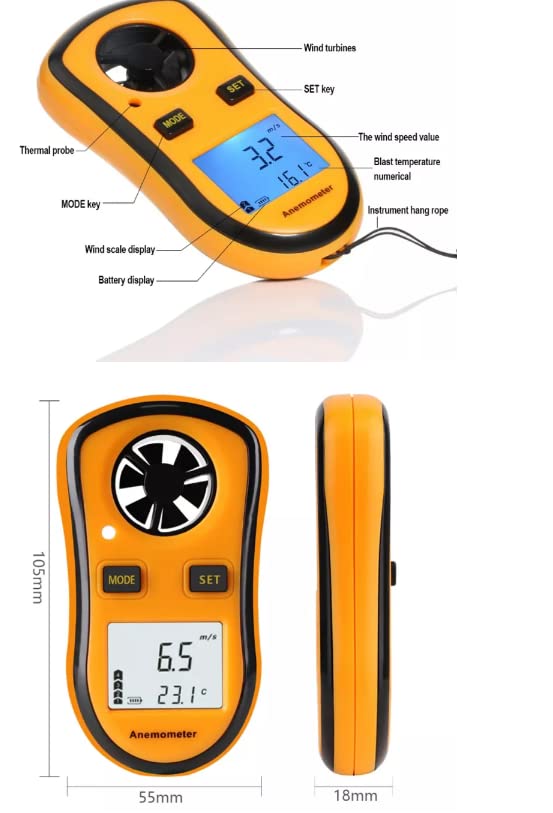
Figure 1: Front view of the GM8908 Anemometer with key components labeled. This includes the wind turbines for air velocity measurement, the MODE and SET control buttons, the LCD display showing readings, and the instrument hang rope.
Key Components:
- Wind Turbines: Located at the top, these six-leaf blades are designed for sensitive and accurate wind speed measurement.
- Thermal Probe: An integrated sensor for precise air temperature measurement.
- LCD Display: A high-definition screen with backlight for clear visibility of wind speed, temperature, and battery status, even in low light conditions.
- MODE Key: Used to power the device on/off, cycle through measurement modes (current, maximum, average), and activate/deactivate auto power off.
- SET Key: Used to change wind speed units and toggle the LCD backlight.
- Battery Door: Located on the back of the device, providing access for battery installation and replacement.
- Temperature Unit Conversion Switch: A small switch inside the battery compartment to select between Celsius (°C) and Fahrenheit (°F).
Specifications
The following table details the technical specifications of the VIHELM GM8908 Anemometer:
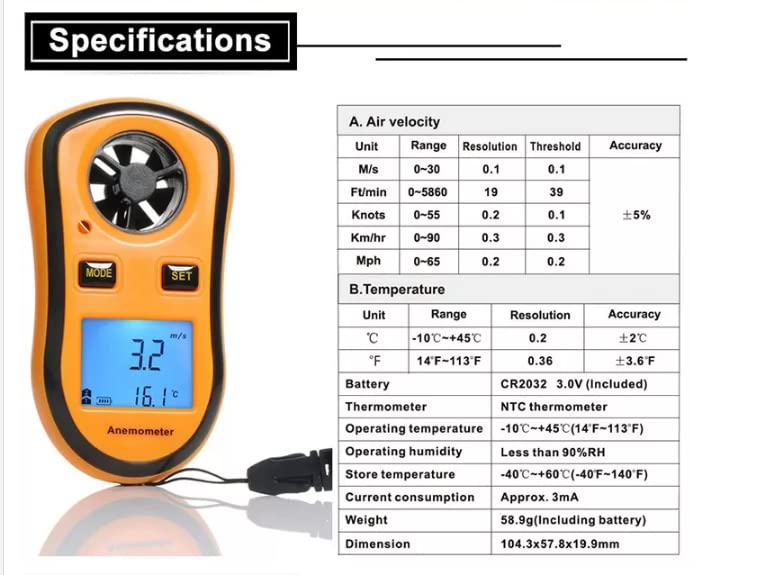
Figure 2: Comprehensive table outlining the performance characteristics of the GM8908 Anemometer.
| Parameter | Value |
|---|---|
| Measuring Items | Air velocity (Wind speed), Air temperature |
| Range of Air Velocity | 0~30m/s, 0~90km/h, 0~5860ft/min, 0~55knots, 0~65mph |
| Accuracy of Air Velocity | ±5% |
| Range of Air Temperature | -10~45°C (14~113°F) |
| Accuracy of Air Temperature | ±2°C (3.6°F) |
| Resolution of Air Velocity | 0.1m/s, 0.2°C |
| Battery | CR2032 (not included) |
| Thermometer | NTC thermometer |
| Operating Temperature | -10~45°C (14~113°F) |
| Operating Humidity | Less than 90%RH |
| Store Temperature | -40~+60°C (-40~140°F) |
| Current Consumption | Approx. 3mA |
| Weight | 58.9g (Including battery) |
| Dimension | 104.3x57.8x19.9mm |
Setup
Battery Installation:
The GM8908 requires one CR2032 battery (not included) for operation.
- Locate the battery door on the back of the anemometer.
- Use a small screwdriver to remove the screw securing the battery door.
- Gently open the battery door.
- Insert one CR2032 battery, ensuring the positive (+) side faces upwards as indicated inside the compartment.
- Close the battery door and secure it with the screw.
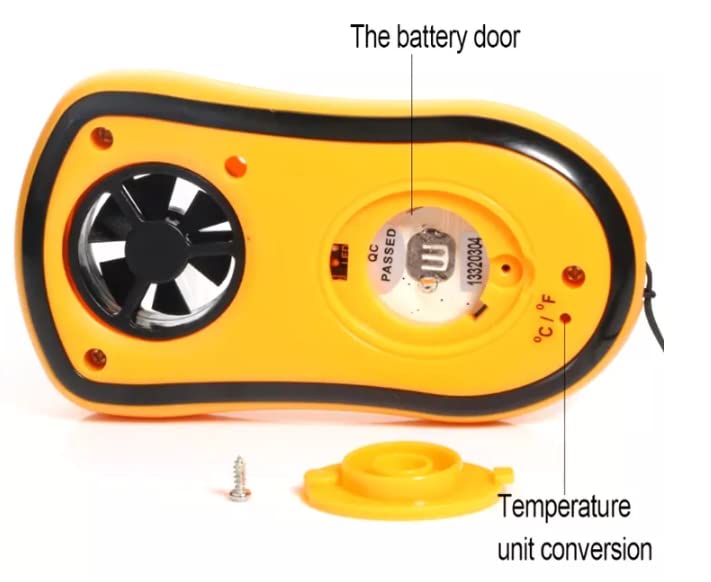
Figure 3: Rear view of the GM8908 Anemometer with the battery door open, illustrating the battery compartment and the temperature unit conversion switch.
Temperature Unit Selection:
You can select your preferred temperature unit (°C or °F) before closing the battery compartment.
- With the battery door open, locate the small switch labeled