
1. Product Overview
The BORUIT LED Rechargeable Headlamp (Model HP700) is a versatile and powerful lighting device designed for various applications, including outdoor activities, emergency preparedness, and general tasks. It features an ultra-bright LED light source, multiple operating modes, and a rechargeable battery for extended use. Its lightweight and adjustable design ensures comfort and adaptability for both adults and children.
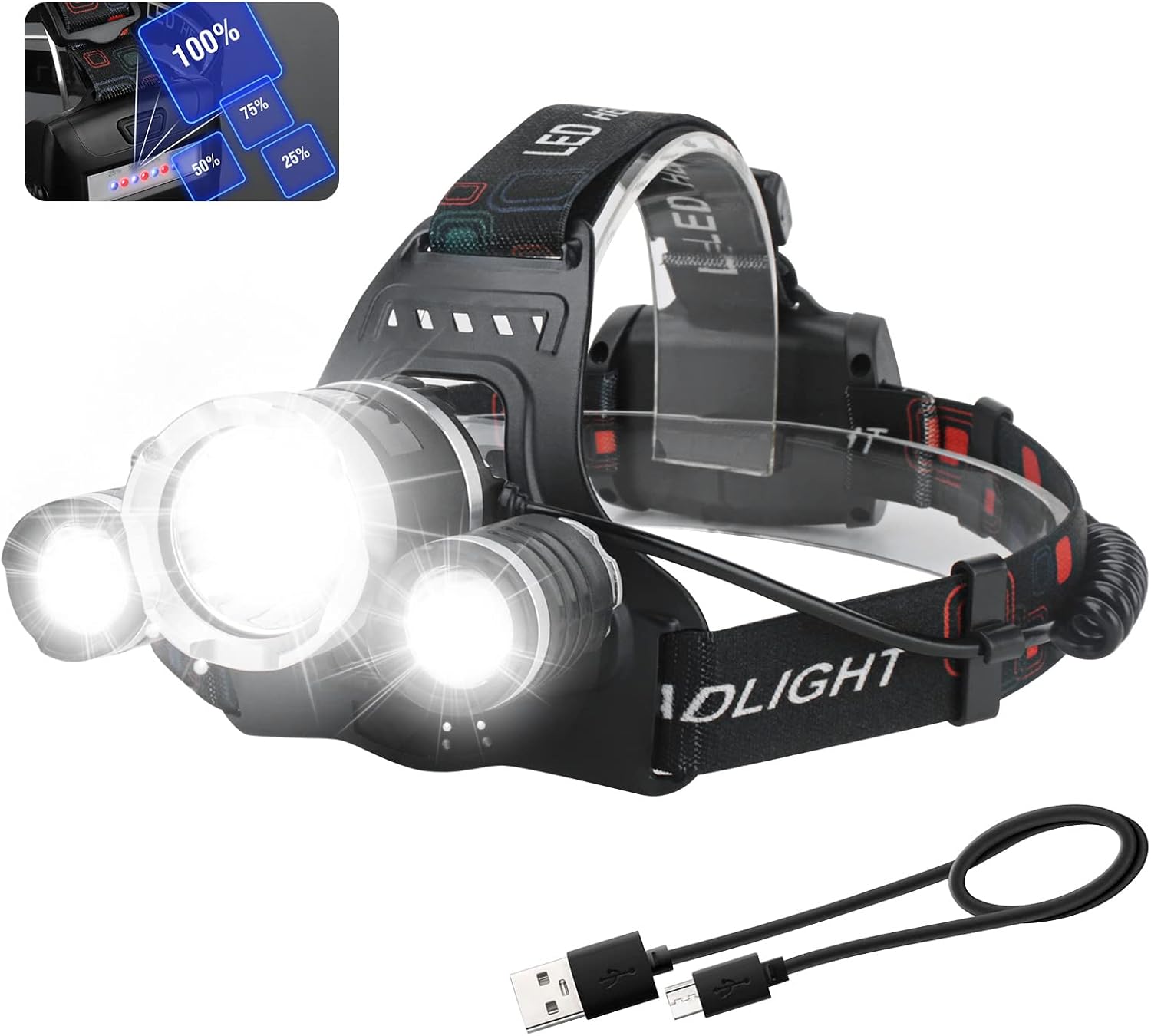
Image 1.1: The BORUIT LED Rechargeable Headlamp, showcasing its main light and two auxiliary lights, along with the included USB charging cable.
2. Key Features
- Ultra-Bright Illumination: Equipped with premium LED beads, providing up to 5000 lumens of brightness and illuminating distances up to 100 meters.
- Multiple Lighting Modes: Features four distinct modes: Main Light Bright, Side Light Bright, All Three LEDs Bright, and Strobe (SOS) for various lighting needs and emergencies.
- Rechargeable Battery: Built-in 1800mAh lithium-ion battery with a micro USB charging port for convenient recharging. Includes a blue light battery indicator and a red light warning on the battery pack.
- Adjustable Beam Angle: The headlamp can be adjusted 90 degrees vertically to direct light precisely where needed.
- IPX4 Waterproof Rating: Designed to withstand splashes and rain, making it suitable for use in various weather conditions.
- Lightweight and Comfortable: Weighing approximately 214g (7.55 ounces), with an elastic and anti-slip headband for a secure and comfortable fit for all head sizes.

Image 2.1: Visual summary of the headlamp's primary features, including its light output, weight, battery, water resistance, and adjustability.
3. Components
The BORUIT LED Rechargeable Headlamp package typically includes the following components:
- BORUIT LED Rechargeable Headlamp Unit
- Built-in Lithium-Ion Battery (1800mAh)
- Micro USB Charging Cable
- Adjustable Elastic Headband (pre-attached)
4. Setup Instructions
4.1 Initial Charging
Before first use, fully charge the headlamp's built-in battery. This ensures optimal performance and battery longevity.
- Locate the micro USB charging port on the headlamp's battery pack.
- Connect the provided micro USB cable to the headlamp's charging port.
- Plug the other end of the USB cable into a standard USB power adapter (e.g., phone charger, computer USB port, power bank).
- The blue battery indicator lights on the battery pack will illuminate to show charging progress. All lights will be solid blue when fully charged.
- Charging typically takes a few hours. Disconnect the cable once charging is complete.

Image 4.1: The headlamp's battery pack with visible indicator lights and the micro USB charging port.
4.2 Adjusting the Headband
The elastic headband is adjustable to fit various head sizes, hats, or helmets comfortably.
- Place the headlamp on your head.
- Adjust the sliding buckles on both sides of the headband to achieve a snug yet comfortable fit. Ensure the headlamp is stable and does not slip during movement.

Image 4.2: The headlamp worn on a model, illustrating the adjustable headband for a comfortable fit.
5. Operating Instructions
5.1 Power Button and Mode Selection
The headlamp is controlled by a single button located on the top of the main light unit.
- Press once: Activates the headlamp in Main Light Bright mode.
- Press twice: Switches to Side Light Bright mode.
- Press three times: Activates All Three LEDs Bright mode.
- Press four times: Activates Strobe (SOS) mode.
- Press five times: Turns the headlamp OFF.

Image 5.1: Visual representation of the four distinct lighting modes available on the headlamp.
5.2 Adjusting Beam Angle
The main light unit can be tilted up or down to adjust the beam angle.
- Gently hold the headlamp unit and tilt it forward or backward to achieve the desired angle. The unit allows for up to 90 degrees of vertical adjustment.

Image 5.2: Illustration of the headlamp's 90-degree adjustable tilt mechanism.
6. Maintenance
Proper maintenance ensures the longevity and optimal performance of your BORUIT Headlamp.
- Cleaning: Wipe the headlamp with a soft, damp cloth. Do not use abrasive cleaners or solvents. Ensure the charging port cover is securely closed before cleaning.
- Storage: Store the headlamp in a cool, dry place away from direct sunlight and extreme temperatures. If storing for extended periods, charge the battery every 3-6 months to maintain battery health.
- Battery Care: Avoid fully depleting the battery frequently. Recharge the headlamp when the battery indicator shows low power.
- Water Resistance: While IPX4 rated (splash-proof), avoid submerging the headlamp in water. Ensure the charging port cover is sealed when not charging, especially in wet conditions.
7. Troubleshooting
| Problem | Possible Cause | Solution |
|---|---|---|
| Headlamp does not turn on. | Battery is depleted. | Charge the headlamp fully using the provided USB cable. |
| Light is dim or flickers. | Low battery. | Recharge the headlamp. |
| Headlamp does not charge. | Faulty cable or power adapter; charging port issue. | Try a different USB cable or power adapter. Ensure the cable is fully inserted into the charging port. |
| Headband feels too tight or too loose. | Improper adjustment. | Adjust the sliding buckles on the headband for a comfortable fit. |
8. Specifications
| Feature | Detail |
|---|---|
| Model Number | HP700 |
| Light Source Type | LED |
| Brightness | Up to 5000 Lumens |
| Light Path Distance | 100 meters |
| Power Source | Battery Powered |
| Battery Type | Built-in 1800mAh Lithium-Ion |
| Voltage | 3.7 Volts |
| Runtime | Approximately 2 hours (on highest setting) |
| Water Resistance Level | IPX4 (Waterproof / Splash-proof) |
| Adjustability | 90° adjustable head |
| Material | ABS, Aluminum |
| Item Weight | 214g (7.55 ounces) |
| Included Components | Headlamp, Built-in Battery, USB Cable |
9. Warranty and Support
BORUIT provides a warranty for this product to ensure customer satisfaction.
- Warranty Period: The product comes with a 1-year free warranty from the date of purchase.
- Money Back Guarantee: A 30-day money-back guarantee is offered.
- Customer Support: For any questions, issues, or warranty claims, please contact BORUIT customer service through the retailer's platform or the official BORUIT website. Please have your purchase details and model number (HP700) ready when contacting support.

