
1. Introduction
This manual provides essential information for the safe and efficient installation, operation, and maintenance of the Beninca BULL15MA KIT Slide Gate Electric Motor Opener/Operator. This robust single-phase operator is designed for sliding gates up to 40 feet or 3,000 lbs, offering silent and smooth operation with an integrated control panel.
Please read this manual thoroughly before beginning any installation or operation procedures. Proper installation and regular maintenance are crucial for the longevity and safe functioning of the gate opener.
2. Safety Information
WARNING: Improper installation or use of this product can lead to serious injury or death. Always follow all safety precautions and instructions.
- Installation must be performed by qualified personnel in accordance with all local electrical and safety codes.
- Disconnect power before performing any service or maintenance.
- Do not allow children to play near the gate or operate the gate opener.
- Ensure the gate area is clear of obstructions before operating.
- Regularly inspect the gate and operator for signs of wear, damage, or misalignment.
- This operator is equipped with an anti-crushing reverse sensor. Ensure it is properly configured during setup.
3. Package Contents
The Beninca BULL15MA KIT includes the following components:
- 1 x Beninca BULL15MA Slide Gate Operator
- 2 x Beninca Long-Range 2-Button ARC 128 Remote Controls
- 5 x RI.M4P Nylon Steel Core Racks Module M4 (1 meter / 39 3/8 inches each)
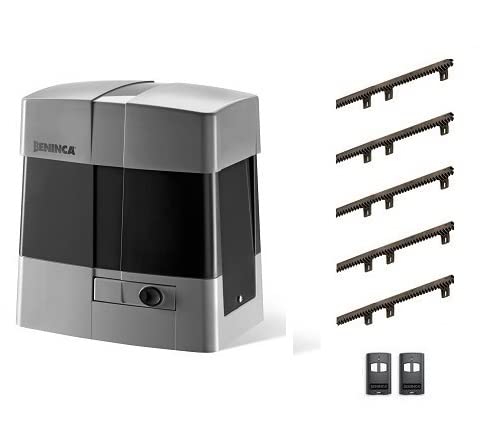
Image 3.1: Overview of the Beninca BULL15MA KIT components, including the main operator unit, five sections of gate rack, and two remote controls.
4. Technical Specifications
The Beninca BULL15MA operator is engineered for high performance and durability. Key specifications are detailed below:
| Feature | Specification (BULL15MA) |
|---|---|
| Power Supply | 115 VAC Single-Phase |
| Max. Gate Weight Capacity | 3,000 LBS (1360 kg) |
| Max. Gate Length Capacity | 40 FT (12.2 m) |
| Operating Temperature | 0°F to 150°F (-17°C to 65°C) |
| Control Panel | Built-in with Integrated LCD Display |
| Radio-Receiver | Built-in |
| Operation Type | For Frequent Use |
| Key Features | Silent Operation, Energy Efficient, Smooth Operation, Electronic Settings (Torque, Stroke, Anti-Crushing Reverse Sensor, Soft-Start, Soft-Stop, Working Time, Number of Cycles) |
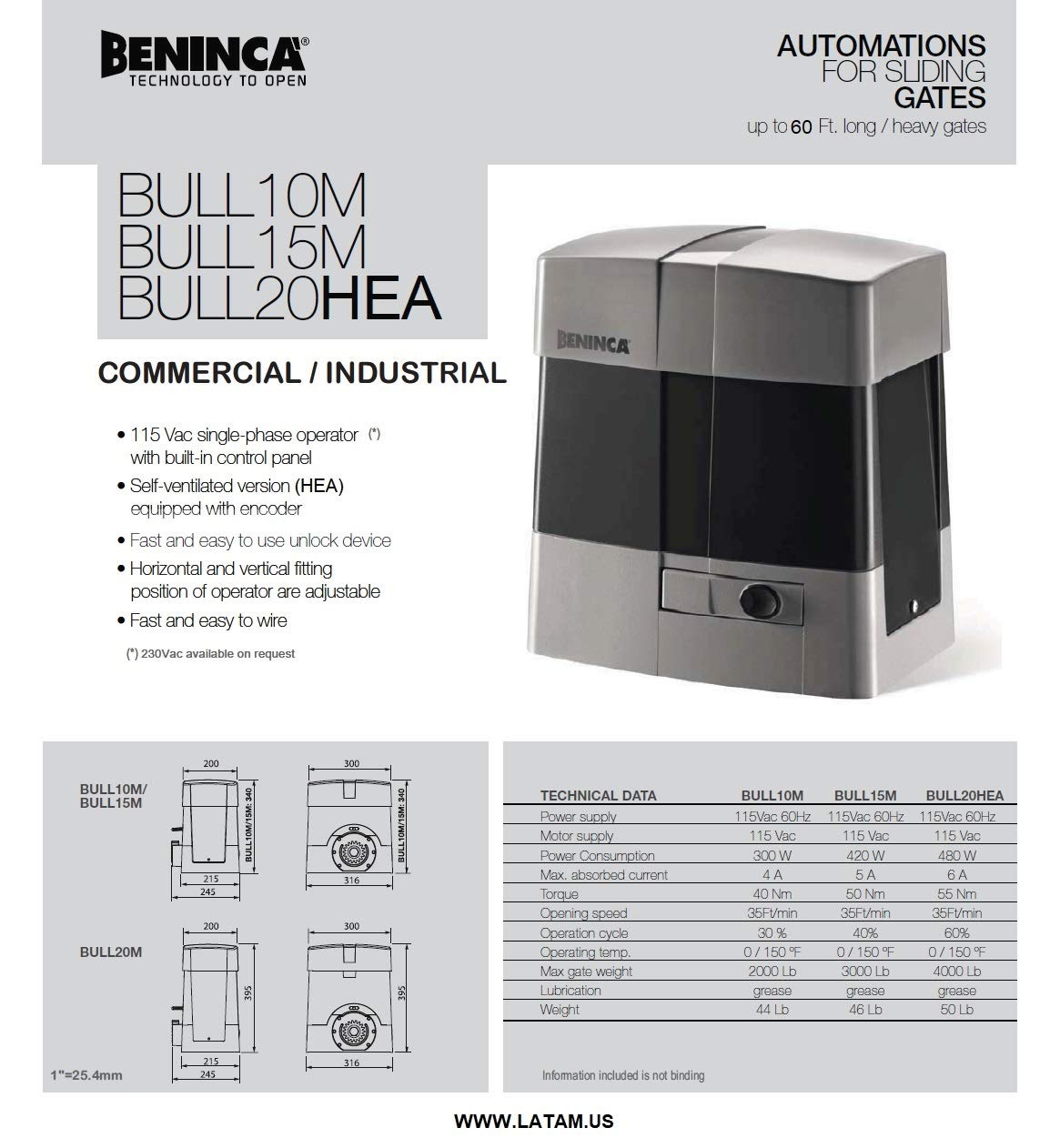
Image 4.1: Technical data sheet providing detailed specifications for the Beninca BULL series, including the BULL15MA model.
5. Setup and Installation
Installation of the Beninca BULL15MA KIT requires electrical and mechanical expertise. It is highly recommended that installation be performed by a certified professional to ensure safety and proper functionality.
5.1 Mounting the Operator
Securely mount the BULL15MA operator on a stable, level concrete pad or equivalent foundation adjacent to the gate. Ensure proper alignment with the gate's movement path.
5.2 Installing the Racks
Attach the RI.M4P nylon steel core racks along the length of the sliding gate, ensuring they are level and properly meshed with the operator's pinion gear. Maintain a small clearance between the rack and the pinion to allow for gate movement and thermal expansion.
5.3 Electrical Connections
Connect the 115 VAC single-phase power supply to the operator's built-in control panel. All wiring must comply with local electrical codes. The control panel is designed for fast and easy wiring.
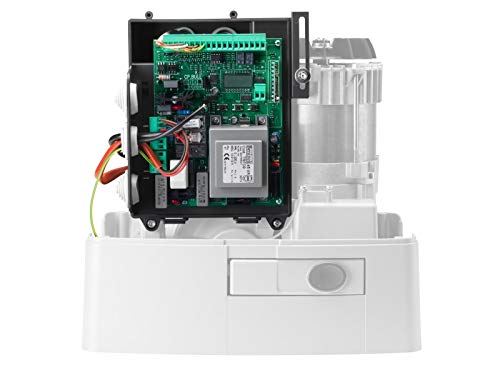
Image 5.1: Internal view of the BULL15MA operator, highlighting the built-in control panel for electrical connections and programming.
5.4 Initial Programming
The integrated LCD display on the control panel facilitates easy programming. This includes setting parameters such as:
- Torque: Adjust motor power.
- Stroke: Define gate travel limits.
- Anti-Crushing Reverse Sensor: Calibrate safety reversal sensitivity.
- Soft-Start/Soft-Stop: Configure smooth acceleration and deceleration.
- Working Time: Set maximum operation duration.
- Number of Cycles: Monitor usage.
Refer to the detailed programming guide provided with the operator for step-by-step instructions on configuring these settings.
6. Operating Instructions
The Beninca BULL15MA operator is designed for user-friendly operation, primarily via the included remote controls.
6.1 Remote Control Operation
The two Beninca Long-Range 2-Button ARC 128 Remote Controls are pre-programmed or easily paired with the built-in radio-receiver. Each button can be assigned to control the gate's open/close function or other programmed actions.
- Pressing the assigned button once will initiate the gate's movement (open or close).
- Pressing the button again during operation will stop the gate.
- A third press will reverse the gate's direction.

Image 6.1: Beninca 2-button remote control for convenient gate operation.
6.2 Manual Release
In case of power failure or emergency, the operator features a manual release mechanism. Consult the detailed product manual for instructions on how to safely disengage the motor and manually open or close the gate.
7. Maintenance
Regular maintenance ensures the optimal performance and extends the lifespan of your Beninca BULL15MA gate operator. Perform the following checks periodically:
- Monthly: Inspect the gate's movement for any resistance, unusual noises, or jerky motion. Check the rack for debris or damage.
- Quarterly: Verify the proper functioning of safety features, including the anti-crushing reverse sensor. Clean any debris from the operator housing and around the pinion gear.
- Annually: Have a qualified technician inspect all electrical connections, motor components, and mechanical parts for wear and tear. Lubricate moving parts as recommended by Beninca.
Always disconnect power to the unit before performing any maintenance or cleaning.
8. Troubleshooting
This section provides guidance for common issues. For complex problems, contact a qualified technician.
| Problem | Possible Cause | Solution |
|---|---|---|
| Gate does not respond to remote. | No power to operator; remote battery dead; remote not paired; obstruction. | Check power supply; replace remote battery; re-pair remote (refer to programming guide); clear gate path. |
| Gate stops unexpectedly or reverses. | Obstruction detected by safety sensor; sensor misalignment; motor overload. | Remove obstruction; check and realign safety sensors; consult LCD display for error codes. |
| Gate moves slowly or with difficulty. | Low power; mechanical friction; worn components. | Verify power supply; check gate wheels and hinges for friction; inspect rack and pinion for wear. |
The integrated LCD display on the control panel can provide diagnostic information and error codes. Consult the full product manual for a comprehensive list of error codes and their resolutions.
9. Warranty and Support
For specific warranty terms and conditions, please refer to the documentation provided at the time of purchase or contact Beninca directly. Beninca products are known for their quality and are "Made in Italy."
For technical support, spare parts, or service inquiries, please contact your authorized Beninca dealer or the seller, Latam Automation. Provide your product model number (BULL15MA KIT) and purchase date when seeking assistance.
Manufacturer: Beninca
Model: BULL15MA KIT