
Introduction
This manual provides comprehensive instructions for the assembly, operation, and maintenance of your Hooga Horizontal Mobile Stand, designed specifically for HGPRO Series Red and Near Infrared Light Therapy Panels. This stand enhances the versatility of your therapy panels by allowing horizontal mounting and easy mobility, facilitating larger, customized full-body setups.
Note: The HGPRO Red Light Therapy Device is sold separately and is not included with this stand.
Product Overview and Features
The Hooga Horizontal Mobile Stand is engineered for stability and convenience, offering a robust solution for positioning your HGPRO series light therapy panels.
- Adjustable Height: The stand features an adjustable vertical pole, allowing you to set the panel at your desired height for optimal therapy positioning.
- Mobile Design: Equipped with wheels on its base, the stand can be conveniently rolled to different locations.
- Locking Wheels: The wheels include locking mechanisms to secure the stand in place during use, preventing unintended movement.
- Strong Construction: Built with durable materials to provide stable support for your HGPRO series panels.
- Horizontal Mounting: Includes mounting brackets specifically designed to attach HGPRO panels horizontally to the stand.

Figure 1: Front view of the Hooga HGPRO Series Red Light Therapy Stand with a panel mounted horizontally. Note that the red light panel is sold separately.
Compatibility
This stand is ONLY compatible with Hooga HGPRO Series Red Light Therapy Panels. It will NOT work with HG Series panels or any other series of light therapy devices. Ensure your panel is an HGPRO Series model before attempting to use it with this stand.
Safety Information
Please read and understand all safety instructions before assembling or operating the stand. Failure to do so may result in injury or damage to the product.
- Ensure all bolts and fasteners are securely tightened during assembly and before each use.
- Always engage the wheel locks when the stand is in its desired position to prevent accidental movement.
- Do not exceed the weight capacity of the stand. This stand is designed for Hooga HGPRO Series panels only.
- Keep hands and fingers clear of moving parts, especially during height adjustment.
- Statements regarding dietary supplements have not been evaluated by the FDA and are not intended to diagnose, treat, cure, or prevent any disease or health condition. This product is a stand for a therapy device, not the device itself.
Setup and Assembly
While specific detailed instructions are not provided, general assembly steps for the Hooga Horizontal Mobile Stand typically involve:
- Unpack Components: Carefully remove all parts from the packaging. Verify that all components and hardware (bolts, nuts, washers) are present. Refer to the included parts list (if available in your package).
- Assemble Base: Attach the wheeled base components to the vertical support pole. Ensure the wheels are properly aligned and can rotate freely before locking.
- Attach Horizontal Arm: Secure the horizontal arm to the top of the vertical support pole. This arm will hold the light therapy panel.
- Install Mounting Brackets: Attach the provided mounting brackets to the back of your HGPRO Series light therapy panel. These brackets are designed to interface with the horizontal arm of the stand.
- Mount Light Therapy Panel: Carefully slide or secure your HGPRO Series panel onto the horizontal arm using the installed mounting brackets. Ensure the panel is centered and balanced.
- Secure All Connections: Double-check that all bolts, screws, and connections are tightened securely. Do not overtighten, but ensure there is no wobble.
If you encounter misaligned holes or missing hardware during assembly, please refer to the Troubleshooting section or contact customer support.

Figure 2: Side view of the Hooga HGPRO Series Red Light Therapy Stand, illustrating the adjustable height feature and the panel mounted horizontally.
Operating Instructions
Using your Hooga Horizontal Mobile Stand is straightforward:
- Positioning: Unlock the wheels by flipping the locking levers upwards. Gently roll the stand to your desired location.
- Securing: Once positioned, push down the locking levers on all wheels to engage the locks. This will prevent the stand from moving during use.
- Adjusting Height: To adjust the height of the light therapy panel, loosen the height adjustment knob on the vertical pole. Carefully slide the pole up or down to the desired height. Once set, securely tighten the knob to lock the height in place.
- Using the Panel: With the stand securely positioned and the panel at the correct height, you can now operate your HGPRO Series Red Light Therapy Panel according to its own instruction manual.
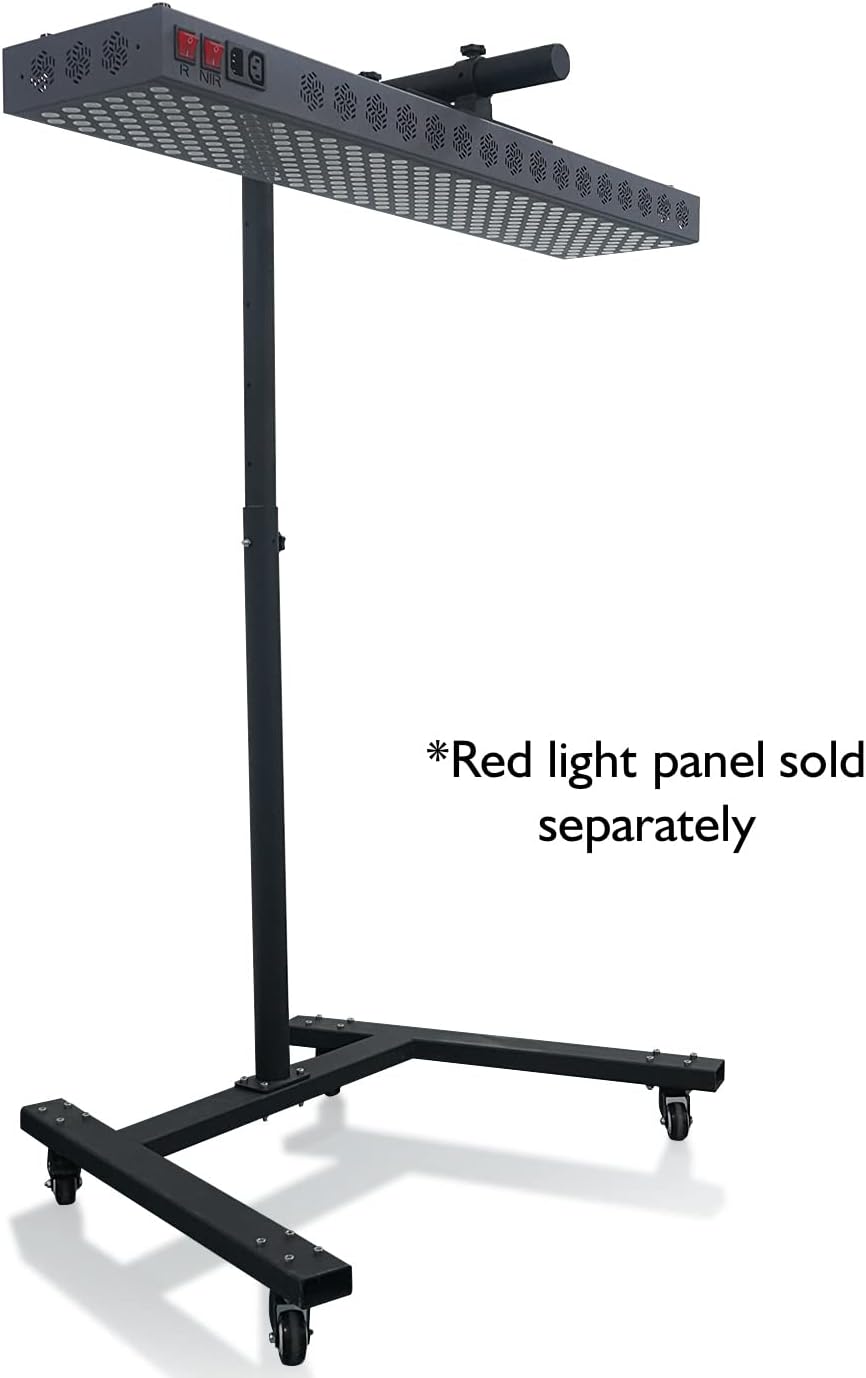
Figure 3: Angled view of the Hooga HGPRO Series Red Light Therapy Stand, demonstrating its mobile design and stable base with a panel attached.
Maintenance
Regular maintenance will ensure the longevity and proper function of your Hooga Horizontal Mobile Stand:
- Cleaning: Wipe down the stand with a soft, dry cloth. For stubborn dirt, a slightly damp cloth can be used, followed by immediate drying. Avoid abrasive cleaners or solvents.
- Fastener Check: Periodically check all bolts, screws, and connections to ensure they remain tight. Retighten if necessary.
- Wheel Inspection: Inspect the wheels for any debris or hair that might impede their movement. Clean as needed. Ensure the locking mechanism engages properly.
- Storage: Store the stand in a dry, cool place away from direct sunlight and extreme temperatures when not in use for extended periods.
Troubleshooting
| Problem | Possible Cause | Solution |
|---|---|---|
| Stand is wobbly after assembly. | Loose fasteners. | Ensure all bolts and screws are securely tightened. |
| Wheels do not roll smoothly or lock. | Debris in wheels; locking mechanism engaged/damaged. | Clean wheels of debris. Ensure locking levers are fully disengaged for rolling and fully engaged for locking. If damaged, contact support. |
| Light panel does not fit the stand. | Incorrect panel series. | This stand is ONLY compatible with Hooga HGPRO Series panels. Verify your panel model. |
| Missing parts or misaligned holes during assembly. | Manufacturing defect or packaging error. | Contact Hooga customer support immediately for replacement parts or assistance. Do not force assembly. |
Specifications
- Model: B0B7P8GCKG
- Compatibility: Hooga HGPRO Series Red Light Therapy Panels ONLY
- Dimensions (Packaged): 34.4 x 19 x 7.9 inches
- Weight (Packaged): 36.3 Pounds
- Adjustability: Adjustable Height
- Mobility: Mobile with Locking Wheels
- Manufacturer: Hooga
- First Available Date: July 26, 2022
Warranty and Support
For information regarding product warranty, returns, or technical support, please contact Hooga Health directly. While specific warranty details are not provided in this manual, Hooga Health typically offers support for their products.
Return Policy: This product is eligible for a refund/replacement within 30 days of purchase, subject to the seller's return policy.
You can often find contact information on the official Hooga website or through the retailer where you purchased the product. For purchases made on Amazon, you can visit the Hooga Store on Amazon.