
1. Introduction
Thank you for choosing the Beleeb C06 Automatic Battery Charger & Maintainer. This manual provides essential information for the safe and effective operation, maintenance, and troubleshooting of your device. Please read this manual thoroughly before use and retain it for future reference.
The Beleeb C06 is designed to charge and maintain 6V and 12V lead-acid batteries, including SLA and AGM types. It features intelligent charging, a pulse repair function, and an LCD display for monitoring battery status.
2. Safety Information
Important Safety Instructions:
- Always wear eye protection and protective clothing when working with batteries.
- Ensure adequate ventilation during charging to prevent the accumulation of explosive gases.
- Never smoke or allow a spark or flame in the vicinity of the battery or engine.
- Avoid touching battery terminals or clamps together.
- Disconnect the AC power supply before making or breaking connections to the battery.
- Do not charge frozen batteries.
- Keep out of reach of children.
- This charger is designed for lead-acid batteries only. Do not use it for other battery types.
3. Product Overview
The Beleeb C06 charger features a compact design with an intuitive LCD display and control buttons. It includes battery clamps for connection and a power plug for AC input.

Image 3.1: Beleeb C06 Battery Charger with its components.
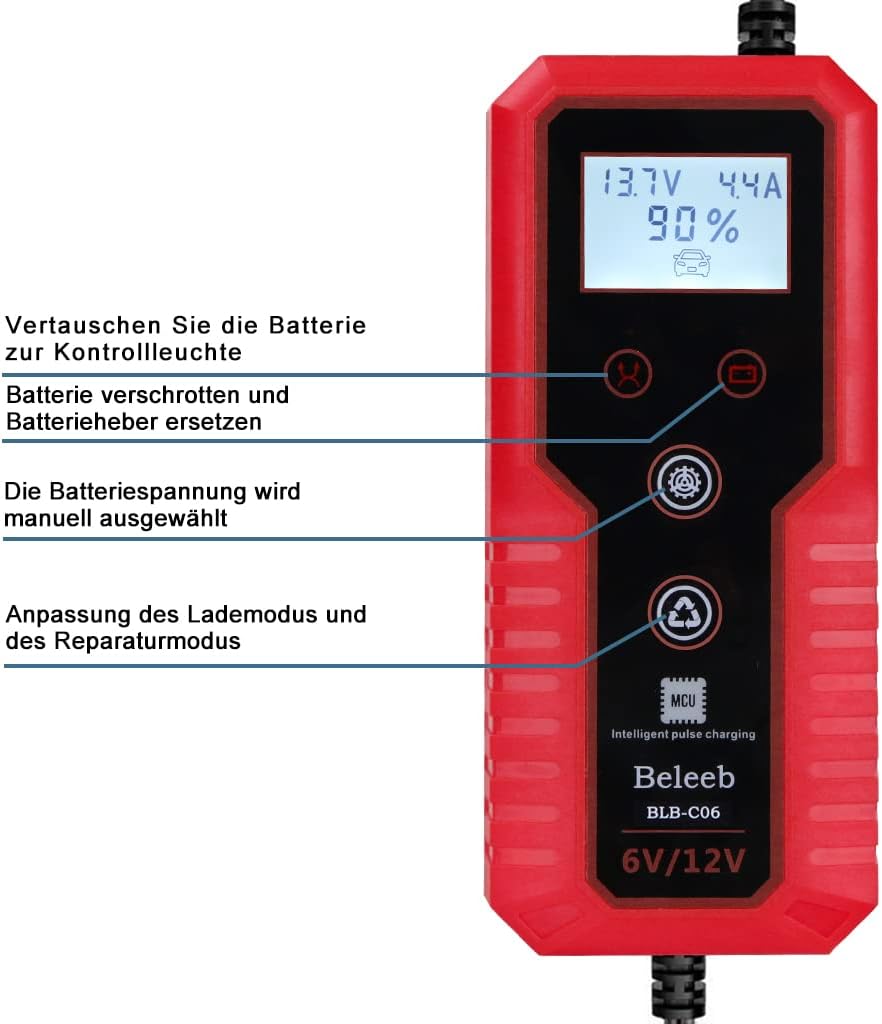
Image 3.2: Detailed view of the charger's LCD display and control buttons.
3.1. Components
- Main Unit: Houses the charging circuitry, LCD display, and control buttons.
- Battery Clamps: Red (+) and Black (-) for connecting to the battery terminals.
- AC Power Cord: For connecting the charger to a standard wall outlet.
3.2. LCD Display Indicators
The intelligent digital display shows various charging parameters:
- Charging Status: Indicates the progress of the charging cycle.
- Battery Status: Shows the current charge level of the battery.
- Charging Voltage: Displays the voltage being applied to the battery.
- Charging Current: Shows the amperage flowing into the battery.
4. Setup
Follow these steps to safely connect the battery charger:
- Prepare the Battery: Ensure the battery terminals are clean and free of corrosion.
- Connect to Battery: First, connect the red (+) positive clamp to the positive terminal of the battery. Then, connect the black (-) negative clamp to the negative terminal of the battery. The charger features reverse polarity protection, but correct connection is always recommended.
- Connect to Power: Plug the AC power cord into a standard 230V AC wall outlet. The charger will automatically detect the battery voltage (6V or 12V) and begin the charging process.
The intelligent digital display will activate, showing the current battery status and charging parameters.
5. Operating Instructions
The Beleeb C06 offers three primary charging modes:
5.1. Charging Modes
- Motorcycle Mode: Suitable for batteries with capacities between 2Ah and 20Ah.
- Car Mode: Suitable for batteries with capacities between 20Ah and 150Ah.
- Repair Mode: This pulse repair function is designed to help restore lost battery capacity and extend battery life, particularly for batteries that have been deeply discharged or used for a long time.
The charger automatically selects the appropriate charging current based on the battery's condition. You can manually select the battery voltage (6V/12V) and switch between charging and repair modes using the buttons on the device.

Image 5.1: Illustration of the pulse charging method used by the charger.
5.2. Intelligent Battery Maintenance
The charger provides a constant voltage charge for optimal battery maintenance, preventing overcharging. Once the battery is fully charged, the device automatically switches to a maintenance mode to keep the battery at an optimal level without fear of damage. This allows for continuous connection for long-term battery care.
6. Maintenance
Proper maintenance ensures the longevity and optimal performance of your Beleeb C06 charger:
- Cleaning: Disconnect the charger from both the AC power and the battery before cleaning. Wipe the exterior with a soft, dry cloth. Do not use solvents or abrasive cleaners.
- Storage: Store the charger in a cool, dry place when not in use. Ensure the cables are neatly coiled and not kinked.
- Ventilation: The charger is equipped with a cooling fan (as shown in Image 6.1). Ensure the ventilation openings are not blocked during operation to prevent overheating.

Image 6.1: The charger's design incorporates heat dissipation features for optimal performance.
7. Troubleshooting
If you encounter issues with your Beleeb C06 charger, refer to the following common problems and solutions:
| Problem | Possible Cause | Solution |
|---|---|---|
| Charger does not turn on. | No AC power, faulty outlet, or internal issue. | Check AC power connection. Test the outlet with another device. If still not working, contact support. |
| Charger displays '0V' or does not recognize battery. | Battery is deeply discharged (below 0V) or severely damaged. | The charger may not be able to detect batteries with 0V. Try the Repair Mode if the battery is not completely dead. If the battery is severely damaged, it may need replacement. |
| Charging is slow or incomplete. | Incorrect mode selected, battery capacity too large for charger, or battery issue. | Ensure the correct mode (Motorcycle/Car) is selected for your battery size. Check battery health. |
| Charger gets hot during operation. | Normal operation, or blocked ventilation. | Some heat is normal. Ensure ventilation openings are clear and the charger is in a well-ventilated area. If overheating persists, disconnect and contact support. |
If the problem persists after attempting these solutions, please contact Beleeb customer support for further assistance.
8. Specifications

Image 8.1: Physical dimensions of the Beleeb C06 charger.
| Feature | Specification |
|---|---|
| Brand | Beleeb |
| Model | BLB-DE-C06 |
| Input Voltage | 230 Volts AC |
| Output Voltage | 6V / 12V (Automatic Detection) |
| Charging Current | 6 Ampere |
| Battery Types | Lead-acid batteries (SLA, AGM) |
| Battery Capacity (Motorcycle Mode) | 2Ah - 20Ah |
| Battery Capacity (Car Mode) | 20Ah - 150Ah |
| Dimensions (L x W x H) | 17 x 7.5 x 5.5 cm |
| Weight | 550 g |
| Compliance | Energy Star |
9. Warranty and Support
For warranty information and customer support, please refer to the documentation included with your purchase or visit the official Beleeb website. Keep your proof of purchase for any warranty claims.
If you have any questions or require assistance with your Beleeb C06 charger, please contact Beleeb customer service.


