
WORKPRO W122061
WORKPRO Pink Cordless Drill Driver Set User Manual
Model: W122061 | Brand: WORKPRO
1. Introduction
Thank you for choosing the WORKPRO Pink Cordless Drill Driver Set. This 12V electric power drill is designed for household tasks, offering versatility and ease of use for various DIY projects. Its lightweight design and adjustable settings make it suitable for tasks such as hanging pictures, assembling furniture, and tightening screws.

Image: The WORKPRO Pink Cordless Drill Driver Set, showcasing the drill, various drill bits, and the Type-C charging cable.
2. Safety Information
Always observe basic safety precautions when using electric tools to reduce the risk of fire, electric shock, and personal injury.
- Wear appropriate personal protective equipment, including eye protection (safety glasses or goggles) and hearing protection.
- Keep your work area clean and well-lit. Cluttered or dark areas invite accidents.
- Do not operate power tools in explosive atmospheres, such as in the presence of flammable liquids, gases, or dust.
- Keep children and bystanders away while operating a power tool. Distractions can cause you to lose control.
- Avoid accidental starting. Ensure the switch is in the off-position before connecting to battery pack, picking up or carrying the tool.
- Use the correct tool for your application. Do not force the tool.
- Maintain tools with care. Keep cutting tools sharp and clean.
- Disconnect the battery pack from the power tool before making any adjustments, changing accessories, or storing power tools.
- Store idle power tools out of the reach of children and do not allow persons unfamiliar with the power tool or these instructions to operate the power tool.
3. Components and Package Contents
Your WORKPRO Pink Cordless Drill Driver Set includes the following items:
- 1 x WORKPRO 12V Cordless Drill Driver
- 6 x Drill Bits (various sizes)
- 1 x Type-C Charge Cable

Image: A detailed diagram of the WORKPRO Pink Cordless Drill, highlighting its key components such as the keyless chuck, torque adjustment collar, variable speed switch, LED light, and Type-C charging port. The included drill bits and screwdriver bits are also shown.
4. Setup
4.1 Attaching Drill Bits / Screwdriver Bits
The drill features a 3/8-inch keyless chuck for quick and easy bit changes. To attach a bit:
- Ensure the drill is off and the forward/reverse switch is in the neutral (locked) position.
- Twist the chuck counter-clockwise to open the jaws.
- Insert the desired drill bit or screwdriver bit into the chuck, ensuring it is seated firmly.
- Twist the chuck clockwise to tighten the jaws securely around the bit. The automatic spindle lock assists in one-handed tightening.
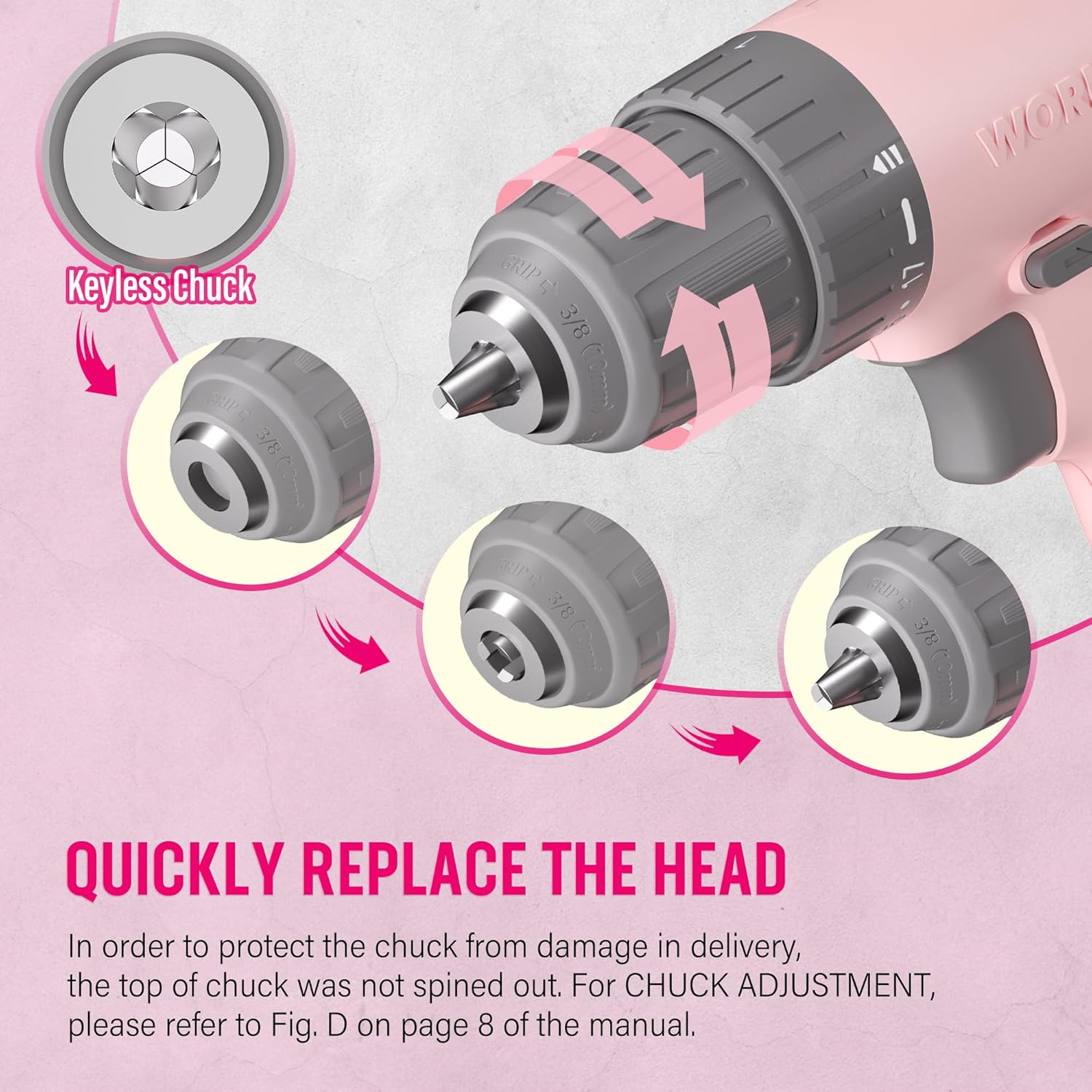
Image: A close-up illustration demonstrating the operation of the keyless chuck, showing how to open and close it to quickly replace drill or screwdriver bits.
4.2 Charging the Battery
The drill is equipped with an integrated 12V Lithium-Ion battery and charges via a Type-C USB cable. Use a 5V/1A charger for optimal charging.
- Connect the Type-C end of the charging cable to the drill's charging port.
- Connect the USB-A end of the cable to any compatible USB power source (e.g., computer, power bank, USB wall adapter, car charger).
- Monitor the battery capacity indicator lights on the drill to check the charging status.
- A blinking light indicates the battery needs recharging. Multiple solid lights indicate charge level.

Image: The WORKPRO Pink Cordless Drill connected to a laptop via its Type-C charging cable, illustrating its USB rechargeable feature.
5. Operating Instructions
5.1 Variable Speed Control
The drill features a variable speed trigger, allowing you to control the rotational speed from 0 to 750 RPM based on the pressure applied.
- Light Pressure: For slower speeds, ideal for starting holes or driving screws precisely.
- Heavy Pressure: For faster speeds, suitable for drilling into materials.
- Releasing the trigger will automatically stop the drill.

Image: A hand holding the WORKPRO Pink Cordless Drill, illustrating how the variable speed switch operates based on trigger pressure (0-750 RPM).
5.2 Torque Settings (17+1)
The 17+1 torque adjustable design allows you to select the appropriate torque for different tasks and materials, preventing over-driving screws or damaging surfaces. The maximum torque can reach 19 Newton Meters (168 IN-LBS).
- Rotate the torque adjustment collar located behind the chuck to select the desired setting.
- Lower settings are for driving small screws or working with soft materials.
- Higher settings are for driving larger screws or drilling into harder materials like wood, PVC, or metal.
- The "+1" setting is for drill mode, providing maximum torque for drilling applications.
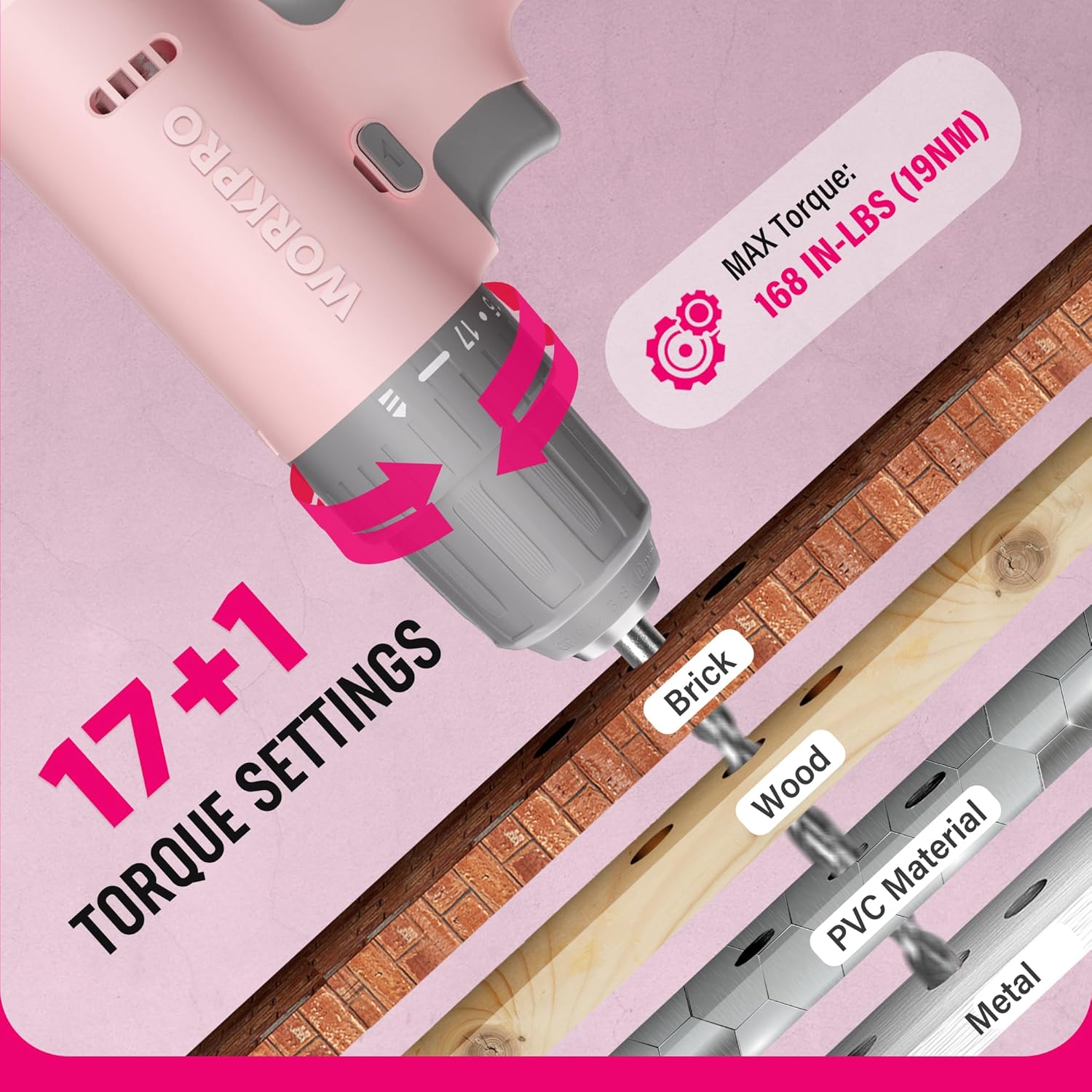
Image: A close-up view of the WORKPRO Pink Cordless Drill's 17+1 torque settings, indicating suitable materials like brick, wood, PVC, and metal for different torque levels.
5.3 Forward/Reverse Switch
The forward/reverse switch allows you to change the direction of rotation for driving or removing screws and bits.
- Push the switch to the left for forward rotation (driving screws/drilling).
- Push the switch to the right for reverse rotation (removing screws/bits).
- Center the switch to lock the trigger and prevent accidental operation.
5.4 LED Work Light
The integrated LED light activates when the trigger is pressed, illuminating the work area for improved visibility in dark or confined spaces.

Image: The WORKPRO Pink Cordless Drill in use, with its LED work light brightly illuminating the area, making it easier to work in dark environments.
6. Maintenance
Proper maintenance ensures the longevity and optimal performance of your drill.
- Cleaning: Regularly wipe down the drill with a soft, damp cloth. Do not use harsh chemicals or abrasive cleaners. Keep ventilation openings clear of dust and debris.
- Storage: Store the drill in a dry place, away from direct sunlight and extreme temperatures. Ensure the battery is partially charged before long-term storage.
- Battery Care: Avoid fully discharging the battery frequently. Recharge the battery before it is completely depleted to prolong its lifespan.
- Chuck Maintenance: Periodically clean the chuck jaws to ensure proper gripping of bits.
7. Troubleshooting
| Problem | Possible Cause | Solution |
|---|---|---|
| Drill does not turn on. | Battery is depleted. Forward/reverse switch is in the locked (center) position. | Charge the battery using the provided Type-C cable. Move the forward/reverse switch to the forward or reverse position. |
| Reduced power or speed. | Low battery charge. Incorrect torque setting for the task. | Recharge the battery. Adjust the torque collar to a higher setting or switch to drill mode. |
| Bit slips in chuck. | Chuck not tightened sufficiently. Bit shank is dirty or damaged. | Retighten the chuck firmly. Clean or replace the bit. |
8. Specifications
| Feature | Detail |
|---|---|
| Brand | WORKPRO |
| Model Number | W122061 |
| Power Source | Battery Powered |
| Voltage | 12 Volts |
| Maximum Rotational Speed | 750 RPM |
| Maximum Torque | 19 Newton Meters (168 IN-LBS) |
| Torque Settings | 17 + 1 (Drill Mode) |
| Chuck Size | 3/8 Inches (Keyless) |
| Battery Type | Lithium Ion (Included) |
| Charging Port | Type-C USB (5V-9V input) |
| Special Features | Variable Speed, LED Work Light |
| Material | ABS Plastic + TPE |
| Item Weight | 1.37 Kilograms (approx. 3.01 lbs) |
| Product Dimensions | 9.37 x 2.87 x 9.92 inches |
9. Warranty and Support
For warranty information or technical support, please refer to the contact details provided with your product packaging or visit the official WORKPRO website. Keep your purchase receipt as proof of purchase.
WORKPRO Tools is committed to quality and customer satisfaction. Additionally, a portion of this product's purchase supports the NATIONAL BREAST CANCER FOUNDATION, INC., aiding in early detection, education, and support services.
Related documentsW122061


Ask a question about this manual
Ask about setup, troubleshooting, compatibility, parts, safety, or missing instructions. Manuals+ will review the question and use this page’s manual context to help answer it.