
ODK SNFZ-01
ODK L-Shaped Desk Instruction Manual
Model: SNFZ-01
1. Introduction
This manual provides detailed instructions for the assembly, operation, maintenance, and troubleshooting of your ODK L-Shaped Desk. Please read this manual thoroughly before beginning assembly or use to ensure proper function and longevity of your product. Keep this manual for future reference.
2. Safety Information
- Ensure all components are present and undamaged before assembly. Do not use if any parts are missing or broken.
- Assemble the desk on a soft, clean surface to prevent scratches.
- Do not overtighten screws during assembly, as this may damage the material.
- Keep small parts away from children to prevent choking hazards.
- Do not exceed the maximum weight capacity of the desk surfaces or drawers.
- For electrical components (USB ports, power outlets), ensure proper grounding and do not overload the circuit. Disconnect power before cleaning or maintenance.
- Always lift the desk when moving it; do not drag to prevent damage to the legs or floor.
3. Package Contents
Before starting assembly, verify that all the following components are included in your package:
- Desk Panels (Main desktop, side desktop, monitor stand)
- Metal Frame Components (Legs, support bars)
- 4 Fabric Drawers with Handles
- Integrated Power Strip with 2 AC Outlets and 2 USB Ports
- Power Cable (200cm)
- Storage Bag (Side mounted)
- Adjustable Feet
- Assembly Hardware (Screws, Allen wrench, etc.)
- Instruction Manual

Figure 3.1: Overview of desk components and dimensions.
4. Setup and Assembly
The ODK L-Shaped Desk is designed for straightforward assembly. Follow the numbered steps and diagrams provided in the separate assembly guide for detailed instructions. Ensure you have ample space and a clean, soft surface for assembly.
- Unpack and Identify Parts: Lay out all components and hardware. Refer to the parts list in the assembly guide to ensure everything is present. Each part is typically labeled with a number or letter.
- Assemble the Frame: Begin by connecting the metal frame components according to the instructions. Do not fully tighten screws until all frame pieces are loosely assembled.
- Attach Desktop Panels: Secure the main desktop and side desktop panels to the assembled frame. Ensure proper alignment before tightening screws.
- Install Monitor Stand: Attach the monitor stand to the designated area on the desktop. This stand is designed to elevate your monitors for improved ergonomics.
- Insert Drawers: Assemble the fabric drawers and slide them into the designated compartments. The desk features four drawers for ample storage.
- Install Power Strip: Carefully place the integrated power strip into its recessed slot on the desktop. Connect the power cable and route it as desired.
- Attach Storage Bag: Secure the side storage bag to the desk frame as shown in the assembly guide.
- Adjust Leveling Feet: Once the desk is assembled and in its desired location, adjust the leveling feet at the bottom of the legs to ensure stability on uneven floors.

Figure 4.1: Fully assembled ODK L-Shaped Desk.

Figure 4.2: The desk can be configured with the storage unit on either the left or right side.
5. Operating Instructions
5.1. Using the Integrated Power Strip
The desk is equipped with a built-in power strip for convenient access to power and charging. This includes two standard AC power outlets and two USB charging ports.
- AC Outlets (220-250V/16A): Plug in your computer, monitor, lamps, or other AC-powered devices directly into the desk.
- USB Charging Ports (5V/2A): Use these ports to charge smartphones, tablets, smartwatches, or other USB-powered devices.
- Power Cable: The integrated power cable is 200cm long, providing flexibility for connecting to a wall outlet.

Figure 5.1: Detail of the recessed power strip with charging capabilities.
5.2. Utilizing Storage Features
The ODK L-Shaped Desk offers multiple storage solutions to keep your workspace organized.
- 4 Fabric Drawers: These drawers provide ample space for storing documents, office supplies, and personal items, helping to reduce clutter on your desktop.
- Side Storage Bag: A convenient fabric bag attached to the side of the desk is ideal for magazines, notebooks, or other frequently accessed items.
- CPU Stand: A dedicated shelf beneath the desk provides a secure and elevated spot for your computer tower, keeping it off the floor and improving airflow.

Figure 5.2: The four fabric drawers offer practical storage for office essentials.
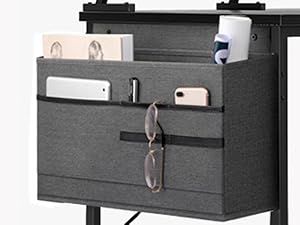
Figure 5.3: The side storage bag provides additional accessible storage.
5.3. Ergonomic Monitor Stand
The integrated monitor stand helps improve your posture and reduce strain during long working or gaming sessions by elevating your screen(s) to an optimal viewing height.
- The stand can accommodate up to two monitors and other accessories.
- Position your monitors so that the top of the screen is at or slightly below eye level when you are seated comfortably.

Figure 5.4: The monitor stand promotes better ergonomic posture.
6. Maintenance and Care
Proper care will extend the life and appearance of your ODK L-Shaped Desk.
- Cleaning: Wipe surfaces with a soft, damp cloth. Avoid harsh chemicals or abrasive cleaners, which can damage the wood-engineered material. For the fabric drawers, spot clean with a mild detergent and allow to air dry.
- Spills: Immediately wipe up any spills to prevent staining or damage to the surface.
- Heat and Moisture: Avoid placing hot items directly on the desk surface. Use coasters for drinks. Keep the desk away from direct sunlight and excessive moisture.
- Hardware: Periodically check all screws and fasteners to ensure they are tight. Retighten if necessary to maintain stability.
- Moving the Desk: When relocating the desk, always lift it. Do not drag it across the floor, as this can damage the legs, leveling feet, or the floor surface.
7. Troubleshooting
| Problem | Possible Cause | Solution |
|---|---|---|
| Desk is wobbly or unstable. | Uneven floor; loose screws; improper assembly. | Adjust the leveling feet at the bottom of the legs. Check and tighten all assembly screws. Review assembly instructions to ensure all parts are correctly installed. |
| Power outlets or USB ports are not working. | Power cable not plugged in; circuit breaker tripped; faulty device. | Ensure the desk's power cable is securely plugged into a working wall outlet. Check your home's circuit breaker. Test with a different device to rule out a faulty device. |
| Drawers do not slide smoothly. | Overloaded drawer; obstruction; fabric not properly aligned. | Reduce the weight in the drawer. Check for any items obstructing the drawer's path. Ensure the fabric drawer is fully and correctly assembled. |
| Missing parts during assembly. | Packaging oversight. | Carefully check all packaging materials. If parts are genuinely missing, contact ODK customer support with your purchase details. |
8. Specifications
- Brand: ODK
- Model Number: SNFZ-01
- Color: Black
- Product Dimensions: 140 x 80 x 87 cm (Length x Width x Height)
- Item Weight: 18.7 Kilograms
- Material: Engineered Wood (MDF) and Metal Frame
- Power Outlets: 2 x AC (220-250V/16A)
- USB Ports: 2 x USB (5V/2A)
- Power Cable Length: 200 cm
- Special Features: Integrated USB Port, Integrated Monitor Stand, Reversible L-shape, 4 Fabric Drawers, Side Storage Bag, CPU Stand.
9. Warranty and Support
ODK stands behind the quality of its products. For any questions, concerns, or issues regarding your ODK L-Shaped Desk, please contact our customer support team.
- Customer Support: Refer to your purchase documentation or the ODK official website for contact information.
- Warranty: Information regarding product warranty is typically provided at the time of purchase or can be found on the ODK official website. Please retain your proof of purchase for warranty claims.
- Returns: This item may be returned. Please refer to the retailer's return policy for details.
We are committed to providing reliable support and ensuring your satisfaction with ODK products.
Related documentsSNFZ-01


Ask a question about this manual
Ask about setup, troubleshooting, compatibility, parts, safety, or missing instructions. Manuals+ will review the question and use this page’s manual context to help answer it.