
1. Introduction
This manual provides detailed instructions for the installation, operation, and maintenance of your LAMPAOUS Smart LED Under Cabinet Lights. These 12-inch, 2-bar fixtures offer versatile lighting solutions with options for hardwired or plug-in connections, smart control via Amazon Alexa and Google Home, and adjustable color temperature (2700K-6500K) and RGB multicolor options. Please read this manual thoroughly before installation and use.
2. Safety Information
- Electrical Safety: Installation should be performed by a qualified electrician or in accordance with local electrical codes. Ensure power is disconnected at the circuit breaker before any installation or maintenance.
- Voltage: This product operates on 120V AC. Do not connect to any other voltage.
- Indoor Use Only: These lights are designed for indoor use in dry locations. They are not water resistant.
- Ventilation: Ensure adequate ventilation around the fixtures to prevent overheating.
- Damage: Do not operate if the product or power cord is damaged. Contact customer support for assistance.
3. Package Contents
Verify that all components are present before beginning installation:
- 2 x 12-inch LED Light Bars
- Mounting Hardware (screws, anchors)
- Power Cord (for plug-in option)
- Jumper Cable (for linking multiple bars)
- Connectors (for linking multiple bars)
- Remote Control
- User Manual
4. Product Features
- Dual Connection Options: Designed for both hardwired (direct wire to 120V power) or plug-in installation (using the included power cord).
- Smart Control: Compatible with Amazon Alexa and Google Home for voice activation and app control.
- Adjustable White & Color Ambiance: Offers adjustable white color temperature from 2700K (warm white) to 6500K (cool white), plus over 15 million RGB multicolor options.
- Dimmable: Adjust brightness levels to suit your needs.
- Linkable Design: Multiple LED bars can be linked together using connectors or jumper cables for customized lighting layouts.
- Easy Installation: Designed for straightforward setup with minimal tools required.
5. Setup and Installation
Before installation, ensure the power supply is turned off at the circuit breaker.
5.1 Mounting the Light Bars
- Determine the desired location for your under cabinet lights.
- Use the provided mounting hardware (screws and anchors) to secure the light bars to the underside of your cabinet. Ensure the bars are firmly attached.
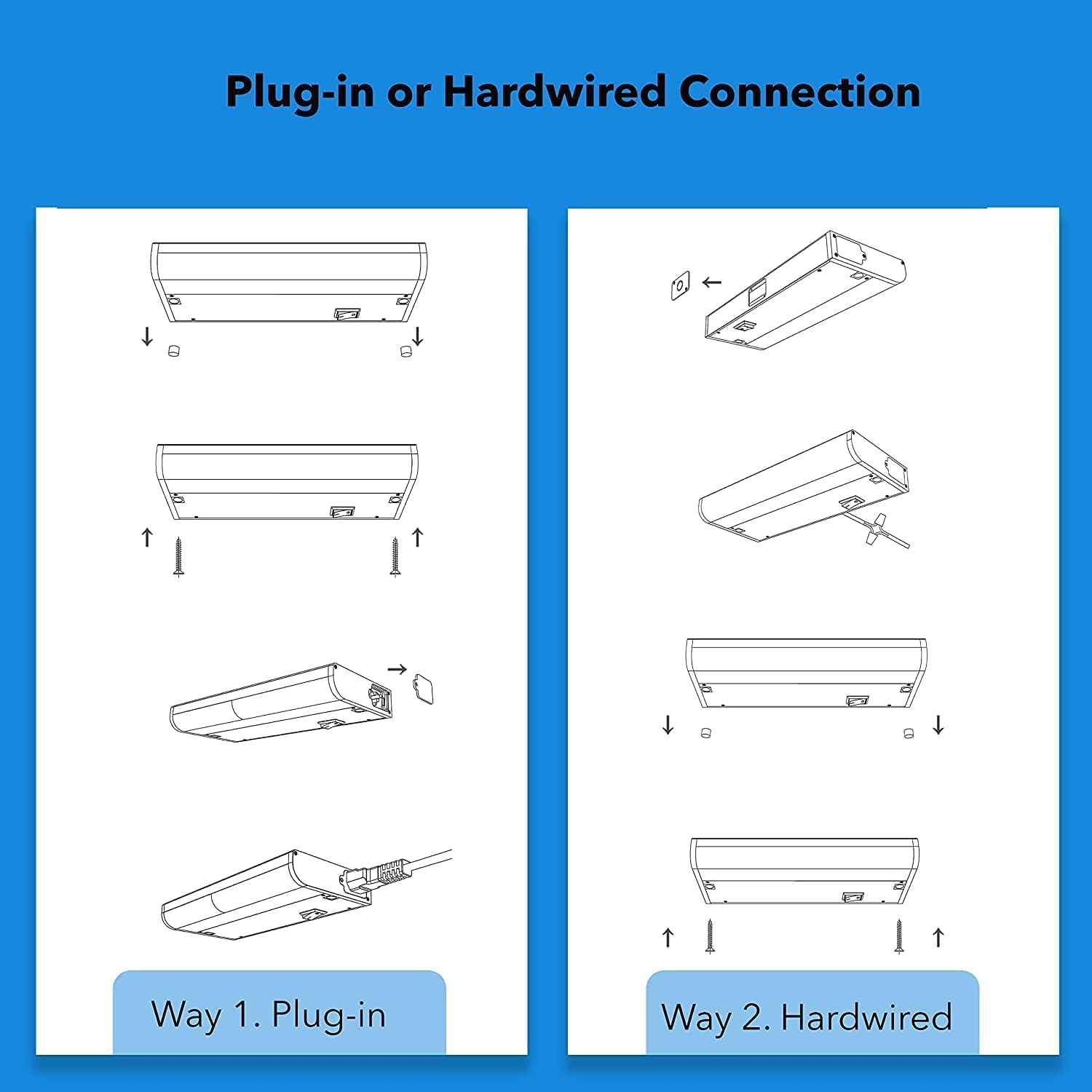
Figure 5.1: Illustration of Plug-in and Hardwired Installation Methods.
5.2 Connection Options
Choose between plug-in or hardwired connection:
Way 1: Plug-in Connection
- Connect the provided power cord to one end of the LED light bar.
- Plug the power cord into a standard 120V AC wall outlet.
Way 2: Hardwired Connection
- Ensure power is OFF at the circuit breaker.
- Carefully open the wiring compartment on the light bar.
- Connect the household electrical wires (live, neutral, ground) to the corresponding wires on the light fixture using appropriate wire connectors. Refer to local electrical codes for proper wiring.
- Securely close the wiring compartment.
Video 5.1: FixtureSmart Installation Guide. This video demonstrates the hardwired installation process for the under cabinet lights.
5.3 Linking Multiple Light Bars
If you have multiple light bars, you can link them together:
- Direct Connector: Use the small direct connectors to link two light bars end-to-end.
- Jumper Cable: Use the jumper cable to connect light bars that are spaced apart.

Figure 5.2: Options for linking multiple light bars: direct connector or jumper cable.
6. Operating Instructions
Once installed, restore power to the circuit. Your lights can be controlled via app, voice, or remote control.
6.1 App Control (Smart Life App)
- Download the 'Smart Life' app from your smartphone's app store.
- Register or log in to your Smart Life account.
- Add a new device: Follow the in-app instructions to add your LAMPAOUS LED Under Cabinet Lights. Ensure your phone is connected to a 2.4GHz Wi-Fi network during setup.
- Once connected, you can schedule lighting times, change colors, adjust brightness, and set various color scenes from the app.

Figure 6.1: Smart Life App interface demonstrating scheduling, color scene selection, remote control, and dimming functions.

Figure 6.2: The Smart Life App allows comprehensive control over your lighting from anywhere.
6.2 Voice Control (Alexa & Google Home)
- Ensure your lights are successfully connected to the Smart Life app.
- Open the Amazon Alexa or Google Home app.
- Enable the 'Smart Life' skill/service and link your Smart Life account.
- Discover devices. Once discovered, you can use voice commands such as:
- "Alexa, turn on kitchen lights."
- "Hey Google, set kitchen lights to blue."
- "Alexa, dim kitchen lights to 50%."
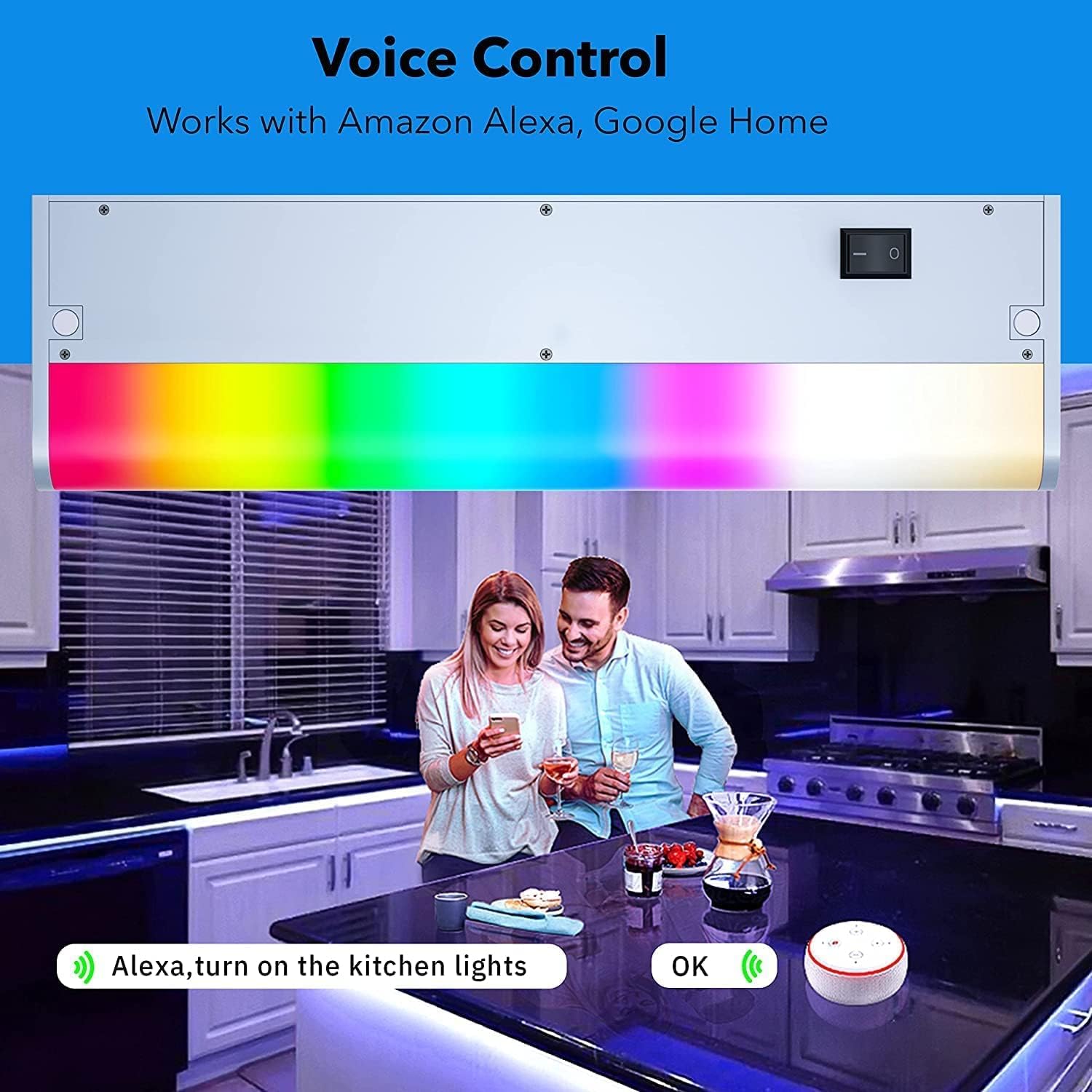
Figure 6.3: Voice control integration with Amazon Alexa and Google Home for convenient operation.
Video 6.1: Smart Hardwired Undercabinet Lighting. This video demonstrates the voice control capabilities of the lights with smart assistants.
6.3 Remote Control
Use the included remote control for basic functions:
- ON/OFF: Power the lights on or off.
- Brightness: Adjust the light intensity.
- Color Selection: Cycle through preset colors or white light options.

Figure 6.4: The included remote control provides convenient access to basic lighting functions.
6.4 Music Sync Feature
The lights can synchronize with music played through your smartphone's microphone via the Smart Life app, creating dynamic lighting effects.
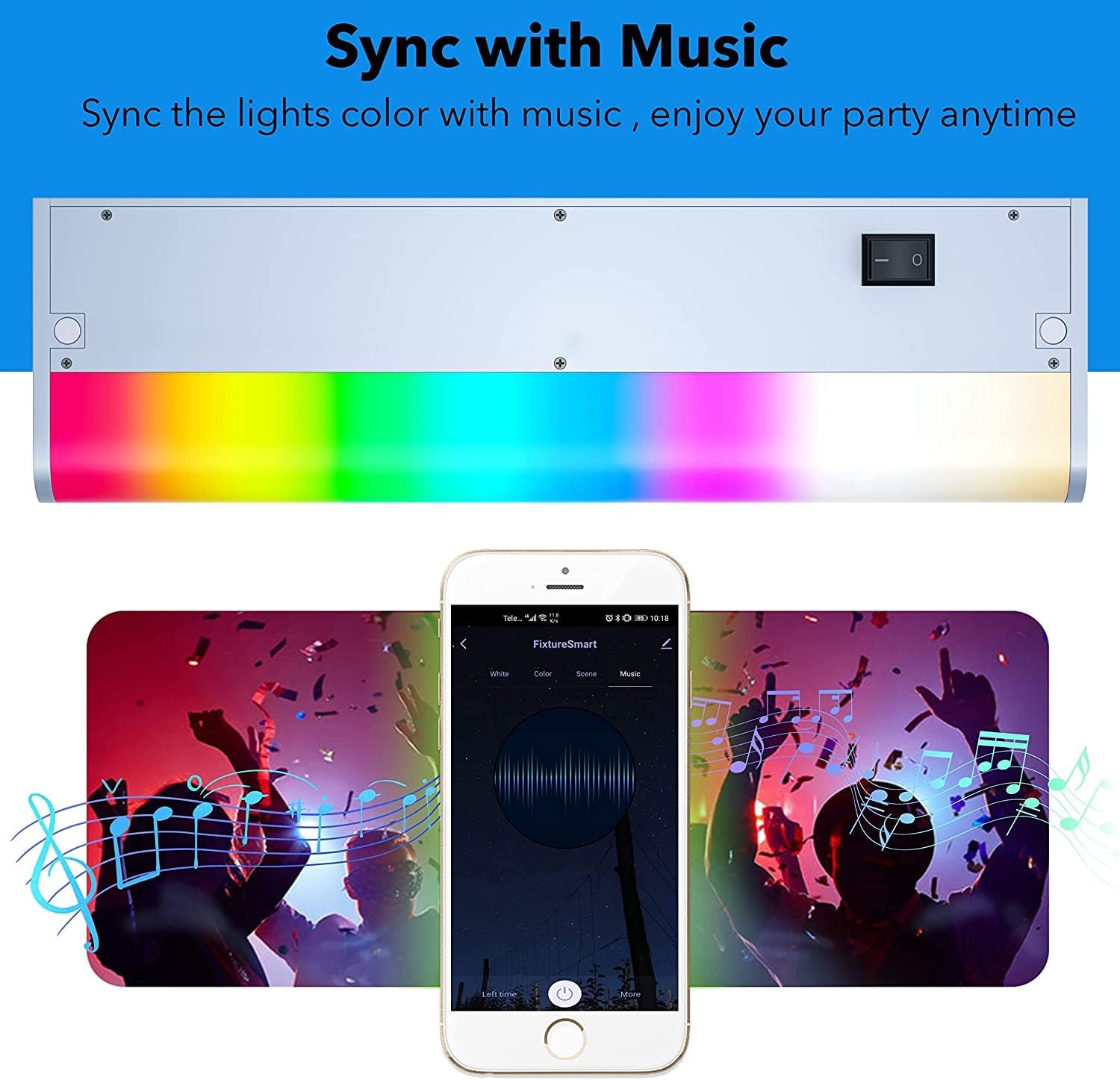
Figure 6.5: Enjoy dynamic lighting that syncs with your music through the Smart Life app.
7. Maintenance
To ensure optimal performance and longevity of your LAMPAOUS LED Under Cabinet Lights, follow these maintenance guidelines:
- Cleaning: Disconnect power before cleaning. Use a soft, dry cloth to wipe the surface of the light bars. Do not use abrasive cleaners or solvents, as they may damage the finish or electronic components.
- Inspection: Periodically check the wiring and connections for any signs of wear or damage. If any damage is observed, discontinue use and contact customer support.
- LED Lifespan: The integrated LEDs are designed for long-term use (approximately 10 years based on 3 hours/day). They are not user-replaceable.
8. Troubleshooting
If you encounter issues with your LAMPAOUS LED Under Cabinet Lights, refer to the following troubleshooting steps:
| Problem | Possible Cause | Solution |
|---|---|---|
| Lights do not turn on. | No power supply; loose connection; light bar switch is off. | Check circuit breaker. Ensure power cord is securely plugged in or hardwired connections are tight. Verify the physical switch on the light bar is in the ON position. |
| Cannot connect to Wi-Fi/Smart Life app. | Incorrect Wi-Fi band; weak signal; incorrect setup steps. | Ensure your router is broadcasting a 2.4GHz Wi-Fi network. Connect your smartphone to the 2.4GHz network during setup. Move closer to the router. Follow in-app instructions carefully. Some mesh routers may require temporarily disabling 5GHz. |
| Remote control not working. | Battery depleted; obstruction; out of range. | Replace remote battery. Ensure no obstructions between remote and light bar. Operate within effective range. |
| Lights flicker or behave erratically. | Loose wiring; power fluctuations; faulty unit. | Check all electrical connections. Ensure stable power supply. If problem persists, contact customer support. |
9. Specifications
| Feature | Detail |
|---|---|
| Brand | LAMPAOUS |
| Model Number | LPS-FS-9 |
| Size | 2-Bar 12 Inch |
| Power Source | AC (120 volts) |
| Wattage | 12 watts |
| Brightness | 1080 lumens |
| Light Color | 15 Million Color Changing, 2700K-6500K Warm to Cool White |
| Control Method | App, Remote, Voice (Amazon Alexa, Google Assistant) |
| Material | Aluminum |
| Indoor/Outdoor Usage | Indoor |
| Water Resistance Level | Not Water Resistant |
| Item Weight | 2 pounds (for the set) |
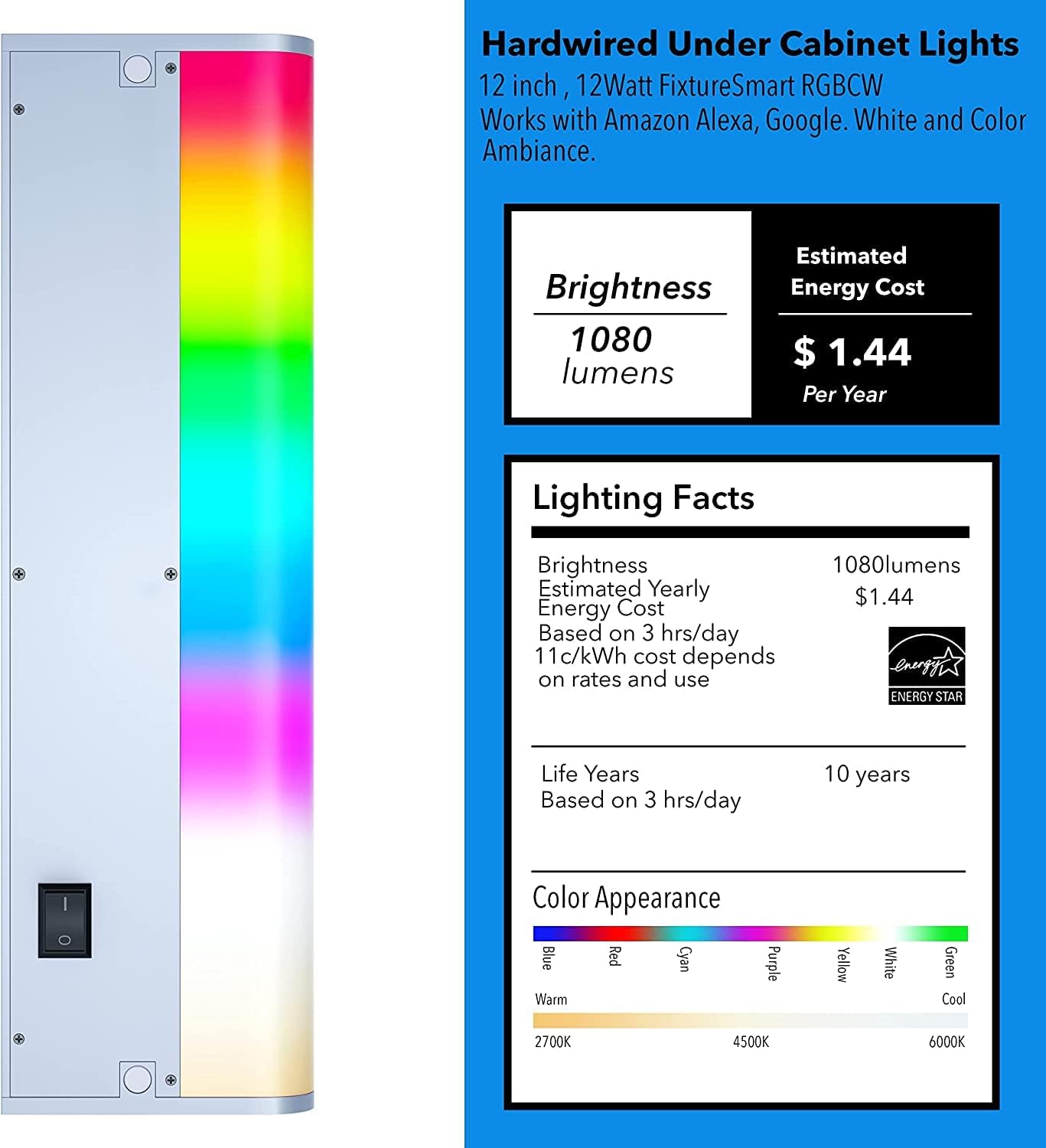
Figure 9.1: Lighting Facts and Color Appearance for the 12-inch, 12-watt fixture.
10. Warranty and Support
This LAMPAOUS product comes with a 1-year manufacturer's warranty from the date of purchase. This warranty covers defects in materials and workmanship under normal use.
For warranty claims, technical support, or any questions regarding your product, please contact LAMPAOUS customer service. Please have your purchase receipt and model number (LPS-FS-9) available when contacting support.
Manufacturer: LAMPAOUS Electronics


